Skip to content
| Marketplace
Sign in
Visual Studio Code>Programming Languages>TypeScript Plugin Scoped ImportsNew to Visual Studio Code? Get it now.
TypeScript Plugin Scoped Imports

TypeScript Plugin Scoped Imports

Nicolas Viotti

|
5 installs
| (0) | Free
Prevent out-of-scope auto-imports from __private__ folders in TypeScript projects.
Installation
Launch VS Code Quick Open (Ctrl+P), paste the following command, and press enter.
Copied to clipboard
More Info

TypeScript Plugin Scoped Imports (VS Code)

This extension prevents accidental auto-imports from __private__ folders when you are outside the allowed scope, while keeping valid suggestions for files in the parent directory and its descendants.

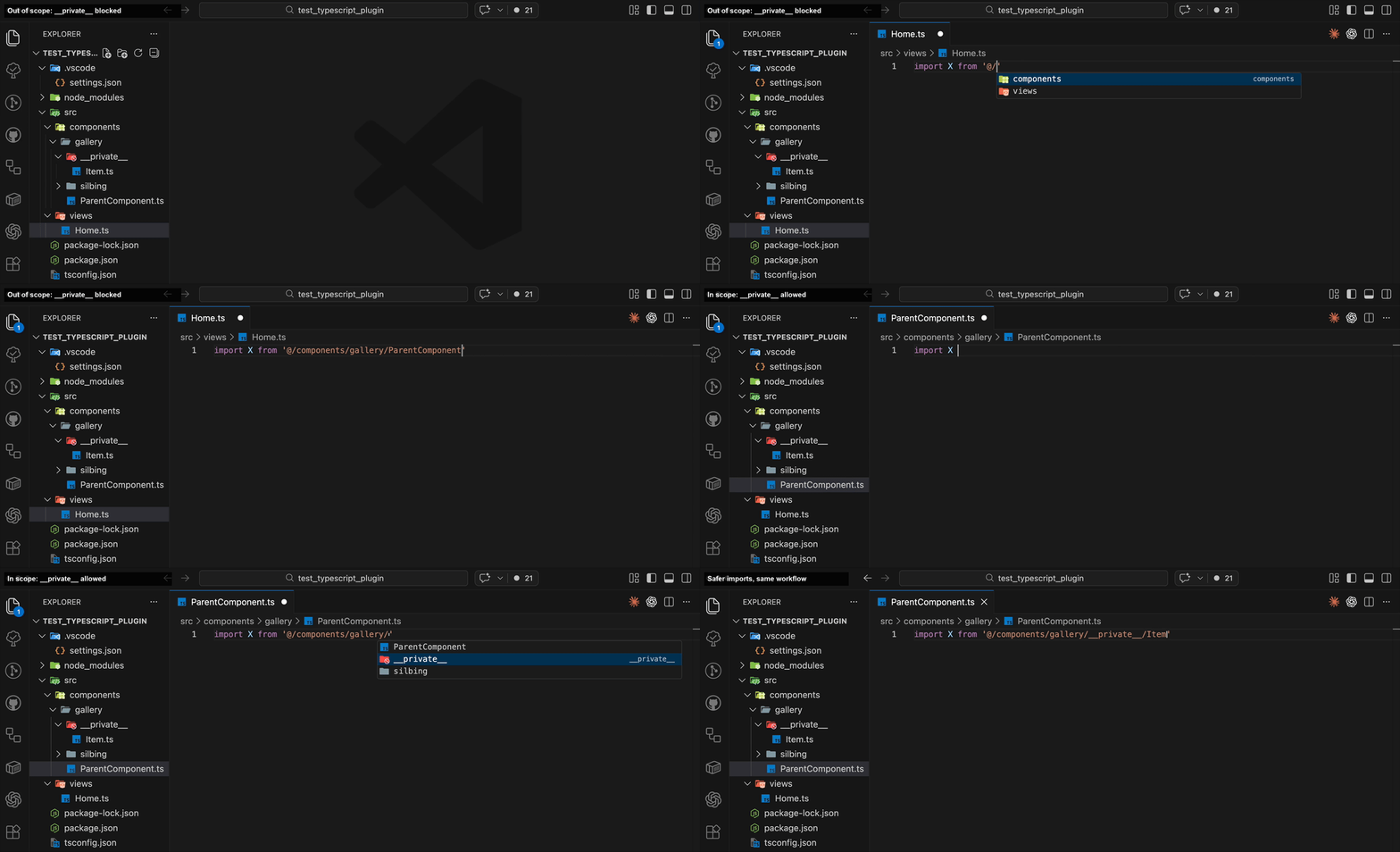
Quick demo

Scoped imports demo

What you get

  • Out-of-scope files do not get auto-imports from __private__
  • In-scope files still get normal suggestions and quick fixes
  • Works with path completions and import-related code actions

Scope rule

  • Allowed: parent directory of __private__ and all descendants

  • Blocked: any file outside that subtree

Example:

  • src/components/gallery/__private__/Item.ts (private module)
  • src/components/gallery/Parent.tsx -> allowed
  • src/components/gallery/sibling/Nephew.tsx -> allowed
  • src/views/Home.tsx -> blocked

Setup

  1. Install this extension from Marketplace.
  2. In most cases it starts working immediately.
  3. If changes are not applied yet after install/update, run TypeScript: Restart TS Server or Developer: Reload Window.

Optional: explicit project config

The extension works without this, but you can still add plugin config in tsconfig.json:

{
  "compilerOptions": {
    "plugins": [{ "name": "typescript-plugin-scoped-imports" }]
  }
}

Verify

  1. Run TypeScript: Open TS Server log.
  2. Confirm this log line exists:
PLUGIN LOADING: typescript-plugin-scoped-imports

Troubleshooting

  • Ensure the file is inside a TypeScript project (tsconfig.json).
  • Restart TS Server or reload window if behavior is stale after install/update.

Source code

  • Repo: https://github.com/nicovio/typescript-plugin-scoped-imports
  • Core plugin docs: https://github.com/nicovio/typescript-plugin-scoped-imports/tree/main/packages/typescript-plugin-scoped-imports
  • Contact us
  • Jobs
  • Privacy
  • Manage cookies
  • Terms of use
  • Trademarks
© 2026 Microsoft