Langfuse Traces for VS Code
Inspect LLM traces, spans, token usage and costs from Langfuse directly inside VS Code or Cursor — without switching tabs.
Screenshots
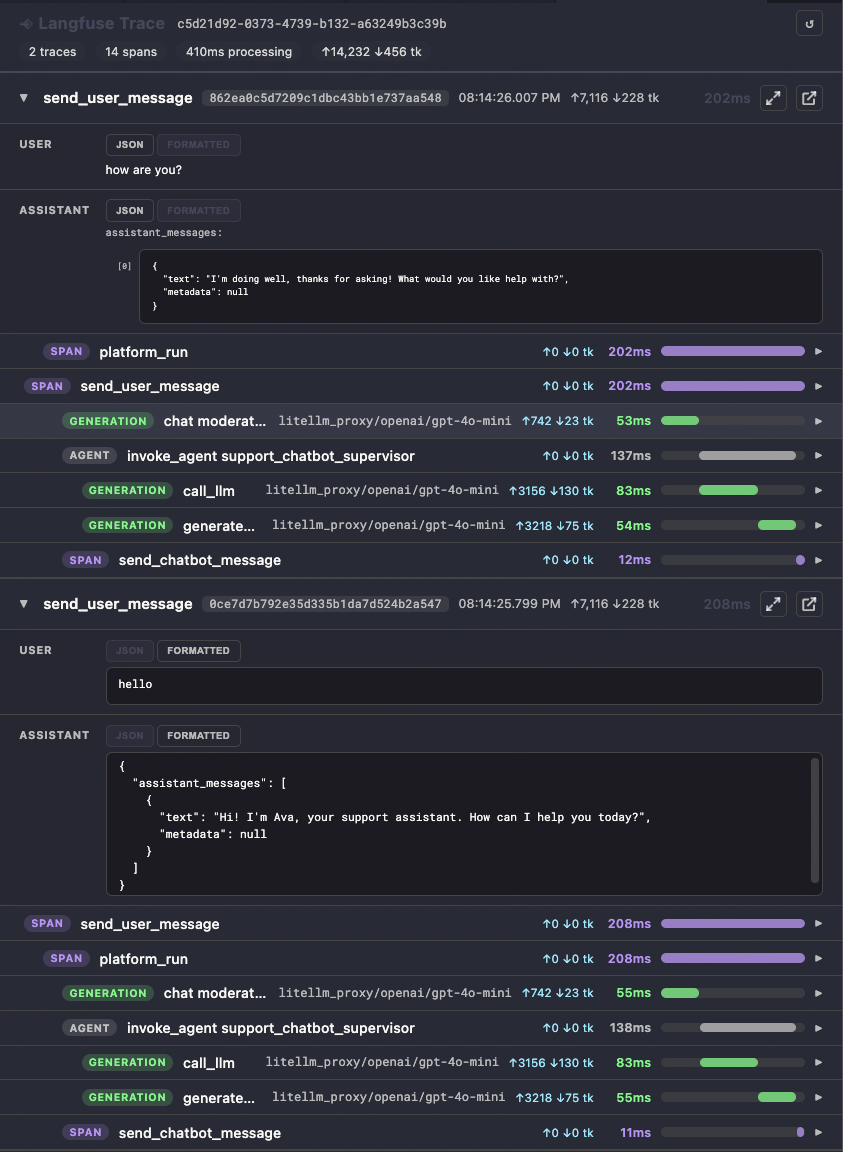
Session overview — the newest trace opens expanded with its span tree and waterfall; older traces collapse to the message that started them.
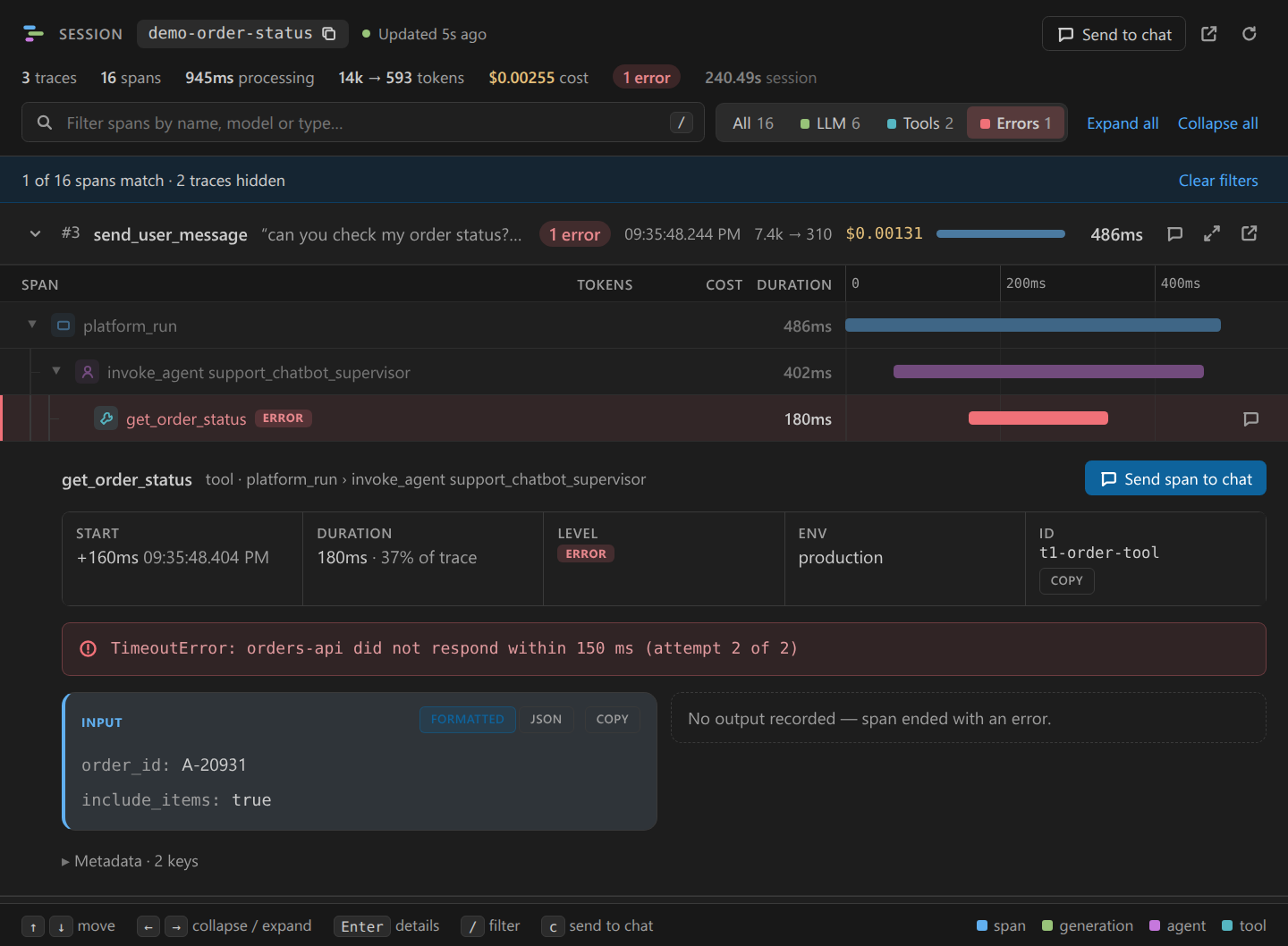
Debug errors — filter to failing spans and see the error, input and missing output at a glance.
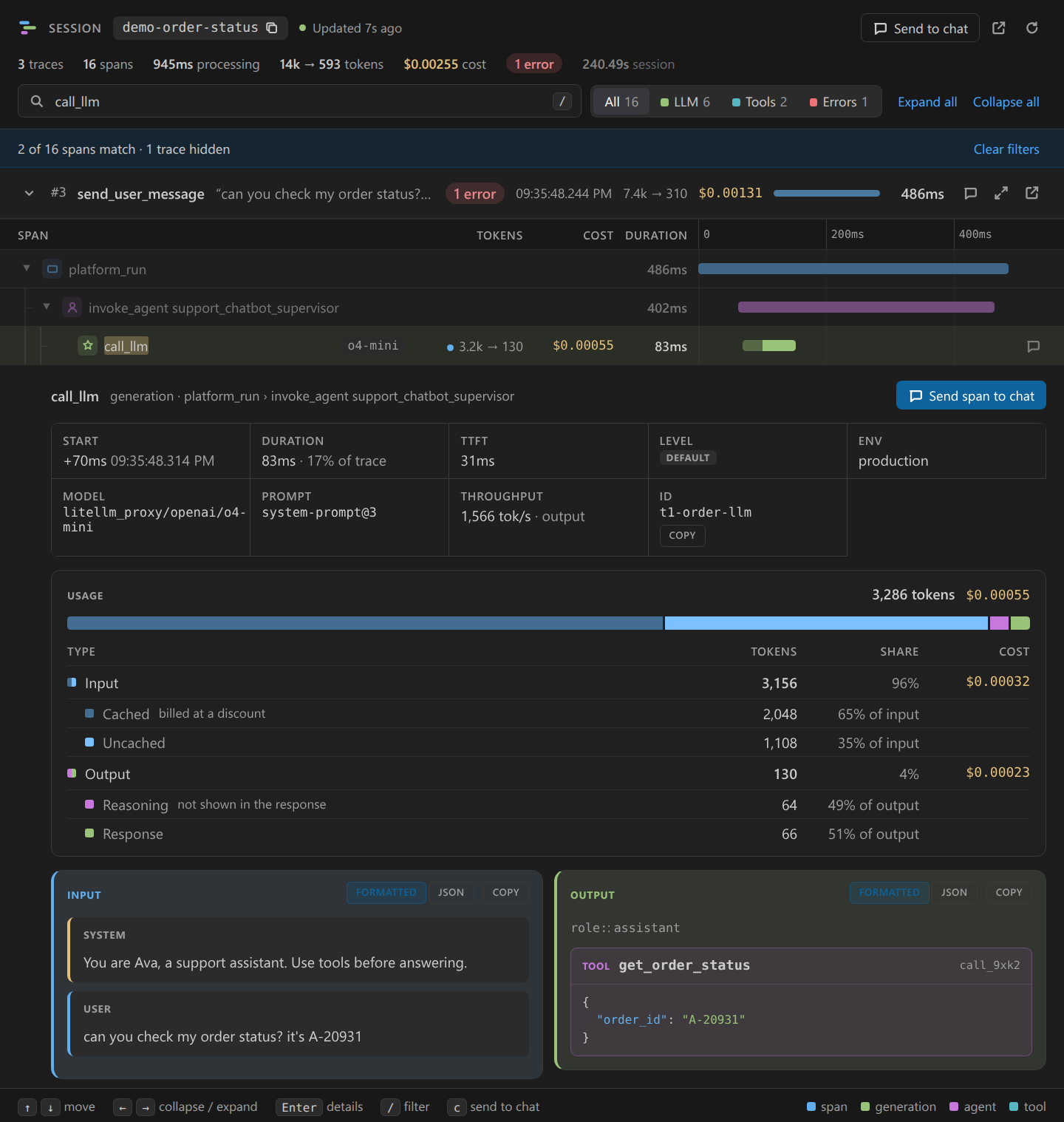
Token usage — cached / uncached input, reasoning / response output, and cost per category for every generation.
Screenshots are rendered from demo data (make mock) with a dark theme.
Quick start
- Configure Langfuse in Settings → search
langfuse and set host, publicKey, and secretKey (or use SecretStorage / Sync Credentials from Vault if you configure a Vault CLI).
- Open the Langfuse sidebar — click the Langfuse icon in the Activity Bar. Recent sessions from your project load automatically.
- Open a session — click a session in the sidebar, or use the Command Palette:
Langfuse: Open Trace Panel — focuses the active panel or prompts for a session IDLangfuse: Open Trace by Session ID… — paste a session ID to load the full conversation
The first trace panel opens beside your editor; additional sessions open as tabs in the same editor group. Re-opening an already-open session focuses the existing tab instead of creating a new split.
Features
- Inline trace panel — waterfall with a time axis, span nesting, tokens and costs per span; the newest trace opens expanded and older ones collapse to the user message that started them
- Filter spans — search by name, model or type, or narrow to LLM / Tools / Errors; errors are highlighted in the tree and counted in the header
- Token usage breakdown — every generation shows input (cached / uncached), output (reasoning / response), extra categories like cache writes, and cost per category
- Keyboard navigation —
↑ ↓ move, ← → collapse / expand, Enter opens details, / focuses the filter, c sends the focused span to chat
- Refresh-safe view — open spans, collapsed branches, filters and scroll position survive refreshes
- Session sidebar — recent sessions labelled with their opening message, relative time and error badges; pin sessions to keep them on top, refresh, hide, or open with one click
- JSON / Formatted toggle — raw JSON or human-readable chat view for every input and output
- Open by session ID — load a full conversation from the sidebar or Command Palette
- Send context to chat — export span, trace, or session context into Cursor/VS Code chat (MCP pointers for agents)
- MCP integration (Cursor) — agents can list sessions, fetch traces, inspect spans, and control the open panel
- Auto-refresh — panel updates when a host extension triggers
langfuse.autoRefreshIfOpen
- Direct link to Langfuse UI — open any trace in the full Langfuse web app
- Local or cloud Langfuse — point
langfuse.host at Docker, self-hosted, or cloud.langfuse.com
Commands
| Command |
Description |
Langfuse: Open Trace Panel |
Focus the active panel or open by session ID |
Langfuse: Open Trace by Session ID… |
Open (or focus) a panel by session ID |
Langfuse: Send Trace Context to Chat |
Send active panel context to chat |
Langfuse: Add Session |
Add a session ID to the sidebar |
Langfuse: Refresh |
Reload recent sessions in the sidebar |
Langfuse: Open Session Traces |
Open traces for a sidebar session |
Langfuse: Pin Session / Langfuse: Unpin Session |
Keep a session in the Pinned section of the sidebar |
Langfuse: Hide from Sidebar |
Remove a session from the sidebar (does not delete data in Langfuse) |
Langfuse: Send Session to Chat (MCP) |
Send an MCP pointer for a sidebar session to chat |
Langfuse: Register MCP Server |
Re-register the Langfuse MCP server with Cursor |
Langfuse: Sync Credentials from Vault |
Fetch project keys via a configured Vault CLI into SecretStorage and re-register MCP |
Langfuse: Set Secret Key (SecretStorage) |
Manually store/clear the secret key in SecretStorage |
Configuration
| Setting |
Default |
Description |
langfuse.host |
http://127.0.0.1:3000 |
Base URL of your Langfuse instance |
langfuse.publicKey |
pk-lf-local-dev |
Langfuse public API key (overridden by Vault sync / SecretStorage) |
langfuse.secretKey |
sk-lf-local-dev |
Langfuse secret API key (prefer Vault sync / SecretStorage) |
langfuse.vault.cli |
vault |
Vault CLI executable |
langfuse.vault.mount |
secret |
KV mount for HashiCorp Vault CLI (or {mount} in custom template) |
langfuse.vault.env |
(empty) |
Value for {env} when using commandTemplate |
langfuse.vault.commandTemplate |
(empty) |
Optional shell command with {cli}, {env}, {mount}, {path} placeholders |
langfuse.vault.outputFormat |
json |
json, keyvalue, or auto output parsing |
langfuse.vault.path |
(empty) |
Optional combined Vault path with public_key + secret_key |
langfuse.vault.publicKeyPath |
(empty) |
Vault path for a split public-key secret |
langfuse.vault.secretKeyPath |
(empty) |
Vault path for a split secret-key secret |
langfuse.vault.field |
value |
Field name inside split secrets |
langfuse.recentSessionsLimit |
10 |
How many recent sessions to show in the sidebar (1–100) |
Vault sync (optional)
Default (HashiCorp Vault CLI): set langfuse.vault.cli, langfuse.vault.mount, and either:
langfuse.vault.path — one secret with public_key / secret_key, orlangfuse.vault.publicKeyPath + langfuse.vault.secretKeyPath — two secrets (field value by default)
Custom CLI: set langfuse.vault.commandTemplate with placeholders {cli}, {env}, {mount}, {path}:
{
  "langfuse.vault.cli": "my-secrets-cli",
  "langfuse.vault.env": "production",
  "langfuse.vault.commandTemplate": "{cli} secrets get --env {env} {path}",
  "langfuse.vault.outputFormat": "auto",
  "langfuse.vault.publicKeyPath": "apps/langfuse/public-key",
  "langfuse.vault.secretKeyPath": "apps/langfuse/secret-key"
}
Then run Langfuse: Sync Credentials from Vault (or Configure Vault… in the sidebar).
Requirements
A running Langfuse instance with API access:
The extension talks directly to the host you configure. With a local instance, data stays on your machine; with cloud Langfuse, requests go to your cloud project.
MCP (Cursor)
On activation, the extension registers two MCP servers when running in Cursor:
langfuse-traces (stdio — Langfuse API)
Read-only access to your Langfuse project:
| Tool |
Description |
get_session_traces |
Fetch all traces and span summaries for a session |
list_recent_sessions |
List recent sessions (newest first) |
get_span_detail |
Full input/output for a single span |
Resource: langfuse://session/{sessionId} — JSON snapshot of a session.
langfuse-traces-panel (HTTP — active viewer)
Interact with open trace panels in the editor:
| Tool |
Description |
open_trace_panel |
Open the viewer for a session (optional traceIndex) |
refresh_open_trace |
Refresh data in an open panel |
get_active_panel_state |
Focused trace, expanded spans, last clicked span |
get_active_span_detail |
Full I/O for the span currently viewed |
list_open_trace_panels |
Session IDs of all open panels |
Resource: langfuse://active — JSON snapshot of the active panel session.
Enable both servers under Cursor Settings → MCP. If they do not appear, run Langfuse: Register MCP Server.
Programmatic API (for extension authors)
Host extensions (e.g. a webchat panel) can open traces without user input:
await vscode.commands.executeCommand('langfuse.openTrace', {
  sessionId: '<your-langfuse-session-id>',
  traceIndex: 2, // optional — 0-based, oldest message first
});

// Background refresh after a new LLM response (no-op if panel is closed)
vscode.commands.executeCommand('langfuse.autoRefreshIfOpen', {
  sessionId: '<your-langfuse-session-id>',
});
sessionId must match the Langfuse sessionId field on your traces (Python/JS SDK or OTel session.id attribute).
How it works
- Your backend instruments LLM calls with the Langfuse SDK and sets
sessionId on each trace.
- This extension queries the Langfuse REST API (
GET /api/public/traces?sessionId=… and GET /api/public/traces/{traceId} per trace).
- Traces render in a webview panel beside the editor; the sidebar lists recent sessions from
GET /api/public/sessions.
Development
make setup          # install deps, compile, run tests
make dev            # open Extension Development Host (Cursor or VS Code)
make package        # build langfuse-traces.vsix
make install-local  # install .vsix in the current editor window
make test           # run unit tests
make doctor         # diagnostics when the extension does not show up
Override the editor with make dev IDE=code if you prefer VS Code over Cursor.
License
MIT

