Rune DSL StudioProject management, language support, and a guided product Designer for Rune DSL models (FINOS CDM, DRR, ISO 20022) Installation Launch VS Code Quick Open ( Ctrl+P), paste the following command, and press enter.Copied to clipboard |

Rune DSL StudioA complete workbench for Rune DSL — model, build, and validate FINOS CDM, DRR, FpML, or any Rune DSL domain model, end to end inside your editor. Rune DSL Studio takes a
Project / Build Manager

Building a Rune DSL model normally means hand-managing a complex Maven build — wiring poms, classpaths, and toolchain jars before you can compile a line. Studio removes all of it: create a project from a model source (FINOS CDM, DRR, or your own) and Studio wraps it in a managed project with full build management. DRR is a private model, so building it requires a GitHub account with rosetta-models authorisation. The Master Build downloads the model, compiles the Rosetta DSL to its Java implementation, extracts the toolchain, and indexes everything for navigation and search — a nine-step pipeline with a live build log, named steps, and javac diagnostics surfaced straight into the Problems panel.
Coding Suite

Full
Rune DSL Copilot — Multi-Model AI IntegrationDeep integration with your AI coding assistant — GitHub Copilot and Claude Code among the options under evaluation — is in development: page and context awareness inside Studio's surfaces, guided setup assistance, and model-aware coding assistance that understands Rune DSL semantics, not just syntax. Model Visualisation


A Three.js-powered type relationship explorer: anchor on the model's root type and watch the structure expand outward — types, attributes, enums, inheritance, and cross-namespace references, navigable in three dimensions. The same graph anchors inside RuneBooks, so you can see a type's shape the moment you author it. RuneBook — an interactive model notebook
RuneBooks are interactive notebooks for prototyping and learning Rune DSL and its Java integration points — author a type, generate its Java, run it, and validate it in one living document you work in directly. Your own custom Java and the toolchain's generated Java sit side by side, clearly distinguished:
Designer

A guided accelerator for CDM onboarding. Pick a starting point, answer what the model asks, and the Designer assembles a valid object as you go — qualifying it live against your model's own qualification functions, then building the matching code, executing it, validating it, and exporting it into your project. It moves in five steps:
Beyond the base trade, the Designer also builds post-trade lifecycle events against a trade you have built: it detects which events apply, then qualifies and walks the one you choose through the same five steps. What you execute is stored as a named instance, and a top-down lineage view lays out the resulting chain of states and the events between them, with before-and-after quantities at each step. The Designer is derived from the model you are working on, not hardcoded: it works across CDM major versions 5, 6 and 7 — and DRR projects through the CDM embedded in them — with the qualification flow, choices, semantic values, and generated code all read from that version's own model. Each supported major is exercised against its complete built-in sample product set before release. The effect is to compress the analysis-and-build phase of onboarding: the Designer takes on roughly 95% of the initial effort of standing up a CDM product — turning what is typically months of work into days. It won't populate every optional field — the last mile stays yours. It is early and evolving, so treat it as a preview: explore it, and tell us where it helps or gets in the way.
DRR Data Lineage
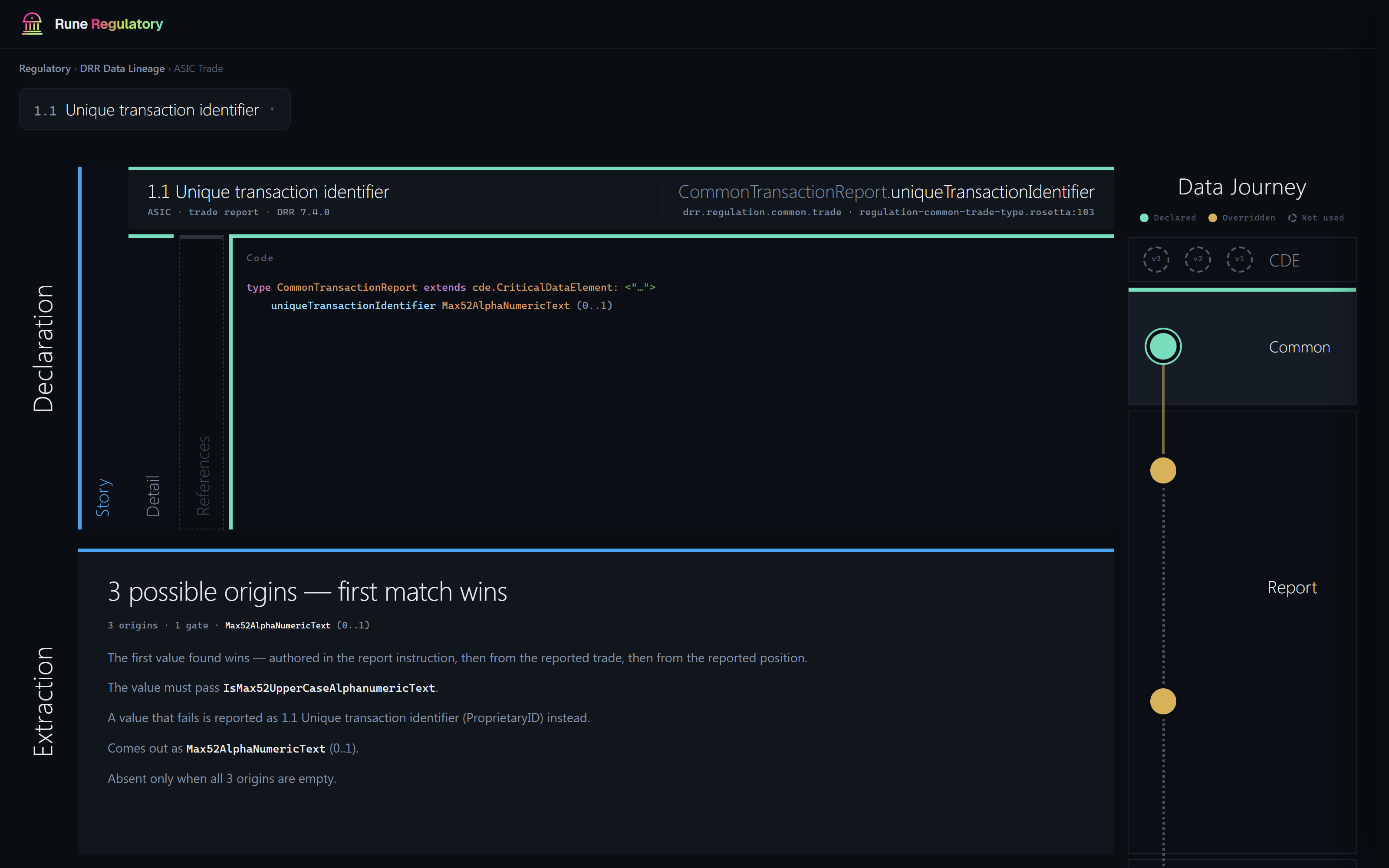
Ask any field of a DRR report where its value comes from — and read the answer on one page, straight from the compiled model. Open the Regulatory tab in a built DRR 7.x project and choose DRR Data Lineage. Pick a report (twelve reports across nine regimes: ASIC, CFTC, CSA, ESMA EMIR, FCA UK EMIR, HKMA, JFSA, MAS and SEC), pick a field — or search the full list — and the field's journey renders in four layers:
What you read is what runs — every line comes from the same compiled model your build uses; nothing is hand-written. The lineage pack downloads once per DRR release on first open (~95 MB) and is cached locally. Packs are published per DRR release, starting with 7.4.0 — on other versions the page tells you which packs exist. Available in built DRR 7.x projects; access follows your DRR model access. DRR Data Lineage ships as a beta — feedback is welcome through the in-product feedback button. Training

The first course — CDM & DRR end to end — is available in Studio now, with more to follow. A full four-module, hands-on walkthrough from first enum to regulator-ready XML:
Every lesson runs against the real toolchain — real builds, real validation, deliberate-break exercises, and a guided sidebar that tracks your progress. Execution Harness

Run whole-model regression pipelines at scale: ingest event batches, validate ReportableEvents, generate and validate transaction reports per regime, and project to XML — with live dashboards for throughput and findings, per-stage validation rollups, and top-exception triage that takes you straight to what broke. Getting started
Requirements
Feedback & supportAll feedback flows through the app itself — the feedback icon in the Studio sidebar or the Releases and release notes: github.com/nubbymong/rune_dsl_studio Privacy & dataRune DSL Studio runs entirely on your machine and collects no background telemetry. The only outbound data is user-initiated: when you submit feedback, the report — with the diagnostics you can review first, plus any optional screenshot and email you attach — is sent over HTTPS via a maintainer-operated relay (a Cloudflare Worker) and raised as an issue in a private repository visible only to the maintainer; it is never published publicly. Those diagnostics are limited to your plugin / VS Code / OS versions, environment-check results, and an anonymised (hashed) workspace identifier so related reports can be correlated — never file contents or model data. GitHub authentication uses VS Code's native OAuth; any local secrets the extension stores are held in the editor's Attribution & licensingLicense: Rune DSL Studio is proprietary software — all rights reserved; see the So that projects build without external toolchain setup, this extension bundles the Rune DSL build toolchain — an open-source project hosted by FINOS (the Fintech Open Source Foundation), maintained by Regnosys. The ~120 third-party dependency components (Jackson, Guava, Apache Commons, SnakeYAML, …, and the Eclipse EMF/Xtext/LSP4J/JDT stack) are redistributed unmodified under their own licenses — principally Apache 2.0 and the Eclipse Public License (EPL), with a small number of MIT, BSD, and CDDL components. The Rune DSL engine itself is incorporated under the Apache 2.0 license and is recompiled/modified by the maintainer; modified files are acknowledged in Related projects: FINOS · Rune DSL · FINOS Common Domain Model (CDM) · Digital Regulatory Reporting (DRR). DisclaimerThis extension is provided "as-is" without warranty of any kind. Evaluate suitability before use in production environments. Rune DSL Studio is an independent, community-built extension. It is not affiliated with, endorsed by, or sponsored by FINOS, ISDA, Regnosys, or any other organisation. "Rosetta". Rosetta is a commercial SaaS modelling platform and a trademark of Regnosys. This extension is not affiliated with, endorsed by, or connected to Regnosys or the Rosetta platform. References to "Rosetta" here — the Rune DSL Studio © Nicholas Moger · Built with the open-source Rune DSL toolchain (FINOS) |