DLL Structure Viewer
VS Code extension that opens DLL, EXE, SO, and other PE/ELF binary files as a graphical structure view.
What it does
Click any binary file in VS Code and it opens automatically in a structured viewer instead of a hex dump.
Supported formats:
| Format |
Extensions |
| PE (Windows) |
.dll .exe .sys .ocx .drv .cpl .scr .efi .mui .ax |
| ELF (Linux) |
.so .so.* .ko .elf .axf |
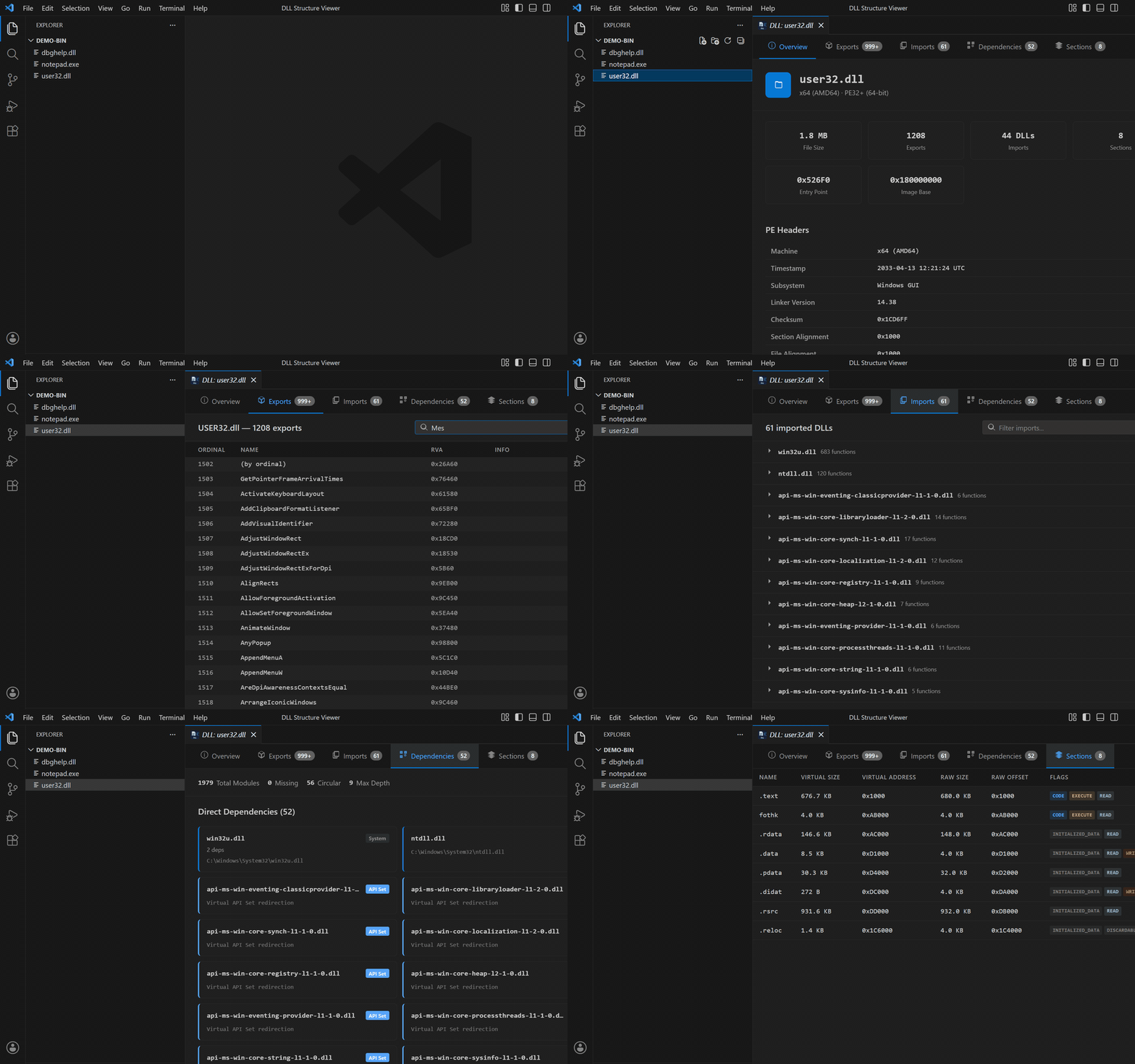
5 tabs:
- Overview: version info (product, company, file version), PDB path and
debug records, Authenticode / TLS / .NET presence, resource counts, headers,
characteristics and data directories. ELF files show program headers and
dynamic info instead.
- Exports: searchable table of exported functions and symbols with
ordinals, RVAs and bind type
- Imports: grouped by source library, expandable, with function names and
hints
- Dependencies: recursive dependency tree with expand/collapse, search,
circular-reference and missing-DLL detection. ELF files show the DT_NEEDED
list with full dynamic entries.
- Sections: sizes, addresses, offsets and permission flags
(READ / WRITE / EXECUTE)
Features
- Pure TypeScript PE and ELF parsers (no native dependencies, no external tools)
- Handles PE32 (32-bit) and PE32+ (64-bit)
- Handles ELF32 and ELF64, little and big endian
- Version info from
VS_VERSIONINFO, and the original PDB path from the CodeView debug record
- Recursive dependency resolution for PE files (searches application directory, System32, SysWOW64, Windows directory, and PATH)
- API Set DLL detection (virtual redirections shown separately from missing dependencies)
- Names the formats it cannot open (16-bit NE, OS/2 LE/LX, Mach-O, static libraries, WebAssembly) instead of failing with a generic error
- Virtual scrolling for binaries with thousands of exports
- Adapts to your VS Code theme (dark/light)
Usage
- Click any supported file in the explorer sidebar and it opens automatically
- Right-click a binary file → View DLL Structure
- Ctrl+Shift+P → View DLL Structure → pick any file from the dialog
Install
Search "DLL Structure Viewer" in the VS Code Extensions tab, or:
ext install nhunter0.dll-structure-viewer
Requirements
- VS Code 1.85+
- Windows recommended for PE dependency resolution (ELF viewing works on any platform)
Want to go deeper?
This extension is free and stays free. For most day-to-day questions about a
DLL it is the faster tool, because it is already open in your editor.
Binocular is our desktop binary explorer, built on the same parser family.
Here is the honest split.
What both do:
|
DLL Structure Viewer |
Binocular |
| Price |
Free |
Paid, 30-day trial |
| Runs inside VS Code |
Yes |
No, desktop app |
| Exports, imports, dependency tree |
Yes |
Yes |
| Version info, PDB path, headers, sections |
Yes |
Yes |
| PE and ELF |
Yes |
Yes |
Where Binocular goes further:
|
DLL Structure Viewer |
Binocular |
| Authenticode signature |
Presence only |
Digest and signer verified offline, with an intact / tampered / forged verdict |
| PE checksum |
Value shown |
Recomputed and compared |
| Security hardening (ASLR, DEP, CFG…) |
Flags listed |
Scored audit, plus checksec-style for ELF |
| Resources |
Counts only |
Extracted, decoded and previewed |
| .NET metadata |
No |
Parsed |
| C++, Rust, Swift, Objective-C symbol names |
Shown mangled |
Demangled |
| Imports by ordinal |
Ordinal shown |
Name resolved from the target DLL |
| Imports the target DLL does not export |
No |
Flagged |
| Win32 / CRT function prototypes |
No |
Bundled offline database |
| Compiler and linker provenance |
No |
Read from the Rich header |
| Strings |
No |
Yes, ASCII and UTF-16 |
| Structure-aware hex view |
No |
Yes, bytes linked to structures |
| Binaries hidden inside other binaries |
No |
Found and carved |
| Side-by-side binary diff |
No |
Yes |
| Mach-O, 16-bit NE, static libraries, WebAssembly |
Identified by name only |
Parsed |
Binocular runs fully offline, which is why its signature verdict rests on what
the bytes prove rather than on a certificate chain checked against a trusted
root.
If you only need exports, imports and dependencies, stay here. That is what
this extension is for, and it is free for good.
| |

