Dalton Dark
A colorblind-first dark theme for Visual Studio Code.
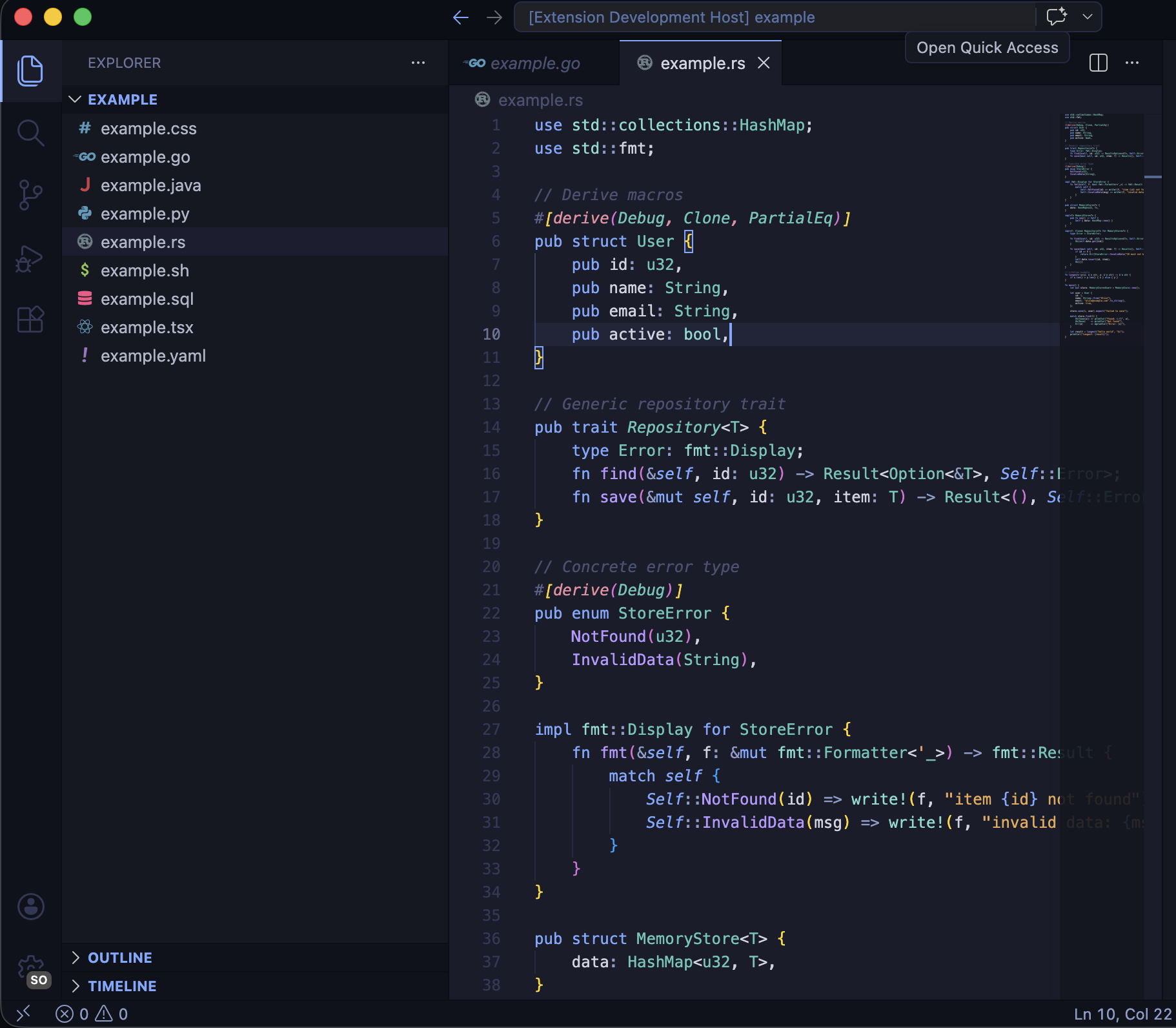
Dalton Dark is built from the ground up for developers with color vision deficiency. Every color in the palette was selected and tested to remain distinguishable under deuteranopia, protanopia, and tritanopia simulations -- so you never have to guess what a token means.
Design Principles
- No red/green reliance. The palette avoids red and green as primary distinguishing pairs. Token categories are separated by hue and luminance, so they remain distinct even in grayscale.
- Warm/cool separation. Keywords and types sit on the cool end (blue, teal); strings and constants sit on the warm end (amber, orange). This split holds up across all three major forms of CVD.
- Luminance contrast matters. Colors are not only hue-shifted but also spread across the lightness spectrum, giving each token a unique brightness signature against the deep navy background.
- Tested, not assumed. Every combination was validated against deuteranopia, protanopia, and tritanopia simulation tools before shipping.
Color Palette
| Role |
Color |
Hex |
| Background |
Deep Navy |
#1a1c2a |
| Foreground |
Light Gray |
#d0d4e0 |
| Keywords |
Blue |
#7aa8ff |
| Types / Classes |
Teal |
#5ec4b6 |
| Strings |
Amber |
#e8a855 |
| Constants / Numbers |
Orange |
#f09860 |
| Functions |
Lavender |
#b898ff |
| Tags / Decorators |
Rose |
#e88ca0 |
Language Support
Syntax highlighting has been tuned for 15+ languages:
- JavaScript, TypeScript, JSX, TSX
- Python, Rust, Go
- Java, Kotlin, C, C++
- Ruby, PHP
- CSS, SCSS, Less
- SQL, GraphQL
- Shell / Bash
- YAML, TOML, JSON
- Dockerfile, Markdown
UI Coverage
Dalton Dark themes the full VS Code interface, not just the editor:
- Activity bar, sidebar, status bar, title bar
- Tabs, breadcrumbs, command palette
- Terminal, minimap, scrollbar
- Git decorations and diff editor
- Peek view, notifications, inputs, debug toolbar
Installation
- Open VS Code.
- Go to Extensions (
Ctrl+Shift+X / Cmd+Shift+X).
- Search for Dalton Dark.
- Click Install, then select Dalton Dark from the theme picker (
Ctrl+K Ctrl+T / Cmd+K Cmd+T).
Or install from the command line:
ext install nheo.vs-themes
Part of vs-themes
Dalton Dark is part of the vs-themes collection by nheo, a set of carefully crafted VS Code themes. Check out the other themes in the collection, including Noctiluca.
License
MIT -- see LICENSE for details.
| |

