Antigravity Monitor







100% local & secure quota monitor for Antigravity IDE with real-time dashboard, usage analytics, cache management, and intelligent auto-accept.
Zero network calls. Zero telemetry. Everything stays on your machine.
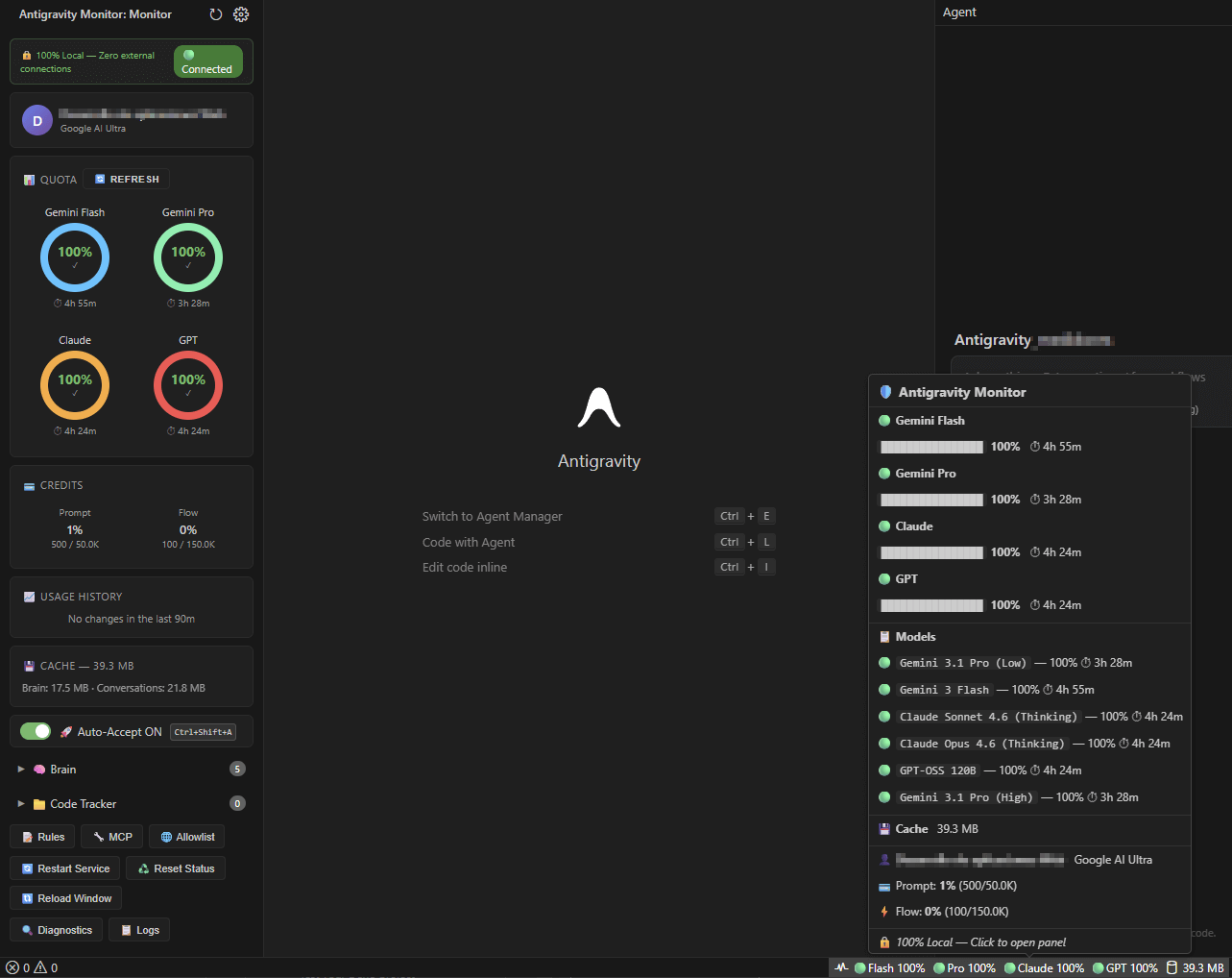
Features
📊 Real-Time Quota Dashboard
- Live circular gauge showing remaining credits vs. daily limit
- Credit breakdown by model group (Pro, Flash, Balanced, Legacy)
- Color-coded usage indicators (green → yellow → red)
- Auto-refresh every 90 seconds or manual refresh on-demand
📈 Usage History
- SVG sparkline showing credits remaining over time
- Separate lines for Prompt (blue) and Flow (purple) credits
- Session consumption summary with credits used
- Smart flat-line detection — shows values when no changes occur
🚀 Intelligent Auto-Accept
Three-layer system for fully hands-free agent operation:
| Layer |
Method |
What it does |
| Commands |
8 VS Code commands (800ms polling) |
Accepts agent steps, terminal commands, completions |
| Settings |
Gemini yolo mode + auto-execution policies |
Configures persistent approval settings |
| UI Automation |
Native OS automation |
Clicks "Run"/"Accept" buttons automatically |
Platform-specific behavior:
| Platform |
Auto-clicker method |
Requirements |
| Windows |
Native UI Automation (PowerShell) |
None — works out of the box |
| macOS |
CDP via WebSocket |
Launch with --remote-debugging-port=9000 |
| Linux |
CDP via WebSocket |
Launch with --remote-debugging-port=9000 |
💾 Cache Manager
- View cache size and entry count at a glance
- One-click cache clear
- Automatic cache invalidation on data changes
🔒 Security First
- Local-only — All communication restricted to
127.0.0.1
- No telemetry — Zero external network calls, ever
- CSP nonce — Webview content secured against injection attacks
- Input sanitization — All user inputs validated and escaped
- No data leaves your machine — Quota reads from local language server only
💿 Installation
From GitHub Releases
- Download the latest
.vsix from the Releases page
- In Antigravity/VS Code:
Extensions → ... → Install from VSIX...
- Restart the editor
From Open VSX / Marketplace
- Open the Extensions view (
Ctrl+Shift+X)
- Search for "Antigravity Monitor"
- Click Install
From Command Line
antigravity --install-extension nextcortex-antigravity-monitor-*.vsix --force
Build from Source
git clone https://github.com/nextcortex/antigravity-monitor.git
cd antigravity-monitor
npm install
npm run build
npx @vscode/vsce package --no-dependencies
antigravity --install-extension antigravity-monitor-*.vsix --force
⚡ Quick Start
- Install the extension (see above)
- Reload the editor —
Ctrl+Shift+P → Developer: Reload Window
- Look for the Antigravity Monitor icon in the Activity Bar (left sidebar)
- Click it to open the dashboard
- (Optional) Enable Auto-Accept from the sidebar toggle
Auto-Accept: Windows
Works immediately. Toggle Auto-Accept ON in the sidebar. The extension spawns a background PowerShell process that uses Windows UI Automation to find and click Accept/Run buttons natively. No additional setup required.
Auto-Accept: macOS / Linux
Launch Antigravity with the Chrome DevTools Protocol flag:
antigravity --remote-debugging-port=9000
Then toggle Auto-Accept ON. The extension connects via WebSocket to the renderer and clicks Accept/Run buttons using CDP mouse events. If the flag is missing, you'll see a one-time warning with instructions.
⚙️ Configuration
All settings are under the agm.* namespace:
| Setting |
Type |
Default |
Description |
agm.dashboard.refreshRate |
number |
90 |
Quota poll interval in seconds (min: 30) |
agm.dashboard.historyRange |
number |
90 |
Usage history range in minutes |
agm.dashboard.gaugeStyle |
string |
semi-arc |
Gauge display style |
agm.system.autoAccept |
boolean |
false |
Enable auto-accept on startup |
agm.system.autoAcceptInterval |
number |
800 |
Auto-accept tick interval in ms (min: 200) |
🎯 Commands
Open the Command Palette (Ctrl+Shift+P) and type Antigravity Monitor:
| Command |
Description |
Antigravity Monitor: Toggle Auto-Accept |
Enable or disable auto-accept |
Antigravity Monitor: Refresh Quota |
Force an immediate quota refresh |
Antigravity Monitor: Clear Cache |
Clear all cached quota data |
🏗️ Architecture
┌──────────────────────────────────────────────┐
│             Antigravity Monitor               │
├──────────┬───────────┬───────────────────────┤
│  Quota   │  Cache    │    Auto-Accept        │
│  Fetcher │  Manager  │    Service            │
│          │           │    ├── VS Code Cmds   │
├──────────┴───────────┤    ├── Settings API   │
│  Process Finder      │    └── UIA / CDP      │
│  (127.0.0.1 only)    │        Clicker        │
├──────────────────────┴───────────────────────┤
│  Sidebar Webview (CSP + Nonce secured)       │
├──────────────────────────────────────────────┤
│  Status Bar · Logger · Config Manager        │
└──────────────────────────────────────────────┘
🛡️ Privacy
This extension is designed with privacy as a core principle:
- ✅ All communication is local-only (
127.0.0.1)
- ✅ Quota data is read from the local Antigravity language server
- ✅ Cache is stored in VS Code's local
globalState
- ❌ No analytics
- ❌ No tracking
- ❌ No telemetry
- ❌ No external API calls
- ❌ No data collection of any kind
🔧 Troubleshooting
Auto-accept is ON but commands still ask for confirmation
- Windows: Check the Output Channel (
Ctrl+Shift+U → select "Antigravity Monitor") for UIA auto-clicker ready. If missing, the PowerShell worker may have failed to start.
- macOS/Linux: Ensure Antigravity was launched with
--remote-debugging-port=9000. Check the Output Channel for CDP auto-clicker started.
Quota shows "No data" or doesn't update
- Ensure the Antigravity language server is running (check the status bar)
- Try
Ctrl+Shift+P → Antigravity Monitor: Refresh Quota
- Check the Output Channel for connection errors
Extension doesn't appear in the Activity Bar
- Right-click the Activity Bar → ensure "Antigravity Monitor" is checked
- Try
Ctrl+Shift+P → Developer: Reload Window
📋 Requirements
| Requirement |
Version |
| Antigravity IDE |
v1.0+ |
| VS Code Engine |
≥ 1.90.0 |
| Node.js |
18+ (bundled with Antigravity) |
| OS |
Windows 10+ · macOS 12+ · Linux (glibc 2.31+) |
Acknowledgments
Inspired by and built upon patterns from:
⚠️ Disclaimer
This project is not affiliated with, endorsed by, or associated with Google or Antigravity in any way. It is an independent, community-driven tool created for personal use. Use at your own risk.
📄 License
This project is licensed under the MIT License. See LICENSE for details.

