Nexpath — The thing that keeps AI-generated code from becoming a mess.
Stop. Think. Prompt better.
Strengthen your prompts and catch skipped checks before shipping. Nexpath is a quality
engineering layer for AI-powered development: it catches your prompt at the moment you
submit it, offers a sharper version with your intent preserved, and sends the version
you choose — keeping your AI coding workflow disciplined without breaking flow.
Demo: Prompt Enhancement in action, on YouTube
Built for: Cursor · Windsurf (Devin) — fully supported & end-to-end tested.
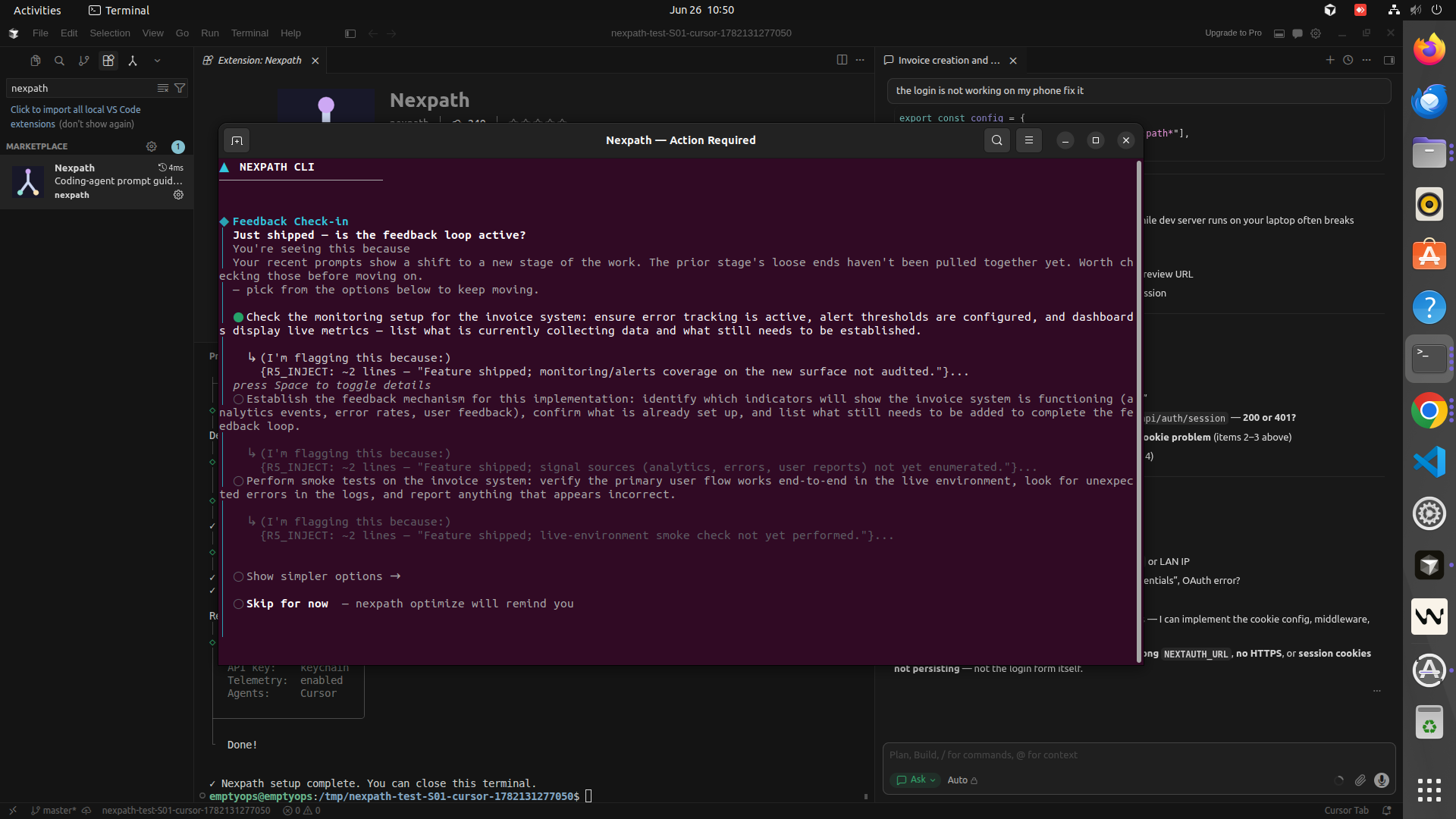
What Nexpath Does
While you're working with AI coding agents like Cursor and Windsurf (Devin),
Nexpath watches your session locally and surfaces the decisions you're missing —
incomplete specs, missing test strategy, risky shortcuts — before they ship.
Your AI pair programmer focused on process, not code. One suggestion. You decide.
Your original request stays visible. Nexpath prepares an enhanced version — task
breakdown, acceptance criteria, verification steps, risks — from your own words.
Pick the enhanced version, add details, or keep your original. Only the version
you choose is sent.
Why This Matters
AI coding agents are revolutionary. They're also too fast. Here's what happens:
- You start a chat with your agent
- Working code appears in minutes
- You're in momentum — moving too fast to think clearly
- Specs go incomplete
- Tests get skipped
- Edge cases hide silently
- Your codebase becomes harder to maintain with every change
Momentum isn't laziness. It's the default when AI agents are this good. Nexpath is the
architect in the room who asks: "Wait — did we think this through?"
How It Works
- You submit a prompt in your agent's chat, exactly as you always do.
- Nexpath analyzes it — when guidance matters, it holds the prompt and opens a
quick review with a strengthened version: decomposition, ordering, acceptance
criteria, verification and risk checks — built from your original request.
- You review — use the enhanced prompt, apply additional details, or keep your
original. Your wording stays visible throughout.
- Nexpath sends the version you choose — injected back and submitted for you.
No copy-paste, no re-typing, no duplicate runs.
- Ship cleaner code — fewer skipped checks, faster reviews.
Not a new tool to learn. A workflow step to adopt.
Supported Agents
| AI Coding Agent |
Status |
| Cursor |
✅ Fully supported · end-to-end tested |
| Windsurf / Devin |
✅ Fully supported · end-to-end tested |
Nexpath installs in VS Code-family editors, but its guidance is built for and tested on
Cursor and Windsurf (Devin). Claude Code users: the same guidance ships in the
Nexpath CLI.
What You Get
- ✓ Prompt strengthening — a sharper version of your prompt, intent preserved
- ✓ Spec review catching — incomplete requirements surface before you send
- ✓ Test-strategy prompts — verification and acceptance checks built into the request
- ✓ Risk surfacing — architectural gaps and edge-case blindspots called out up front
- ✓ You stay in control — your original is always one keypress away; the version you pick is sent for you
- ✓ Local-first — your prompt history lives in a local store on your machine
- ✓ No subscriptions — bring your own API key
Result: AI agents generate better code. Reviews go faster. Fewer production bugs.
Getting Started
- Install — search "Nexpath" in your editor's Extensions panel, or install
directly: Command Palette →
ext install nexpath.nexpath-vscode.
- On first launch, Nexpath shows two prompts in the bottom-right:
- "Allow Nexpath to read your AI chat history for prompt-level guidance?" → click
Allow. (This lets Nexpath see your prompts so it can guide you — your data stays
on your machine. Without it, Nexpath will not work.)
- "Set up Nexpath for Cursor now?" → click Set up.
- A terminal opens — answer the one-time prompts. First, how Nexpath should run:
your own OpenAI API key, or a Nexpath token if you would rather not create an
OpenAI account. Then your project role.
- Fully restart your editor (quit and reopen — agents load their hooks at startup),
then start prompting — Nexpath surfaces guidance when it helps.
Re-run setup anytime from the Command Palette → "Nexpath: Set up CLI".
For Whom
Built for solo developers, indie hackers, startup founders, and professional teams who
want to ship fast without shipping broken — using AI agents like Cursor and
Windsurf (Devin).
Requirements
- Cursor or Windsurf (Devin) — VS Code
^1.80.0 or compatible.
- Node.js ≥ 20.19 on your machine (the bundled engine needs it; older Node will fail to start).
- One credential. Either your own OpenAI API key
(https://platform.openai.com/api-keys), or a Nexpath token from a free account at
parseos.tech/nexpath if you would rather not create an
OpenAI account. Setup asks which you want. Without one, prompts are tracked but no
guidance is generated.
If both are configured, your OpenAI key is the one used.
Your Privacy
- Your API key is stored in your OS keychain (or a
0600 file fallback) — never bundled or logged.
- Your prompt history is stored locally on your machine — never sent to Nexpath servers.
- To generate guidance, Nexpath sends recent prompt context to OpenAI using your
key — or, with a Nexpath token configured in the CLI, through Nexpath's own service,
which forwards it to OpenAI and meters your account credit — and only when guidance fires.
- Telemetry is off unless you turn it on. Setup does not ask, and nothing is enabled
for you — it starts off and stays off until you run
nexpath config set telemetry.enabled true. If you do turn it on, only anonymous usage
events (command names, timings, error types) are collected — never your code, prompts,
credential, or file paths. No vendor lock-in.
Legal / Attribution
Nexpath is an independent tool. Not affiliated with, endorsed by, or sponsored by
Cursor, Windsurf, or Devin — those names describe which AI agents Nexpath supports.
License: Apache-2.0
Made by ParseOS · AI developer tools for the vibe-coding era

