NetPolicy Map — Kubernetes Network Policy Analyzer
Stop guessing whether traffic is allowed. NetPolicy Map reads the
Kubernetes NetworkPolicy resources in your Terraform (.tf) files,
interprets their selectors and rules across the selected project folders, and explains
which declared policies allow or block a connection, with links to the source.
Launch trial: every feature in this VS Code extension is currently available to everyone — no
account or license key required. The CLI will be released separately and is not included with the
extension.
Important — indicative analysis: The graph and reachability results are an interpretation of
the Kubernetes NetworkPolicy resources found in Terraform. They show logical links between
selected endpoints and may not match the cluster's runtime behavior exactly. NetPolicy Map does
not model every network component or validate the complete end-to-end path, so its results are
not a guarantee of connectivity or isolation. Verify critical conclusions in the cluster; the
extension is provided as an analysis aid and accepts no responsibility for outcomes based on its
visualizations.
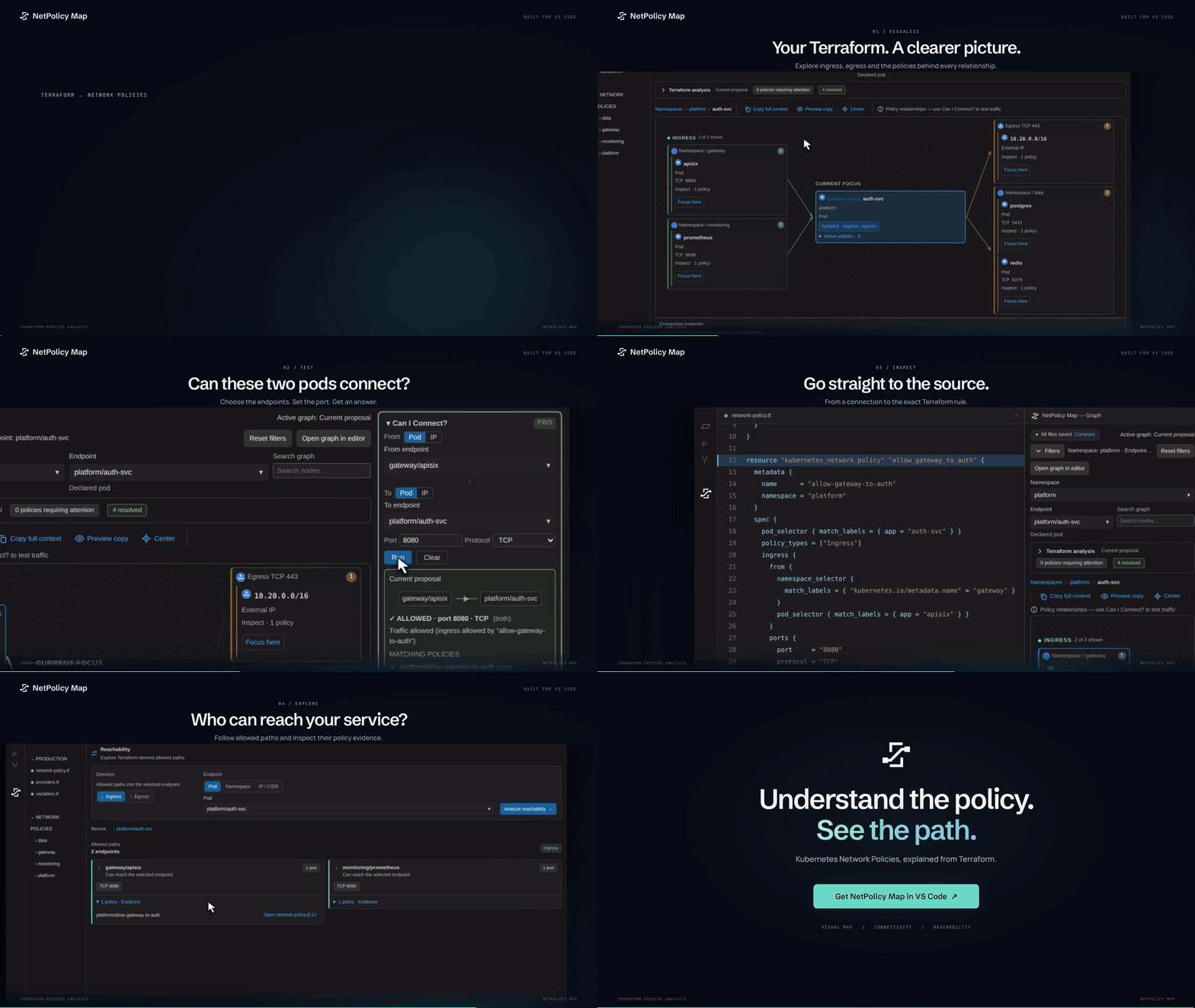
Why?
Debugging Kubernetes Network Policies defined as Terraform across multiple repos
is painful. You stare at kubernetes_network_policy blocks, mentally trace label
selectors across namespaces, and still end up guessing whether traffic is allowed
or blocked. NetPolicy Map automates that reasoning and shows you the answer — with
the exact file:line of the rule that blocks traffic.
Features
Available in the launch trial
| Feature |
What you get |
| Policy Tree View |
Namespaces → pods → ingress/egress rules in the sidebar, color-coded: green (allowed), gray (default-deny), yellow (no policy) |
| "Why? (Can I Connect?)" |
Pick source pod + destination pod + port → allowed/blocked verdict with the exact blocking policies (file:line) |
| Diagnostics |
Malformed policies, missing policyTypes, unintended default-deny, podSelector matching no pod |
| Hover Summary |
Human-readable summary of any kubernetes_network_policy block |
| Project Folder Selector |
Every directory with .tf files detected as a candidate project, with multi-folder selection |
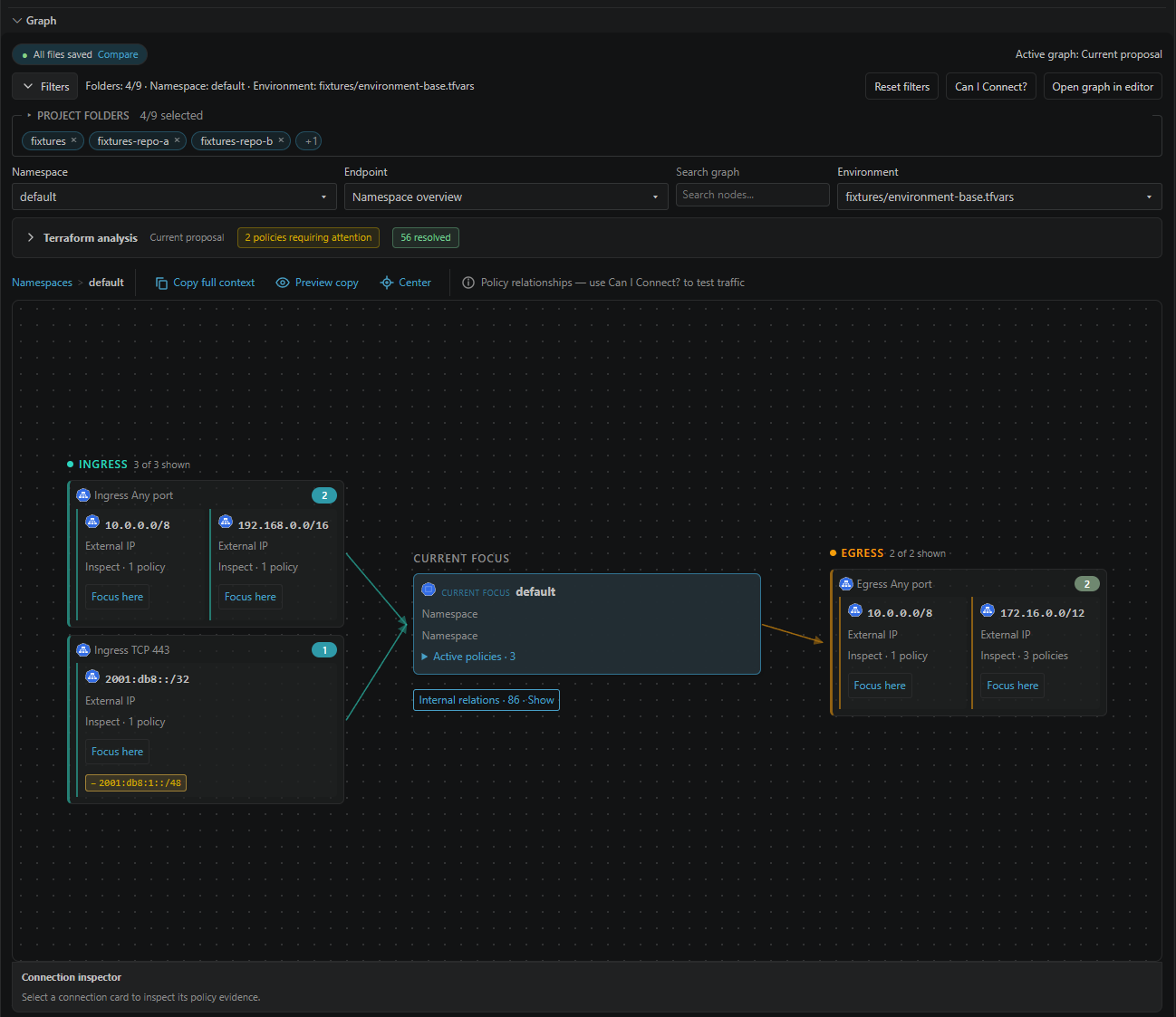
| Full Interactive Graph |
All selectors unlocked: namespace, pod, project folders (multi-select), search |
| Focus Graph Map |
Three-column board (Ingress · Focus · Egress) with policy evidence per connection |
| Connection Inspector |
Direction, ports, and policy source links for any connection |
| Reachability |
Every endpoint a pod, namespace, or IP/CIDR can reach — or be reached from |
| Cross-Repo Analysis |
Correlates policies across all repositories in your VS Code workspace |
| Advanced Linter |
0.0.0.0/0 open traffic, overlapping rules that cancel out, orphaned labels, missing default-deny |
Screenshots
| Allowed connection |
Blocked connection |
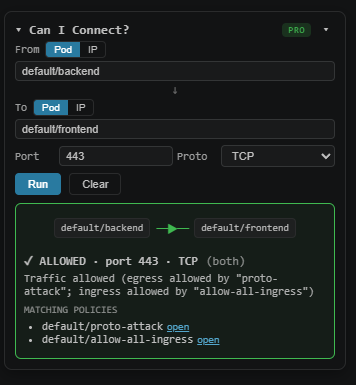 |
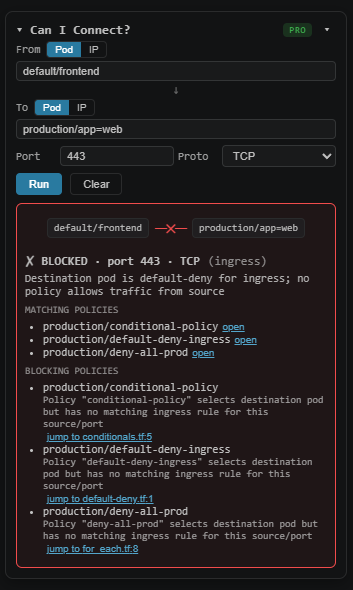 |
Quickstart
- Install the extension and open a workspace folder containing
.tf files with
kubernetes_network_policy, kubernetes_network_policy_v1, or inline
kubernetes_manifest NetworkPolicy resources.
- Click the NetPolicy Map icon in the activity bar — the policy tree appears.
- Press
Ctrl+Shift+P → NetPolicy Map: Why? (Can I Connect?) → pick source
pod, destination pod, and port → see the verdict and the blocking rules in the
Output panel.
Tip: hover any kubernetes_network_policy block in a .tf file for an instant
summary, and check the Problems tab for policy diagnostics.
Starting without a project? Run NetPolicy Map: Open Terraform Example, save the example as
quickstart.tf inside an open workspace folder, then open the graph. The example policy allows
client → API on TCP 8080 and blocks TCP 9090.
| Input |
Support |
kubernetes_network_policy, kubernetes_network_policy_v1 |
Selectors, ingress/egress, CIDR exceptions, named ports, port ranges, TCP/UDP/SCTP |
kubernetes_manifest with kind = "NetworkPolicy" |
Inline networking.k8s.io/v1 objects; unresolved structures are reported as analysis gaps |
| Pods, Deployments, StatefulSets, DaemonSets |
Typed resources and inline workload manifests; controller endpoints use pod-template labels |
| Variables and locals |
Defaults, terraform.tfvars, *.auto.tfvars, and a selected .tfvars environment; partial expression evaluation |
| Functions |
length, keys, values, lookup, merge, concat, format, join, toset, try, coalesce for supported known inputs |
for_each, count, dynamic |
Known resource values; local module instances support count and for_each |
| Local modules |
Sources inside the workspace boundary, up to three nested levels |
Remote Registry/Git modules, Helm chart rendering, standalone YAML, kubectl_manifest,
.tf.json, and .tfvars.json are not analyzed. Terraform environment variables, CLI arguments,
remote data sources, and values known only during planning or apply are not automatically available.
Resource and dynamic-block expansion is limited to 50 entries per expansion; omissions are reported.
Inspect Terraform analysis for policies requiring attention, skipped resources, missing
modules, and expansion limits. Connectivity queries show Indeterminate when missing data
could change the result. Reachability requests require complete analysis of the selected scope.
“Resolved” describes the available Terraform values, not a guarantee about the running cluster.
Only select project folders that describe the same cluster and environment. Matching namespaces
are combined across selected folders; provider aliases do not establish separate clusters.
Endpoints inferred from policy selectors represent possible matching pods, not observed running pods.
Confirm the selected project folders and variable environment before interpreting results.
Commands
| Command |
Description |
NetPolicy Map: Why? (Can I Connect?) |
Connectivity query between two pods |
NetPolicy Map: Open Interactive Graph |
Full graph view |
NetPolicy Map: Open Reachability |
Reachability analysis |
NetPolicy Map: Refresh |
Re-scan the workspace |
NetPolicy Map: Open Terraform Example |
Open an editable sample project file |
NetPolicy Map: Report Issue / Send Feedback |
Prepare an editable feedback report |
NetPolicy Map: Copy Reviewed Feedback and Open Email Draft |
Copy the reviewed report and open your email client |
Launch trial
All extension functionality is enabled during the launch trial, including the full graph,
reachability, cross-repository analysis, and advanced linting. There is no Pro tier to purchase
or activate in this release.
CLI (CI/CD)
The CLI is being prepared as a separate CI/CD package. It is not included when installing the
VS Code extension and is not yet available for installation.
Requirements
- VS Code 1.90 or newer
- Terraform files containing supported Kubernetes NetworkPolicy resources (see compatibility above)
Support & Feedback
Use Report Issue / Send Feedback from the Command Palette or the policy sidebar's feedback
button. It opens an editable local report with extension/VS Code versions, platform, and aggregate
counts. Add what you expected, what happened, and steps to reproduce. A small sanitized .tf
example or screenshot is optional and especially useful for compatibility issues.
After reviewing the report, run Copy Reviewed Feedback and Open Email Draft. Paste the report
into the draft and send it yourself. If no email app opens, the support address and report remain
available for use in webmail. Terraform content, file paths, labels, variables, account details,
and license keys are never automatically included. No report is sent automatically.
Data & Privacy
NetPolicy Map collects no telemetry. During the launch trial, the extension runs without an
account or license key.
License
Proprietary. The current Marketplace release is a launch trial with all extension features
enabled. See the LICENSE.txt file bundled with this extension.

