Vimperor
Vim for VS Code, powered by IdeaVim's engine.
This is not another Vim written from scratch, and it is not a Neovim running as a subprocess. It is
IdeaVim's vim-engine — with its Vimscript parser, its regex engine and its test corpus — compiled
to JavaScript and loaded into the extension host. Modes, operators, text objects, registers, macros,
marks and Vimscript are the engine's own, so they behave the way they do in IdeaVim rather than the
way somebody reimplemented them. It reads your existing ~/.ideavimrc unchanged.
EasyMotion: jump to anywhere you can see
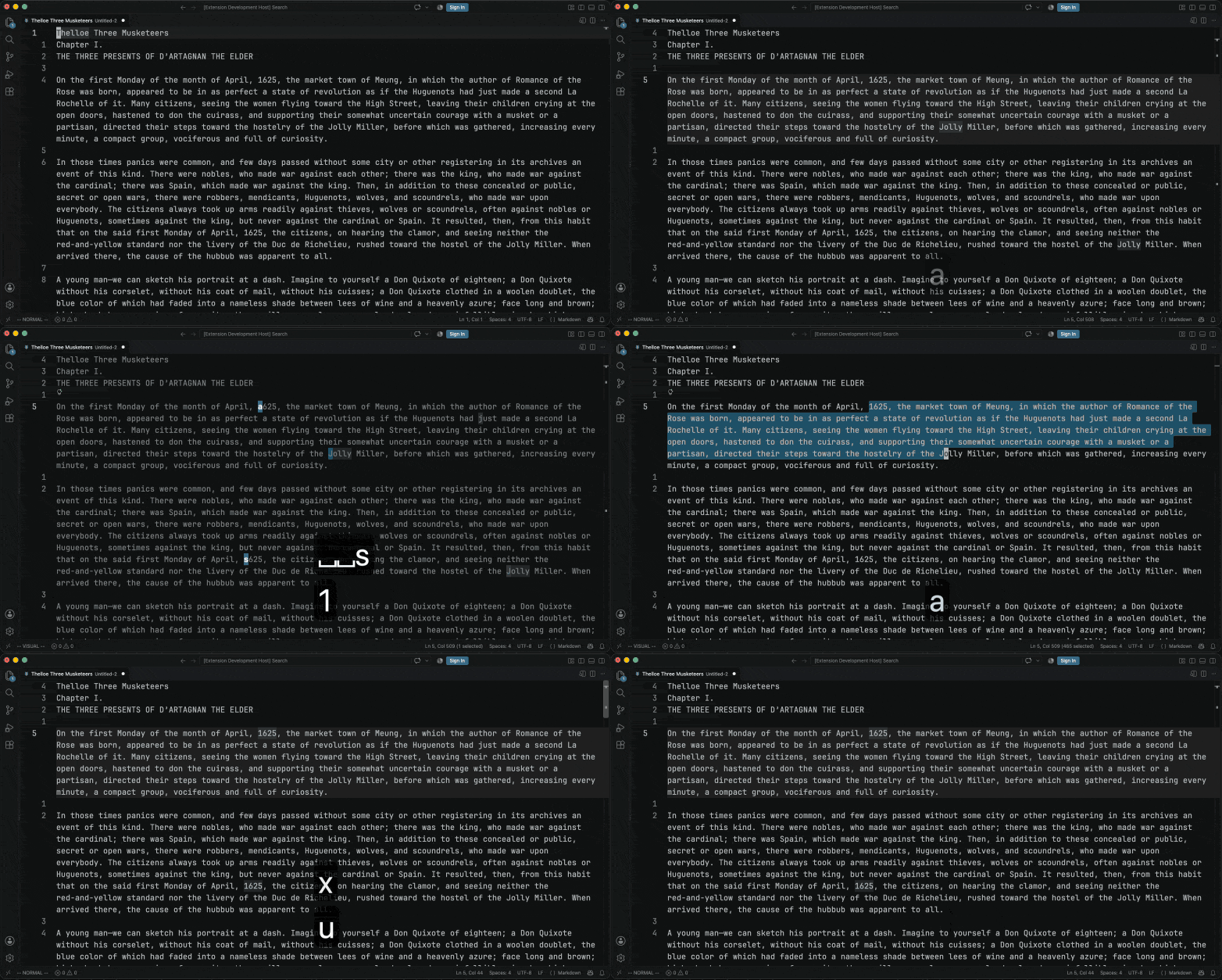
<Leader><Leader>s then J labels every J on screen, above the caret and below it, and one
keystroke goes there. Then the same from Visual mode, where the jump extends the selection instead
— x takes what it covered, u puts it back.
Counting ws to reach a word is the part of Vim that never got faster. EasyMotion replaces the
counting: press a motion and every place that motion could land is labelled with a letter, and
typing the letter puts you there. The target can be above the caret as easily as below it.
set easymotion
Seventeen mappings, vim-easymotion's own, behind <Leader><Leader>:
| keys |
labels |
s{char} |
every match of a character, both directions |
f{char} F{char} |
matches forwards, matches backwards |
t{char} T{char} |
up to a character, either way |
w W b B |
word starts |
e E ge gE |
word ends |
j k |
lines |
n N |
matches of your last search |
It is a motion, so it goes where a motion goes. d<Leader><Leader>s, then r, then the label
sitting on the r you meant, deletes from the caret to there — forwards or backwards, and c,
y, gu, > and the rest behave the same. In Visual mode the jump extends the selection.
g:EasyMotion_keys chooses the label letters, and the whole <Plug>(easymotion-*) namespace is
there to map yourself: the bd-, sol-, eol-, iskeyword- and within-line families. Labels are
command keys, so a Cyrillic layout reaches them too.
This one is written for Vimperor rather than ported. IdeaVim's EasyMotion is a separate plugin
built on AceJump, and both are GPL, so neither could come across to an MIT fork. It follows
vim-easymotion itself, which is MIT.
Cyrillic keyboard layouts
Vim commands are Latin letters, so with a Cyrillic layout active dw is typed as вц and reaches
nothing. Set a layout and it does:
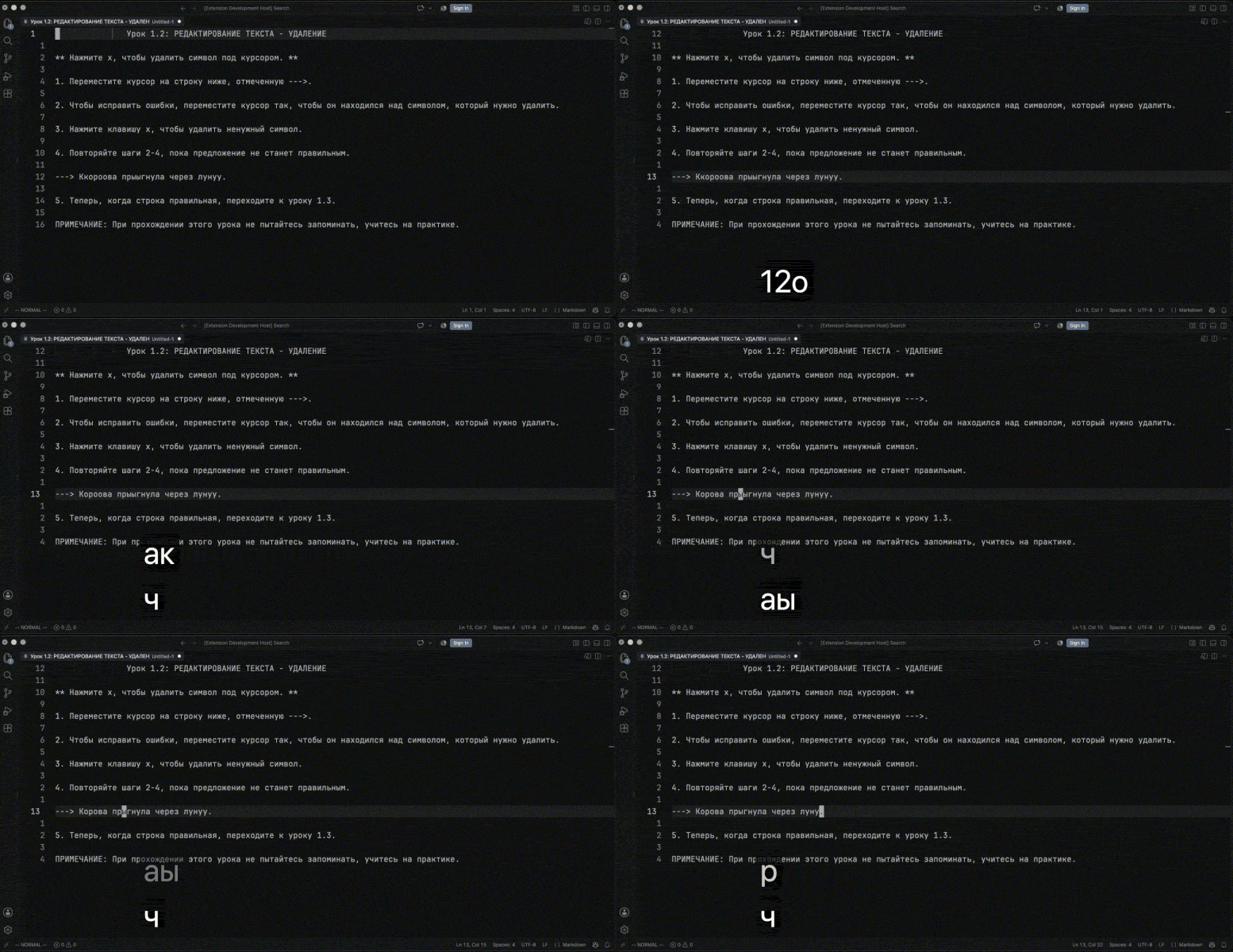
set keyboardlayout=russian
russian, ukrainian and belarusian are built in. Counts, registers, marks, operators, text
objects and . all follow, because this translates the key rather than adding mappings — which is
what nmap ш i and sixty more lines can never do, since a mapping cannot reach a register name, a
mark name or a count.
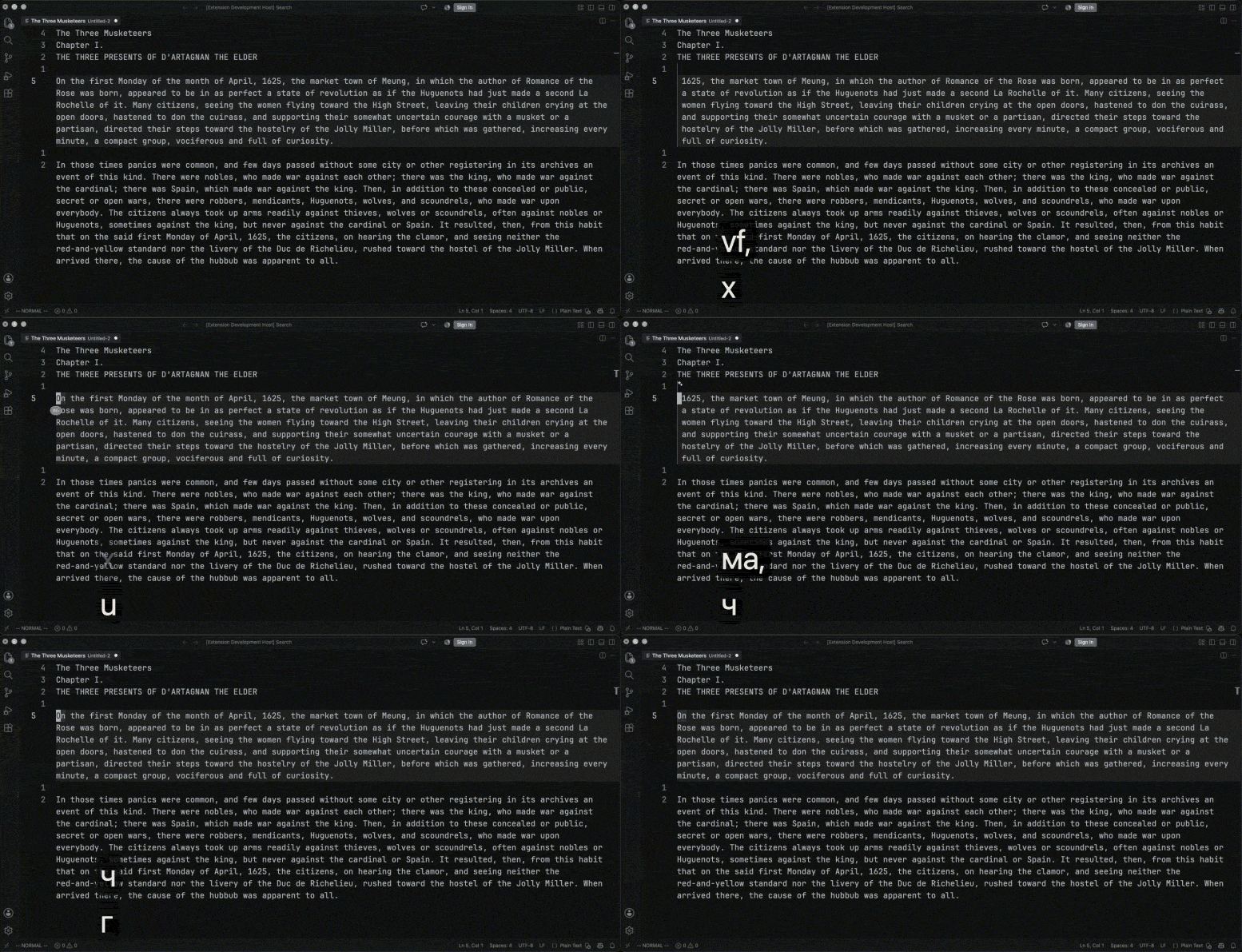
The same edit twice. First vf,x — select to the first comma, delete it — and u to put it back.
Then ма,ч and г, which is those same keys struck on a Russian layout, with nothing switched.
The comma stays a comma: it is f's argument, and an argument is text.
Insert mode is untouched, which is the point: ш enters it and what you type after that is the
word you meant. Search patterns, : commands and f's argument are text too, and are left alone.
This is Vim's 'langmap' with the table filled in — the half Vim has never shipped. 'langmap'
still works and is consulted first, so a single key can be redirected without giving up the rest.
Seven keys are deliberately left out ($, ^, @, &, /, ?, |): on a Cyrillic layout
those sit on keys that emit ASCII, and translating them would take ., ,, ;, :, / and ?
away from anyone typing in Latin. Both layouts keep working.
A whole command line typed in the wrong layout is corrected, and says so:
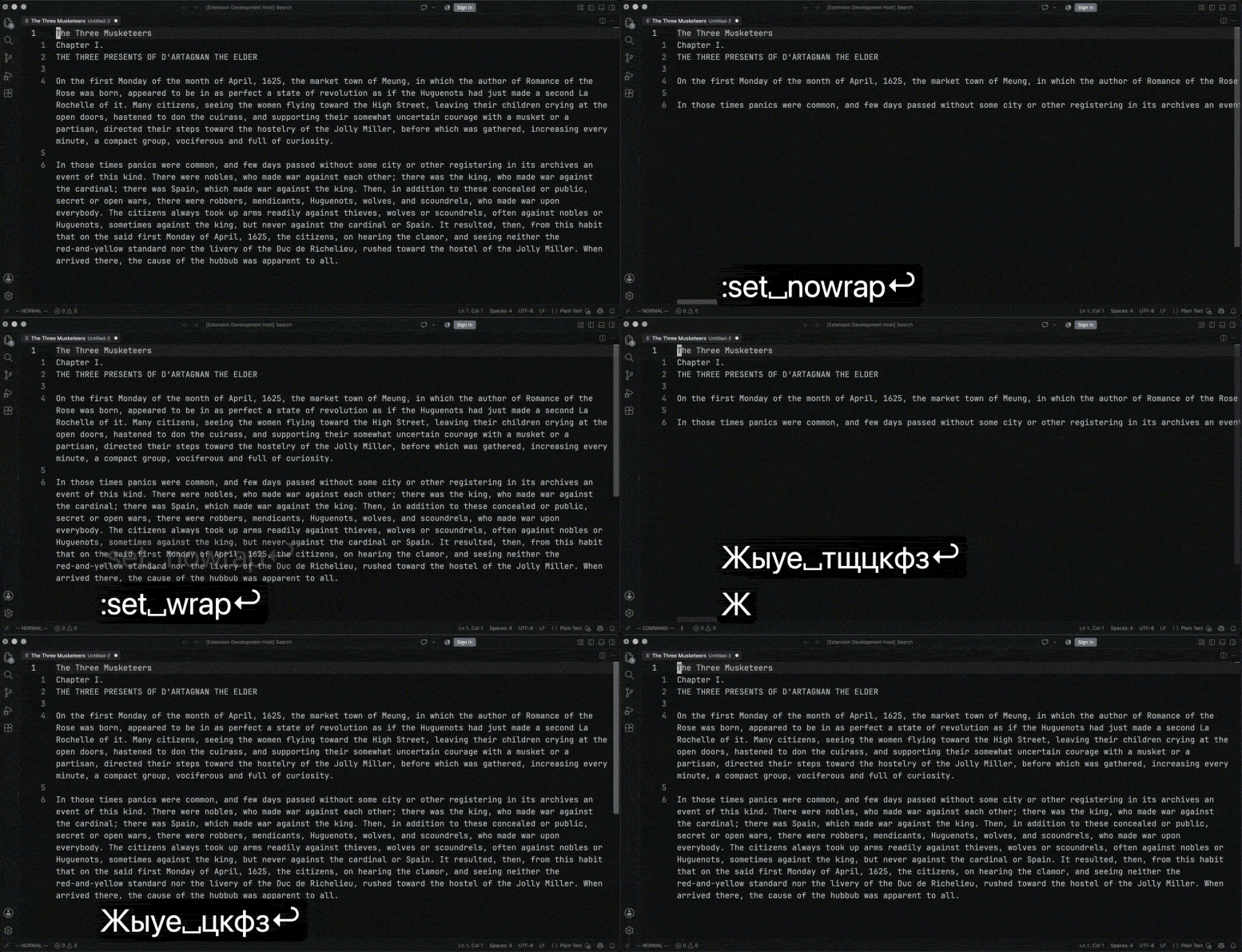
:ыуе тщцкфз runs :set nowrap. This is not 'langmap' reaching the command line — a command
line carries text as well as commands, and :s/привет/пока/ must mean what it says. The correction
is allowed only where it cannot destroy anything: the line must contain no Latin letter at all,
the command as typed must be no command, and the corrected one must be real. So :w привет.txt is
left alone, and nothing has run when the decision is made.
Install
Install it, reload the window, and start typing. The mode appears in the status bar.
Cursor, Windsurf, VSCodium and the other forks cannot use Microsoft's Marketplace, so every
release also goes to Open VSX, which is what
they search — and attaches the .vsix to its
GitHub release for anything that searches neither.
Install one by hand with Install from VSIX… in the Extensions view, or from the command line:
codium --install-extension vimperor-0.0.14.vsix # cursor, windsurf, code-insiders, ...
Nothing in the extension is specific to VS Code, and &ide answers with whichever editor it is in.
Disable any other Vim extension first. Seeing ordinary typing means taking over VS Code's
type command, and type has one owner. With two installed, one of them gets your keystrokes
and the other does not.
Your config
Vimperor reads all three of these, and in this order — the last one wins wherever two of
them disagree:
| read |
file |
for |
| 1st |
~/.vimrc |
Vim's own — nothing to copy, nothing to rename |
| 2nd |
~/.ideavimrc |
shared with IdeaVim in IntelliJ, unchanged |
| 3rd |
~/.vimperorrc |
Vimperor's own. Has the last word |
So an existing setup works untouched, and you only need a ~/.vimperorrc for what should apply
here and not elsewhere — it runs last, so anything in it overrides the others:
" ~/.vimperorrc

set number relativenumber
set incsearch hlsearch
set clipboard^=unnamed

let mapleader = " "
nnoremap <leader>f <Action>(workbench.action.quickOpen)
<Action>(id) runs any VS Code command from a mapping — :actionlist lists them all, with the
shortcut each already has. Each config name is also looked for as _name and in its XDG directory;
of those spellings the first one found is the file for that row, since ~/.vimrc and ~/_vimrc are
two names for one config rather than two configs. The startup line in the output channel names what
was read, in the order it was read — which is the order that settles a conflict.
This is a divergence from Vim and IdeaVim, which each read one file. Vimperor is the third program
to read these rather than the first, so arriving with both a ~/.vimrc and a ~/.ideavimrc means
two configs that each say something true about how you want to work, and taking only one of them
threw the rest away without saying so.
IDEA_VIM_CUSTOM_VIMRC is the exception: set it and that file is the only one read, because a path
you name outright is an instruction rather than a preference.
Editing it while Vimperor is running
Save your config and Vimperor offers to load it, right away — no reload, no restart. It watches
every path in the table above, not just the one that loaded, so creating a ~/.vimperorrc when
you only had a ~/.vimrc counts as well. Editing any of the files in force counts, and the
question names the one you changed.
set vimrcreload=prompt        " ask, which is the default
set vimrcreload=autoreload    " re-run it without asking
set vimrcreload=autorestart   " restart the extension host without asking
set vimrcreload=none          " leave me alone while I edit
The question has two ways to say yes, and the two automatic values are those two answers with the
question taken out:
- Reload re-runs the file. Instant, and your editors, undo history and unsaved changes are
untouched. It replaces the mappings the old config made and leaves any you typed by hand alone.
- Restart Extensions restarts the extension host, so the config is read exactly as it is at
startup.
The difference is worth knowing, and it is Vim's: re-running a config cannot undo an option it no
longer sets. Delete set nonumber from your file and a reload will not bring the numbers back,
because :source only applies what the file says. That is what the restart is there for.
You can reload whenever you like without waiting to be asked: Vimperor: Reload Config in the
Command Palette, or :action vimperor.reloadConfig — :actionlist lists it like any other. Doing
that while the question is on screen settles it, so its buttons stop doing anything; VS Code gives
an extension no way to take its own notification down, so you may still have to close it.
A borrowed ~/.vimrc is read as it is, but expect part of it not to apply: there are no Vim
plugins here, so a plugin manager does nothing, and neither do autocommands, syntax or
colorscheme. Those lines are stepped over and the rest takes effect. The Vimperor output channel
names the file it loaded.
What works
Normal, insert, visual, visual block, select, replace and operator-pending modes. Counts, registers,
macros, marks, jumps, the change list, text objects, ., undo and redo. Search with 'incsearch'
and 'hlsearch', :substitute with its flags, :global, :normal, :sort. Vimscript with
functions, conditionals, loops, dictionaries and around 170 builtin functions. Just over 400 ex
commands and more than a hundred options.
gf opens the file under the caret; % on the command line is the current file and takes Vim's
:p, :h, :t, :r and :e modifiers. The tag stack is real rather than a wrapper around Go to
Definition — a tags file is read, and <C-]> and <C-T> walk it. q:, q/ and q? open the
history as a buffer you can edit. :sign draws in the gutter.
New to Vim, or new to Vimperor? :tutor opens Vim's own thirty-minute introduction in a
scratch buffer. :vimtutor and :vimperortutor are the same command — type one in full, since
none of the three abbreviates, :t being Vim's :copy — and Vimperor: Open Vim Tutor in the
Command Palette is the same door from VS Code's side. The buffer is meant to be taken apart: the
lessons say "delete this word" and mean it, nothing is saved unless you ask, and it goes with the
tab. These are Vim's lessons with Vimperor's answers written into them, so where a lesson would
have sent you to a ~/.vimrc or to a part of Vim that an editor extension has no equivalent of,
it tells you what to do here instead.
:help opens Vimperor's own help, in Vim's format and with Vim's tags — :help dd, :help v_d,
:help i_CTRL-W and :help :s each jump to their subject. It is rendered from the commands this
host has registered rather than kept in a file, so it cannot drift from them: a command missing
from the help is a command Vimperor does not have.
28 of IdeaVim's 30 bundled extensions are here, plus easymotion written for this fork —
twenty-nine in all, enabled with set <name> or a Plug line:
surround, sneak, clever-f, commentary, targets, easymotion, multiple-cursors,
visual-multi,
highlightedyank, exchange, abolish, argtextobj, camelcasemotion, indentwise, yankring,
signature, keylog, NERDTree, ReplaceWithRegister, the textobj-* family and the rest. The
repository README lists them all.
What does not
:set wrap after View: Toggle Word Wrap from the Command Palette. 'wrap' is the editor's
own word wrap — the one Alt+Z sets — so it is per file, survives a tab switch, and writes
nothing to your settings. Vimperor claims Alt+Z so that your own toggling is kept up with, but
the Command Palette entry runs a built-in command no extension can see. After it, :set wrap and
:set nowrap mean the opposite in that file until you close it or press Alt+Z. Two splits of
one file share a wrap, because VS Code attaches it to the document.- Vim plugins. There is no
pack/ directory. 2 of IdeaVim's 30 bundled extensions are absent —
matchit and VimEverywhere want IDE machinery VS Code has nothing shaped like. Everything else
IdeaVim bundles is here.
- Windows and tabs are VS Code's.
:split and :vsplit open its editor groups, so <C-w>
movements go where VS Code's do. No preview window, so :pedit has nothing to open into.
- A terminal, channels and jobs. No
:terminal, no job_start(), no timer_start().
:syntax, :colorscheme, :filetype. VS Code decides all three. The commands are accepted
so a borrowed ~/.vimrc loads without a wall of errors, and say so when asked to change
something.
Reporting a problem
vimperor.trace in settings writes what each keystroke did — the mode, the carets, the selections
handed to VS Code — to the Vimperor output channel. A trace from a real window is worth more than a
description, because most of what is left to get wrong lives in the gap between the engine and the
editor.
Issues: https://github.com/neshkeev/vimperor/issues
More
The repository README is the long version: the full
extension list and what each one does here, how the port was built and tested, and what the
replayed corpus of IdeaVim's own tests says about it.
Licence and attribution
MIT. The engine is IdeaVim's, © the IdeaVim authors, MIT-licensed; see ThirdPartyLicenses.md.
The name is deliberately not IdeaVim's — "Idea" means IntelliJ IDEA and means nothing here, and a
licence that makes code free to use does not make it free to imply an endorsement with. What the
fork keeps is the attribution, and the ability to read ~/.ideavimrc unchanged.

