Neo Bug Forge — The AI Bug Fixer That Actually Teaches You
Other AI tools fix your bug silently. You ship it, and learn nothing.
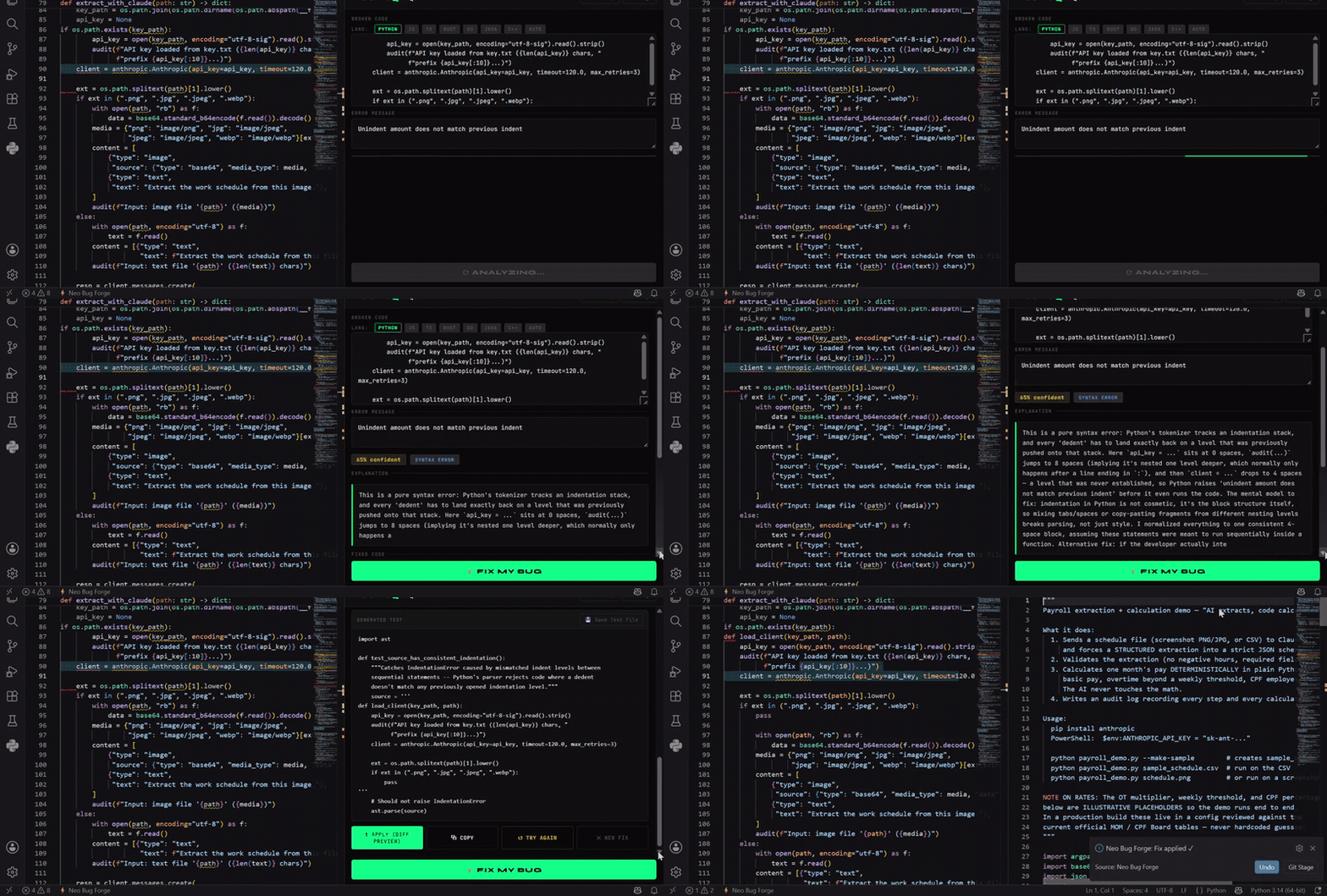
Neo Bug Forge fixes the bug and makes sure you understand it — the concept behind it, why you hit it, and what to watch for next time. Click any red squiggle, stay in your editor, come out a better developer.
Key Features
- 🎓 Teaches, doesn't just patch — every fix names the underlying concept and the mental-model gap that caused the bug, in plain English
- 🔀 Shows you the fork in the road — when a bug has more than one valid fix, it tells you both and how to choose. Most tools silently decide for you
- 🧪 Self-explaining tests — generated tests open with what they catch and why, so you learn what makes a good regression test
- ⚡ Lightbulb Quick Fix — click any red squiggle → Fix with AI
- 🚀 No signup to start — 10 free fixes the moment you install
- 🧠 Deep workspace context — understands your entire project
- 🔍 Explain Code — learn what any code does, and why it works that way
- ✅ One-click apply — fix goes straight into your file, no copy-paste
- ⚡ Works in Cursor and VS Code
Built for developers who want to get better, not just get unblocked — juniors levelling up, and anyone working in an unfamiliar codebase.
How it works
Install → start fixing immediately. No API key. No signup. No friction.
- Install the extension
- See a red squiggle → click the 💡 lightbulb → ⚡ Fix with AI — Neo Bug Forge
- Fixed code appears in seconds — click Apply to apply it directly
You get 10 free fixes instantly with no account needed.
Sign up free at neobugforge.io for 100 fixes/month.
Installation
- Open VS Code → Extensions (
Ctrl+Shift+X)
- Search "Neo Bug Forge"
- Click Install
- That's it — start fixing bugs immediately, no setup required
(Optional) Sign up at neobugforge.io to unlock 100 free fixes/month
Usage
Lightbulb — fastest way
- Hover over any red squiggle
- Click the 💡 lightbulb (or press
Ctrl+.)
- Select ⚡ Fix with AI — Neo Bug Forge
- Fix appears and applies directly in your file
Keyboard shortcut
Select broken code → press Ctrl+Shift+F (Mac: Cmd+Shift+F) → fix appears
Select code → right-click → choose:
- Neo Bug Forge: Fix Selected Code — fix bugs
- Neo Bug Forge: Explain Code — understand what the code does
- Neo Bug Forge: Write Test — generate unit tests
Panel
Command Palette → Neo Bug Forge: Open Panel → paste code and error → ⚡ Fix My Bug
What you get back
|
|
| ✅ Fixed code |
Complete, corrected version — applied directly to your file |
| 🧠 Explanation |
Plain-English: what was wrong and what changed |
| 📊 Confidence |
How certain the AI is (0–100%) |
| 🏷 Root cause |
null_reference · type_mismatch · off_by_one · logic_error · and more |
| 🧪 Test case |
Minimal unit test that would have caught this bug |
Lightbulb Quick Fix
Neo Bug Forge integrates with VS Code's diagnostic system. Whenever your language server, TypeScript, ESLint, or any linter flags an error, the ⚡ lightbulb appears automatically.
Configure in Settings:
neo-bug-forge.diagnostics.enabled — turn the lightbulb on/off (default: on)neo-bug-forge.diagnostics.severityThreshold — error (default) · warning · all
Workspace Context
When you trigger a fix, Neo Bug Forge automatically includes related files for deeper context:
- Files open in your editor
- Files in the same folder as the broken code
- Files that reference the same functions or classes
You'll see a 📎 X context files included badge in the panel.
Configure in Settings:
neo-bug-forge.context.enabled — turn off for sensitive codeneo-bug-forge.context.maxFiles — how many files to include (default: 5, max: 10)
Supported Languages
Python · JavaScript · TypeScript · Java · Rust · Go · C++ · C · C# · Ruby · PHP · Swift · Kotlin · and more (auto-detect)
Pricing
| Plan |
Fixes/month |
Price |
| Keyless trial |
10 |
Free — no account, works on install |
| Free |
100 |
Free — sign up at neobugforge.io |
| Pro |
500 |
$12.99/mo |
| Team |
Unlimited (fair use, up to 10 seats) |
$49.99/mo |
Sign up at neobugforge.io
Security
- API key stored in VS Code SecretStorage — never written to disk in plaintext
- Code sent over HTTPS, never used to train AI models
- Context collection skips
node_modules, dist, and build folders automatically
Links
👨💻 Available for Hire
Neo Bug Forge was built by Yousef — a full-stack developer specialising in AI-powered tools, VS Code extensions, FastAPI backends, and React apps.
If you need help building something similar — a developer tool, VS Code extension, AI integration, or SaaS backend — I'm available for freelance work.
MIT © 2026 Neo Bug Forge

