tonto visualizer: diagrams of tonto models
tonto visualizer draws a tonto model as an OntoUML class diagram in a panel beside the text. The diagram follows the model as you type it, and you arrange it by hand: drag a class where you want it, and it stays there when the model changes.
The diagram is a reading aid; it edits the saved view, not the model. The Tonto
language supplies semantics such as class natures, parthood, and package
ownership. The extension draws the diagram itself: no PlantUML, no Graphviz, no
rendering server, and nothing sent anywhere.
Open a diagram
Install the tonto extension, which provides the .tonto language, and this one beside it, in VS Code 1.90 or later. Then open a .tonto file and run Tonto: Open Diagram, or use the diagram button in the editor's title bar or Open Diagram in the Explorer's context menu.
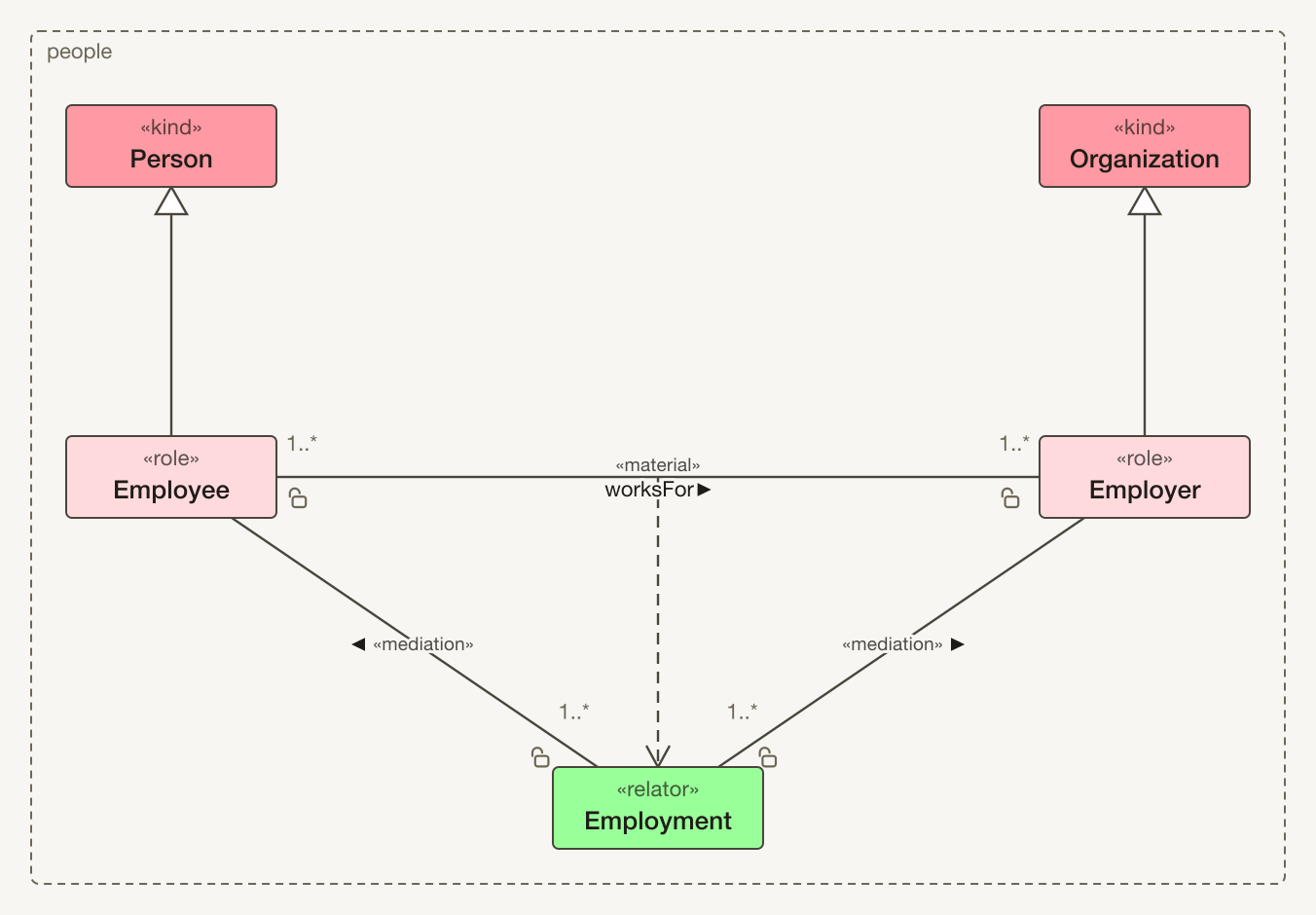
The diagram above is the people.tonto example from the tonto README:
/// People and their employment.
ontology people

/// A person, in the everyday sense.
kind Person

/// A person employed by an organization.
role Employee specializes Person

/// An organization of people.
kind Organization

/// An organization that employs people.
role Employer specializes Organization

/// The employment binding an employee and an organization.
relator Employment {
    @mediation [1..*] -- [1] (const) Employee
    @mediation [1..*] -- [1] (const) Employer
}

@material relation Employee [1..*] -- worksFor -- [1..*] Employer derivedFrom Employment
Each class is coloured by the nature its instances have, as the language works it out, and the legend says which colour is which. The padlock marks an end that is not const: an end that cannot change is the ordinary case, so the exception carries the mark. A multiplicity of 1 is left unwritten, as in a UML diagram.
Read the model as you write it
| In the panel |
What you can do |
| Live redraw |
The diagram follows each keystroke. While the model does not parse, the last good picture stays up and the problem is reported beside it, not across it. |
| Navigation |
Double-click a class to open its declaration; moving the cursor in the text selects the element it is on. Double-click a package in an ontology diagram to open that package's class diagram. |
| Scope and filters |
Draw the open file's packages or the whole workspace, filter by package, class or association, and show both relators and derived material relations, only relators, or only derived material relations. Taxonomy only hides attributes and associations and arranges from inheritance alone. |
| Display |
Choose straight, curved or right-angled lines, the typeface, and how much space associations get, with Distance −/+. Fit keeps the whole diagram in view as the panel is resized. |
| Ontologies |
An ontology file with a bundles clause is drawn as a package diagram: its member packages, the ontologies it imports, and the dependencies between them. |
The notation covers stereotypes and attributes, datatypes and enumerations, generalizations and generalization sets (one shared triangle with {disjoint, complete}), relation stereotypes and reading direction, whole-part diamonds, instanceOf, and derivedFrom.
Arrange it by hand
Drag classes to arrange them; select several with a marquee; pin, align and distribute them. Select a line to show its handles: drag a hollow midpoint to add a bend, drag a solid handle to move one, and press Delete to remove it. Tonto: Arrange Diagram Automatically places whatever you have not placed yourself; adding a class never moves the ones you have already arranged. Tonto: Undo Diagram Change and Redo step through arrangement changes.
Once you change an arrangement, it is saved under the model's views folder, as a file you can commit next to the model. Tonto: Save Diagram as Named View keeps another arrangement of the same model, such as views/employment.core-taxonomy.tontoview, and Tonto: Open Diagram View switches between views. When you rename or move a model in VS Code, its views move with it, in the same edit, so undoing the rename puts them back too.
The diagram never edits the model: everything you do in the panel changes only the view.
Export
Tonto: Export Diagram as SVG and Tonto: Export Diagram as PNG write the current diagram as it appears, in the typeface it is drawn in, for documents and slides.
Settings
| Setting |
Default |
What it does |
tonto.viz.update |
onType |
Redraw as the model is typed (onType), or only when it is saved (onSave). |
tonto.viz.followActiveEditor |
true |
Draw whichever .tonto file is open in the editor. Turn this off to keep one diagram on screen while you read elsewhere. |
tonto.viz.saveArrangement |
true |
Save a changed arrangement under the model's views folder, so it survives a restart. |
Acknowledgements
The language, its validation, and the reasoning about natures that colours the diagram are tonto's, from the NEMO Ontology & Conceptual Modeling research group at the Federal University of Espírito Santo (UFES), Brazil. See the tonto extension for its full acknowledgements.
License
MIT. The extension includes code from other open-source packages; their
licenses and notices are in out/THIRD-PARTY-NOTICES.txt inside the installed
extension. Among them is the Eclipse Layout Kernel,
used for automatic layout, which is distributed under the Eclipse Public
License 2.0; that file also says where its source is available.

