Spec Review
Review Markdown documents written by AI agents the way you review a pull
request: read a rendered document, leave comments anchored to the text, let
the agent process them, then see exactly what changed between revisions.
An agent (Claude Code, Codex or any other) writes a spec, a plan or a report
as a .md file. Reading raw Markdown is fine, but commenting on it is not:
you end up copying paragraphs into the chat. Spec Review keeps comments,
replies and revision snapshots on disk next to the document, so the agent
reads them itself and the extension can diff what it did.
Features
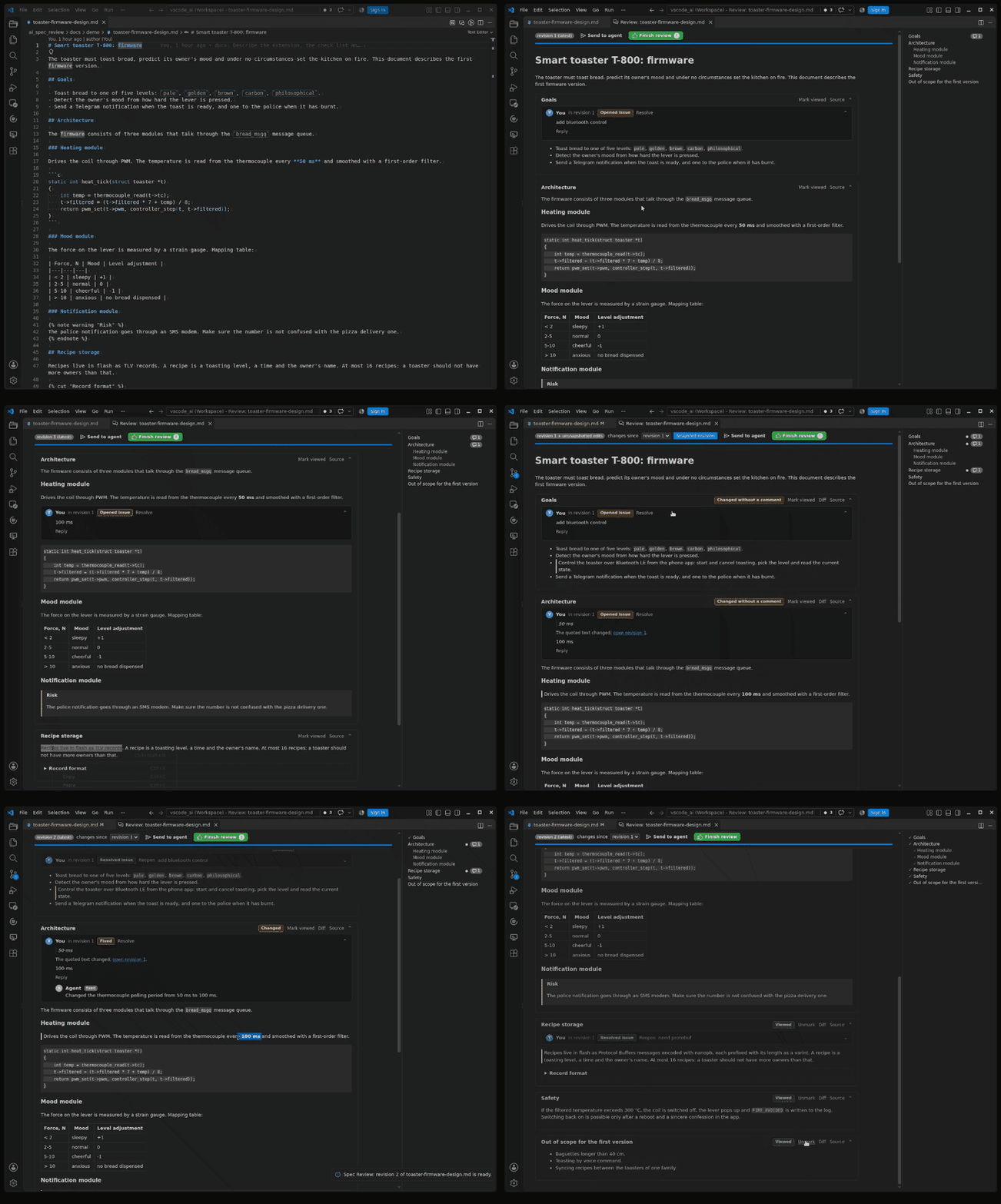
- Rendered review panel. Each
## section is a card with a "viewed"
mark, a table of contents on the right and reading progress on top.
Tables, code, {% cut %} and {% note %} blocks are rendered.
- Anchored comment threads. Select text, press
Ctrl+Shift+M, write
the comment. The thread hangs under that block. Remarks about the
document as a whole go to the agent in the chat, not here. A thread is
red while it waits for the agent, yellow once the agent answered with a
verdict (fixed, declined, question) and waits for you, green once
you resolve it.
- Revisions and diff. Every finished round is a revision. Changed
blocks get a bar, changed sections get a badge and lose their "viewed"
mark, and a section the agent changed without any comment pointing at it
is flagged. "Diff" opens the built-in diff editor against the previous
revision, or any revision you pick.
- Agent skill. "Install Agent Skill" drops a skill with a small script
into your agents' skill directories. Say "process the review comments"
and the agent lists the open threads, edits, replies to each and
finishes the round.
Requirements
- VS Code 1.96 or newer on Linux or macOS.
- Node 20+ on the machine where the agent runs, for the skill script.
Getting started
- Open a Markdown file, run Spec Review: Open in Spec Review from the
editor title or the explorer context menu.
- Read, mark sections viewed, select text and comment.
- Run Spec Review: Install Agent Skill once.
- Press Send to agent and paste the copied prompt into the agent's
session. The panel updates as the agent replies and shows the new
revision when it finishes.
- Resolve threads you are happy with, reply to the rest, mark sections
viewed, repeat. When every thread is resolved and every section viewed,
Finish review deletes the review data and the document starts
clean.
Where the data lives
.spec-review/<path of the document>/ at the root of the repository
(.git or .arc), or next to an existing .spec-review, or in the
document's own directory. Nothing is written until the first comment:
.spec-review/docs/spec.md/
  meta.json          revision number, approval, per-revision summaries
  revisions/0001.md  snapshots
  threads/<id>.json  one thread per file
  viewed.json        viewed marks
Commit it or ignore it; the extension does not decide for you. Files are
written atomically and never overwritten when they fail to parse.
The agent script
node spec-review.mjs list   <doc.md> [--all]
node spec-review.mjs reply  <doc.md> <id> --verdict fixed|declined|question --message "..."
node spec-review.mjs finish <doc.md> [--summary "..."]
node spec-review.mjs status <doc.md>
finish refuses while any thread is open (exit code 2), so the agent
cannot skip a comment.
Settings
specReview.skillTargets - directories the skill is copied into
(default ~/.claude/skills, ~/.codex/skills).
Not in this version
Starting the agent from the extension, editing the document inside the
panel, YFM terms and tabs, Windows.

