Agent Sessions
All your AI coding sessions in one VS Code side bar: Claude Code and Codex,
on this machine and on remote machines over ssh, with live statuses, unread
marks, and one-click resume in the agent's own plugin.
VS Code's built-in "Chat Sessions" view only knows the agents that plug into
it, does not tell Claude sessions from Codex ones, and opens Claude sessions
in Copilot rather than in the Claude Code extension. Agent Sessions reads the
agents' own session stores instead and stays out of their way.
Features
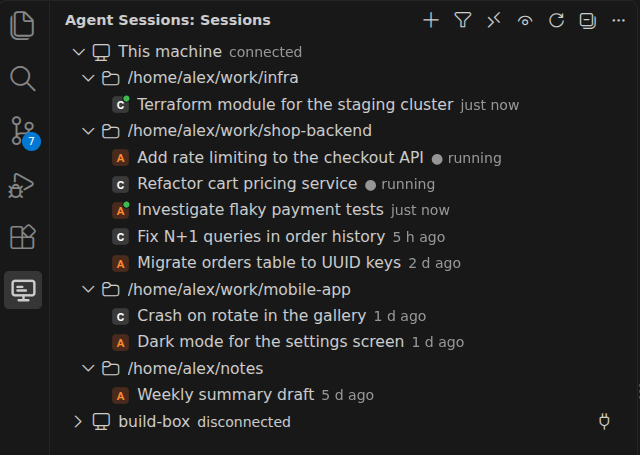
- One tree for every agent. Sessions are grouped by machine and project.
Each row shows the agent icon, the title the agent gave the session, and how
long ago it was last active.
- Live status. A running session gets a green dot. Claude Code status
comes from its process registry; Codex status comes from the last turn
event in the rollout, so an abandoned turn is not shown as running forever.
- Unread marks. A session that finished work since you last opened it is
marked with
●. Opening a session in Claude Code or Codex does not count
as activity, so merely looking at old sessions keeps them read.
- Opens in the native plugin. Double-click a Claude session and it opens
in the Claude Code extension; a Codex session opens in the Codex plugin,
in its side bar or in an editor tab. "Resume in Terminal" prepares the CLI
command instead.
- Remote machines. Add any host from
~/.ssh/config. The extension
installs a small daemon on the remote machine, brings its own Node when the
host has none, and streams that machine's sessions into the same tree.
- Housekeeping. Hide sessions you no longer care about, mark them read or
unread, delete them for good, and apply all of that to a multi-selection.
- One daemon per machine. All VS Code windows share one background
process, so opening a second window does not rescan anything.
Requirements
- VS Code 1.96 or newer on Linux or macOS. Windows is not supported.
- The Claude Code
and Codex
extensions for opening sessions in place. Listing sessions works without
them.
- For remote machines: ssh access that works without prompts
(
BatchMode=yes), and either Node 20+ on the host or the ability to
download Node 22 from nodejs.org.
Getting started
- Install the extension and reload the window. The Agent Sessions icon
appears in the activity bar.
- "This machine" connects on its own and lists the sessions found in
~/.claude and ~/.codex.
- To watch a remote machine, click Add Machine in the view header, pick
a host from your ssh config, and let Prepare Machine finish. The
machine then connects and shows its sessions.
Working with sessions
| Action |
How |
| Open a session |
Double-click it (or single-click with agentSessions.openOn set to singleClick). "Open Session" in the context menu always opens immediately. |
| Open a Claude session of another folder |
Claude Code finds only sessions of the folder open in its window and its git worktrees, so such a session offers "Open Folder in New Window", which then opens the session there, or "Resume in Terminal". |
| Resume in a terminal |
"Resume in Terminal" opens a terminal in the session folder with claude --resume <id> or codex resume <id> typed in, not run. |
| Mark read / unread |
Context menu. Opening a session marks it read. |
| Hide / unhide |
"Hide Session" removes a session from the tree; the eye button in the header shows hidden sessions dimmed with the word hidden. |
| Delete |
"Delete Session…" or the Delete key (Cmd+Backspace on macOS) in the focused list asks once and deletes permanently, see below. |
| Several at once |
Shift-click and Ctrl-click select several sessions; hide, delete and mark-as-read then apply to the whole selection. |
| Copy the id |
"Copy Session ID". |
Filter
The Filter Sessions button opens one list with three sections:
- Agents: which agents to show.
- Projects: "Only the workspace open in this window" keeps, on this
machine, the sessions whose folder is open in the window. Remote machines
are not affected.
- Remote machines: "Show remote machines" toggles the remote machines,
same as the header button.
The button icon is filled while the filter restricts anything. The filter is
remembered per window.
Deleting sessions
Deletion is permanent and is carried out by the agent's own tooling on the
machine that holds the session, so it also works for remote machines:
- Claude Code:
deleteSession from the Agent SDK removes the session file and
its subagent transcripts.
- Codex:
codex delete --force <id> lets Codex update its own indexes.
A running session cannot be deleted. A session that is currently loaded in
the Codex plugin cannot be deleted either, because Codex holds a lock on it
until the window is reloaded; the error message says so.
Remote machines
Add Machine lists the Host entries of ~/.ssh/config. The extension
stores only the host name in its own machines.json; address, user and key
stay in your ssh config.
Prepare Machine runs over ssh: it checks the platform (Linux or macOS,
x64 or arm64), looks for Node 20+, downloads Node 22.15.0 into
~/.local/share/agent-sessions/ when there is none, copies the daemon there
and verifies it. Run it again after updating the extension.
The ssh connection uses BatchMode=yes, RemoteCommand=none and
RequestTTY=no, so hosts that force an interactive shell in ssh config still
work, and no password prompt can appear.
Opening a remote session in place is not possible yet; remote sessions are
shown with their status and can be hidden, marked and deleted.
The local daemon
One daemon.mjs --listen process per machine serves every VS Code window
over a unix socket. The first window starts it, later windows attach, and it
exits by itself after 60 seconds without clients.
- Socket, pid and log:
$XDG_RUNTIME_DIR/agent-sessions/ on Linux,
~/.local/share/agent-sessions/ where XDG_RUNTIME_DIR is not set (macOS).
- The directory is private (
0700); a directory left with wider permissions
is narrowed, one owned by someone else is refused.
- The daemon inherits the environment of the window that started it
(
CLAUDE_CONFIG_DIR, CODEX_HOME, PATH).
- After an extension update the windows notice the version mismatch and
restart the daemon. Restart Local Daemon does the same by hand and
kills a daemon that does not exit.
If "This machine" stays disconnected, run Restart Local Daemon and look
at Show Log; the daemon's own log is daemon.log next to the socket.
Settings
| Setting |
Default |
Meaning |
agentSessions.openOn |
doubleClick |
Open a session on double click; singleClick opens on the first click. |
agentSessions.codex.openTarget |
sidebar |
Open Codex sessions in the Codex side bar or in an editor panel. |
agentSessions.showHidden |
false |
Show hidden sessions in the tree. |
agentSessions.autoConnectOnStartup |
true |
Connect the local machine and machines marked autoConnect on startup. |
agentSessions.ssh.path |
ssh |
The ssh binary used for remote machines. |
Machines are kept in machines.json under the extension's global storage;
the file can be edited by hand (for example to set "autoConnect": true).
Credits
The Codex rollout discovery and parsing was ported from
Codex History Viewer (MIT).
See THIRD_PARTY_NOTICES.md.
License
MIT

