Antigravity Usage MonitorMonitors Antigravity token limits in status bar Installation Launch VS Code Quick Open ( Ctrl+P), paste the following command, and press enter.Copied to clipboard |

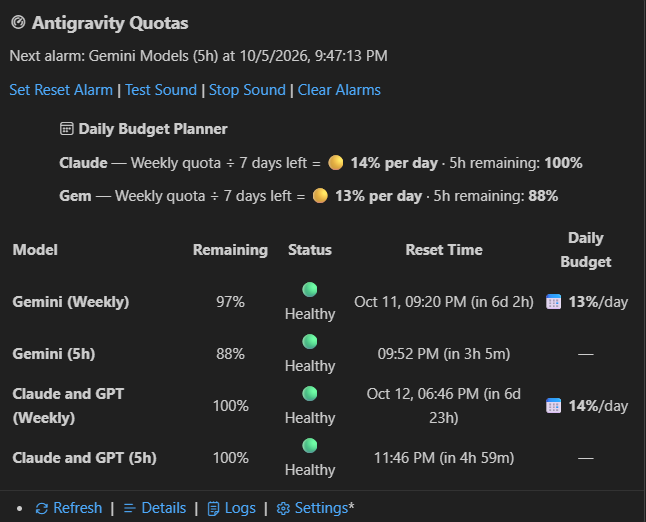
Antigravity Usage MonitorSee your remaining Antigravity quota in the VS Code status bar. Hover for five-hour and weekly limits, reset times, and a daily budget estimate. Set a reset alarm with sound so you know when to check your quota again.
Getting startedThe default API mode requires Windows, VS Code 1.137.0 or later, and an existing Antigravity CLI (
For a manual check, open the Command Palette with For the local 0.1.9 build, choose Install from VSIX... in the Extensions menu and select API mode makes HTTP requests without launching a terminal, CLI, or PowerShell process. If an API request fails, the extension shows an error rather than switching to the CLI. Reading your quota
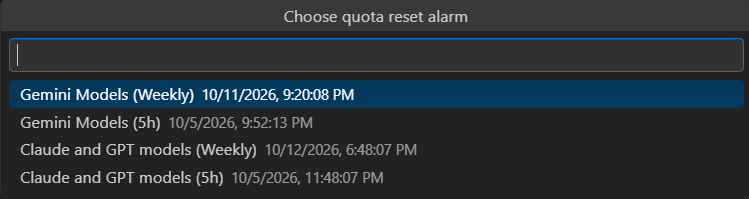
Hover over the status bar to see weekly limits and reset times in your local time zone. Open the Antigravity icon in the Activity Bar for the sidebar view, or click the status bar to browse quota details and models. The daily budget estimate divides your remaining weekly quota by the days left until reset. For example, 70% remaining with five days left gives an estimate of 14% per day. This helps you pace usage; it does not change your account's limits. If a refresh fails, the extension keeps previous readings and marks them stale. Automatic retries slow down after repeated failures, up to a one-hour delay. A manual refresh bypasses that delay. Quota reset alarmsRun Antigravity: Set Quota Reset Alarm from the Command Palette, dashboard, or tooltip. Choose a quota and either its reset time or five minutes before reset. Each alarm is for one reset cycle; setting another alarm for the same quota replaces it. Alarms survive window reloads and follow changed reset times from successful quota refreshes. They run independently of background quota polling. Keep VS Code open and your PC awake; overdue alarms appear when the extension runs again. A reset-time notification is a reminder, so use Refresh Usage to confirm the quota actually reset. On Windows, alarms play a bundled sound. Use Antigravity: Test Alarm Sound to check your output and Antigravity: Stop Alarm Sound to silence playback. The notification offers Refresh Usage, Snooze 5 minutes, and Dismiss. Antigravity: Clear Reset Alarms removes all saved alarms. Multiple editor windows can each show an alarm. Configure SettingsOpen Settings and search for
CommandsRun these from the Command Palette:
TroubleshootingQuota unavailable or login expiredSign in again through Antigravity, then run Antigravity: Refresh Usage. The extension reads your existing login but does not renew it independently. If the error continues, open Antigravity: Show Diagnostics Logs. The extension uses Google's internal API, which may change. A terminal window opensCheck that Using macOS or LinuxDirect credential access currently supports Windows only. If Alarm has no soundRun Antigravity: Test Alarm Sound. Check that 30-second video walkthroughSee videoexecution.md for a ready-to-paste video prompt, timed scenes, narration, and recording instructions covering installation, quotas, and the sound alarm. Login dataAPI mode reads the access token from the Antigravity login in Windows Credential Manager and sends it to Google's quota and model endpoints. The extension does not log the token or write it to workspace files. For source setup, tests, and packaging, see CONTRIBUTING.md. Licensed under MIT. |