Read the Holy Quran without leaving your editor. A beautiful, distraction-free Quran reader right inside VS Code — with Arabic text, English translation, transliteration, and audio recitation.
Features
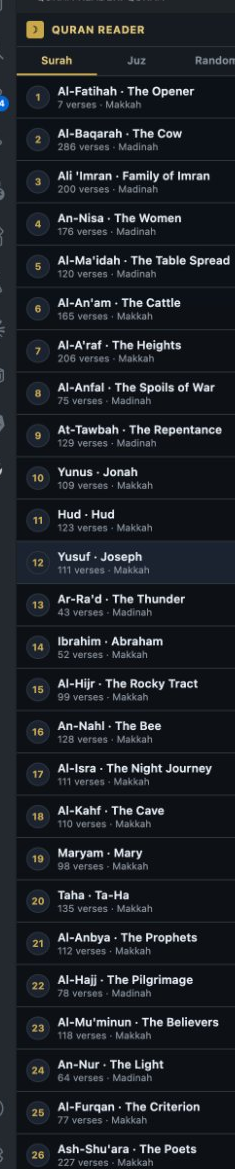
📖 Browse by Surah — All 114 chapters with Arabic names, English names, verse count, and revelation place
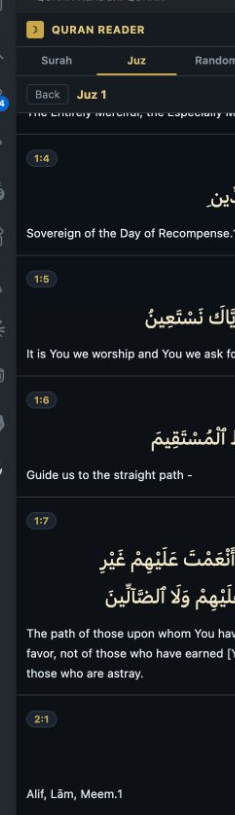
📚 Browse by Juz — All 30 Juz with verse-by-verse navigation
🎲 Random Verse — Get inspired with a random ayah
🔍 Search — Search the Quran by keyword in English or Arabic
🎵 Audio Recitation — Listen to every verse by Sheikh Abdul Samad
✨ Two Reading Modes:
Verse by Verse — Each verse as a card with Arabic, transliteration, and translation
Reading Mode — Flowing continuous Arabic text like a Mushaf, with translation below
🔤 UthmanicHafs Font — The same beautiful font used on Quran.com
No Setup Required
Just install and start reading. No API keys, no accounts, no configuration needed.
Usage
Click the Quran Reader icon (☽) in the Activity Bar on the left
Choose Surah, Juz, Random, or Search
Click any Surah or Juz to open it
Toggle between Verse by Verse (☷) and Reading Mode (☰) using the buttons in the header
Press ▶ on any verse to hear the audio recitation
Settings
Setting
Default
Description
quranReader.translationId
20
Translation ID (20 = Sahih International English)
quranReader.showTransliteration
false
Show romanized Arabic transliteration
Data Source
All Quran text, translations, and audio are served from the free public Quran.com API. No data is stored locally.