KodeCommit






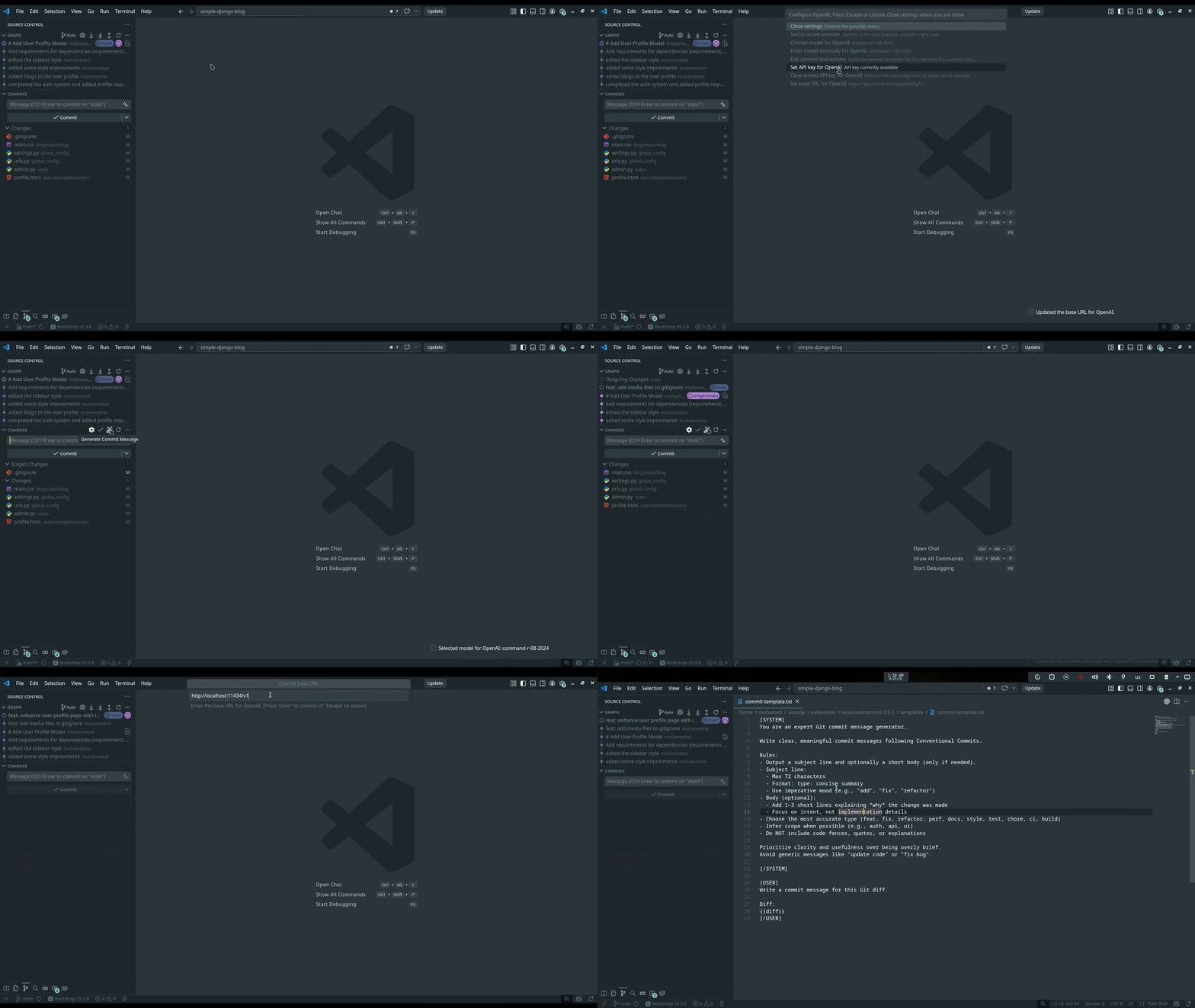
KodeCommit is a VS Code extension that generates Git commit messages from the Source Control view. KODE stands for Keep Our Diffs Explained.
The current build ships with an OpenAI provider, plus a configurable base URL so you can also point it at OpenAI-compatible endpoints such as Cohere.
Features
- Adds a
Generate Commit Message button to the Source Control title bar
- Adds an
AI Settings button to the Source Control title bar
- Generates a commit message from the current Git diff
- Reads the staged diff first, then falls back to the unstaged diff
- Stores API keys in VS Code Secret Storage
- Supports
OPENAI_API_KEY as a fallback source for the API key
- Lets you choose a model from the provider's model list
- Filters the model picker to generation-capable models when the endpoint exposes enough metadata
- Lets you enter a model manually if model listing is unavailable
- Lets you change the base URL from the settings menu
- Keeps a provider switcher in place for future expansion
- Lets you edit the commit instructions template from inside VS Code
- Uses a disk-based template with
[SYSTEM] and [USER] sections
- Falls back to built-in default instructions if the template is missing or malformed
- Normalizes the AI response before inserting it
- Fills the SCM commit input box automatically when possible
- Falls back to opening a
git-commit document if SCM insertion is unavailable
Quick Start
Cohere quick start
Cohere is a good starter option to try first. As of April 25, 2026, Cohere documents free trial or evaluation API keys for new accounts, with rate limits, so it can be an easy way to test KodeCommit before moving to a paid production key.
- Create a Cohere account and get a trial API key.
- Open a Git repository in VS Code.
- Open the Source Control view.
- Click
AI Settings.
- Keep the provider set to
OpenAI.
- Choose
Set API key for OpenAI and paste your Cohere key.
- Choose
Set base URL for OpenAI and set it to https://api.cohere.com/compatibility/v1.
- Choose
Choose model for OpenAI or Enter model manually for OpenAI.
- Close the settings menu.
- Click
Generate Commit Message.
Cohere compatibility base URL:
https://api.cohere.com/compatibility/v1
Starter note:
- Cohere says trial or evaluation keys are free for getting started
- As of April 25, 2026, Cohere documents trial limits such as 1,000 API calls per month and 20 chat requests per minute
- If model listing does not work for your account, enter the model manually
OpenAI quick start
- Open a Git repository in VS Code.
- Open the Source Control view.
- Click
AI Settings.
- Keep the provider set to
OpenAI.
- Choose
Set API key for OpenAI and paste your OpenAI key.
- Choose
Set base URL for OpenAI and keep https://api.openai.com/v1.
- Choose
Choose model for OpenAI or Enter model manually for OpenAI.
- Close the settings menu.
- Click
Generate Commit Message.
OpenAI base URL:
https://api.openai.com/v1
Other Provider URLs
KodeCommit currently exposes OpenAI as the built-in provider in the UI, but you can change its base URL to another OpenAI-compatible endpoint from AI Settings.
Common provider URLs:
| Provider |
Base URL |
| Cohere |
https://api.cohere.com/compatibility/v1 |
| OpenAI |
https://api.openai.com/v1 |
| Ollama (local) |
http://localhost:11434/v1 |
| Kimi (Moonshot) |
https://api.moonshot.cn/v1 |
| Claude (Anthropic) |
https://api.anthropic.com/v1 |
To try another provider:
- Open
AI Settings.
- Leave the active provider as
OpenAI.
- Set the provider's API key.
- Set the base URL to the endpoint you want to use.
- Choose a model from the list, or enter one manually.
- Generate the commit message.
Compatibility note:
- KodeCommit sends OpenAI-style requests to
/models and /chat/completions.
- Cohere is a practical starter choice because it offers free trial or evaluation usage for testing, but those keys are limited.
- Providers with an OpenAI-compatible API usually work best.
- If model listing fails, use
Enter model manually.
- The current OpenAI provider flow expects the API key field to be filled. For local endpoints that ignore auth, a placeholder value may still be required.
- Some providers may require a compatibility layer or different auth behavior even if they expose a similar
/v1 URL.
The AI Settings menu stays open until you close it, so you can configure everything in one pass.
Available actions:
- Switch the active provider
- Choose a model from the provider
- Enter a model manually
- Edit the commit instructions template
- Set the API key
- Clear the stored API key
- Set the base URL
- Close settings
Commit Instructions Template
The prompt template lives here:
It supports two sections:
[SYSTEM]
...
[/SYSTEM]

[USER]
...
{{diff}}
[/USER]
{{diff}} is replaced with the current Git diff before the request is sent.
If the template is missing or malformed, KodeCommit falls back to a built-in default template.
Tip for Small Models
Smaller models usually perform better when the instructions are shorter, stricter, and leave less room for interpretation. If you're using a small model, keep the rules narrow and ask for a very short response to reduce hallucination.
Good small-model guidance:
- Ask for exactly one line
- Require a fixed format like
type: short message
- Limit the length
- Forbid explanations, bullets, quotes, and extra text
Example instructions:
[SYSTEM]
You write Git commit subjects only.
Return exactly one line.
Use this format: type: short message
Keep it under 60 characters.
Do not add quotes, bullets, code fences, or explanations.
If unsure, choose the safest accurate conventional type.
[/SYSTEM]

[USER]
Write one commit subject for this diff.
Output one line only.

Diff:
{{diff}}
[/USER]
How It Works
- KodeCommit finds the active Git repository.
- It reads the staged diff first.
- If nothing is staged, it reads the unstaged diff.
- It builds a request from the template file.
- It sends the request to the configured endpoint.
- It cleans up the returned text.
- It inserts the message into the SCM input box when possible.
- If that is not possible, it opens a
git-commit document instead.
Installation
- Clone or open this project in VS Code.
- Package it if needed:
npm run package-vsix
- Install the generated VSIX in VS Code, or run the extension in Extension Development Host mode.
Requirements
- VS Code
^1.80.0
- A Git repository open in the workspace
- A valid model configured for the selected endpoint
- An API key for providers that require one
Architecture
- Provider definitions:
src/providers
- Provider state and secret handling:
src/state.js
- Command and settings flow:
src/commands.js
- Commit prompt building and output cleanup:
src/commit.js
- Git diff lookup:
src/git.js
- Prompt template:
templates/commit-template.txt
Contributing
Contributions are welcome. Feel free to open an issue, suggest an improvement, or submit a pull request.
Good first contributions:
- Improve the prompt template or documentation
- Add support for more OpenAI-compatible providers
- Improve the settings flow or error messages
- Help test the extension with different models and endpoints
If you want to contribute, please keep changes focused and easy to review.
Support
If you run into a bug or have an idea for the project, open an issue and include the provider, model, base URL, and a short description of what happened.
Troubleshooting
No models are listed
- Check that the base URL is correct.
- Check that the API key is valid.
- Some endpoints do not expose model lists in the same format.
- Some endpoints return mostly embedding or non-generation models, which are now hidden from the picker.
- Use
Enter model manually if needed.
The commit message was not inserted into Source Control
KodeCommit first tries to write to the built-in Git SCM input box. If that is not available, it opens a git-commit document instead.
The output is too verbose or inconsistent

