Automated security scanning, upgrading, and breaking change detection for Python dependencies
Python Dependency Remediation is a VS Code extension that scans Python dependency files for known CVE vulnerabilities, upgrades packages to safe versions, runs tests in isolated environments, and uses AI to detect and fix breaking API changes — all from within your editor.
The extension works alongside the Python extension and is designed for developers who want to keep their Python projects secure without manual version research or risky blind upgrades.
Quick Start
- Install the Python extension from the Marketplace if you haven't already — it will be detected automatically.
- Open a folder containing a
requirements.txt, pyproject.toml, Pipfile, or environment.yml.
- Vulnerable packages are highlighted automatically with inline CVE counts.
- Click the lightbulb (
Ctrl+.) on a vulnerable package to upgrade it, or use the notification prompt to upgrade all.
New to the extension? Run Ctrl+Shift+P → "Welcome: Open Walkthrough" and select "Get Started with Python Dependency Remediation" for a guided tour.
Features
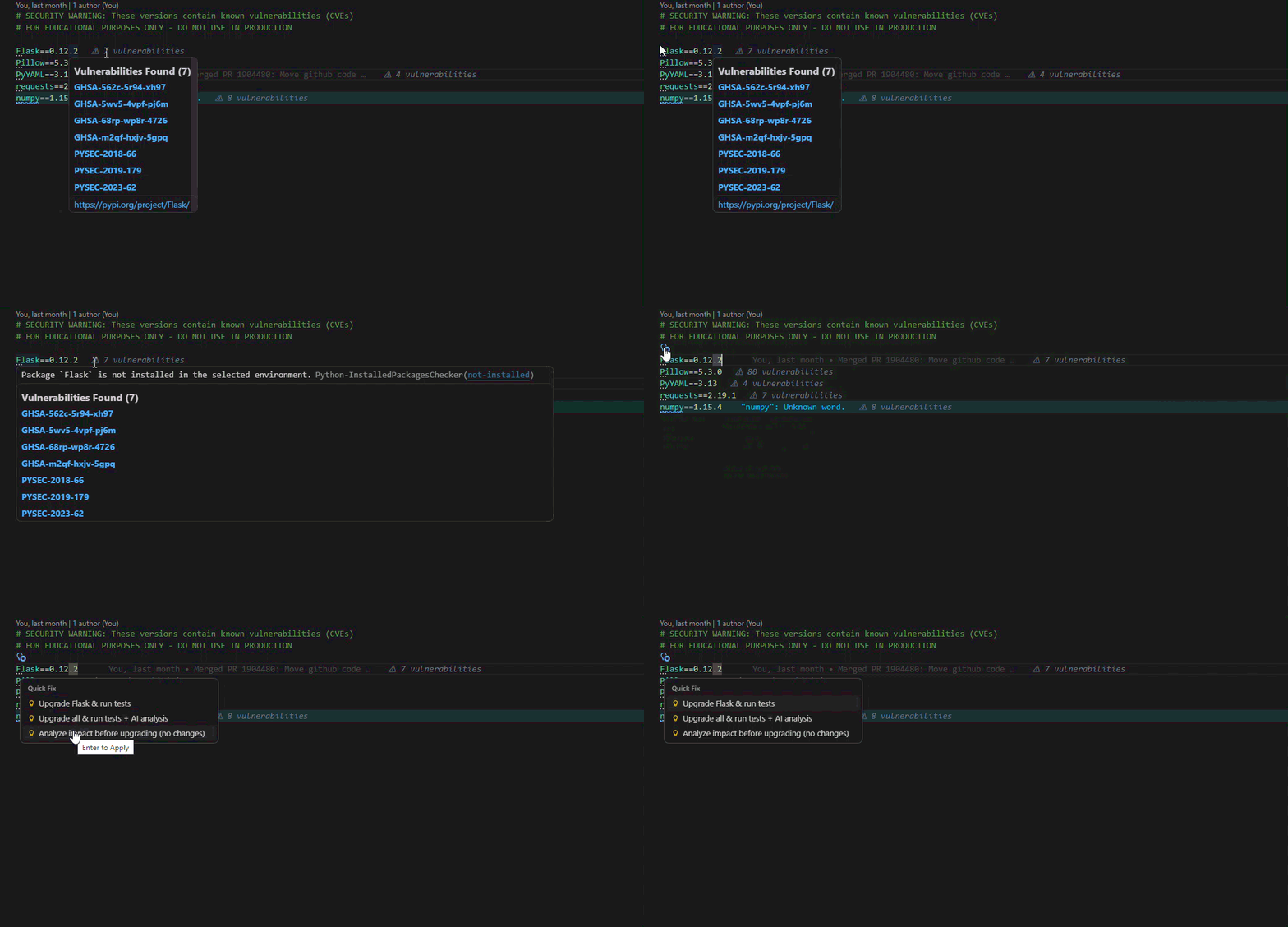
- Real-time vulnerability scanning — inline CVE decorations with hover details and osv.dev links
- File explorer badges — files with vulnerabilities marked with warning icons
- One-click upgrades — upgrade individual or all vulnerable packages to the latest safe, non-yanked version via PyPI
- Full AI-powered workflow — upgrade → test → detect breaking changes → auto-fix → re-test → report
- Markdown security report — auto-generated report with CVE findings, breaking changes (before/after), and test results
- AI-powered workflow — works with any language model available via the VS Code Language Model API (GitHub Copilot, Claude, GPT, etc.)
- Cross-file consistency check — detect conflicting package versions across multiple requirements files in monorepos
- Multi-format support —
requirements.txt, pyproject.toml (PEP 621 + Poetry), Pipfile, and conda environment.yml
- Isolated test execution — tests run in a fresh virtual environment with upgraded packages — your workspace stays untouched
- Localized UI — available in 15 languages including English, Japanese, Chinese, Korean, German, French, Spanish, and more
How It Works
Scan (automatic)
When you open a Python dependency file, the extension:
- Parses all packages and their pinned versions
- Queries OSV.dev for known CVE vulnerabilities (batched, cached)
- Shows inline decorations with CVE details and severity
- Offers code actions (
Ctrl+.) to upgrade vulnerable packages
Upgrade + Test + Analyze (on demand)
When you click "Upgrade + Test + Analyze" from the prompt:
- Upgrades all vulnerable packages to the latest safe, non-yanked versions
- Creates an isolated venv and installs the upgraded packages
- Runs pytest against your test suite in the isolated environment
- Uses AI to analyze source code for breaking API changes (via the VS Code Language Model API)
- Auto-applies fixes and re-runs tests (up to 3 iterations)
- Generates a Markdown report with CVEs found, packages upgraded, test results, and breaking changes
Commands
| Command |
Description |
| Python Dep Rem: Scan Requirements for Vulnerabilities |
Scan the active dependency file for CVEs |
| Python Dep Rem: Clear Vulnerability Cache |
Reset cached CVE data from OSV.dev |
| Python Dep Rem: Select AI Model |
Choose the preferred AI model for analysis |
| Python Dep Rem: Check Version Consistency |
Detect conflicting versions across multiple requirements files |
Settings and Customization
All settings are under the pythonDepRem namespace and can be configured in settings.json or the Settings Editor UI.
| Setting |
Type |
Default |
Description |
pythonDepRem.enableAutoScan |
boolean |
true |
Automatically scan dependency files when opened or modified |
pythonDepRem.scanDebounceMs |
number |
1000 |
Debounce delay (ms) before scanning after edits (100–30000) |
pythonDepRem.cacheExpirationMinutes |
number |
60 |
How long to cache CVE data in minutes (1–1440) |
pythonDepRem.aiModel |
string |
auto |
AI model selection: auto picks the first available language model |
pythonDepRem.enableAIAnalysis |
boolean |
true |
Enable AI-powered breaking change analysis after upgrades |
AI Model Selection
The pythonDepRem.aiModel setting controls which AI model is used for breaking change detection:
auto (default) — automatically selects the first available language model registered in VS Codecopilot — prefer models from the GitHub Copilot provider
The extension uses the VS Code Language Model API, which works with any language model provider installed in VS Code — GitHub Copilot, Anthropic Claude, or any other LM extension. No API keys are required.
With AI vs Without AI
| Feature |
Without AI |
With AI |
| Scan for CVEs |
✅ |
✅ |
| Inline vulnerability decorations |
✅ |
✅ |
| One-click package upgrades |
✅ |
✅ |
| Isolated test execution |
✅ |
✅ |
| Markdown security report |
✅ |
✅ |
| Breaking change detection |
❌ |
✅ |
| Automated code fixes |
❌ |
✅ |
| Fix → re-test iteration loop |
❌ |
✅ |
The extension is fully functional without any AI — scanning, upgrading, testing, and reporting all work independently. AI enhances the workflow by detecting breaking API changes caused by upgrades and auto-applying fixes.
To disable AI, set pythonDepRem.enableAIAnalysis to false in settings.
Supported Dependency Files
| File |
Format |
Example |
requirements.txt |
PEP 508 pinned versions |
Flask==2.3.2 |
pyproject.toml |
PEP 621 + Poetry |
dependencies = ["Flask==2.3.2"] |
Pipfile |
Pipenv |
Flask = "==2.3.2" |
environment.yml |
Conda + pip |
- Flask==2.3.2 |
Requirements
- VS Code 1.99.0 or later
- Python 3.x (uses the interpreter selected in the Python extension)
- Python extension (
ms-python.python) — declared as a dependency, installed automatically
Optional
- A language model provider (e.g., GitHub Copilot, Claude, etc.) — for AI-powered breaking change detection and automated fixes
- pytest — for running tests during the upgrade workflow (the extension installs it in the isolated venv if not present)
Telemetry
This extension collects anonymized usage telemetry via Azure Application Insights to help improve the product. All telemetry respects VS Code's telemetry.telemetryLevel setting. No personally identifiable information (PII) is collected — file paths, emails, and credentials are automatically redacted.
To opt out, set telemetry.telemetryLevel to off in VS Code settings.
Troubleshooting
Known issues are documented in TROUBLESHOOTING.
Contributing
Python Dependency Remediation leverages the OSV.dev vulnerability database and the VS Code Language Model API for AI-powered analysis.
For information on getting started, refer to the CONTRIBUTING instructions.
Feedback
License
See the python-dependency-remediation-release repository's LICENSE for more information.

