VS Code Kusto Extension
A VS Code extension for Kusto Query Language (KQL) with enhanced syntax features.
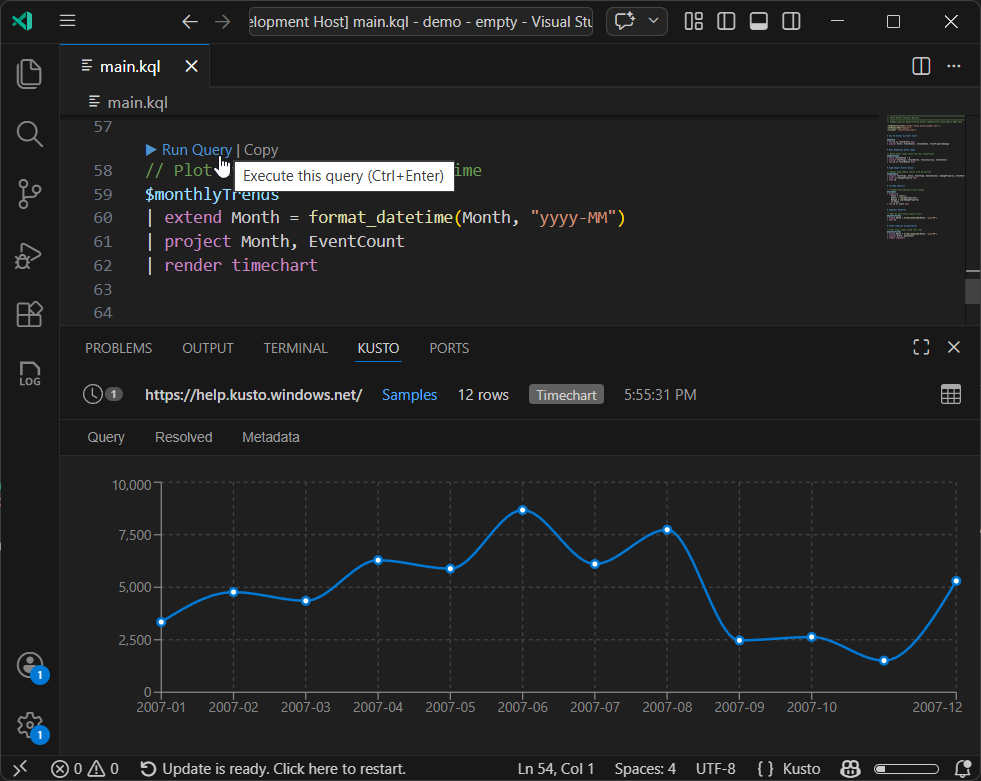
Features
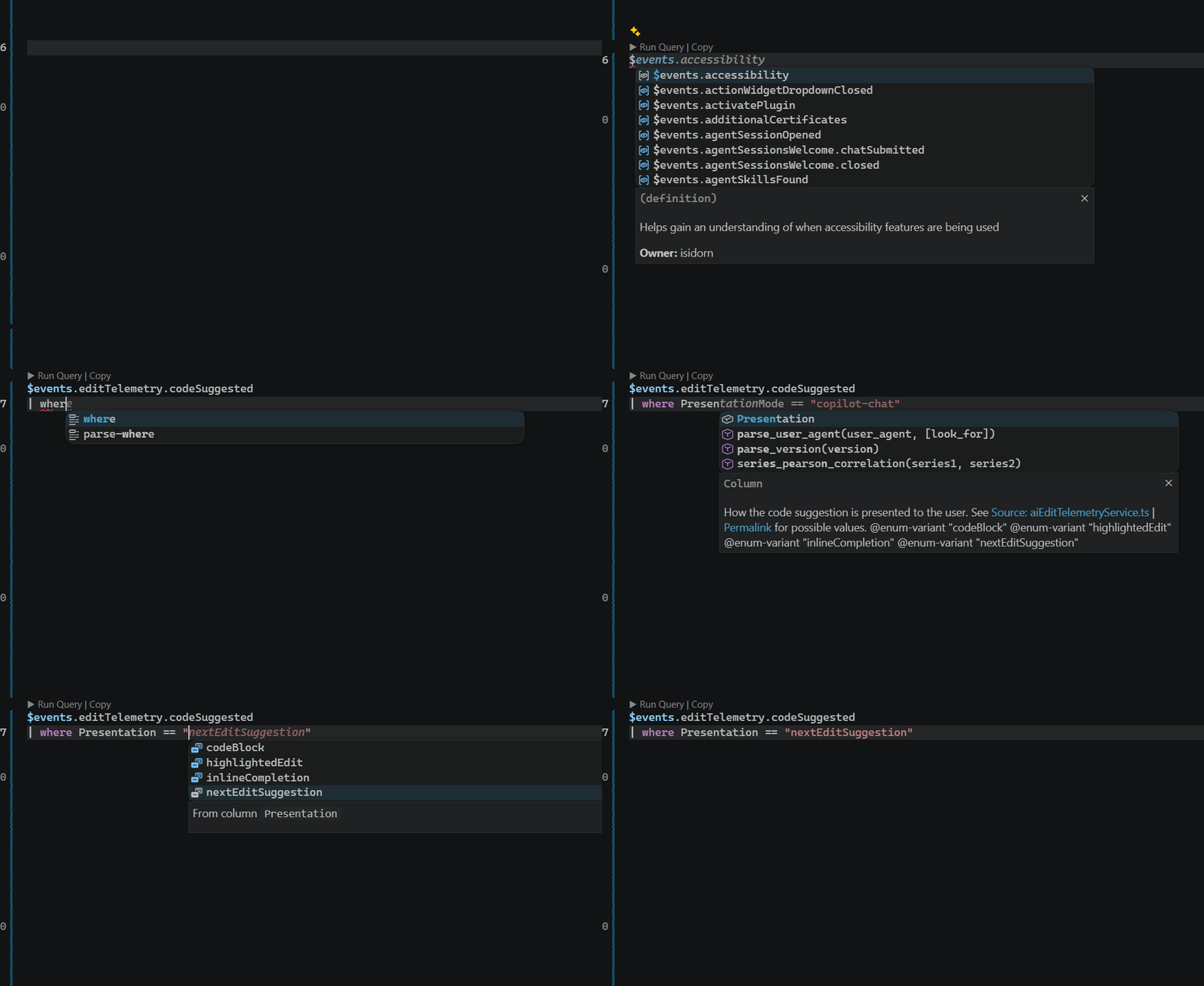
- Semantic highlighting for KQL syntax
- Go to definition across files
- Autocomplete with enum values and column descriptions
- Run queries directly from VS Code
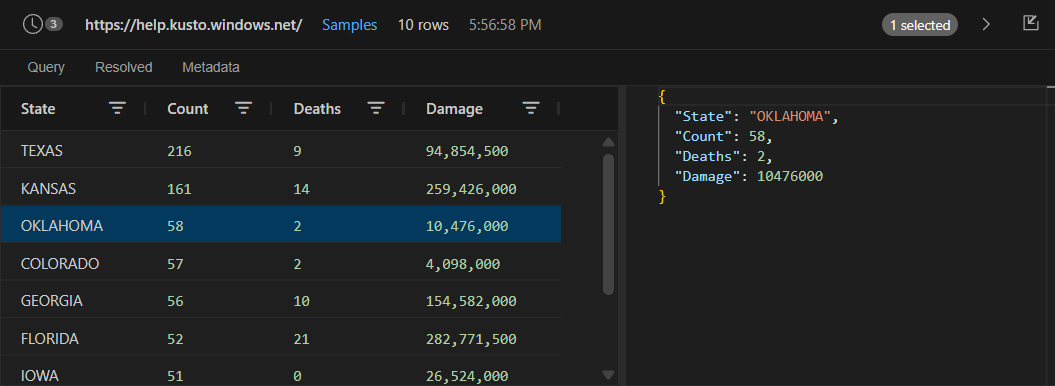
- Results panel with table and graph views
| Language Features |
Table View |
 |
 |
Getting Started
Running Queries from a KQL File
- Create a
.kql file (e.g., main.kql)
- Add connection instructions and a query:
:setDefaultCluster("https://help.kusto.windows.net/")
:setDefaultDb("Samples")

StormEvents | take 10
- Click Run query in the editor toolbar to execute the query and see results in the results panel.
Exploring Data via Copilot Chat
- Make sure the Kusto Explorer Tool is enabled in Copilot chat (it is enabled by default)
- Ask a question like:
Explore the storms in https://help.kusto.windows.net/, database Samples
- The Kusto results pane opens and AI explores the data for you
Akusto
Akusto is an extended syntax layer for .kql files that adds modularity to Kusto queries: reusable definitions, cross-file imports, chapters, and per-file connection configuration.
Definitions
Define reusable query fragments with $-prefixed names:
let $events = StormEvents
| where StartTime >= ago(7d)

let $byState = $events
| summarize Count=count() by State
Names can be hierarchical with dots for organization:
let $telemetry.errors = Events | where Level == "Error"
let $telemetry.warnings = Events | where Level == "Warning"
Since Kusto supports functions, they can also be used in Akusto:
let $plusOne = (x: int) { x + 1 }


let $FilterByDateRange = (tbl: (StartTime: datetime), startTime: datetime, endTime: datetime) {
    tbl | where StartTime between (startTime .. endTime)
}

$events
| invoke $FilterByDateRange(datetime(2000-02-01), datetime(2026-02-23))
| take $plusOne(1)
Instructions
Lines starting with : configure behavior:
| Instruction |
Description |
:include("./path.kql") |
Import definitions from another file |
:setDefaultCluster("https://cluster.kusto.windows.net/") |
Set the default cluster |
:setDefaultDb("DatabaseName") |
Set the default database |
Chapters
Organize queries into sections with # Title. Chapter-local definitions shadow global ones:
:include("./definitions.kql")
:setDefaultCluster("https://help.kusto.windows.net/")
:setDefaultDb("Samples")

# Top States by Event Count

$byState
| top 10 by Count desc


# Tornado Analysis

// Chapter-local definition
let $tornados = $events | where EventType == "Tornado"

$tornados
| summarize Deaths=sum(DeathsDirect) by State
| top 5 by Deaths desc
Comments above definitions become hover documentation:
// All storm events from the past week
// Owner: analytics-team
let $recentEvents = StormEvents
| where StartTime >= ago(7d)
Use @enum-variant to define autocomplete values for string comparisons:
// Event severity level
// @enum-variant "Critical" System is down
// @enum-variant "Error" Operation failed
// @enum-variant "Warning" Potential issue
// @enum-variant "Info" Informational
let $level = tostring(Properties["level"])
Resolution
When you run a query, Akusto resolves all $-references by collecting transitive dependencies in topological order and emitting them as standard let statements ($name becomes name, $a.b becomes a_b).
Example
Source (main.kql):
:include("./defs.kql")

$events | top 10 by StartTime desc
Resolved Kusto:
let events = StormEvents | where StartTime >= ago(7d);
events | top 10 by StartTime desc
Contributing
This project welcomes contributions and suggestions. Most contributions require you to agree to a
Contributor License Agreement (CLA) declaring that you have the right to, and actually do, grant us
the rights to use your contribution. For details, visit https://cla.opensource.microsoft.com.
When you submit a pull request, a CLA bot will automatically determine whether you need to provide
a CLA and decorate the PR appropriately (e.g., status check, comment). Simply follow the instructions
provided by the bot. You will only need to do this once across all repos using our CLA.
This project has adopted the Microsoft Open Source Code of Conduct.
For more information see the Code of Conduct FAQ or
contact opencode@microsoft.com with any additional questions or comments.
Trademarks
This project may contain trademarks or logos for projects, products, or services. Authorized use of Microsoft
trademarks or logos is subject to and must follow
Microsoft's Trademark & Brand Guidelines.
Use of Microsoft trademarks or logos in modified versions of this project must not cause confusion or imply Microsoft sponsorship.
Any use of third-party trademarks or logos are subject to those third-party's policies.



