MyBatis SQL Highlight
Lightweight SQL syntax highlighting for MyBatis XML mapper files in Visual Studio Code.
Designed to keep your XML language mode and existing XML tooling while making embedded SQL easier to read. This extension adds editor decorations; it does not format or modify your source code.
Features
SQL syntax highlighting
Colorizes SQL keywords, common SQL functions (including Oracle functions), identifiers, string and numeric literals, operators, and punctuation.
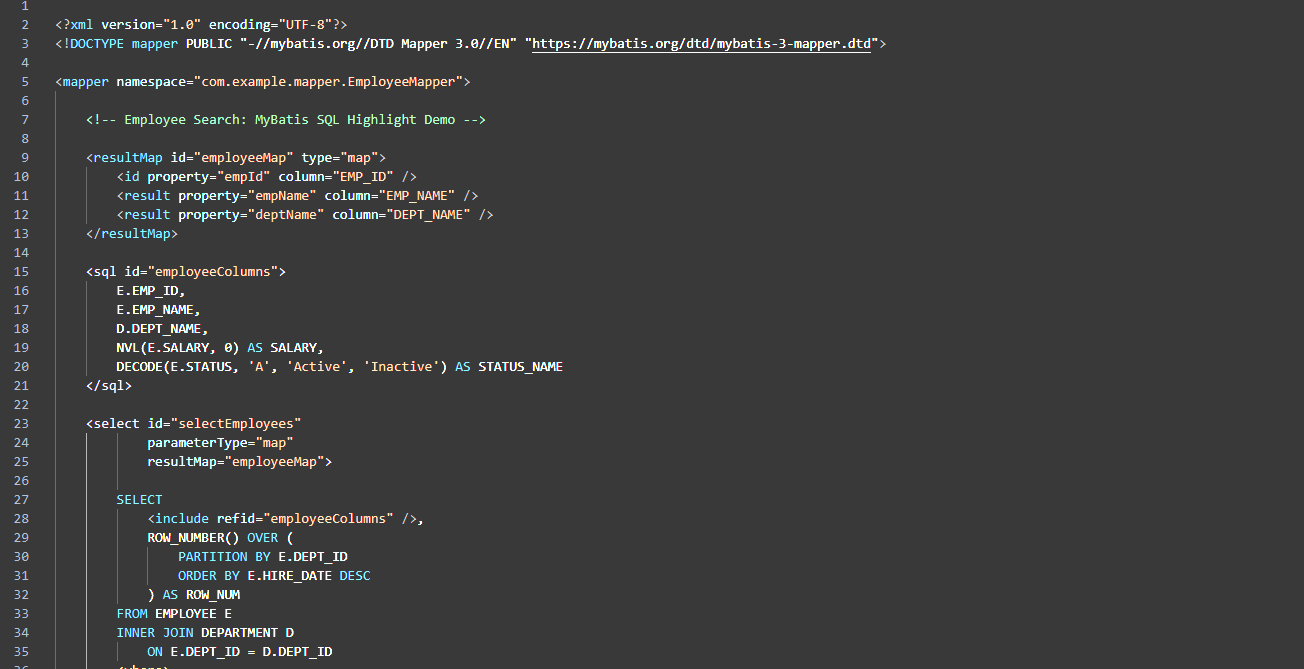
MyBatis dynamic SQL and CDATA
Highlights dynamic tags such as <if>, <foreach>, <choose>, <when>, <otherwise>, and <where>; binding expressions (#{...} and ${...}); SQL comments (-- and /* ... */); and SQL inside <![CDATA[ ... ]]> sections.
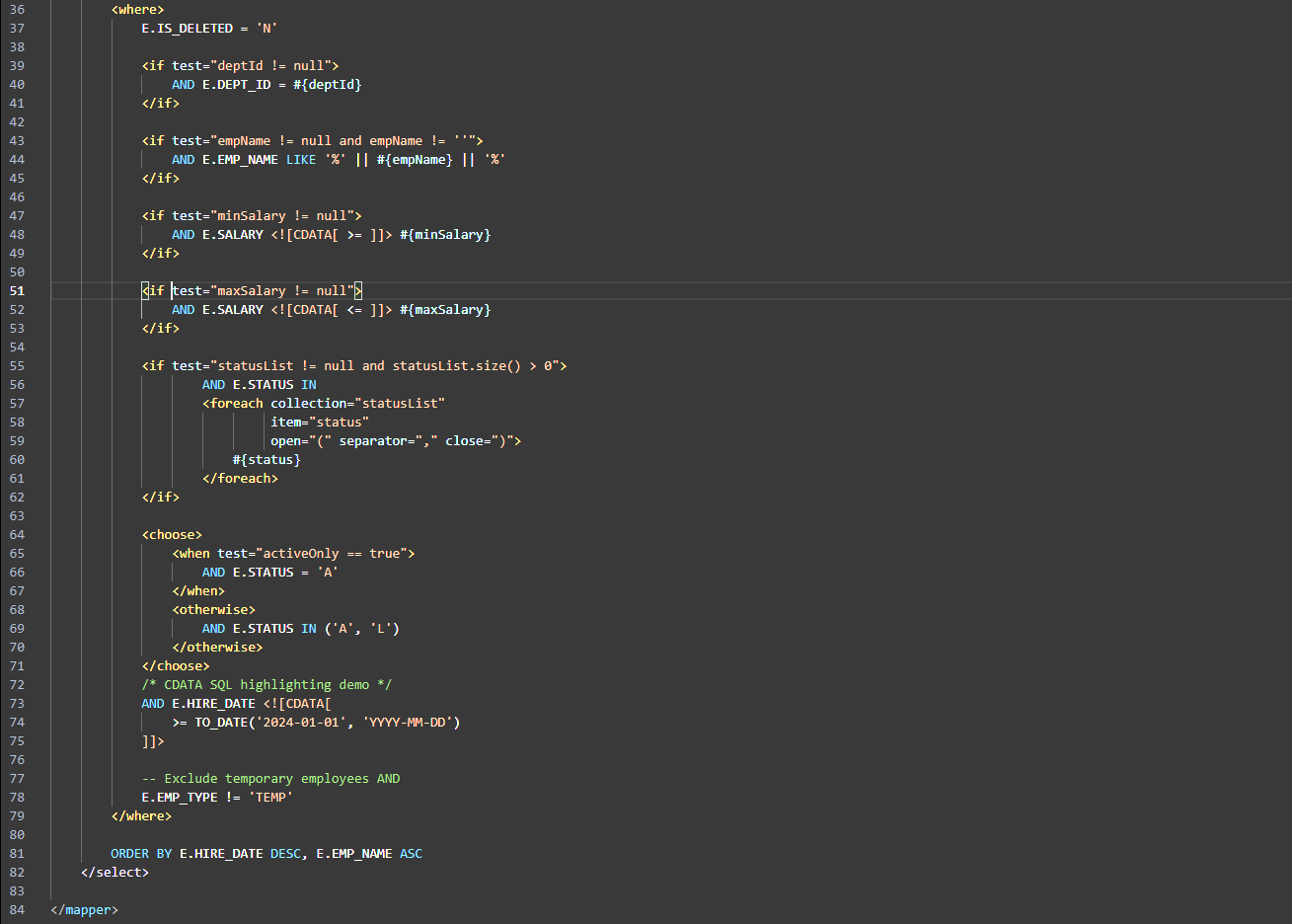
Screenshots show a fictional employee mapper and do not contain production code.
Additional behavior
- Supports unsaved Untitled buffers containing a MyBatis
<mapper> root (XML or Plain Text language mode).
- Preserves the XML language mode for normal
.xml files, so other XML tools can continue to work.
- Updates highlighting after edits, with debounced refresh and a configurable file-size limit (2 MB by default).
- Configurable colors via VS Code settings.
Getting started
- Install MyBatis SQL Highlight.
- Open a
.xml file with a MyBatis <mapper> root, or paste a complete mapper into a new Untitled editor.
- Highlighting is applied automatically. For unsaved Plain Text buffers, choose XML language mode if you also want native XML features such as Outline.
Configuration
Search for mybatisSqlHighlight in VS Code Settings, or edit settings.json:
{
  "mybatisSqlHighlight.enabled": true,
  "mybatisSqlHighlight.keywordColor": "#569CD6",
  "mybatisSqlHighlight.functionColor": "#DCDCAA",
  "mybatisSqlHighlight.stringColor": "#CE9178",
  "mybatisSqlHighlight.numberColor": "#B5CEA8",
  "mybatisSqlHighlight.identifierColor": "#D4D4D4",
  "mybatisSqlHighlight.parameterColor": "#9CDCFE",
  "mybatisSqlHighlight.operatorColor": "#D4D4D4",
  "mybatisSqlHighlight.sqlCommentColor": "#6A9955",
  "mybatisSqlHighlight.commentColor": "#73AD80",
  "mybatisSqlHighlight.statementTagColor": "#B8A1E3",
  "mybatisSqlHighlight.controlTagColor": "#F4B860",
  "mybatisSqlHighlight.maxFileSizeKB": 2048
}
Default identifier and operator colors are tuned for dark themes. Adjust them for light themes as needed.
Limitations
- Syntax highlighting only: no SQL validation, autocomplete, execution, or formatting.
- Token recognition is heuristic rather than a full SQL/XML parser; some uncommon syntax or database-specific constructs may be colored imperfectly.
- SQL function highlighting is strongest for common and Oracle-oriented functions; it is not a complete DBMS dialect grammar.
- Files larger than the configured size limit are skipped.
- Other extensions or themes may apply overlapping colors.
한국어 안내
MyBatis SQL Highlight는 VS Code에서 MyBatis XML Mapper 내부 SQL을 보기 쉽게 색상으로 구분하는 확장입니다.
- SQL 키워드, 함수, 컬럼·테이블명, 문자열, 숫자, 연산자 강조
<if>, <foreach>, <choose> 등 MyBatis 동적 태그 강조#{...}, ${...} 바인딩 파라미터 강조- CDATA 내부 SQL 및
--, /* ... */ 주석 강조
- 저장하지 않은 새 파일(Untitled)에 Mapper XML을 붙여넣어도 지원
- XML 언어 모드 및 기존 XML 확장 기능 유지
주의: SQL 문법 검사, 자동 완성, 자동 포맷팅은 제공하지 않습니다. 다크 테마 기준 기본 색상은 설정에서 변경할 수 있습니다.
License
MIT License — Copyright (c) 2026 Monkie.
Source and issues

