Hush Dark Theme
A refined, distraction-free ultra-minimal dark theme. Designed for developers who want the maximum possible focus on their code.
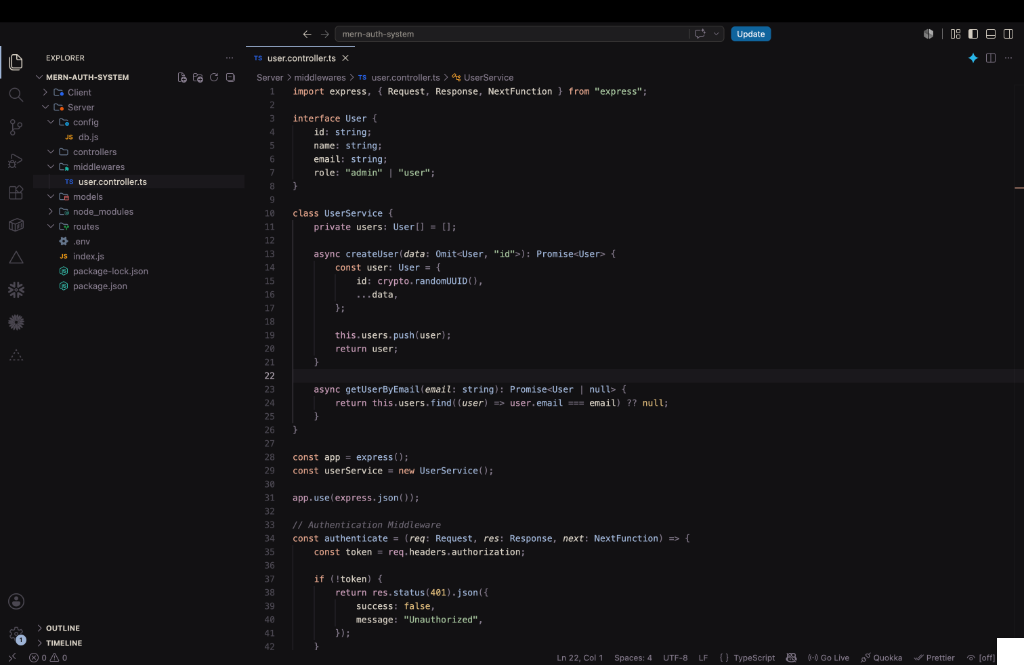 (Screenshot featuring Node/Express API code snippet)
Features
- Ultra Minimalist: Strips away distracting colors, relying heavily on subtle monochromatic greys, stark whites, and very pale blues.
- Pitch Black Options: Includes variants like
Hush Midnight and Hush Void for an incredibly deep, OLED-friendly black background.
- Laser Focus: Designed specifically to keep your eyes entirely locked on the logic of your code without flashy distractions.
Installation
- Open the Extensions sidebar in VS Code.
- Search for
Hush Dark Theme by Mohammed Hasanfatta.
- Click Install.
- Navigate to
File > Preferences > Color Theme and select your preferred Hush variant.
Recommended Settings
For the best experience, we recommend adding the following settings to your settings.json:
{
  "editor.fontFamily": "'JetBrains Mono', 'Fira Code', monospace",
  "editor.fontLigatures": true
}
| |

