Local tab agent
Version 1.1.0
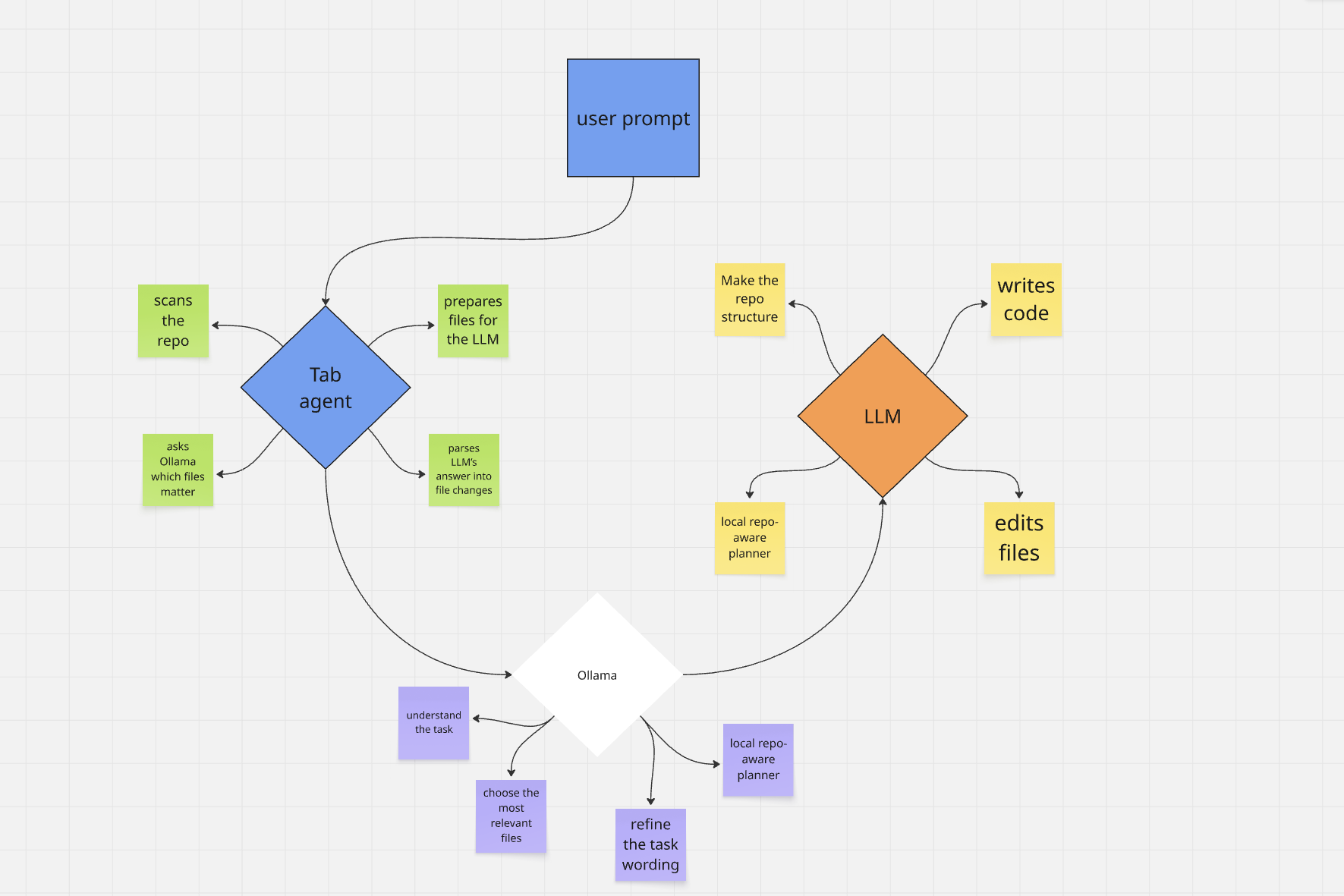
Local tab agent is a local coding agent for VS Code. It uses Ollama for repository-aware planning, distributed Swarm Groups to pool computational power between friends and colleagues to run large models collaboratively, and use it for coding it able you to run models your device alone can't run.
browser bridge to ChatGPT, Google Gemini, or Anthropic Claude (your logged-in tab) for code generation, then lets you review every change before applying it.
Workflow diagram for docs and the Marketplace:
Why use it
- Local repo analysis with Ollama (no cloud LLM required for file selection)
- Local LLM Server Discovery — Scan your localhost or local network to automatically discover and configure Ollama or OpenAI-compatible servers.
- Incremental Codebase Indexing & Vector Search — Build a semantic search index of your codebase that updates incrementally as you save files, allowing the agent to pick the most relevant context files automatically.
- Auto-Fix Diagnostics — Configurable option to let the agent inspect and automatically fix compilation errors and warnings.
- Hybrid Routing — Toggle hybrid routing to use local models for simple tasks and remote API models for complex queries.
- Secure API Key Storage — All keys are securely stored in VS Code's
SecretStorage (never in plaintext settings files).
- Structured patch output (
<<<FILE>>>, diffs, summaries)
- Review-before-apply workflow with inline per-file or bulk apply (diffs live in the chat thread, Cursor-style)
- No VS Code LLM API key — uses your existing browser session on the chosen provider (when in Bridge Mode)
- First-run onboarding in the sidebar with a link to install the Chrome bridge extension
How to use
Repository: github.com/moego0/tab-agent
Local tab agent does not work on its own. You must install Local tab bridge, the Chrome extension from the same repository. That extension connects VS Code to an open ChatGPT, Gemini, or Claude tab over a local WebSocket (pick the provider in the sidebar or via aiagent.aiProvider). For step-by-step install and daily use (load unpacked, pin the icon, stay signed in on the matching site), follow chrome-extension/README.md in the repo.
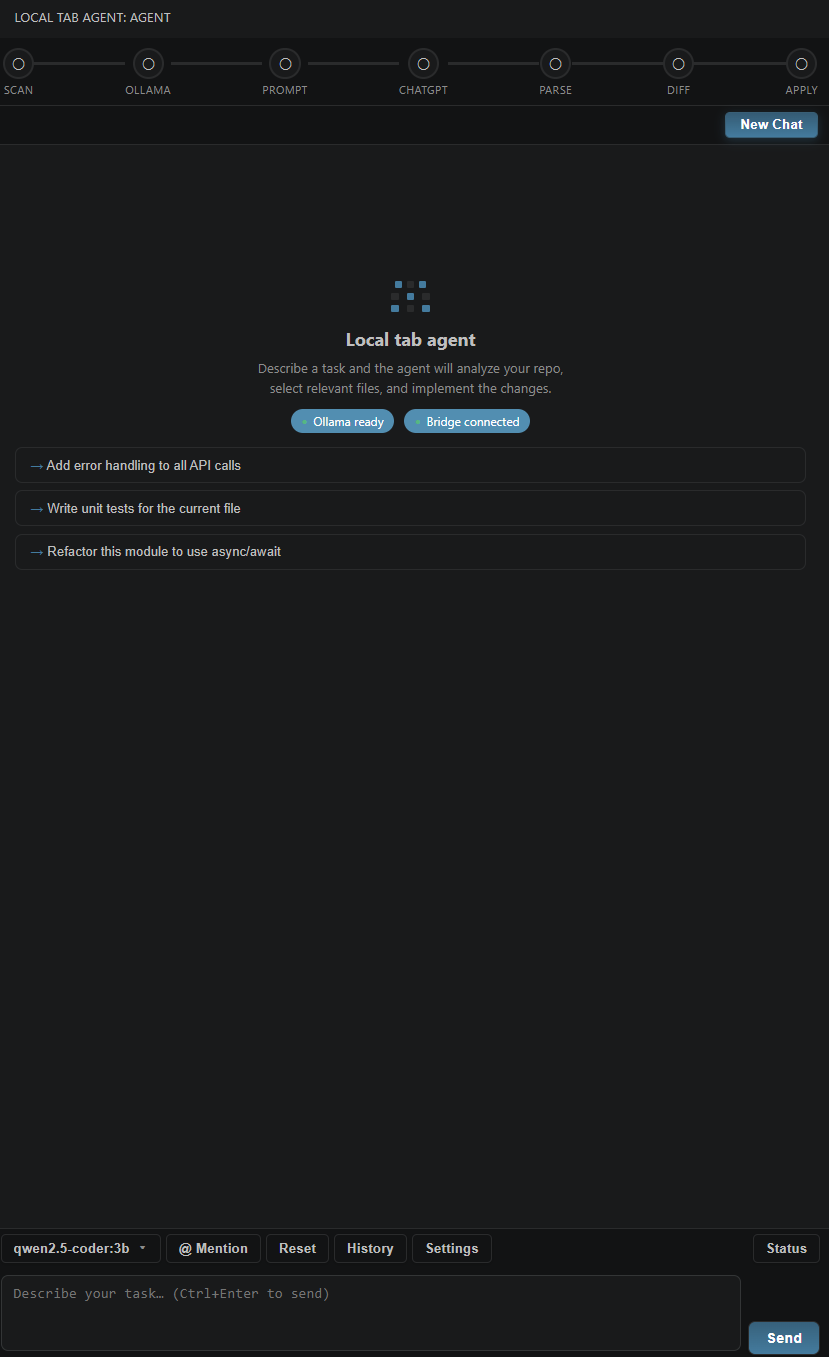
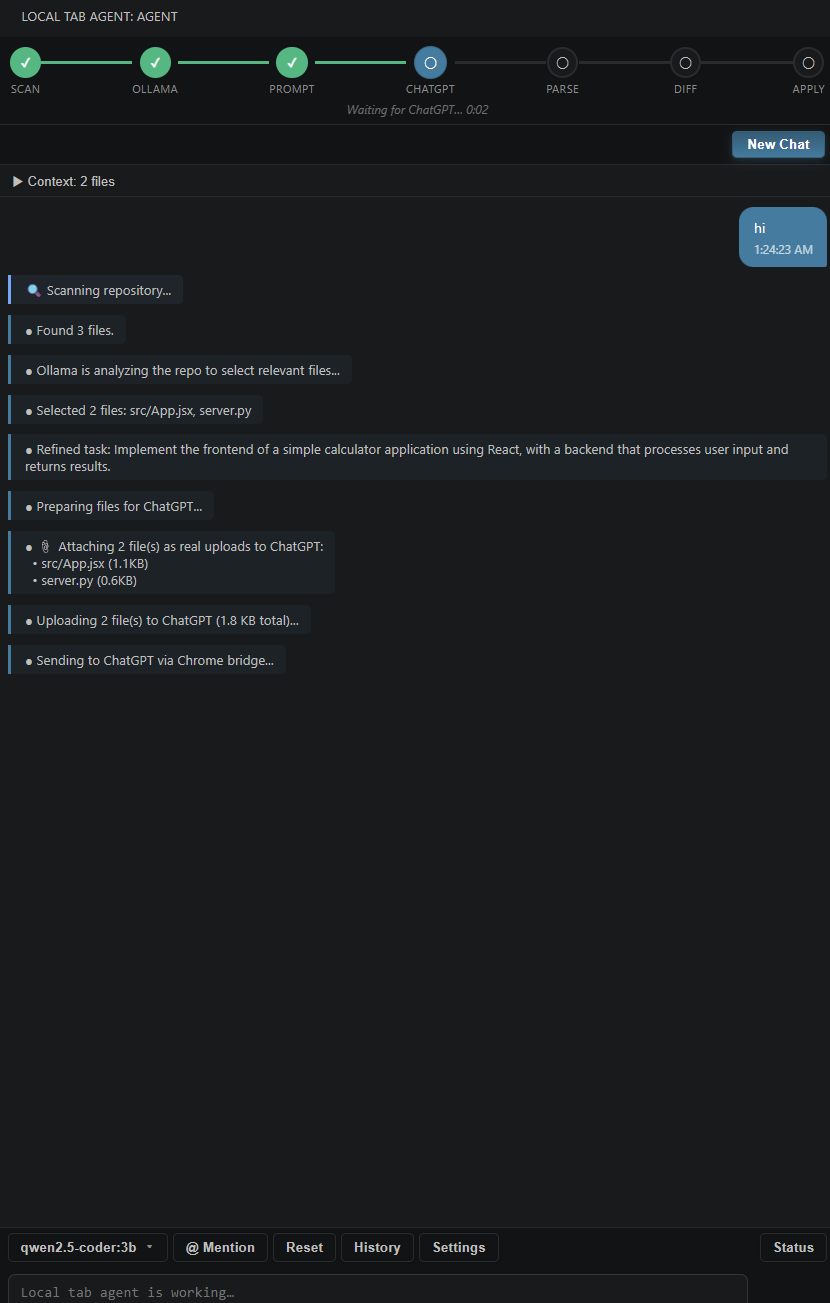
Once the bridge is set up and VS Code shows Ollama ready and Bridge connected in the sidebar, open Local tab agent, describe what you want (optional @ mentions for files), and send with Ctrl+Enter. The agent scans your workspace, uses Ollama or vector search to choose relevant files (when enabled), sends the prompt through the bridge—including file attachments when needed—then shows proposed changes inline in the thread; use Apply All, Reject All, or per-file actions. After apply, a task complete card summarizes writes/deletes/dirs; <<<RUN:>>> commands render as a terminal-style block with exit status when allowed.
AI Backends
Local tab agent supports multiple AI backends for different use cases:
1. Bridge Mode (Default)
Best for free/local usage
- Uses Ollama locally for repository analysis and file selection
- Uses your browser tab (ChatGPT, Gemini, or Claude) for code generation
- No API key required — leverages your existing browser sessions
- Supports file uploads through the Chrome extension
- Best for users who want to avoid API costs and keep everything local
2. Groq Mode (New in v1.1.0)
Ultra-fast code generation & analysis
- Uses the Groq API (https://groq.com) for both codebase analysis and fast inference
- Requires a Groq API key from the Groq console
- Highly recommended for an incredibly snappy experience
- Supports popular models like
llama-3.3-70b-versatile
3. Swarm Groups Mode (New in v1.1.0)
Collaborative Distributed AI Computing
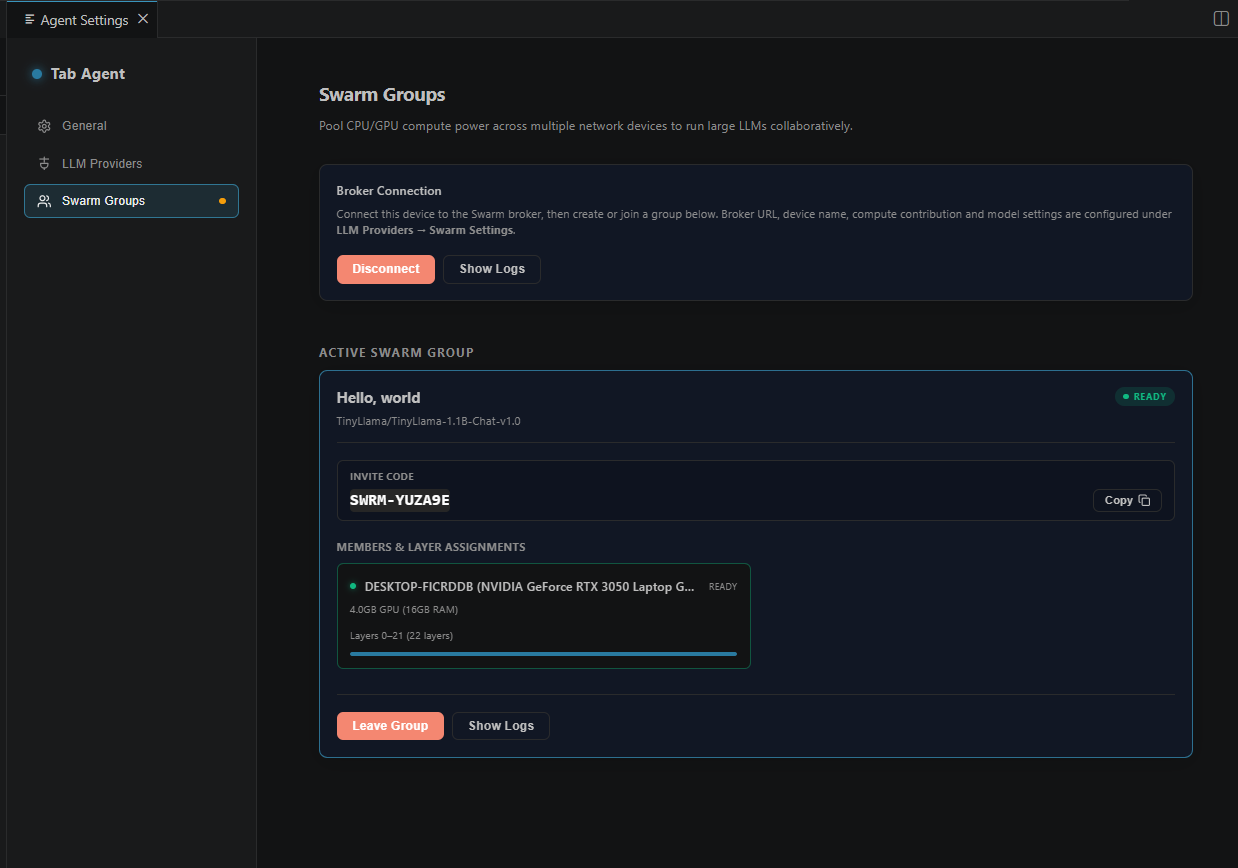
- Pool Local Compute Power: Share and pool your GPU (VRAM) or CPU (RAM) computational resources collaboratively with other users across a WebSocket broker.
- Split Model Layers (Pipeline Parallelism): Dynamically slice large models (e.g., Llama 3 8B, Qwen 1.5 32B) and distribute the layers among group participants. This allows running models that would otherwise exceed your single-device hardware limits (e.g., if a model has 32 layers, Member A can run layers 0-15, and Member B runs layers 16-31).
- Create & Join Groups with Invite Codes:
- Create a Group: Host a new swarm, choose a model family (TinyLlama, Llama 3, Qwen, or custom Hugging Face repos), and get a unique invite code (
SWRM-XXXXXX).
- Join a Group: Paste an invite code to join a colleague or friend's swarm, automatically pooling your machine's processing power into their group.
- Sequential Tensor Forwarding: During inference, the broker routes tensor computations sequentially across each node's assigned layers (
FORWARD_PASS), compiling the generated tokens and returning them seamlessly as agent responses in VS Code.
- Built-in Model Downloader: Enter any Hugging Face repo ID to automatically download, cache, and manage models locally. Supports custom Hugging Face tokens for gated/private models.
Exposing the Swarm Broker Across Networks
By default, the Swarm Broker (located in vscode-extension/broker) runs on ws://localhost:3000. To collaborate with friends on different physical networks, the broker must be publicly accessible. You can do this in three ways:
- Option A: Deploy to the Cloud (Recommended)
Deploy the broker project (Node.js/TypeScript) to free or low-cost hosting services like Render, Railway, or Fly.io, or on a VPS (AWS, DigitalOcean). Ensure standard setup runs
npm install and npm start. Connect your extension using secure WebSocket format: wss://your-broker-app.onrender.com.
- Option B: Local Tunneling (Easiest for quick sessions)
Use tunneling tools to expose your local port 3000 to the web:
- ngrok: Run
ngrok http 3000 to get a public URL (e.g. https://xxxx.ngrok-free.app), and connect extensions via its WebSocket secure mapping wss://xxxx.ngrok-free.app.
- Cloudflare Tunnels: Point a tunnel to
localhost:3000 and use your mapped hostname.
- Option C: Mesh VPNs (Tailscale / ZeroTier)
If you and your friends are part of the same Tailscale network, you can run the broker locally and connect directly using the host machine's private Tailscale IP (e.g.
ws://100.x.y.z:3000).
4. AgentRouter Mode
Direct single API integration
- Uses AgentRouter (https://agentrouter.org) for both file selection and code generation
- Requires an AgentRouter token from their console
- If you see
unauthorized client detected, AgentRouter rejected your account/client/key
- Generate a new token or contact AgentRouter support if authentication fails
5. Generic OpenAI-Compatible Mode
Works with any compatible API
- Supports any API server implementing OpenAI's
/chat/completions format
- Examples: OpenRouter, LM Studio, Ollama (OpenAI-compatible endpoint), llama.cpp server, custom proxies
- Requires base URL, API key, and model name configuration
- Flexible for self-hosted or third-party API providers
Screenshots
Sidebar — ready
 Swarm Groups — Dashboard
Sidebar — running
Changelog (1.1.0)
- Groq API support — Fast, low-latency code generation using Groq. Stored securely in SecretStorage.
- Collaborative Swarm Groups — Pool CPU/GPU computing power collaboratively.
- LLM Server Auto-Discovery — Probes local network for Ollama/OpenAI servers, measures latency, and configures with one click.
- Incremental Vector Indexing & Search — Semantic codebase search index updated automatically on file save.
- Auto-Fix Diagnostics — Automatically trigger code modifications to solve compiler warnings/errors.
- Hybrid Routing — Balance local Ollama and remote backends based on task complexity.
- Security Updates — API keys migrated to VS Code
SecretStorage.
- Documentation Generation — Command (
aiagent.generateDocs) to automatically document workspace files.
- Continued Preview Mode — Remains in preview status for community testing.
Older Versions (1.0.3)
- Chrome / file uploads — Attachments use drag-and-drop on the chat composer (with file-input fallback) so files show up reliably for ChatGPT, Gemini, and Claude; if upload fails, the prompt still goes out in inline mode with context in text.
- Ollama — File-selection JSON parser accepts a bare array of paths, not only a full
{ "selected_files": ... } object.
- Repo scan — Skips more build and tooling folders (
obj, bin, .vs, __pycache__, .pytest_cache, target, .gradle, Pods, etc.) so Ollama picks fewer junk paths.
- Sidebar UI — On first VS Code launch with the extension, a VS Code information notification points users to the Chrome setup guide and the agent sidebar, plus an onboarding banner inside the webview the first time it loads; inline diff cards under the agent message; task complete and terminal cards; code blocks in agent text with a copy control; refreshed message styling.
- Chrome extension — Version 1.0.3; extra manifest permissions for clipboard-related APIs used by the workflow.
Commands
| Command |
Description |
| Local tab agent: Open Sidebar |
Focus the agent view |
| Local tab agent: Clear Chat |
Clear the conversation |
| Local tab agent: Check Ollama Connection |
Verify Ollama is reachable |
| Local tab agent: Check Chrome Bridge |
Verify the WebSocket bridge |
| Local tab agent: New Chat |
Start a fresh session |
| Local tab agent: Clear Chat History |
Remove saved sessions |
| Local tab agent: Select LLM Backend |
Choose AI backend (bridge/agentrouter/groq/swarm/openai-compatible) |
| Local tab agent: Select AI Provider |
Choose browser provider (chatgpt/gemini/claude) |
| Local tab agent: Select Ollama Model |
Choose or pull Ollama models |
| Local tab agent: Discover LLM Servers |
Scan network and configure Ollama or OpenAI compatible endpoints |
| Local tab agent: Generate Documentation |
Automatically generate docstrings/documentation for the current file |
| Local tab agent: Show Swarm Worker Logs |
Show logs of the collaborative Swarm worker |
| Local tab agent: Set Groq API Key |
Securely store your Groq API key |
| Local tab agent: Clear Groq API Key |
Remove your Groq API key |
| Local tab agent: Set AgentRouter API Key |
Securely store AgentRouter key |
| Local tab agent: Clear AgentRouter API Key |
Remove stored AgentRouter key |
| Local tab agent: Set OpenAI-Compatible API Key |
Securely store generic API key |
| Local tab agent: Clear OpenAI-Compatible API Key |
Remove stored generic API key |
| Local tab agent: Test Current LLM Backend |
Test connection to the active backend |
| Local tab agent: Refresh Current Provider Models |
Fetch models for the active backend |
Settings
| ID |
Default |
Description |
aiagent.llmBackend |
bridge |
AI backend: bridge, agentrouter, groq, swarm, or openai-compatible |
aiagent.aiProvider |
chatgpt |
Browser tab target for bridge mode: chatgpt, gemini, or claude |
aiagent.ollamaModel |
qwen2.5-coder:7b |
Model for file selection / prompting |
aiagent.ollamaUrl |
http://localhost:11434 |
Ollama API base URL |
aiagent.agentRouterBaseUrl |
https://agentrouter.org/v1 |
AgentRouter API base URL |
aiagent.agentRouterModel |
gpt-5 |
AgentRouter model name |
aiagent.groqBaseUrl |
https://api.groq.com/openai/v1 |
Groq API base URL |
aiagent.groqModel |
llama-3.3-70b-versatile |
Groq model name |
aiagent.swarmBrokerUrl |
ws://localhost:3000 |
Collaborative Swarm Broker URL |
aiagent.swarmDeviceName |
empty |
Device name in the Swarm group |
aiagent.swarmContributeGpu |
true |
Share local GPU resources to the Swarm |
aiagent.swarmGroupCode |
empty |
Swarm Group access code |
aiagent.hybridRouting |
false |
Enable routing tasks dynamically based on complexity |
aiagent.hybridComplexityThreshold |
moderate |
Task complexity threshold: simple, moderate, or complex |
aiagent.autoFixDiagnostics |
false |
Enable automatic fixes for compiler diagnostics |
aiagent.maxAutoRetries |
2 |
Max automatic compiler error fix attempts |
aiagent.fileSelectionBackend |
ollama |
File selection backend: ollama or same-as-generation |
aiagent.enableProviderFallback |
false |
Enable fallback to another backend on failure |
aiagent.fallbackBackend |
bridge |
Fallback backend when current one fails |
aiagent.maxContextChars |
80000 |
Cap on inlined file context |
aiagent.autoApplyChanges |
false |
Skip diff review (not recommended) |
aiagent.excludePatterns |
(see package.json) |
Scan exclusions |
Security & privacy
- Ollama runs on your machine; file paths and previews stay local until you send a task.
- No separate cloud backend from this extension — prompts go to your chosen provider only through your logged-in browser tab.
- File writes are confined to the workspace root; paths that resolve outside the workspace are rejected.
- Review diffs before apply; treat generated code like any other contribution.
| |

