Modex - Engineering Workbench with AI
Modelica models, PSCAD projects, diagrams, plots and engineering documents, with optional AI assistance in VS Code.



Modex brings engineering modeling, analysis and documentation into one VS Code workspace. Work with Modelica models, edit PSCAD projects through the separately installed AgenticEMT package, draw general diagrams, and turn simulation results into figures and engineering documents.
AI is optional. The editors, libraries, simulation workflow and result tools do not require an AI provider.
Choose Your Workflow
| Workflow |
Files |
What you can do |
Setup |
| Modelica |
.mo |
Edit diagrams, icons and source; simulate and inspect results |
Editing is built in; simulation needs OpenModelica or Dymola |
| PSCAD (Preview) |
.pscx |
Edit existing projects in place with the AgenticEMT editor |
Install AgenticEMT separately; a local PSCAD installation supplies component artwork and the palette |
| General diagrams |
.drawio |
Create and edit diagrams offline |
Built in |
Modex also includes figures (.mxfig) for plotting signals and comparing simulation runs, and documents (.mxdoc) with linked plots and analysis figures.
Quick Start
- Install Modex from the Visual Studio Marketplace.
- Open a folder containing your engineering models, diagrams or documents.
- Open the Modex view in the Activity Bar and choose a workflow below.
Modelica
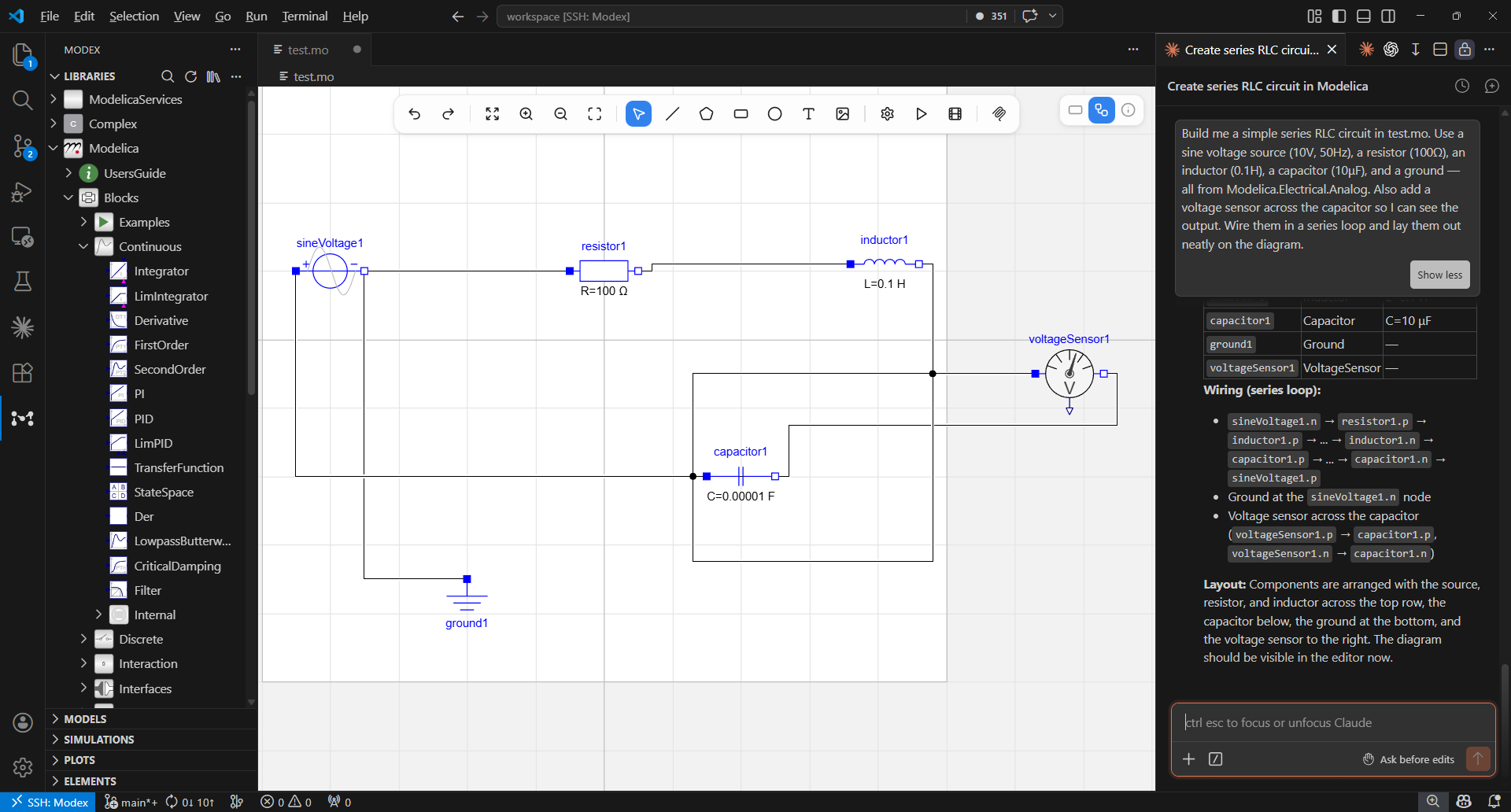
Open a .mo file, or create one with Modex: New Model. Switch among Diagram, Icon and Text from the editor toolbar. To simulate, configure OpenModelica or Dymola in Modex: Settings… → Engines.
PSCAD
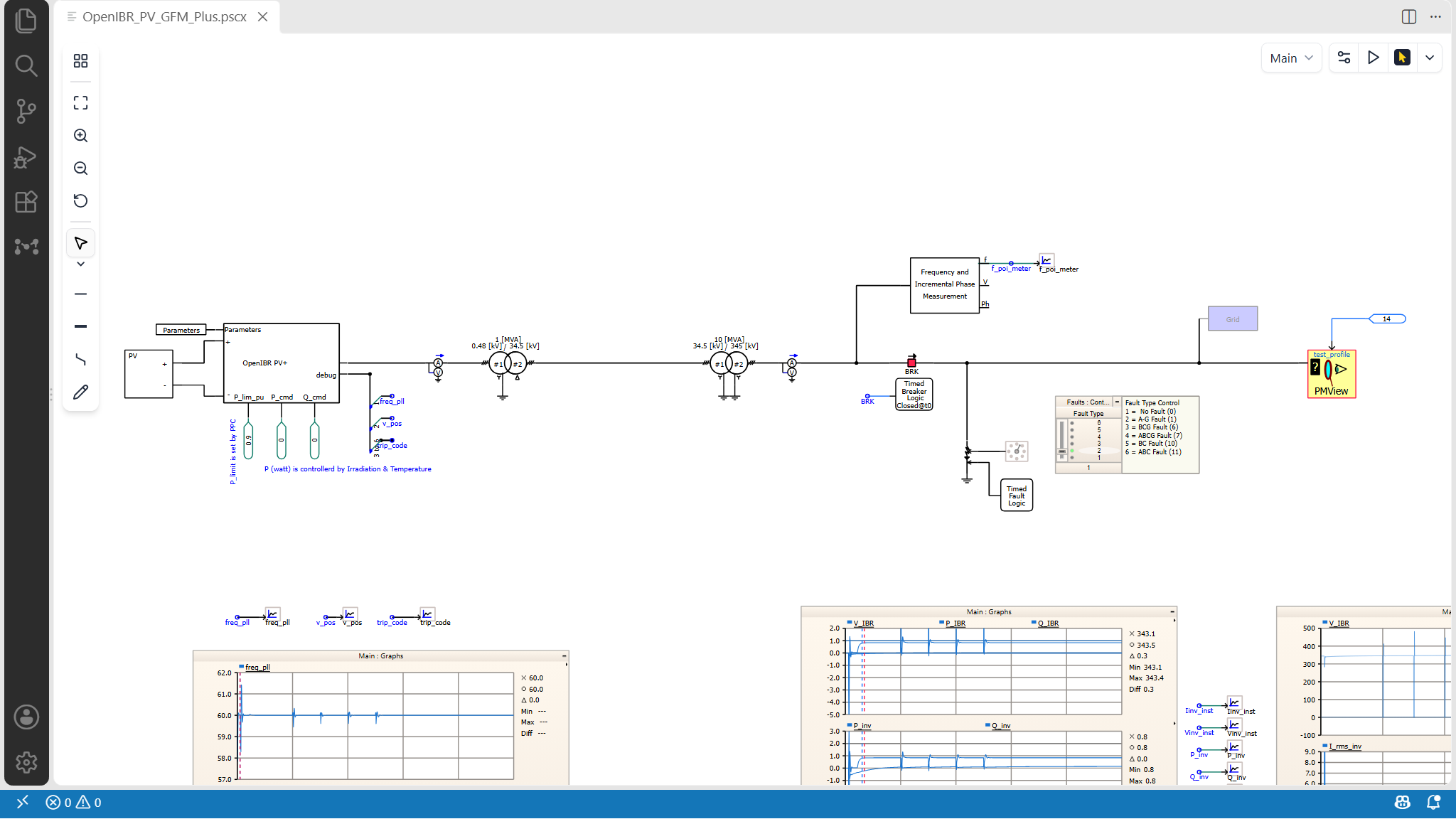
Open an existing .pscx project. If AgenticEMT is missing, click Install AgenticEMT in the project tab to download, verify and install it. The tab then opens the canvas automatically. For offline installation, use Modex: Install AgenticEMT from ZIP… with a package from the AgenticEMT releases page.
Open an existing .drawio, .mxfig or .mxdoc file, or run Modex: New draw.io Diagram, Modex: New Figure or Modex: New Document.
Use Modex: Settings… when you need to configure libraries, simulation engines, AI providers or analysis tools.
What You Can Do
Edit Modelica visually and as text
- Edit
.mo diagrams with drag-and-drop components, routed connections and graphical annotations.
- Edit icons and Modelica source without leaving the model editor.
- Keep graphical and text views synchronized, including unsaved changes.
- Browse workspace models, class elements and installed libraries from the Modex sidebar.
PSCAD projects — powered by AgenticEMT (Preview)
AgenticEMT provides the PSCAD editor and installs separately from Modex.
- Open a PSCAD
.pscx project and edit it in place, keeping its original format.
- Browse the project from the Power Elements view in the Modex sidebar.
- Use the agent to inspect project elements and propose or apply edits supported by AgenticEMT.
- Component artwork and the palette come from a PSCAD installation on the machine running the extension. Without one, components appear as labelled placeholders and the palette is empty.
Simulate Modelica and inspect results
- Configure a Modelica run, choose an available engine, and keep results organized by model.
- Plot signals in interactive figures or inspect their values directly.
- Play supported result-driven graphics on the model diagram.
- Open supported 3D animation results and use the Modelica debugger with OpenModelica.
Work with an AI agent
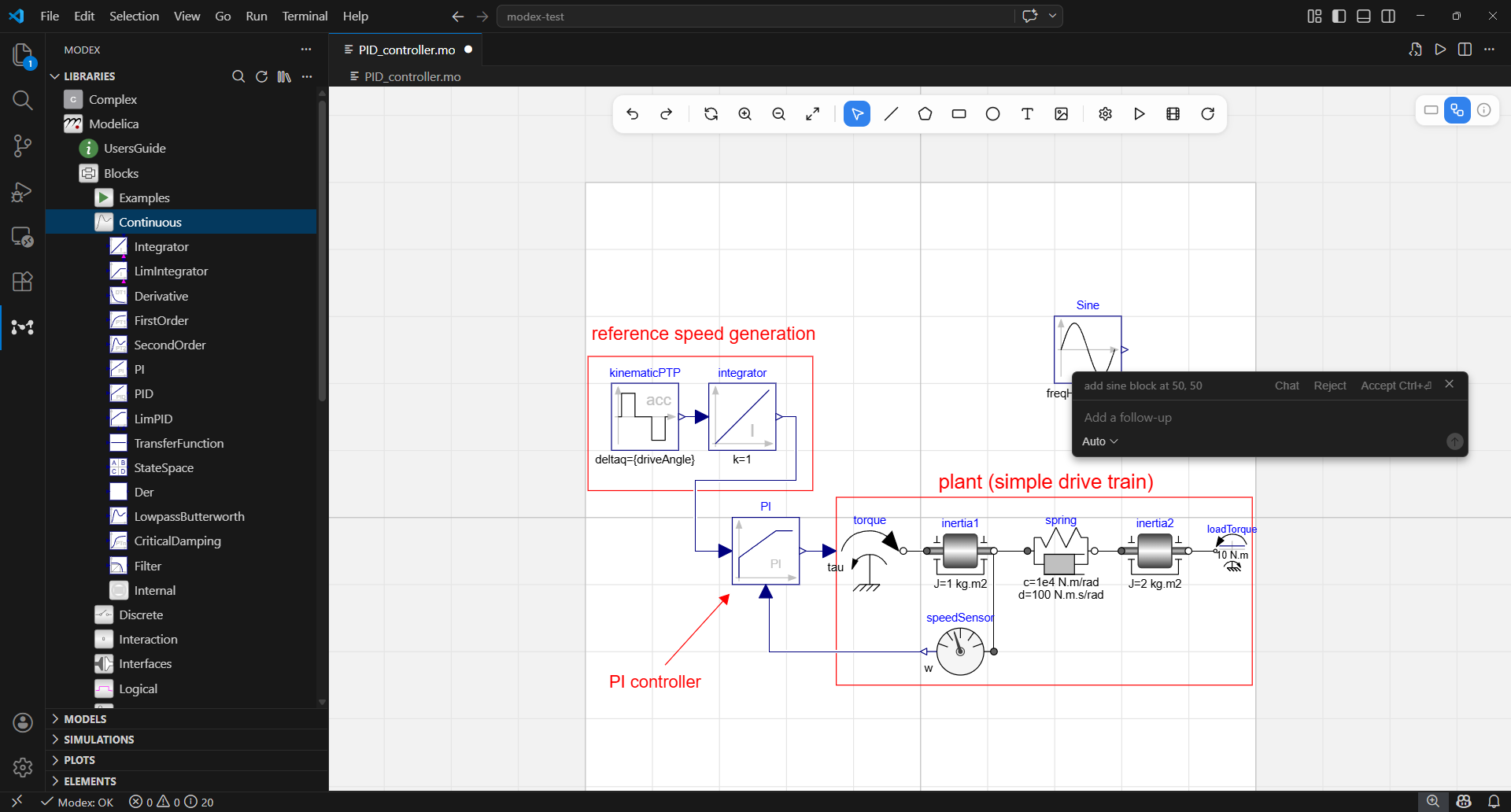
- Ask a supported local agent or provider to help with engineering models, diagrams, figures and documents.
- Use Modelica tools to create, edit, check and simulate
.mo models; use AgenticEMT tools to inspect and edit .pscx projects.
- Give the agent the active model, selection, diagram, figure or document as context.
- Review permission prompts and detected file changes from the Agent sidebar.
- Use Python analysis tools when you configure a compatible local interpreter.
Create engineering artifacts
- Open, create and edit
.drawio files directly in Modex, including offline without an account.
- Build reusable figures from one or more simulation runs.
- Write rich engineering documents and place linked plots or analysis figures in them.
- Export documents for sharing outside VS Code.
Requirements
- VS Code 1.106.0 or later
- A simulation engine, only if you want to simulate Modelica models:
- OpenModelica for OpenModelica simulation and debugging
- An existing, separately licensed Dymola installation for the optional beta Dymola simulation path; Dymola is not included with Modex
- An AI runtime or provider, only if you want AI assistance: Claude Code and Codex can be detected when installed; GitHub Copilot, supported API providers and local OpenAI-compatible endpoints are also available
- A compatible Python interpreter, only for Agent analysis tools: configure it from Modex: Settings… → Python
- The AgenticEMT package, only if you want to edit PSCAD
.pscx projects: it ships and versions separately from Modex. Click Install AgenticEMT in the project tab or run Modex: Install AgenticEMT to download the latest stable public release, verify SHA-256, install and start it. Open project tabs switch to the canvas automatically. For a downloaded ZIP or a developer build, use Modex: Install AgenticEMT from ZIP… or Modex: Install AgenticEMT from Package Folder…. Component artwork comes from a PSCAD installed on the same Windows machine.
Model editing, diagrams, figures and documents work without a simulation engine or AI provider.
Open Modex: Settings… → Engines to choose which simulation engines are available. Engine-specific setup appears alongside the selected engine, while the OpenModelica compiler used for validation and debugging is configured under OpenModelica Toolchain.
OpenModelica
Install OpenModelica with its official installer, then verify that the compiler is available:
omc --version
If that command works in the environment that launched VS Code, Modex normally detects it. Otherwise, open Modex: Settings… → OpenModelica Toolchain and select the omc executable. Reload the VS Code window after changing the executable or its environment.
For WSL, Remote SSH or a development container, install and configure omc in the environment running the VS Code extension host, not only on the client machine.
When programs may only run from certain folders
A simulation compiles your model into a program and runs it. If your organization only allows programs to start from certain folders, set modex.simulation.workingDirectory in your user settings to one of them, then reload the window. Simulations and debug builds are then compiled and run there, in a subfolder for each workspace, much like the working directory in OMEdit. Choose a folder outside the folders you edit.
Dymola
Dymola support is an optional beta feature for an installation supplied and licensed separately by the user or their organization. Configure it from Modex: Settings… → Engines. Modex does not distribute or license Dymola.
Open Modex: Open Agent Settings to choose a model source and review the available Agent tools. AI requests use the runtime or provider you select; core Modex editing and simulation remain available when AI is not configured.
Modex can also connect to supported external AI tools through MCP after you consent. Use Modex: Copy MCP Config Snippet for manual setup. To remove Modex registrations, use Disconnect all in Modex: Settings… → MCP or run Modex: Unregister MCP from AI Tools before uninstalling the extension.
Claude Desktop can connect to a running Modex VS Code window and display interactive Modelica and installed-plugin canvases, including editing and undo. Select the project instance when several windows are open. Plugin transcript canvases currently require one workspace folder and use VS Code file history. AgenticEMT transcript canvases require package 0.1.7 or later.
Python analysis is disabled until an interpreter is selected under Modex: Settings… → Python. Analysis code runs locally with your user permissions, so approve it only when you trust the requested code and inputs.
Settings and Commands
Use Modex: Settings… for the settings most users need: models, MCP connections, libraries, simulation, engines, the OpenModelica toolchain and Python. Advanced options remain available in VS Code Settings by searching for Modex.
Useful Command Palette entries include:
- Modex: New Model
- Modex: Settings…
- Modex: Simulate and Modex: Cancel Simulation
- Modex: New Figure and Modex: New Document
- Modex: New draw.io Diagram
- Modex: Install AgenticEMT and Modex: Install AgenticEMT from ZIP…
- Modex: Open Agent Settings
- Modex: Copy MCP Config Snippet and Modex: Unregister MCP from AI Tools
Privacy
Modex stores project files and local tool output on your machine. AI requests go to the runtime or provider you choose, and product telemetry does not include project content, prompts or replies.
Limited usage telemetry is enabled by default and follows VS Code's telemetry setting. Turn it off with modex.telemetry.enabled or VS Code's telemetry.telemetryLevel.
See the PRIVACY.md bundled with the extension, or the Modex privacy policy, for details about telemetry, external services and local tools.
Known Limitations
- Modex is a Preview release; some features may be incomplete or change before the stable release.
- The general diagram editor currently supports
.drawio, not .dio, .drawio.svg or .drawio.png.
- If another extension also handles
.drawio, VS Code lets you choose an editor; use Reopen With… to change that choice later.
- Large Modelica models may take longer to render the first time.
- PSCAD
.pscx editing is a Preview. A project opens as a canvas only — use Reopen With… to see its XML — and there is no command to create a new one; create projects in PSCAD. Modex's OpenModelica and Dymola simulation workflows apply to Modelica; PSCAD .out results are not read into figures.
- Under Remote-SSH, WSL or Codespaces, AgenticEMT runs on the remote machine, so component artwork needs PSCAD installed there.
Feedback and Support
License and Third-Party Software
Modex is proprietary software. See the LICENSE file included with the extension for its terms.
Modex is independently developed. Third-party product names are used only to identify compatible formats, tools or services and do not imply endorsement. See the bundled NOTICE.md and THIRD_PARTY_NOTICES.md for trademark and third-party license notices.

