Overview Version History Q & A Rating & Review
AEM Click Build Extension
AEM Click Build is extension a VS Code-based IDEs designed to simplify the execution of AEM Maven build commands. It provides a convenient way to run complex build tasks without manually typing commands in the terminal.
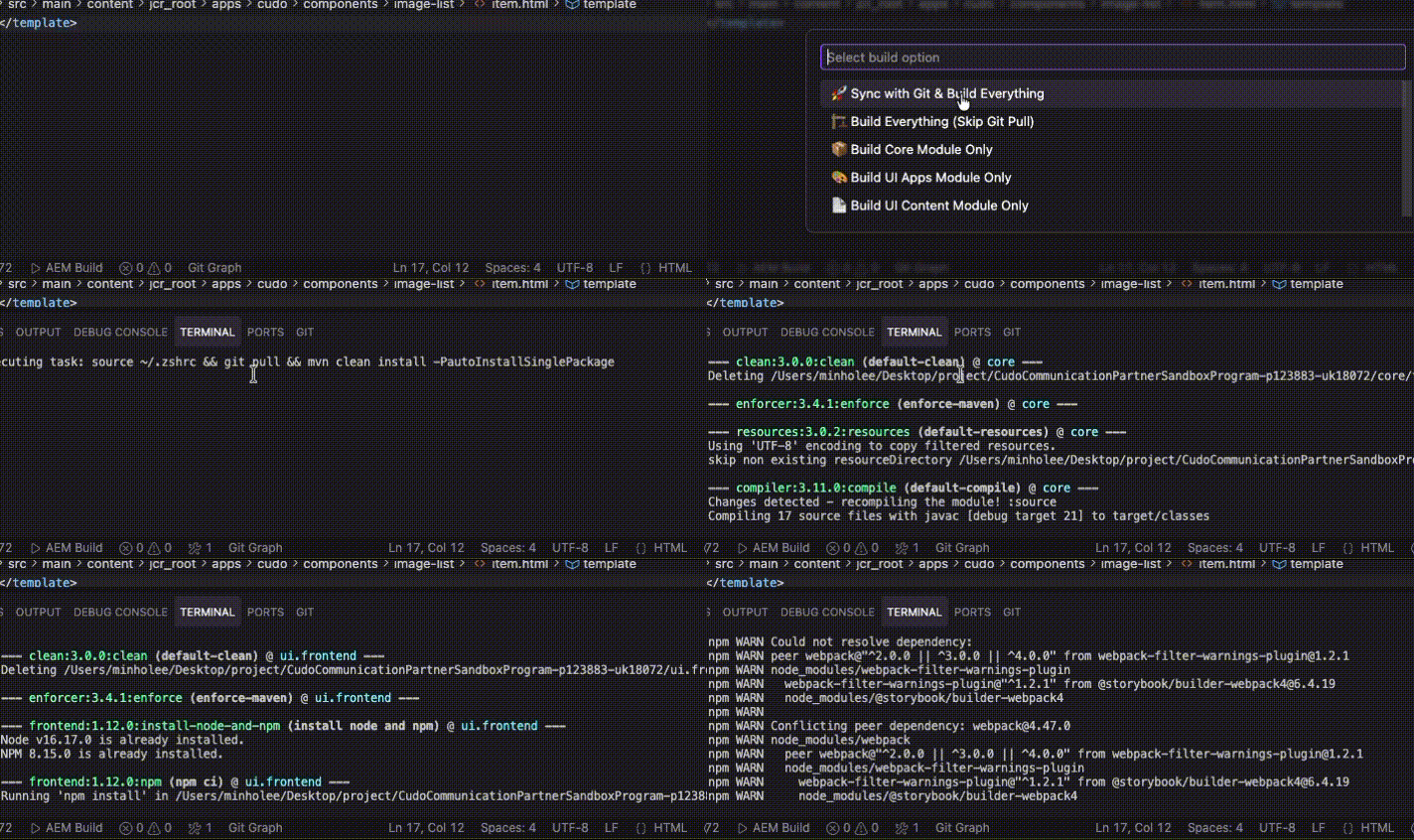
AEM Click Build Demo
한국어 (Korean)
Features
One-Click Build : Easily execute build commands via the Status Bar or Command Palette.Multiple Build Options : Support for various build scenarios:
Full Build (with Git Pull)
Full Build (Skip Git Pull)
Build Core Module Only
Build UI Apps Module Only
Build UI Content Module Only
Visual Progress : Tracks build progress with a notification window and allows cancellation.Auto-Localization : Automatically detects system language and displays messages in English or Korean.Smart Error Analysis : Automatically analyzes build failures and provides specific solutions.
How to Use
Status Bar : Click the AEM Build button located in the status bar at the bottom.Command Palette : Press Ctrl+Shift+P (or Cmd+Shift+P on macOS) and run the command Run Maven Build in Terminal .Error Analysis : When builds fail, the extension automatically analyzes errors and provides solutions.
Requirements
Git : Must be installed and configured in your system path.Maven : Must be installed and configured in your system path.
AEM Click Build Extension (한국어)
AEM Click Build는 VS Code-based IDEs 에서 AEM Maven 빌드 작업을 간소화하기 위해 설계된 확장 프로그램입니다. 복잡한 빌드 명령어를 매번 터미널에 입력할 필요 없이 클릭 한 번으로 실행할 수 있습니다.
주요 기능
원클릭 빌드 : 하단 상태 표시줄(Status Bar)의 버튼이나 명령 팔레트를 통해 손쉽게 빌드를 실행할 수 있습니다.다양한 빌드 옵션 제공 : 상황에 따라 필요한 빌드 옵션을 선택할 수 있습니다.
Git Pull 후 전체 빌드
전체 빌드 (Git Pull 건너뛰기)
Core 모듈만 빌드
UI Apps 모듈만 빌드
UI Content 모듈만 빌드
진행 상태 확인 : IDE의 알림창을 통해 빌드 진행 상태를 확인할 수 있으며 작업 취소가 가능합니다.자동 언어 감지 : 시스템 언어 설정에 따라 메시지가 한국어 또는 영어로 자동 표시됩니다.스마트 에러 분석 : 빌드 실패 시 자동으로 에러를 분석하고 구체적인 해결책을 제공합니다.
사용 방법
Status Bar : IDE 창 하단 상태 표시줄에 있는 AEM Build 버튼을 클릭합니다.Command Palette : Ctrl+Shift+P (맥OS는 Cmd+Shift+P)를 누르고 Run Maven Build in Terminal 명령어를 실행합니다.에러 분석 : 빌드 실패 시 익스텐션이 자동으로 에러를 분석하고 해결책을 제공합니다.
요구 사항
Git : 시스템에 Git이 설치되어 있어야 합니다.Maven : 시스템에 Maven이 설치되어 있어야 합니다.
License
MIT License