Limit Bar
See your coding-agent usage without leaving VS Code. Limit Bar shows current usage in the status bar, with details available on click or hover.
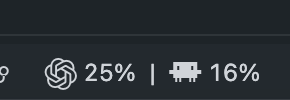
What it does
- Shows a compact remaining-capacity estimate blending the 5-hour and weekly limits for each provider.
- Tints each compact provider item and its thin indicator green above 60%, yellow above 30%, and red at 30% or below; in detailed mode, the color reflects that provider's lowest remaining limit.
- Supports a detailed display with every available usage window and reset time.
- Opens the same details on click or hover.
- Refreshes automatically, with one refresh button beside the usage display when you want an immediate update.
- Automatically detects Claude Code usage when existing Claude credentials are available.
Quick start
- Install Limit Bar from the Extensions view.
- Make sure the Codex CLI is installed, available as
codex on your VS Code PATH, and signed in with ChatGPT.
- Look for the combined Codex and Claude remaining capacity display in the status bar. Click its adjacent refresh icon if you would like to update it immediately.
- If Claude Code is signed in, its usage appears automatically alongside Codex.
Requirements
Codex
Limit Bar uses your existing Codex CLI sign-in. ChatGPT sign-in is required for subscription usage limits.
If the CLI is not available as codex, set Limit Bar › Codex: Executable to its path or command name.
Claude Code
Claude support is detected automatically from your existing Claude Code credentials. No separate connection step is required. You can disable automatic Claude checks in settings if you do not want them displayed.
Display modes
limitBar.displayMode defaults to minimal:
<Codex icon> 78% ▏
When both 5-hour and weekly limits are available, the compact percentage uses a weighted harmonic average, giving the 5-hour limit twice the weight of the weekly limit. For remaining percentages h (5-hour) and w (weekly), the estimate is 3 × h × w / (2 × w + h), rounded to a whole percentage. For example, 100% / 50% shows 75%, and 50% / 90% shows 59%. The estimate falls to 0% when either limit is exhausted. The color follows this blended estimate; hover or click to see the individual limits and reset times. If the pair is unavailable, the first available limit is shown.
Set it to detailed to show every available limit window:
<Codex icon> 78% 1w 91% 5h ▏ <Claude icon> 82% 5h 58% 1w ▏
Commands
| Command |
What it does |
| Limit Bar: Refresh |
Retrieves the latest available usage data. |
| Limit Bar: Show Details |
Opens the complete usage and reset-time view. |
Settings
| Setting |
Default |
Description |
limitBar.enabled |
true |
Shows or hides Limit Bar in the status bar. |
limitBar.displayMode |
minimal |
Chooses between a compact remaining percentage and every available limit window. |
limitBar.refreshIntervalSeconds |
60 |
Controls how often Codex usage refreshes automatically. |
limitBar.codex.executable |
codex |
Sets the Codex CLI path or command name. |
limitBar.claude.enabled |
true |
Automatically detects and displays Claude Code usage when credentials are available. |
limitBar.claude.refreshIntervalSeconds |
900 |
Sets the minimum time between automatic Claude usage refreshes. |
Troubleshooting
- No Codex usage appears: confirm that
codex is on the PATH visible to VS Code and that you are signed in with ChatGPT. If needed, configure limitBar.codex.executable.
- Claude usage does not appear: confirm you are signed into Claude Code. Limit Bar will try again automatically.
- The number is not changing: click the refresh icon next to the usage display. The extension keeps the last successful reading if a provider temporarily cannot be reached.
Development
npm install
npm test
Open this folder in VS Code and press F5 to launch an Extension Development Host. Build a local installable package with:
npm run package
Support
Please report bugs or request features in the issue tracker.
License
MIT

