VS Code support for VRL (Vector Remap Language), the transformation
language used by Vector.
What it does today
Diagnostics from the real compiler. The vrl crate is compiled to
WebAssembly and shipped inside the extension, so what gets underlined in the
editor is what vector validate would reject — not a regex approximation.
It runs as you type, the compiler's notes and labels come through as related
information, and documented error codes link to
errors.vrl.dev.
A file is checked inside the transform that loads it. A remap with
files = [...] is one program: Vector joins the files in order, each
followed by a newline, and compiles the result once. So a .vrl file is
compiled the same way, with the files the transform loads before it, and
every error is put back on the file and line it is in. A variable an
earlier file defines is defined, a type it settles is settled, a block one
file opens can be closed by another. Paths are found the way Vector's
machine would read them, ${VECTOR_CONFIG_DIR} included. When several
transforms load a file, the status bar and a line at the top of the file
say which one it is checked in, and let you pick another; if they disagree
about it, the file says so. Edits to an earlier file, saved or not, show up
in the later ones. Hover a variable or a path to see its type where the
file starts, and completion offers the variables the earlier files define.
A file no transform loads is checked on its own, and says so.
Vector's own functions, not just the standard library. A remap
transform can call more than the vrl crate defines: the enrichment table
lookups (find_enrichment_table_records, get_enrichment_table_record), the
secrets (get_secret, set_secret, remove_secret) and
set_semantic_meaning. They come from Vector itself, at the release the
compiler is pinned to. An enrichment lookup is checked the way vector validate checks it: the table it names has to be declared under
enrichment_tables in one of the workspace's Vector configs.
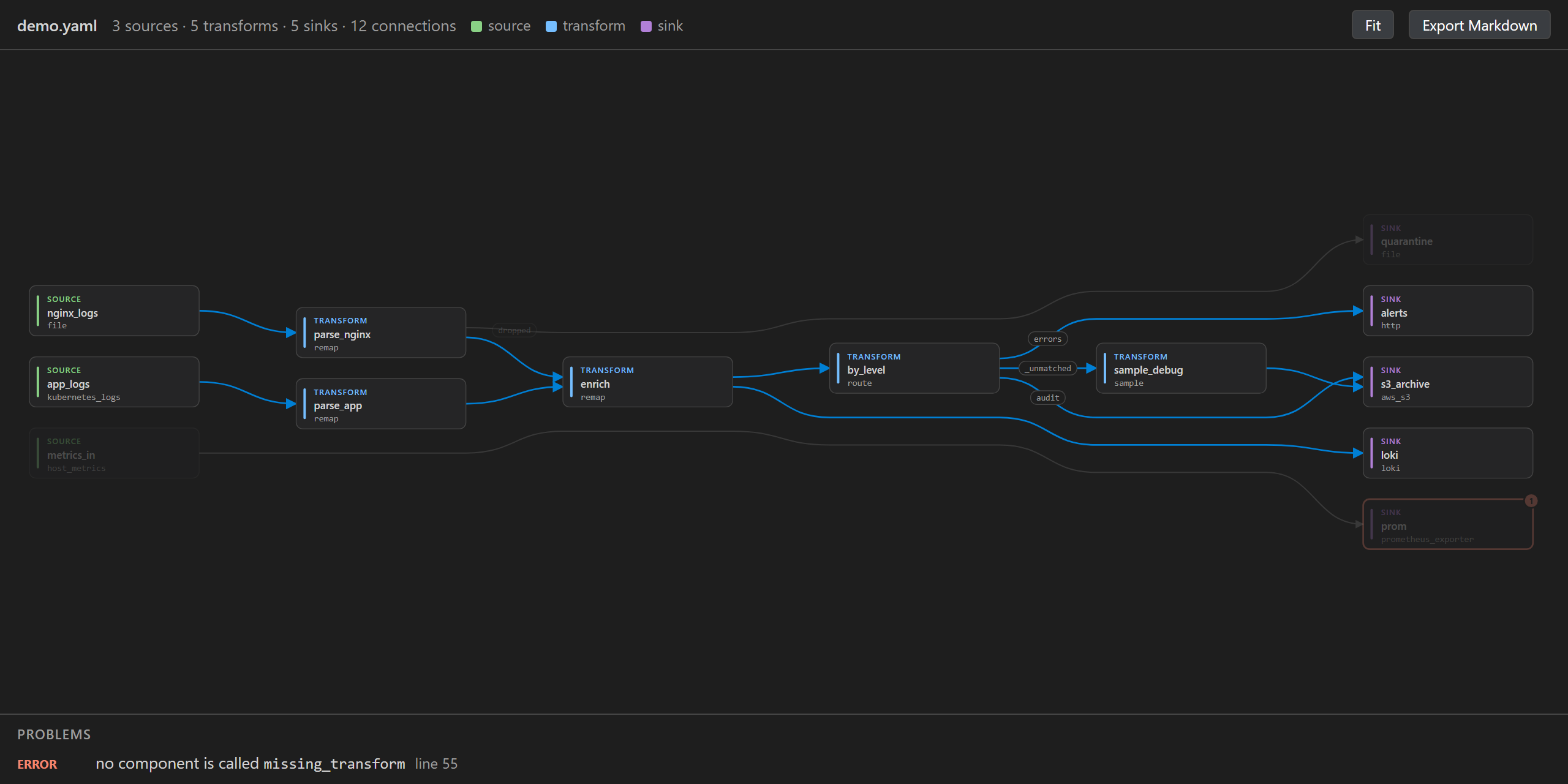
A graph of the pipeline. The Vector icon in the activity bar lists the
pipeline wherever you are in the project — sources, transforms, sinks,
enrichment tables, each with its outputs and its own problems — and any row
opens the graph narrowed to that component and jumps to where it is
declared. There is a graph button in the editor's title bar too, while a
config is the open file.
The graph draws where events go, with named outputs on their arrows: a
route's branches, a remap's dropped, an opentelemetry source's logs,
metrics and traces. Hover a component to light up every path through it.
Problems are marked where they are, and they are Vector's own: an input
naming nothing, a wildcard matching nothing, a router read by its bare name,
an output nobody reads, a transform with no inputs, an input named twice, a
name with a dot in it, a loop. The graph redraws as you edit, and exports as
Markdown with a Mermaid diagram to commit next to the config.
Built for pipelines too big to read at a glance: the wheel scrolls and
Ctrl+wheel zooms; Ctrl+F finds a component by name, type or file and
jumps to it; clicking one keeps its paths lit and shows where it is
declared, with Show only its paths to redraw just what reaches it and
what it reaches. Zoomed out, boxes show only their names, large enough to
read, and a minimap shows where the view is. Double-click a component to
open it in the config.
A pipeline split across several files is drawn whole, and a workspace with
more than one pipeline in it keeps them apart. Which files go together is
decided the way Vector decides it: files whose component names collide
cannot be one config, so config/prod and config/staging are two
pipelines while config/**/*.toml stays one. When there is more than one,
the sidebar's first row says which you are looking at and lets you switch.
To match exactly what your Vector loads — or to include a .json config,
which is read but not searched for — set vrl-tools.vectorConfig to the
patterns you pass to --config, and vrl-tools.vectorConfigDir to the
directories you pass to --config-dir:
"vrl-tools.vectorConfig": ["config/**/*.toml"],
"vrl-tools.vectorConfigDir": ["conf.d"]
The difference matters when one component is written across files — a
router declared in one, each product's file adding a
[[transforms.x.routes]]. Vector merges the top-level files of a
--config-dir into one config, so that works there; a file given with
--config is loaded on its own, and a file that only adds to a component
fails. The graph reads each the way Vector would, and says which it is when
a piece has nowhere to go. Left to guess, it reads them as a directory.
Clicking a component opens the file it is declared in, and a name used in
two files is marked in both, as Vector would refuse it.
Enrichment tables are listed, not drawn: a pipeline can have hundreds, and
no arrow touches one. The sidebar collapses them into one row, grouped by
the file that declares them, each saying which components' VRL reads it —
or that nothing in this pipeline does — with its CSV and its row count.
Show tables draws the ones the components on screen read. Parts of a
config that share no arrow, such as Vector's own metrics beside the
pipeline, are drawn as bands of their own, and an exclusive_route's routes
are numbered in the order they are tried, with a warning for one an earlier
route hides.
An output that is meant to end where it is can be marked, so it stops
being reported: a comment on the line that declares the component or the
route,
[transforms.route_by_product] # vrl-tools: terminal _unmatched
or, outside the config, "vrl-tools.terminalOutputs": ["*._unmatched", "dropped-handler"]. The findings are in the Problems panel too, and
"nothing reads …" has a Quick Fix for either. A team with a naming
convention can have it checked with vrl-tools.componentNamePattern, for
example { "remap": "-normalizer$" }.
Hover, completion and signature help, generated from the compiler. Hover
a function for its signature, return type, whether the call can fail, its
parameters and its examples. Completion lists every function, marks the
fallible ones and expands into a call with tabstops — closure included for
for_each and friends — and after a . it offers the event paths this file
already uses. Signature help follows the cursor from one argument to the
next, named arguments included.
A quick fix for an unnecessary ??, offered only when it is
unnecessary in every transform that loads the file: removing it where one
transform has typed the value would break another where it can still fail.
Run a program on a sample event. Put program.vrl.sample.json next to
program.vrl and VRL: Run on sample event compiles the program, runs it on
that event and opens the result beside the source. The sample also types the
program: .message is a string because the sample says so, so the "this
might fail" noise goes away and a misspelled field starts being caught.
Syntax highlighting built for the constructs that actually show up in
production parsers: quoted path segments (."@timestamp"), metadata paths
(%vector.ingest_timestamp), regex (r'…'), raw strings (s'…'),
timestamps (t'…'), the fallible-call ! told apart from negation, and
error destructuring (x, err = parse_json(.message)).
Highlighting inside Vector configs: a source: block scalar in a YAML
config, or a source = '''…''' string in a TOML one, is coloured as VRL.
Snippets for the recurring shapes: pjson, psyslog, pkv, pgrok,
pregex, ptime, coerce, foreach, mapvalues, ecs, abortif,
ifelse, ifmatch, iferr. Each one is compiled by the test suite, so a
snippet cannot expand into code the compiler rejects.
Which VRL
The extension tracks the vrl crate 0.35.0, the version Vector 0.58.0
depends on, and shows it in the status bar. A mismatch with the Vector you run
in production is the usual source of disagreement between an editor and a
deployment, so it is worth having on screen.
What it does not do yet
- With no sample event, the compiler is told nothing about the shape of your
events, so
parse_json(.message) is reported as fallible even when you know
.message is a string. A sample fixes the typing; it cannot make a function
that fails on valid input infallible.
- Diagnostics, hover and completion apply to
.vrl files. VRL embedded in a
Vector config is highlighted but not yet compiled.
- One sample event per program, not a set of them.
get_vector_metric, find_vector_metrics, aggregate_vector_metrics and
parse_dnstap are still reported as undefined: they need parts of Vector
that do not belong inside an editor extension.- An enrichment lookup is checked against the table's name, not its contents.
Which fields a
geoip or file table can be searched by depends on data
that lives where Vector runs, so that part is left to Vector.
- The graph reads files that are complete configs, the way
vector --config
reads them. The --config-dir layout where sources/, transforms/ and
sinks/ subfolders hold one component per file, named by the file, is not
read yet.
- Which outputs a component has is read from its
type, against a table taken
from Vector's source at the pinned release. A component type newer than that
table keeps the ordinary single output, so a named output it has grown will
be reported as naming nothing until the pin moves.
- The graph does not typecheck edges. Vector also refuses a config where a
metrics output feeds a logs-only sink; that is left to
vector validate.
- Completion does not add the
! of a fallible call for you. Asserting turns
a handled error into an aborted program, and that is your decision to make.
Licence
MIT. The compiler inside it is the vrl crate, which is MPL-2.0 and is
consumed unmodified; its source is at https://github.com/vectordotdev/vrl
under the pinned tag. The terms of everything compiled into the WebAssembly
module ship with the extension, in THIRD-PARTY-NOTICES.md.
| |

