Toy Models Gate
Local HTTP gateway that routes AI coding assistants inside VS Code (Claude Code, Codex, GitHub Copilot, Cline, Continue, Devin, etc.) to custom or self-hosted generative-AI models — local runtimes (Ollama, LM Studio, llama.cpp) and private/cloud deployments (OpenAI, Anthropic, Azure OpenAI, and any OpenAI-compatible endpoint).
The gateway listens on 127.0.0.1 and speaks the wire protocols clients already know — Anthropic Messages, OpenAI Chat Completions, OpenAI Responses, and Ollama — then forwards traffic to your configured upstreams.
Features
- Role profiles as models — an alias can carry a
system_instruction, so qwen-react and qwen-backend appear as separate entries in your client's model picker.
- Effort normalization — translate client-side effort vocabulary (
high, minimal, …) into whatever your upstream deployment actually accepts (xhigh, medium, low), with fallback / reject / passthrough policies and a VS Code warning on fallback.
- Per-client tokens & usage accounting — one token per client; every request is recorded to
~/.toymodelsgate/usage/YYYY-MM-DD.jsonl with client, workspace, alias, tokens, latency and errors.
- Stateless — no conversation state; the client owns history, provider prompt-cache hints (
cache_control, prompt_cache_key) pass through untouched.
- Per-workspace config —
<workspace>/.toymodelsgate/config.yaml overrides ~/.toymodelsgate/config.yaml.
Commands
All commands are available under toymg.* (and the toymodelsgate.* aliases):
| Command |
Description |
Toy Models Gate: Start Gateway |
Start the local gateway |
…: Stop Gateway / …: Restart Gateway |
Lifecycle |
…: Open Configuration File |
Open ~/.toymodelsgate/config.yaml |
…: Open Settings Panel |
Guided settings UI (providers, models, roles, effort) |
…: Open Usage |
Usage aggregation panel |
…: Open Log / …: Toggle Debug Logging |
Output channel |
…: Set Up Clients |
Writes Claude Code / Codex client config |
…: Register API Key |
Store an upstream key in SecretStorage |
…: Register Client Token |
Rotate/register a client bearer token |
…: Rediscover Models |
Reload configuration |
Configuration
Quick setup
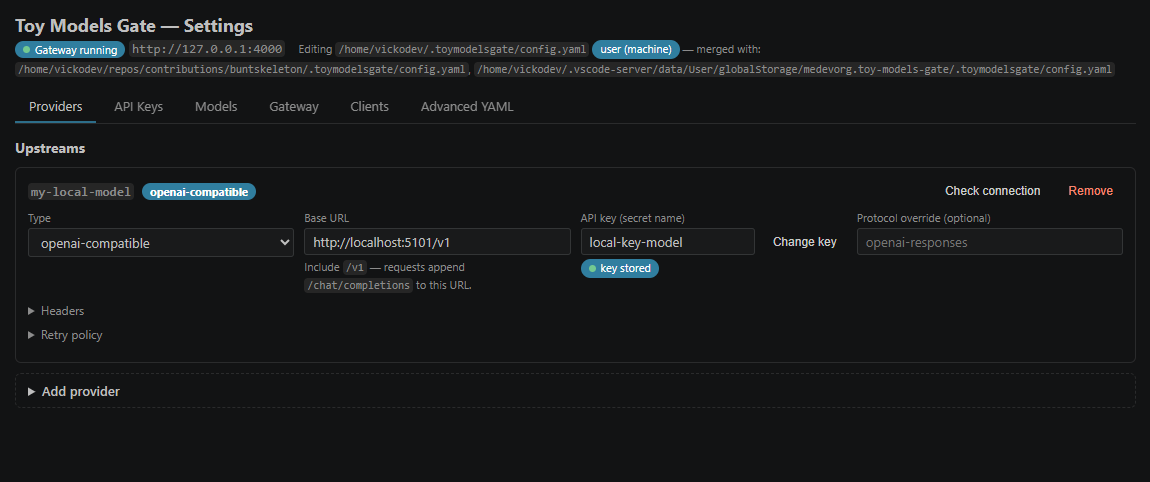
The fastest path is the guided Settings Panel — no YAML required:
Ctrl+Shift+P → Toy Models Gate: Open Settings Panel.- API Keys tab → Register a secret: give it a name (e.g.
my-super-model-key) and paste the key value. Values are stored in VS Code SecretStorage and never displayed again.
- Providers tab → Add provider: name, type,
base_url (include /v1 for OpenAI-compatible endpoints) and the API key name you just registered. Hit Check connection to verify reachability before saving.
- Models tab → Add model: pick an
id (what clients will request), the provider and the upstream model name. Optionally expand Role profile for a system instruction and Effort policy for effort mapping; choose the Default model for unresolved requests.
- Gateway tab → only if you need a different port or
auth: none.
- Clients tab → Set Up Clients writes the Claude Code / Codex configuration for you; each client gets its own token.
- Save configuration in the footer — on first save you'll be asked where to store it (workspace / VS Code profile / machine). Reload refreshes the panel from disk at any time.
Manual setup
Prefer editing by hand? The same configuration lives in YAML — either use the Advanced YAML tab inside the Settings Panel, or open the file directly (Toy Models Gate: Open Configuration File). After changing the file manually, run Rediscover Models (or Reload in the panel) so the running gateway picks it up.
~/.toymodelsgate/config.yaml — three scopes merge, most specific wins: <workspace>/.toymodelsgate/config.yaml → VS Code profile → user home. Providers merge by key, models by id. The Settings Panel edits the most specific existing file, or asks where to save on first use:
providers:
  my-super-model:
    type:
      openai-compatible # openai | anthropic | azure-openai | ollama
      # lm-studio | llama.cpp | openai-compatible
    base_url: https://example.internal/v1
    key: secret:my-super-model-key # stored in VS Code SecretStorage
    retry:
      retries: 3
      incrementalDelayInMs: 500
      retryWhenStatusIs: [429, 502, 503, 504]
      doNotRetryWhenStatusIs: [400, 401, 403, 404, 422]

effort:
  default_on_invalid: fallback # fallback | reject | passthrough

models:
  - id: qwen
    use: my-super-model/qwen-N.M
    effort:
      supported: [xhigh, medium, low]
      default: xhigh
      on_invalid: fallback
      map:
        high: xhigh # client 'high' → upstream 'xhigh'

  - id: qwen-react
    use: my-super-model/qwen-N.M
    system_instruction: >
      You are a senior frontend engineer specialized in React, TypeScript
      and Node.js.

default: qwen

server:
  host: 127.0.0.1
  port: 4000
  auth: required # 'none' for clients that cannot send a token
All effort keys are optional — when omitted, the gateway passes the client's effort hint through untouched and the upstream is responsible for validation.
Example: adding a role model
Say you want a qwen-golang role — same upstream model, a Go-focused
system instruction and its own effort policy:
providers:
  my-super-model:
    type: openai-compatible
    base_url: https://example.internal/v1
    key: secret:my-super-model-key

models:
  # …existing models (qwen, qwen-react, …) stay listed above…
  - id: qwen-golang
    use: my-super-model/qwen-N.M
    system_instruction: >
      You are a senior Go engineer. Prioritize idiomatic Go, explicit error
      handling with wrapped errors (fmt.Errorf with %w), context propagation,
      table-driven tests, and minimal dependencies. Prefer the standard
      library over third-party packages unless strictly necessary. Follow
      the project's existing module layout and respect go.mod conventions.
    effort:
      supported: [xhigh, medium, low]
      default: medium
      on_invalid: fallback
      map:
        high: xhigh
        minimal: low

default: qwen-golang
Register the key once (Toy Models Gate: Register API Key or the Settings
Panel → API Keys tab), then clients can request model: "qwen-golang".
Each alias carries its own role profile — duplicate one per stack.
Client setup
Run Toy Models Gate: Set Up Clients to auto-write:
- Claude Code —
~/.claude/settings.json: env (ANTHROPIC_BASE_URL, ANTHROPIC_AUTH_TOKEN, CLAUDE_CODE_ENABLE_GATEWAY_MODEL_DISCOVERY, ANTHROPIC_SMALL_FAST_MODEL), availableModels + enforceAvailableModels over your aliases, model set to the default alias, and per-alias modelSettings.effortLevel from each effort.default. With one alias it also registers ANTHROPIC_CUSTOM_MODEL_OPTION/_NAME (keeps the client effort selector). With two or more it writes a modelPicker.replaceBuiltInOptions lineup — one labeled row per alias — and ANTHROPIC_DEFAULT_{OPUS,SONNET,HAIKU,FABLE}_MODEL pins so internal model slots (background tasks, subagents, opusplan) resolve to your default alias. Requires Claude Code ≥ 2.1.242 for modelPicker.
- Codex —
~/.codex/config.toml (model_providers.tmg block; set TMG_API_KEY env var to the client token)
For Copilot and other clients, point the client at http://127.0.0.1:4000 (Ollama-compatible endpoints /api/chat, /api/tags are emulated) with the token shown via Register Client Token.
Known limitations
- AWS Bedrock and Google Vertex provider types are recognized in the schema but deferred — requests return a structured "not supported in this release" error.
count_tokens is forwarded only to Anthropic providers.- No server-side session memory (by design — see ADR-001 §AD-8).
Development
pnpm install
pnpm typecheck
pnpm test              # unit tests (offline, no VS Code, no network)
pnpm test:integration  # gateway vs fake providers
pnpm fake:all          # fake upstreams on ports 5101-5104, 5107
pnpm build             # esbuild bundle → dist/extension.js
pnpm package           # vsce package --no-dependencies → .vsix
Package manager is pnpm (corepack enable). Architecture: domain / application / infrastructure — see specs/ADR-001.md.
License
BSD 3-Clause — © Vickodev

