Antigravity CLI Usage StatsShows Antigravity CLI model quotas, including hourly and weekly quota buckets when available. Installation Launch VS Code Quick Open ( Ctrl+P), paste the following command, and press enter.Copied to clipboard |

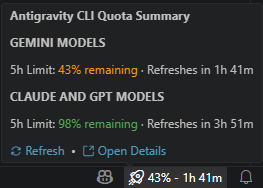
Antigravity CLI Usage StatsA lightweight VS Code extension to monitor your local Antigravity CLI model quotas and rate limits from your status bar. OverviewThis extension provides developers with clear, real-time visibility into the rate limits of models running under the Antigravity CLI environment. By parsing status values from your local machine, it helps you manage your development limits without leaving your editor. ScreenshotsStatus Bar and Hover Tooltip
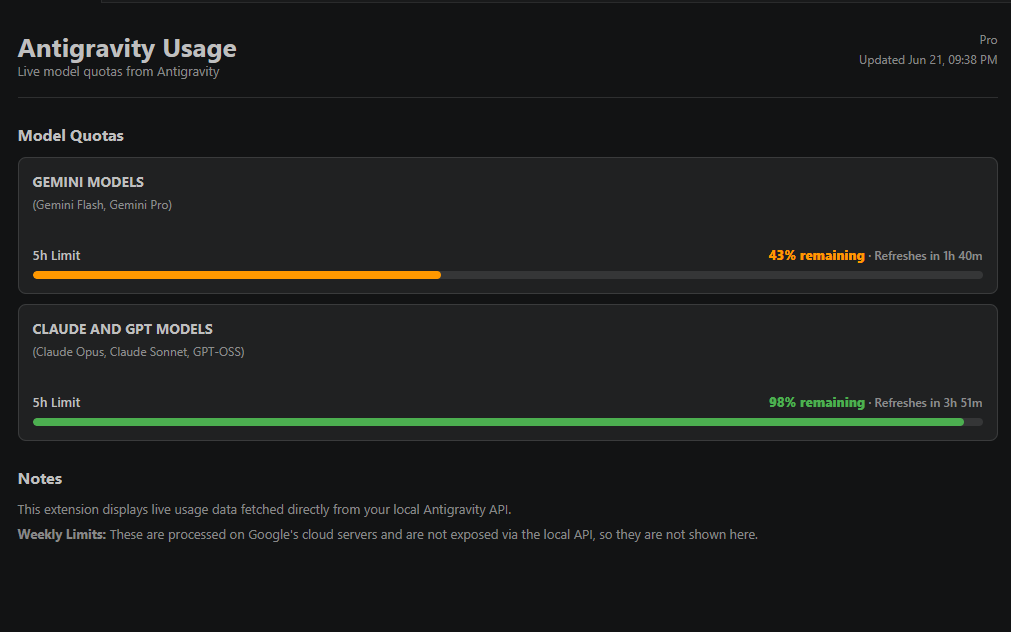
Details Panel Webview
Core Capabilities
Architecture and ProcessAll quota information is queried directly from the local Antigravity server running on your machine. The extension automatically detects the running Visual Design and AlertsRemaining quota status percentages are styled dynamically according to the following rules:
InstallationTo compile and install the extension:
ConfigurationCustomize the extension settings under the
Note on Weekly LimitsWeekly quota allocations are managed and validated on Google's cloud servers. Since they are not exposed by the local Antigravity server API, this extension excludes them to ensure you only see accurate, local rate limits. Open Source and TransparencyThis extension is 100% open-source! If you want to audit the code or inspect how the local server communication is handled, you can check the complete source code directly on our GitHub repository: mdsameersakib/antigravitycli-usage-stats. PrivacyAll operations run entirely on your local machine. The extension does not read private OAuth credential files, handle Google authorization tokens, or transmit telemetry to external servers. |