
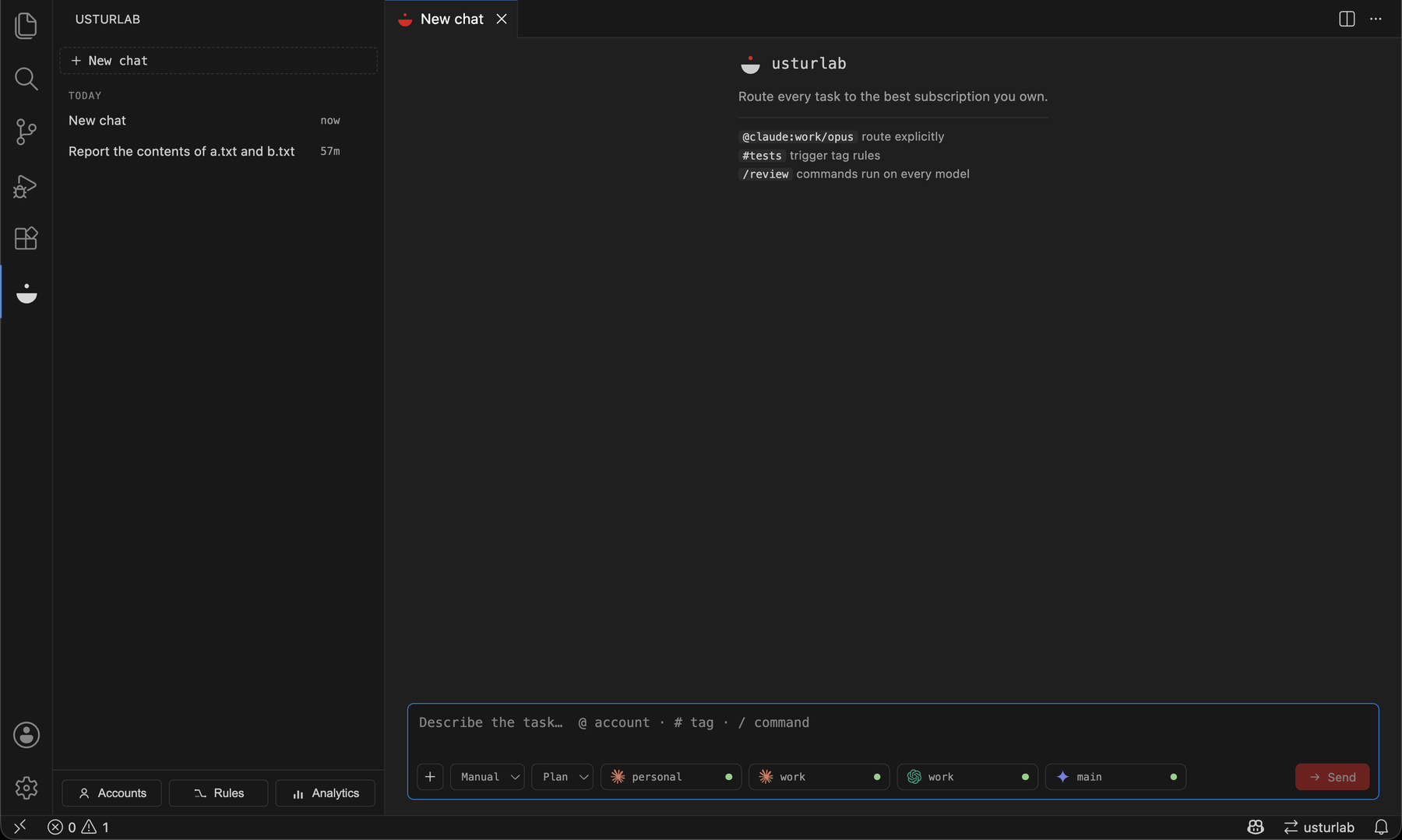
Route every AI coding task to the best subscription you own — and make every model behave like the best one.
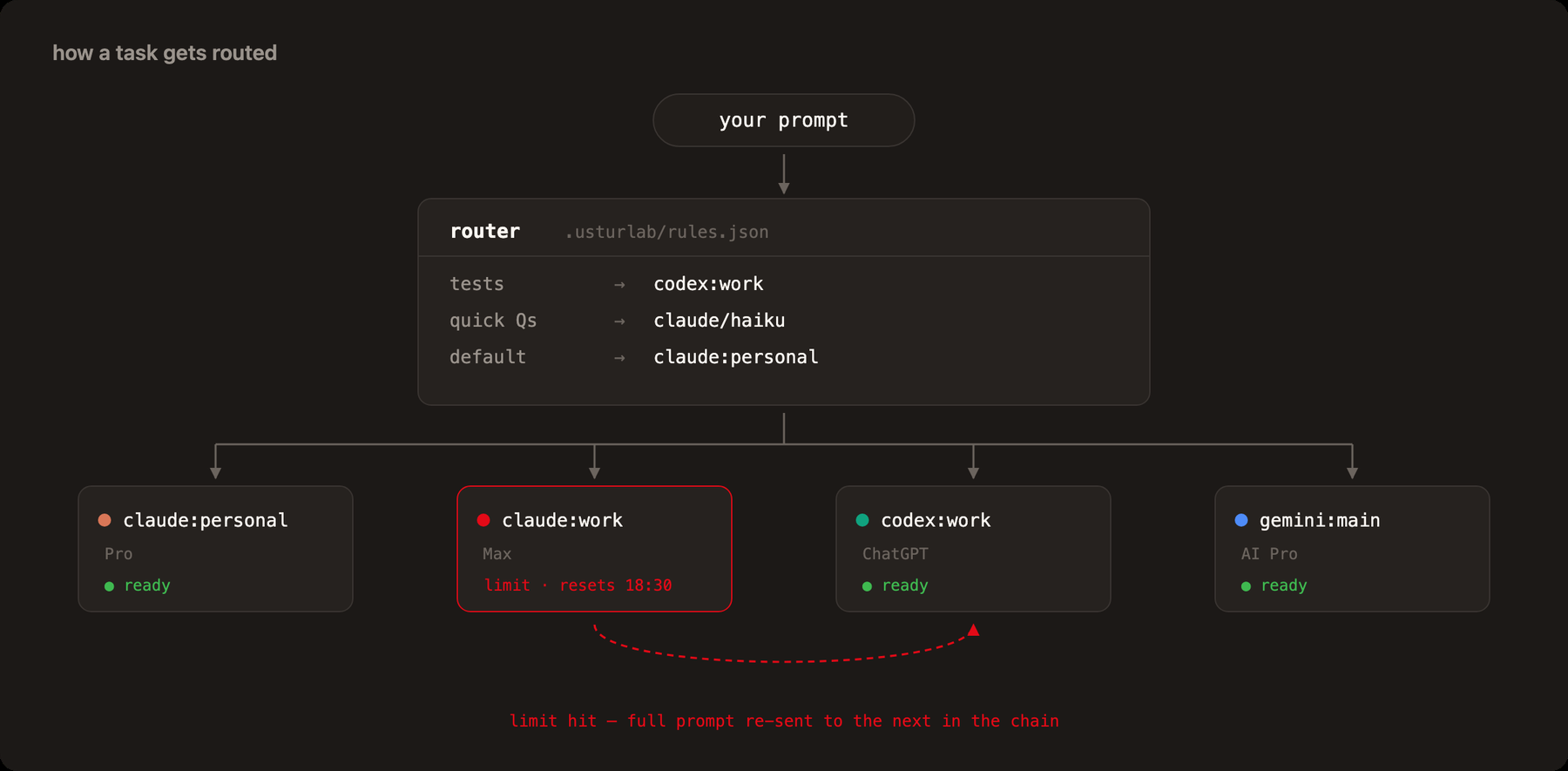
usturlab is an open-source VS Code extension for people who juggle multiple AI subscriptions — two Claude accounts, a ChatGPT plan for Codex, a Google AI subscription, GitHub Copilot. You register all of them once; usturlab then routes each task to the right account and model using your own routing rules, and fails over automatically when an account hits its usage limit.
It does not stop at picking who runs the task. Every provider is given the context it would otherwise lack, held to the same standing instructions through its own system-prompt channel, and — for hard work — checked by a different model before you rely on the answer.
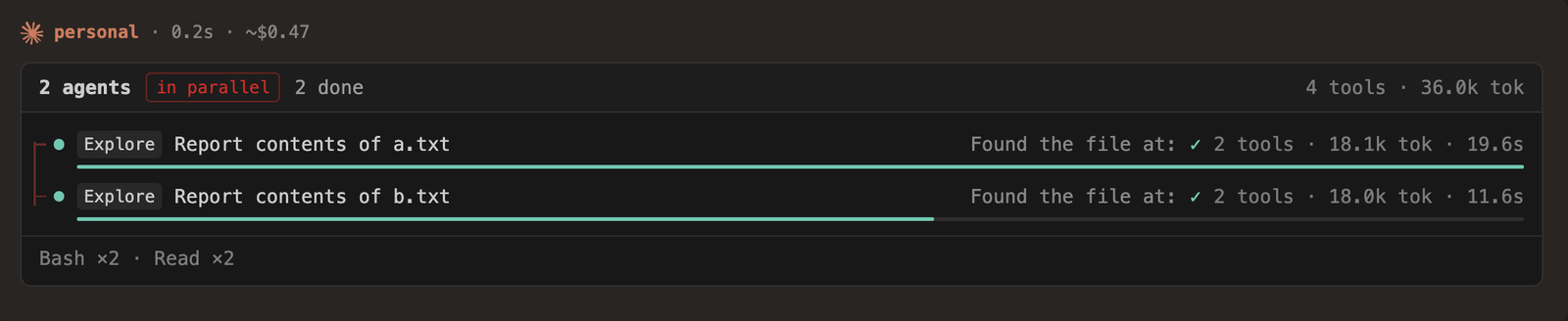
Subagents get their own lane, so a fan-out reads as a fan-out — and the cost line says ~$0.47 with a tilde, because that is what the run would have cost: on a subscription nobody was charged.
Making every model smarter
A model's output quality is a function of the context it gets, the constraints it is held to, and whether anyone checks its work. Routing alone touches none of those.
It knows what you know. Each run carries a task brief: the file you have open with your selection and its line range, the branch and uncommitted changes, and the project's convention files — AGENTS.md, CLAUDE.md, .cursorrules, .github/copilot-instructions.md — normalized so every provider gets them. Nothing is sent twice: Claude already loads CLAUDE.md and Codex AGENTS.md, so their briefs carry only what they cannot know.
Every request gets the framing it is missing. Before a run starts, the brief adds only what your prompt did not already cover: the exact check that will be run against it afterwards (pnpm run typecheck && pnpm run test — your repo's own, never invented), reproducing a failure before fixing it when a bug report has no output in it, naming files before editing them when nothing anchors the work, and staying inside the scope you asked for on heavy changes. Never more than three lines, never a rewrite of what you typed.
Every CLI gets the instructions it is missing, through its own real channel — Claude --append-system-prompt, Codex developerInstructions, and for the ACP agents, which have no system slot, the session's first prompt, restated only when it changes. The content is compensation for what each CLI does not do by default, so Claude's list is the shortest.
The work gets checked. After a run changes files, the project's own typecheck/test script runs and, on failure, the model gets one repair round with the real output. Commands are never invented — only what package.json or a Makefile declares — and nothing runs in Plan mode.
A different model looks for what the checks cannot see. On hard work a different provider reviews the diff adversarially, told that finding nothing (LGTM) is a valid answer. Different labs have different blind spots; that is the whole reason to own several subscriptions. Connect a free OpenRouter key and the review runs on an open-weight model instead, so checking the work costs no quota at all.
It says when a chat has turned against itself. Two corrections, or checks left red twice, and the thread is now feeding the model its own failed attempts every turn. usturlab says so once and suggests a fresh chat — length alone is never the trigger, only evidence of circling.
It learns. Auto routing calibrates each account from your own clean-run rate — runs you did not have to steer, retry, or escalate — keyed by weight class so a scrappy run on the cheap model is not held against the expensive one, and on light work a measurably faster account wins. It estimates how much of a quota window a task will burn before choosing. Corrections you type mid-run are collected, and a recurring one is offered (never silently applied) as a standing rule every provider inherits.
The UI
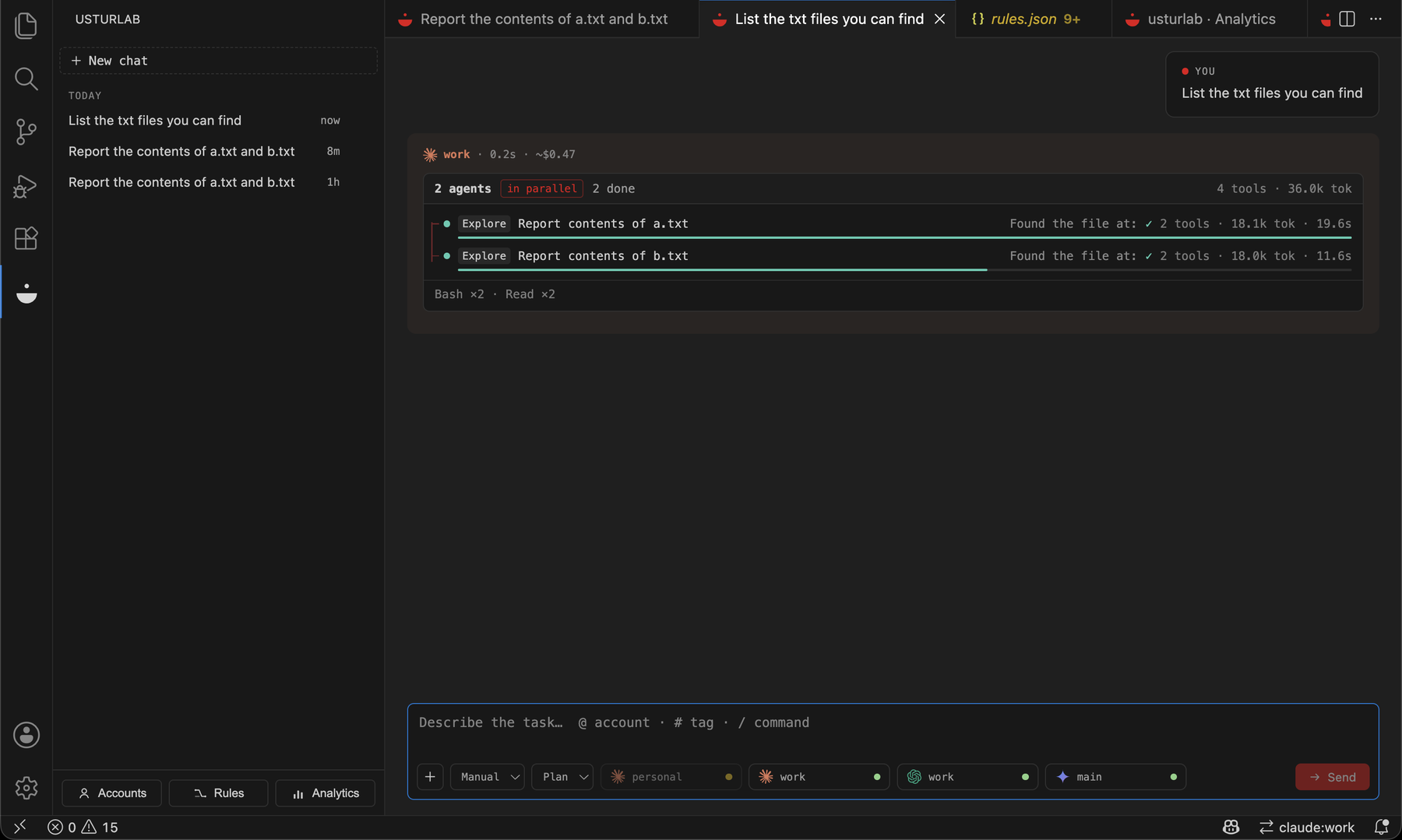
Failover is visible where it happened. When an account reports its limit, the transcript says so on the rail and the next account in your chain picks the task up — the reply that follows carries that account's name and colour, so who actually ran it is never a guess.
Analytics separates what you were billed from what you weren't: Would have cost is the list price of work your subscriptions covered, and it is never added to money actually charged.
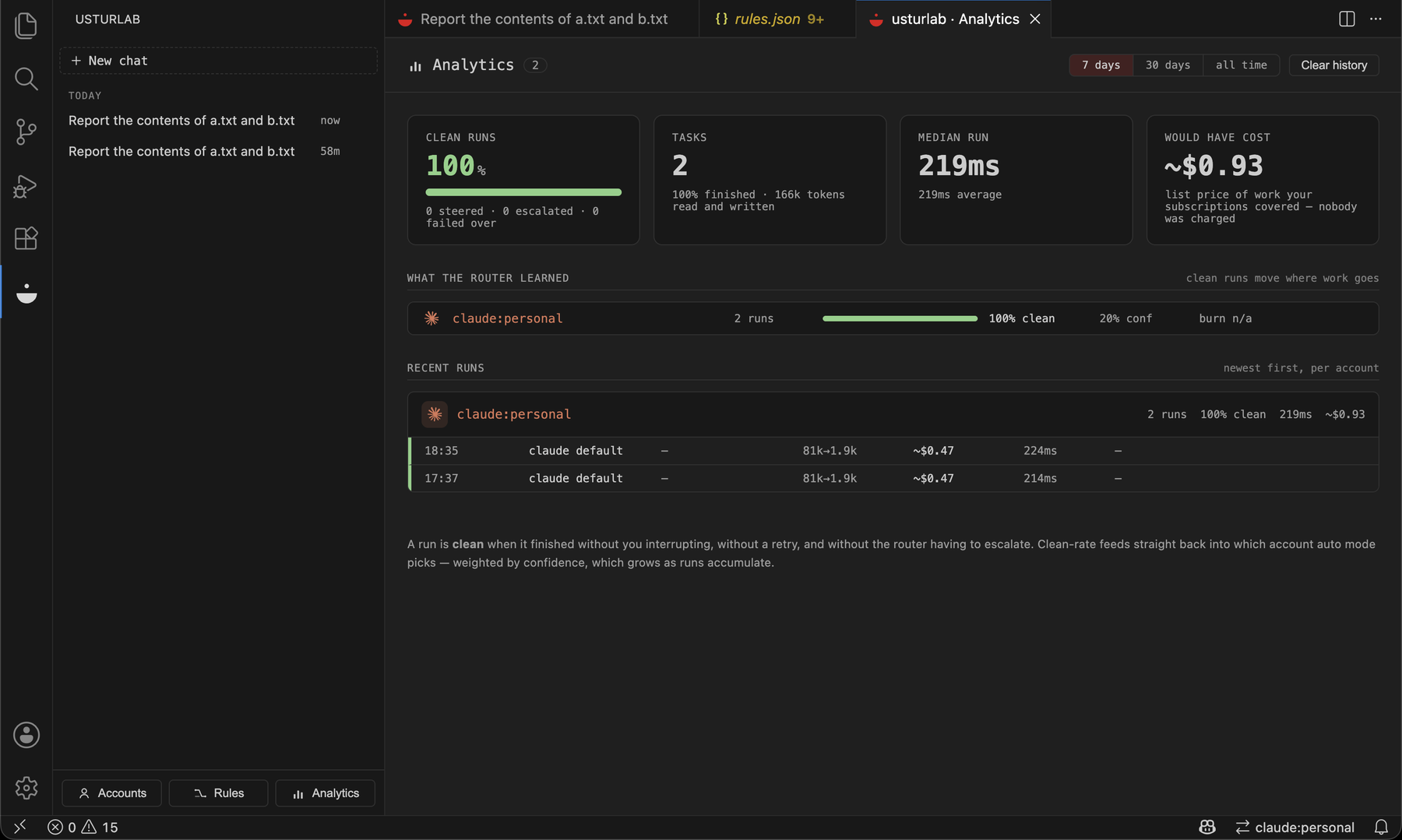
One timeline, and nothing boxed:
- Sidebar — your chat list, grouped by date (Today / Yesterday / Last 7 days / Older). Running chats show a pulsing dot. Nothing is typed here; it's a clean index.
- Chats open in the editor area — one tab per conversation, a reading-width column, markdown + syntax-highlighted code blocks. A hairline rail runs down the transcript and every event is a dot on it, in the colour of the account it belongs to. Two chats side-by-side run concurrently.
- The work stays out of the answer's way. Everything the model did — files read, commands run, subagents dispatched — is one dim line under the reply (
3 steps · 2 agents) that opens on click. The model's own checklist is one line too (tasks 2/4). Model, duration and cost fade in when you look at the row they belong to.
- Parallel agents get lanes. When a model splits the work across subagents, each one is its own lane — its tool calls, what it is doing right now, and what it reported back; when they finish, each lane keeps a duration bar proportional to the slowest.
- One live indicator, in the reply itself. The header of the answer being written says what the run is doing —
thinking, writing, working, 2 agents, or waiting for you when it is blocked — and holds the clock.
- A composer with nothing in it but your task. The text you are writing, a
+, one word — Plan — and Send. That word opens both switches: what the model may do (plan, edit, full, ask) and how it is routed (auto, manual). Typing @ completes account and model names, # your tag rules, / the commands.
- A run that ends, ends. Stop it and the turn closes with
⊘ stopped by you; when every account fails, the error closes it and offers Retry. Copy sits on every code block and every answer.
- Usable without a mouse. The chat list is keyboard-navigable, the transcript is a
log and the live indicator a status, and nothing conveys state by colour alone.
- Accounts tab — one row per account with status (
● ready / ◌ limited · resets 18:30), auth type, usage bars, add/remove.
- Rules tab — your routing rules, read and written in one place: the ordered list is the order the router tries them in, match conditions are chips, failover chains are pill sequences. The JSON file stays the source of truth and edits made there show up here immediately.
Conversations persist across VS Code restarts, including native CLI session ids, so old chats keep their context.
How it works
Consumer AI subscriptions can't be called directly over the API. usturlab therefore never touches provider APIs with subscription credentials — it orchestrates the official CLIs (claude, codex, gemini, copilot) as subprocesses, each authenticated with its own isolated profile:
| Provider |
Multi-account isolation |
Auth options |
| Claude Code |
CLAUDE_CONFIG_DIR per profile, or CLAUDE_CODE_OAUTH_TOKEN |
isolated profile login (recommended — the only one that carries usage scope), claude setup-token, API key |
| Codex CLI |
CODEX_HOME per profile |
ChatGPT login, API key |
| Gemini CLI |
HOME override per profile |
Google login (paid tiers — see caveats), API key |
| Copilot CLI |
COPILOT_HOME per profile |
GitHub login, fine-grained PAT |
| OpenRouter |
none needed (stateless HTTP) |
free API key — reviews only, see below |
The one exception to "no APIs" is OpenRouter, which is not a subscription: it reaches free open-weight models (DeepSeek R1, Qwen3 Coder, Llama 3.3 70B) over plain HTTP so the second opinion can run without spending a second subscription. Because a model reached this way has no tools, no sandbox and no session, it is marked review-only — held out of the default chain, the router's scoring, plan execution and @ mentions. It can check work; it can never be given work.
Secrets (tokens, API keys) live in the VS Code secret store. Profile directories live under ~/.usturlab/profiles/. usturlab also scrubs hijacking env vars (e.g. a stray ANTHROPIC_API_KEY silently overrides Claude subscription auth) from every subprocess.
Adding an account is one authorize click: the wizard opens a login terminal per account and detects completion automatically — by polling claude auth status for a profile login, watching for the auth file (Codex/Gemini), or capturing the token straight from terminal output when you pick claude setup-token instead. No copy-pasting.
Limit detection is first-class: Claude's stream emits rate_limit_event with the exact reset time; Codex/Gemini/Copilot limit messages are fingerprinted in limits.ts. On a limit, the full original prompt is re-sent to the next account in the chain and the account goes on cooldown until its stated reset.
Requirements
- VS Code 1.95+
- The CLIs for the providers you want to use, installed and on
PATH:
Quick start
- Click the usturlab icon in the activity bar → Add account (or
usturlab: Add Account from the command palette). Each account gets an isolated profile, so two Claude accounts never collide.
- Click + New chat — the chat opens as an editor tab. Type your task; the reply is headed with the account and model that ran it, and the rule that picked them is in its tooltip.
- Open the Rules tab (or
usturlab: Routing Rules) and create your rules file:
{
  "version": 1,
  "rules": [
    {
      "id": "tests-to-codex",
      "match": { "keywords": ["test", "spec"], "globs": ["**/*.test.*"] },
      "target": [
        { "provider": "codex", "account": "work" },
        { "provider": "claude", "account": "personal", "model": "sonnet" }
      ]
    },
    {
      "id": "quick-questions",
      "match": { "keywords": ["what is", "explain"], "maxPromptChars": 400 },
      "target": [{ "provider": "claude", "account": "personal", "model": "haiku" }]
    }
  ],
  "defaultChain": [
    { "provider": "claude", "account": "personal", "model": "sonnet" },
    { "provider": "gemini", "account": "main" }
  ]
}
Routing semantics
@provider:account/model mentions in the prompt (e.g. @claude:work/opus) bypass rules entirely.- Rules are evaluated in order; first match wins. Within a rule's
match, fields are AND-ed and values within a field are OR-ed.
- Failover order: the matched rule's
target chain, then defaultChain entries not yet tried.
- A rule may carry
exclude instead of (or alongside) target — { "exclude": [{ "provider": "gemini" }] } bars it from the whole chain, defaultChain included. Every matching rule's exclusions apply, not just the first match's; an explicit @mention overrides them.
- Accounts on cooldown (recently limited) are skipped at routing time.
#hashtags in the prompt become tags for match.tags rules.
Terminal mode
usturlab: Open Session in Terminal opens the chosen CLI interactively in a VS Code terminal with the right account's environment injected — for long agentic sessions where you want the CLI's own UI.
Settings
| Setting |
Default |
Description |
usturlab.permissionMode |
safe |
safe (read/plan), edits (auto-accept edits), full (skip approvals) |
usturlab.routingMode |
auto |
auto reads the task and picks the model; manual follows your chain exactly. Your rules win in both |
usturlab.sendWorkspaceContext |
true |
Send the open file, selection, git state and convention files |
usturlab.frameTasks |
true |
Add the framing a request is missing — the check to run, reproduce first, name files, stay in scope |
usturlab.standingInstructions |
true |
Give each provider the instructions it needs to behave like the best one |
usturlab.verifyChanges |
true |
Run the project's own checks after a change, and let the model fix a failure once |
usturlab.secondOpinion |
hard |
Have a different provider review the work: never / hard / always |
usturlab.autoPlanHeavyEdits |
true |
Plan heavy code-writing work before it edits |
usturlab.askPermission |
false |
Ask before every tool call, on every provider — not just the ones with a native prompt |
usturlab.midRunStrategy |
queue |
A message sent mid-run on a provider without live input: queue after the current task, or restart it with both merged |
usturlab.notifyOnFinish |
true |
Notify when a task finishes while its tab is not focused |
usturlab.pollUsage |
false |
Proactively poll quota (Claude 5h/weekly window, Copilot AI credits) |
usturlab.cliPath.* |
CLI name |
Override binary paths |
Commands
usturlab: Add Account / Remove Account / Manage Accountsusturlab: Routing Rules / Edit Routing Rules (raw JSON)usturlab: New Conversation, Open Chat, Cancel Running Taskusturlab: Open Session in Terminalusturlab: Toggle Ask Before Acting — flip askPermission without leaving the chatusturlab: Edit Custom Slash Commands — your own /name prompts, in .usturlab/commands.json
A commands file that came from the workspace stays inert until you enable it: a command's template
becomes the prompt a provider runs, so a repository you just opened does not get to write one. The
approval is keyed by content — editing an enabled file asks again.usturlab: Sync MCP Servers to All Profiles — write .usturlab/mcp.json into each CLI's own configusturlab: Analytics — what the router learned: clean-run rate and confidence per account, median burn per run, performance per kind of workusturlab: Simulate Usage Limit (debug) — test failover without burning quota
Caveats
- Gemini free tier: as of mid-2026 Gemini CLI rejects free individual Google accounts (
IneligibleTierError pointing to Antigravity). A paid Google AI subscription or a GEMINI_API_KEY is required.
- Gemini multi-account uses a
HOME override (no official config-dir env var yet) — experimental on Windows.
- Copilot CLI's programmatic mode is plain text; tool activity is not itemized.
- Quota polling uses undocumented endpoints and is off by default; passive detection (parsing the CLI's limit message mid-run) is the primary mechanism.
Your accounts, and each provider's terms
usturlab drives each provider's own official CLI, authenticated with credentials you logged in yourself. It does not share, pool or resell accounts, and it never sends subscription credentials to a provider's API.
What it cannot do is know the terms of your plan. Those are set by each provider, differ between plans, and change. Registering several accounts and routing work between them is your decision under whatever agreement you hold with each of them — read those terms and stay inside them. Nothing here is legal advice, and the design described above is not a guarantee about any provider's rules.
One switch is worth choosing deliberately rather than inheriting: quota polling reads undocumented usage endpoints, and is off by default. The primary mechanism — reading the limit message the CLI itself prints mid-run — needs no such call, so leaving it off costs you very little.
Source, license, trademarks and attribution
Source and issue tracker: github.com/mdenesfe/usturlab. MIT licensed.
usturlab is an independent project. It is not affiliated with, endorsed by, or sponsored by Anthropic, OpenAI, Google, GitHub, Microsoft or OpenRouter. Claude, Codex, ChatGPT, Gemini, Copilot and their logos are trademarks of their respective owners, used here only to identify the services usturlab connects to.
Provider mark outlines in the UI come from Simple Icons, released under CC0 1.0.

