Saurus: A VSCode extension for writers
Saurus is an AI-second writing tool designed to keep you in the flow when writing with VSCode.
It detects placeholders (default {{...}}) and shows replacement options in the native completion popover at the cursor. It prioritizes thesaurus results first, keeps AI as opt-in or configurable auto-run, and is designed to avoid slop by targeting single words or short phrases.
Watch the demo video
GitHub preview (GIF, click to open MP4)
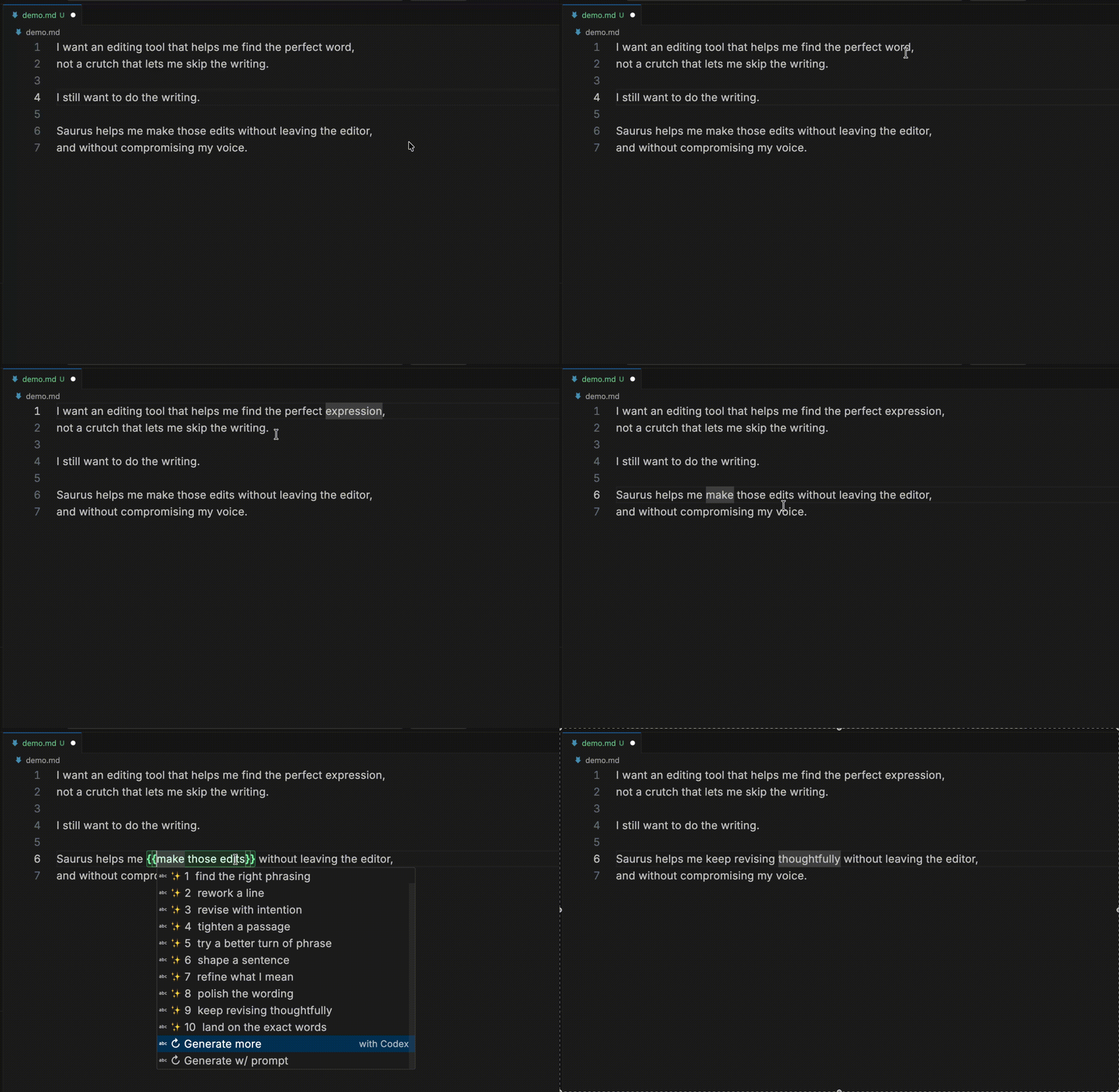
Key Workflows
These are the primary workflows:
- As you write, leave placeholders and come back later, for example:
I came, I saw, I {{took over}}. Placeholders are highlighted, and placing the cursor inside one opens the Saurus suggestions window.
cmd+shift+s / ctrl+shift+s: wrap selected text in delimiters and open suggestionscmd+shift+a / ctrl+shift+a: AI-only suggestions for the current placeholder (also wraps selection if needed)cmd+shift+z / ctrl+shift+z: thesaurus-only suggestions for the current placeholder (also wraps selection if needed)Esc (with suggest menu open): close suggestions and remove placeholder delimiters
Features
- Thesaurus-first suggestions (Merriam-Webster) with AI as optional augmentation
- Works best for single words and short phrases to preserve voice and avoid paragraph-level slop
- Keyboard-first workflow for quick replacement without leaving the editor
- Multiple AI provider support (
copilotChat, copilot, codex, claude)
- Configurable delimiters, language activation, and prompt template behavior
- Smart caching for faster repeat lookups, with optional persistence across reloads
- Visual placeholder highlighting so unfinished spots are easy to find
Supported Files
- By default, Saurus runs in
markdown and plaintext.
- You can add other text-like language IDs via
saurus.languages.
- If a language is not in
saurus.languages, Saurus stays inactive.
Requirements
- VS Code 1.92+
- Node.js 20+
Provider Setup
Thesaurus (Merriam-Webster)
Required settings:
{
  "saurus.thesaurus.enabled": true,
  "saurus.thesaurus.provider": "merriamWebster",
  "saurus.thesaurus.apiKey": "YOUR_MW_API_KEY"
}
AI Provider: Copilot Chat (Native, default)
Recommended settings:
{
  "saurus.ai.provider": "copilotChat",
  "saurus.ai.autoGenerateOnOpen": false
}
Notes:
- No external AI CLI is required for this provider.
saurus.ai.path is ignored when saurus.ai.provider is copilotChat.- If
saurus.ai.model is set, Saurus uses it as a Copilot model hint (id/family), then falls back to any available Copilot model.
AI Provider: Codex CLI
Recommended settings:
{
  "saurus.ai.provider": "codex",
  "saurus.ai.path": "codex",
  "saurus.ai.model": "gpt-5.3-codex",
  "saurus.ai.reasoningEffort": "low"
}
Login check:
codex login status
AI Provider: Copilot CLI
Recommended settings:
{
  "saurus.ai.provider": "copilot",
  "saurus.ai.path": "gh",
  "saurus.ai.autoGenerateOnOpen": false
}
Login check:
gh auth status
AI Provider: Claude CLI
Recommended settings:
{
  "saurus.ai.provider": "claude",
  "saurus.ai.path": "claude",
  "saurus.ai.model": "sonnet",
  "saurus.ai.autoGenerateOnOpen": false
}
Login check:
claude --version
Development Setup
cd /Users/mattgold/Code/saurus-extension
npm install
npm run compile
Press F5 in VS Code to launch the Extension Development Host.
Packaging
npm run package
This produces a .vsix you can install locally.
Usage
- Open a supported file type (default: Markdown or plaintext).
- Select a word or short phrase.
- Press
cmd+shift+s / ctrl+shift+s.
- Pick a replacement from the popover.
- Use
cmd+shift+a for AI-only or cmd+shift+z for thesaurus-only as needed.
- Use
↻ Generate more to append more AI options.
- Use
↻ Generate w/ prompt for a one-off directed AI run.
Commands
Saurus: Generate Placeholder Suggestions (saurus.generateSuggestions)Saurus: Suggest For Selected Text (saurus.suggestForSelection)Saurus: Get More AI Options (saurus.refreshSuggestions)Saurus: Generate With Prompt (saurus.refreshSuggestionsWithPrompt)Saurus: Show AI Suggestions Only (saurus.showAiOnlySuggestions)Saurus: Show Thesaurus Suggestions Only (saurus.showThesaurusOnlySuggestions)Saurus: Exit Placeholder Suggestions (saurus.exitPlaceholderSuggestions)Saurus: Clear Persistent Cache (saurus.clearPersistentCache)Saurus: Disable Auto Trigger (Workspace) (saurus.disableAutoTriggerForWorkspace)
Settings
All settings are under saurus.*.
saurus.enabledsaurus.languagessaurus.delimiters.opensaurus.delimiters.closesaurus.thesaurus.enabledsaurus.thesaurus.providersaurus.thesaurus.apiKeysaurus.thesaurus.timeoutMssaurus.thesaurus.maxSuggestions (default 20)saurus.ai.autoGenerateOnOpensaurus.ai.provider (copilotChat | codex | copilot | claude)saurus.ai.path (optional; ignored for copilotChat; defaults by provider: "", codex, gh, claude)saurus.ai.model (optional)saurus.ai.reasoningEffortsaurus.ai.timeoutMssaurus.menu.thesaurusPrefixsaurus.menu.aiPrefixsaurus.cache.persistAcrossReloadsaurus.cache.persistTtlDayssaurus.placeholderHighlight.enabledsaurus.placeholderHighlight.backgroundColorsaurus.placeholderHighlight.borderColorsaurus.placeholderHighlight.delimiterColorsaurus.placeholderHighlight.textColorsaurus.prompt.templatesaurus.activation.modeOnEnter (hybrid | ai | thesaurus, default hybrid)saurus.suggestions.countsaurus.autoTrigger.onCursorEntersaurus.autoTrigger.debounceMssaurus.context.charsBeforesaurus.context.charsAfter
Example workspace settings:
{
  "saurus.delimiters.open": "[[",
  "saurus.delimiters.close": "]]",
  "saurus.thesaurus.enabled": true,
  "saurus.thesaurus.provider": "merriamWebster",
  "saurus.thesaurus.apiKey": "YOUR_MW_API_KEY",
  "saurus.thesaurus.timeoutMs": 10000,
  "saurus.thesaurus.maxSuggestions": 20,
  "saurus.ai.autoGenerateOnOpen": false,
  "saurus.ai.provider": "copilotChat",
  "saurus.ai.model": "",
  "saurus.ai.reasoningEffort": "low",
  "saurus.ai.timeoutMs": 20000,
  "saurus.activation.modeOnEnter": "hybrid",
  "saurus.menu.thesaurusPrefix": "📖",
  "saurus.menu.aiPrefix": "✨",
  "saurus.cache.persistAcrossReload": false,
  "saurus.cache.persistTtlDays": 7,
  "saurus.suggestions.count": 10,
  "saurus.prompt.template": "Give ${suggestionCount} literary replacements for ${placeholder}. Context: ${contextBefore} || ${contextAfter}. Avoid: ${avoidSuggestions}. Return JSON {\"suggestions\":[\"...\"]}."
}
Prompt Variables
${placeholder}${contextBefore}${contextAfter}${suggestionCount}${avoidSuggestions}${direction}${fileName}${languageId}
Troubleshooting
Copilot Chat access has not been granted: run a manual AI action once (for example ↻ Generate more or Saurus: Get More AI Options) and approve access, or switch providers.No Copilot Chat models are available: sign in to Copilot Chat in VS Code or switch to a CLI provider.AI CLI was not found: set saurus.ai.path or install the selected CLI provider.AI CLI is not logged in: log in for your selected CLI provider (Codex: codex login; Copilot via gh: gh auth login; Claude: run claude and complete login or set ANTHROPIC_API_KEY).Merriam-Webster thesaurus API key is missing: set saurus.thesaurus.apiKey.- No new results on refresh: adjust prompt template or context window.
- Keep
saurus.ai.reasoningEffort at low for faster responses.
- Lower
saurus.suggestions.count if latency is high (default is 10).
- Reduce
saurus.context.charsBefore / saurus.context.charsAfter if latency is high.
Claude note:
saurus.ai.reasoningEffort is applied for Claude via environment variables (CLAUDE_CODE_EFFORT_LEVEL; none maps to MAX_THINKING_TOKENS=0).- Claude Code currently documents effort levels for Opus 4.6.
CI/CD
Saurus uses a minimal GitHub Actions pipeline:
CI (.github/workflows/ci.yml) runs on PRs and pushes to main:
npm cinpm run compilenpm testnpm run package- uploads
.vsix artifact
Release (.github/workflows/release.yml) runs only after CI succeeds on a main push:
- runs
changesets/action to open/update the Version Packages PR when pending .changeset/*.md files exist
- when there are no pending changesets, computes the release tag (
saurus-extension-vX.Y.Z) from package.json
- skips publish if that tag already exists
- otherwise builds/tests/packages again
- uploads VSIX to GitHub Release
- publishes to VS Marketplace
Release authoring:
- Feature/fix PRs should include a
.changeset/*.md file (npm run changeset) unless the change should not affect version/changelog.
- Install the official changeset-bot GitHub App on this repo so PRs missing changesets are flagged automatically.
Required GitHub secret:
VSCE_PAT (Visual Studio Marketplace publisher token)
Branch protection recommendation:
- protect
main
- require PRs
- require status check:
ci


