Look Git
A modern, Git extension for Visual Studio Code — featuring a visual commit graph, an enhanced changes panel with stash management, and an interactive commit history view.
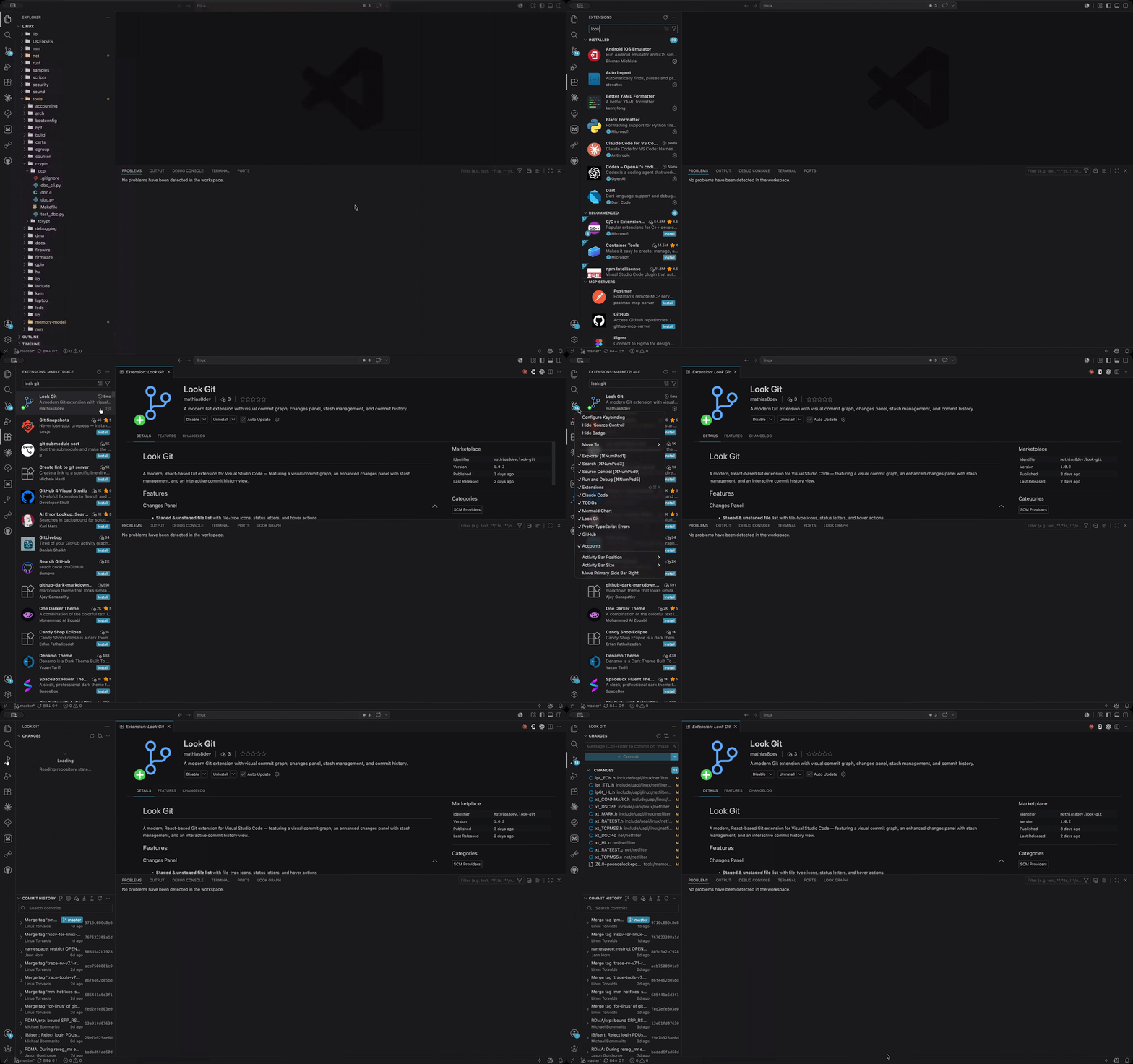
Features
Multi-Repo Workspaces
- Repository discovery — open a Git repository or a plain workspace folder that contains multiple Git repositories
- Repository navigator — Changes, Commit History, and Look Graph show a repository list when multiple repositories are available, then navigate into the selected repository
- Hierarchical repository navigation — keep the current repository and its changes active while browsing collapsible child repositories, then return to the parent repository or workspace root
- Configurable repository scan depth — set
lookGit.repositoryScanMaxDepth for the current workspace folder to control how deeply Look Git searches for repositories; the default is 1
- Cross-platform path handling — repository and worktree matching is canonicalized for macOS path aliases, Windows casing, symlinks, and junctions
Changes Panel
- Staged & unstaged file list with file-type icons, status letters, and hover actions
- Commit composer — commit staged changes, all changes, or amendments; generate commit messages; commit and push or sync in one flow
- Selected-change actions — stage, unstage, stash, discard, explain diffs, or create patches from the current selection
- Inline stash creation — click the archive icon in the Changes section header to stash without leaving the panel
- Stash management — apply, pop, or drop stashes directly; expand any stash to browse its files and open diffs
- Branch, remote & tag workflows — checkout, sync, pull with rebase, pull from a remote, force push, push to a remote, fetch with prune, merge, rebase, publish branches, manage remotes, and create/delete/push tags
- Patch workflows — apply patch files and create patches from selected changes
- Submodule awareness — submodule entries shown with dedicated icons and status badges; unsafe actions (discard, diff) blocked automatically
- Submodule command menus — run commit, pull, push, fetch, branch, stash, tag, and output actions against a submodule without leaving the Changes panel
- Conflict resolution — dedicated section with merge editor, Accept Ours / Accept Theirs actions per file
- Tree & list view — toggle between hierarchical folder tree and flat file list
- Sort controls — order changes by path, file name, status, or extension
- Keyboard navigation — ↑↓ to move between files, Enter to open diff
Commit History
- Multi-expand commits — open several commits simultaneously; each expands in-place showing its message, author, relative date, and changed files
- Inline diff — click any changed file to open a VS Code diff editor for that commit
- Advanced commit actions — copy revision, cherry-pick, checkout revision, compare with local or a worktree, reset, revert, undo, fixup, squash, drop, and start a visual interactive rebase
- Visual rebase panel — plan pick, reword, edit, squash, fixup, drop, and break actions in a floating window; merge-aware plans preserve topology
- Rebase conflict flow — reopen an active interactive rebase, inspect conflicted files, open the merge editor, accept current or incoming changes, mark files resolved, continue, skip, or abort
- Floating commit message editor — reword commits in a dedicated floating editor, with generated replacement messages available from VS Code language models
- Patch and AI actions — create patches from commits and ask VS Code language models to explain commit diffs
- Branch and tag actions — create branches and tags from commits, create a branch with a new worktree, and push commits up to a selected point
- History navigation — jump to the current item, move to parent or child commits, and filter history by branch
- Repository scope — switch Commit History between the main repository and submodule scopes when submodules are available
- File history — open a floating paginated history window for a file from the editor or Explorer Look Git context menu
- Selection history — right-click a selected line range in the editor and choose Look Git → Show History for Selection... to open the commits that touched those lines
- Git blame annotations — use the editor Look Git context menu or
Look Git Blame commands to toggle inline blame for the active line or full-file blame annotations, with configurable date and author display
- File tree mode — changed files shown as a navigable folder tree
- Search — filter the commit list in real time by message, author, hash, or date
- Load more — incremental pagination, 50 commits at a time
Look Graph
- SVG commit graph — colored lanes with Bezier curves for merges and forks, primary branch always on lane 0
- Branch panel — collapsible Local / Remote / Worktrees tree on the left
- WIP rows — each worktree with uncommitted changes shows a dashed-circle row above its HEAD commit with staged/unstaged/conflict counts
- Commit details panel — click any commit to see its full message, author, and changed files in a side panel
- Commit actions — copy revisions, create patches, explain diffs, cherry-pick, checkout revisions, compare with local or worktrees, reset, revert, undo, reword, fixup, squash, drop, visual rebase, branch, tag, and push up to a commit
- Branch actions — checkout, push, publish, rename, delete, rebase, merge, compare with current or worktrees, and create new branches or worktrees from any branch
- Safe branch pushing — publish branches directly, update branches that are behind, recover diverged branches through checkout or update actions, prefer force-with-lease, and keep raw force push behind an explicit confirmation
- Worktree support — add, remove, open, reveal, lock, unlock, fetch, pull, push, commit, stash, and diff linked worktrees; WIP status fetched per worktree
- Submodule visibility — display submodule entries in the graph branch panel with their repository context
- Filters — search by text/hash, filter by branch, author, or path
- Operation feedback — long-running git actions report progress and expose the Look Git output channel when details are needed
Screenshots
Overview
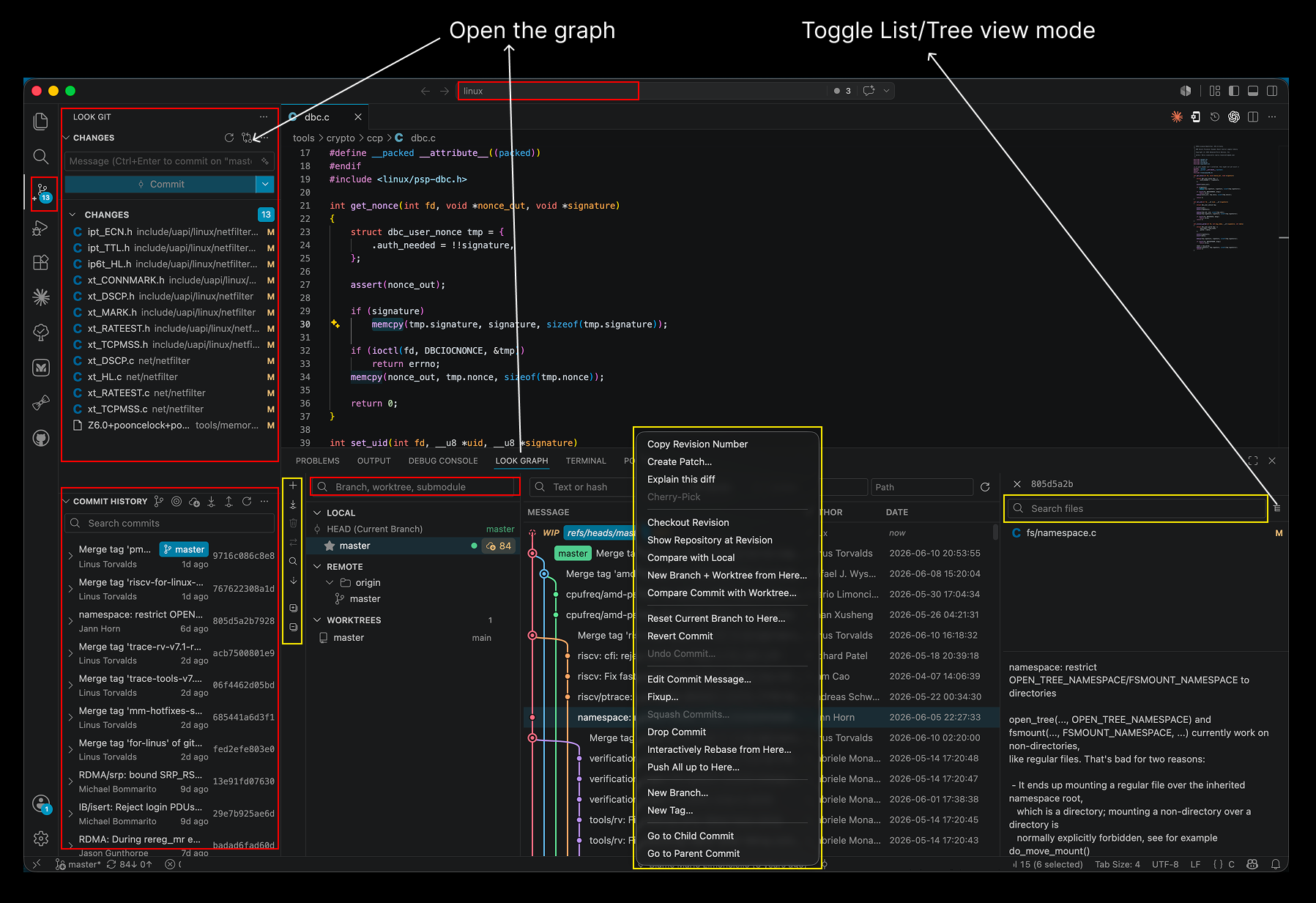
The Changes panel and Commit History live in the sidebar, while the Look Graph opens in the panel area — here showing a commit's context menu with the full set of commit actions.
Changes and repository commands
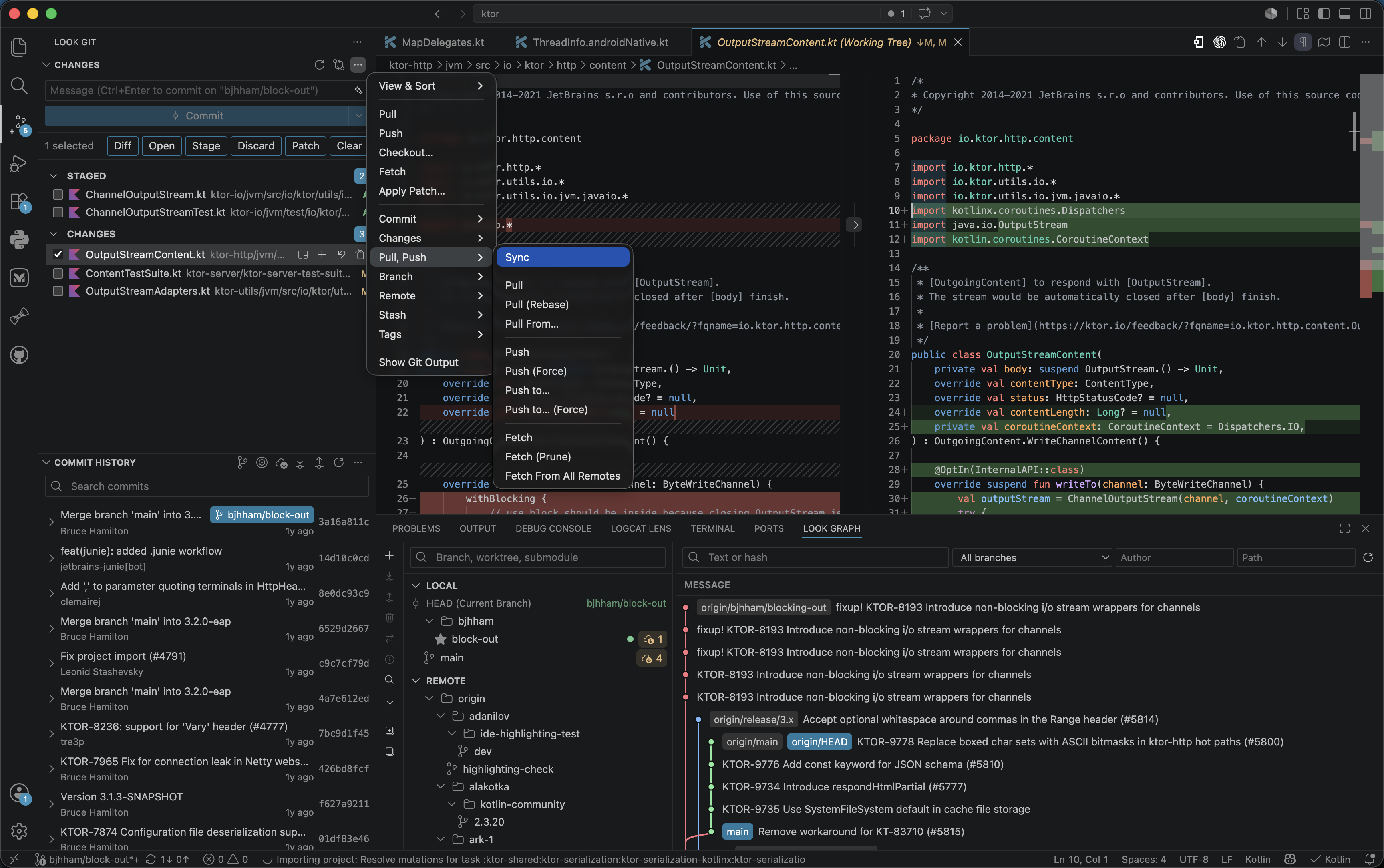
The Changes view provides a broad set of file and repository Git actions, including stage, discard, patch, commit, checkout, pull, push, fetch, branch, remote, stash, and tag workflows ...
Command Palette
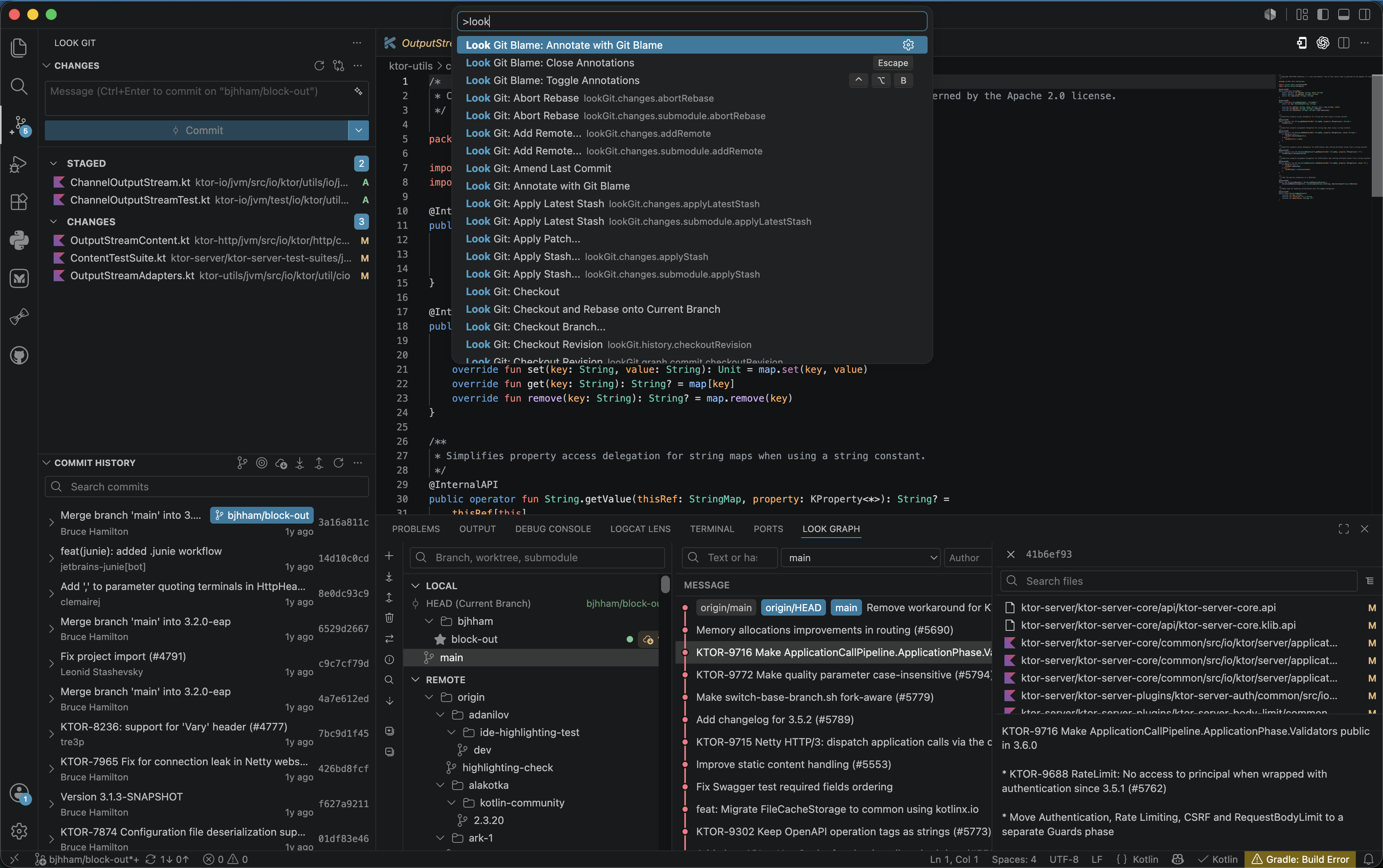
Look Git actions are also available from the Visual Studio Code Command Palette for keyboard-driven workflows.
Submodules, worktrees & conflicts
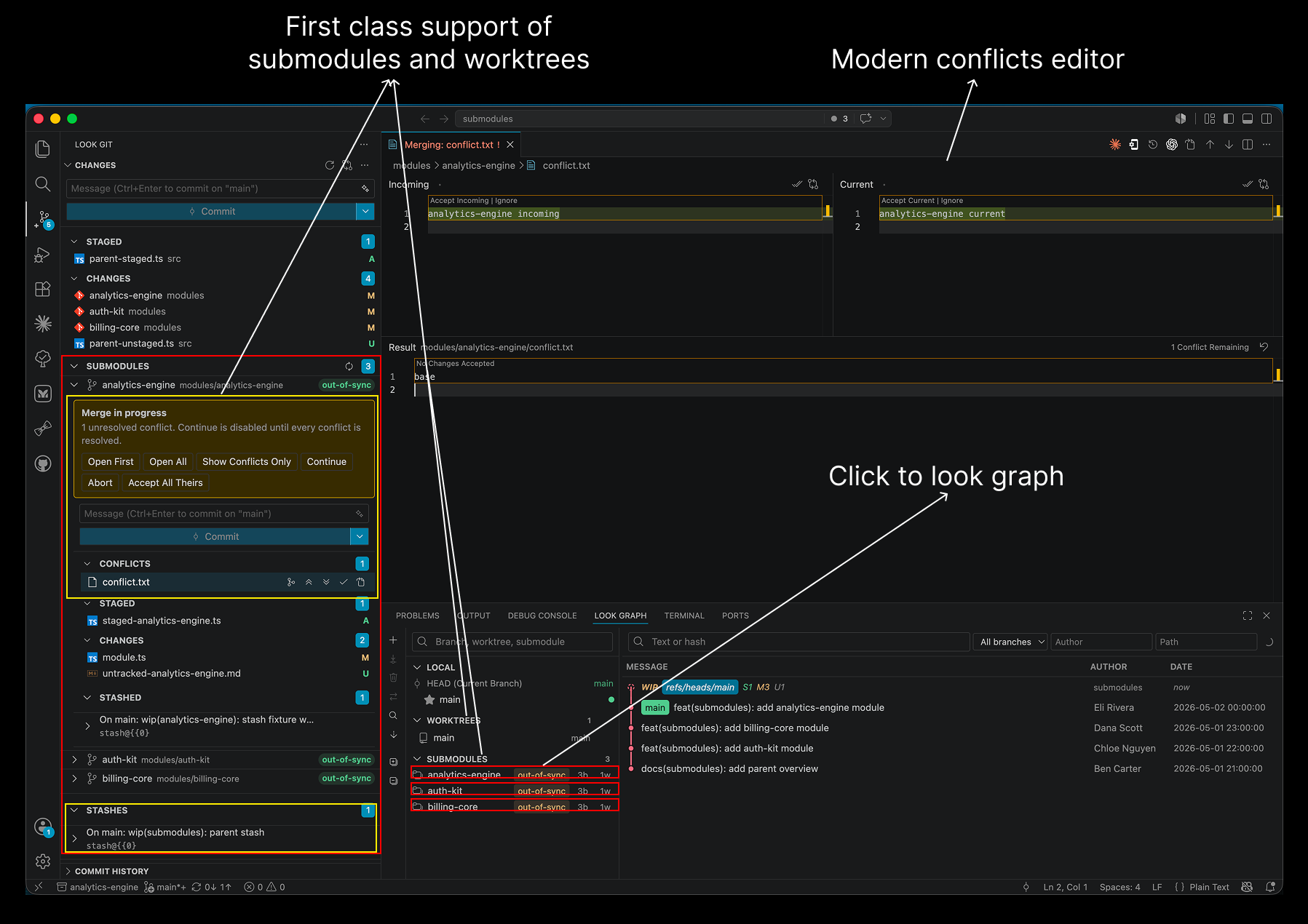
First-class submodule and worktree support, plus the modern conflicts editor for resolving merges in place.
File History
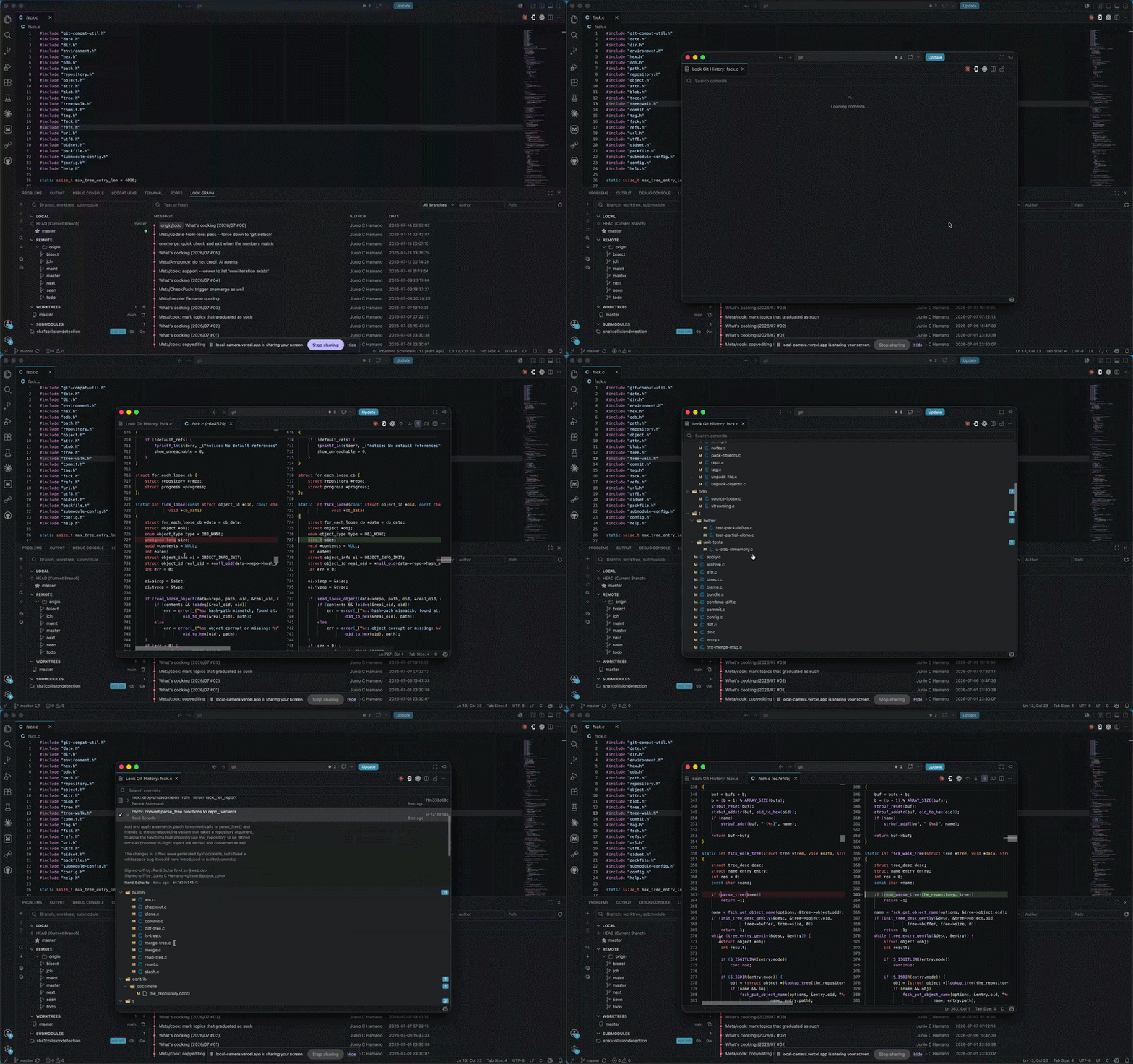
Open a file's history to see every commit that modified it, then inspect and compare the file at any revision.
Commit History
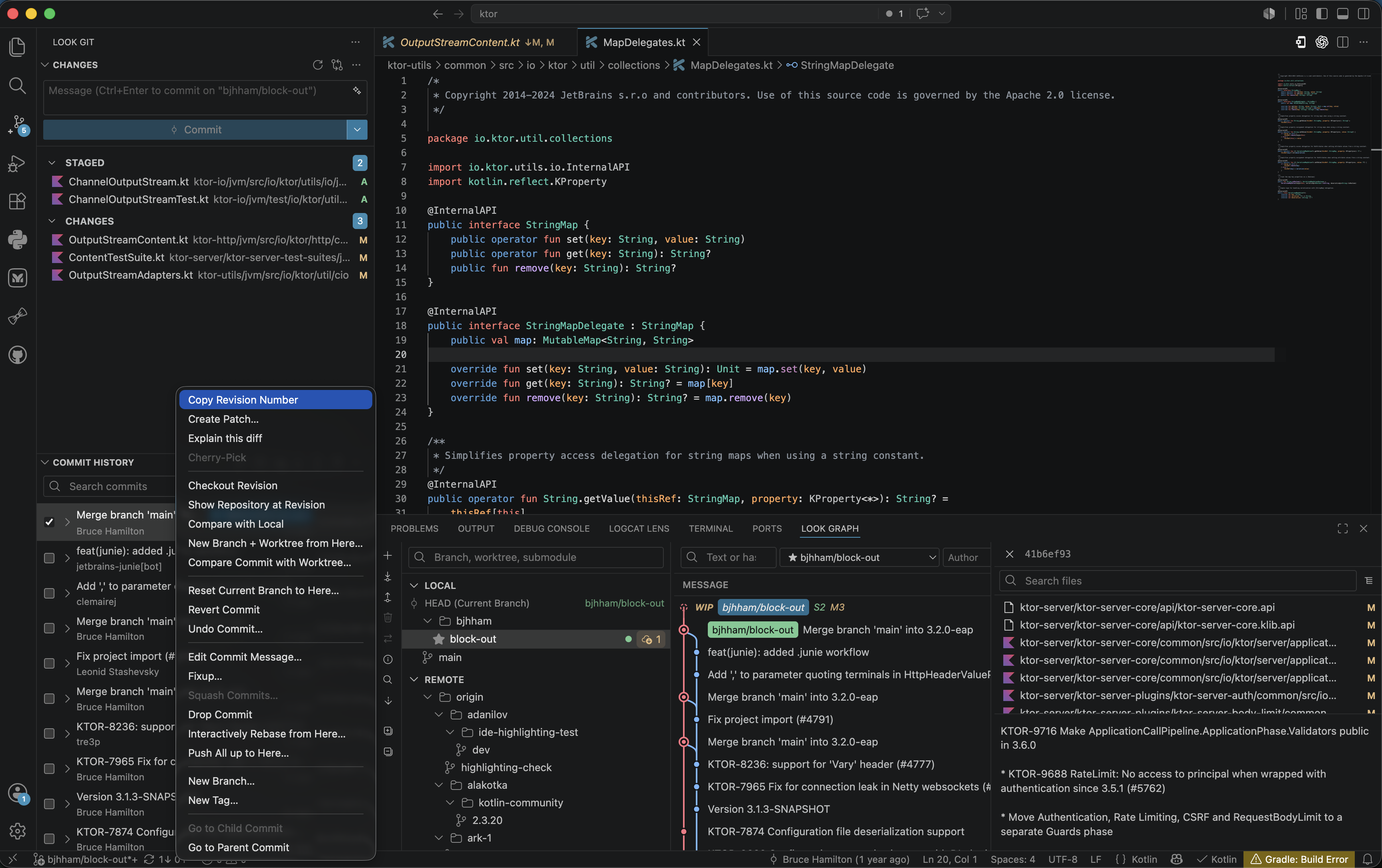
The commit context menu exposes revision, patch, comparison, rewrite, branch, tag, worktree, and navigation actions in one place.
Interactive Rebase
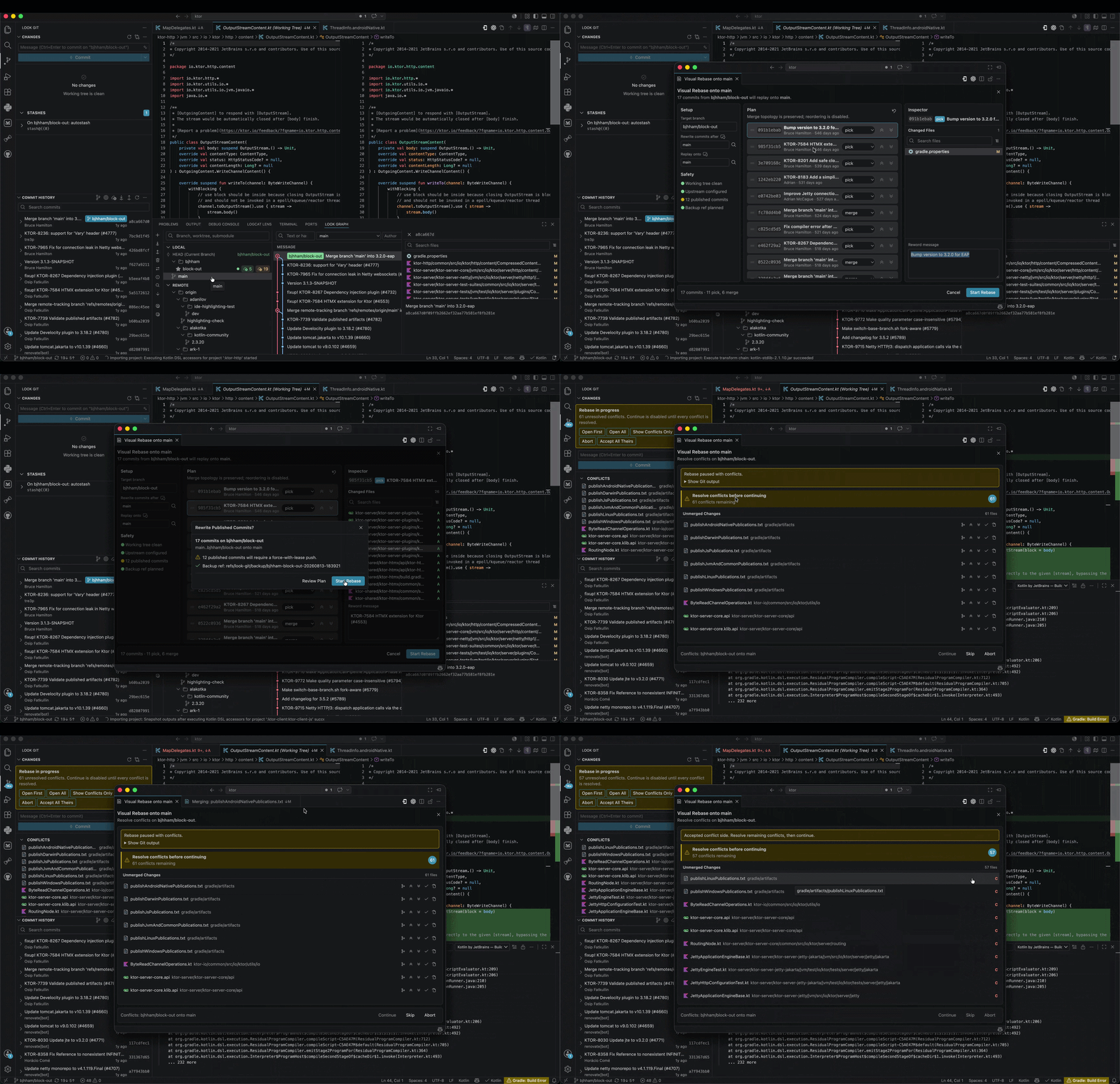
Configure the base and target branches, reorder commits with drag and drop, choose rebase actions, inspect changed files, edit messages, and resolve conflicts through the complete visual rebase flow.
Git Blame

Toggle inline blame or full-file annotations from Look Git commands and jump from blame context back into history or the graph.
Getting Started
- Open a folder or workspace containing one or more Git repositories in VS Code
- Click the Look Git icon in the Activity Bar to access the Changes and Commit History panels
- If multiple repositories are found, choose one from the repository navigator
- Open the Look Graph panel from the bottom panel area
Requirements
- Visual Studio Code 1.85 or later
- A Git repository opened in VS Code
Settings
| Setting |
Default |
Description |
lookGit.fontSize |
0 |
Font size used by Look Git webviews. Set to 0 to follow VS Code's editor.fontSize. |
lookGit.repositoryScanMaxDepth |
1 |
Maximum directory depth scanned for Git repositories. This setting is resource-scoped, so each workspace folder can use its own value. |
lookGit.commitMessageEditor |
window |
Commit message editor used when rewording: window, editor, or input. |
lookGit.inlineBlame.enabled |
false |
Automatically show inline blame for the active editor line. |
lookGit.blame.mergeCommitLines |
false |
Show full-file blame text only on the first line of each commit block. |
lookGit.blame.highlightChangedLines |
false |
Highlight every line belonging to the commit under the cursor. |
lookGit.blame.dateFormatStyle |
date |
Blame date format: date, dateTime, time, relative, or iso. |
lookGit.blame.authorNameStyle |
full |
Blame author name format: full, first, or last. |
Known Limitations
- The Look Graph view loads up to 300 commits per page by default
- CI/CD pipeline status indicators are not shown on graph rows
License
Look Git is licensed under the PolyForm Noncommercial License 1.0.0 for noncommercial use.
Commercial use requires a separate paid commercial license from mathias8dev.
For commercial licensing, contact: mathias8dev@outlook.com.
| |

