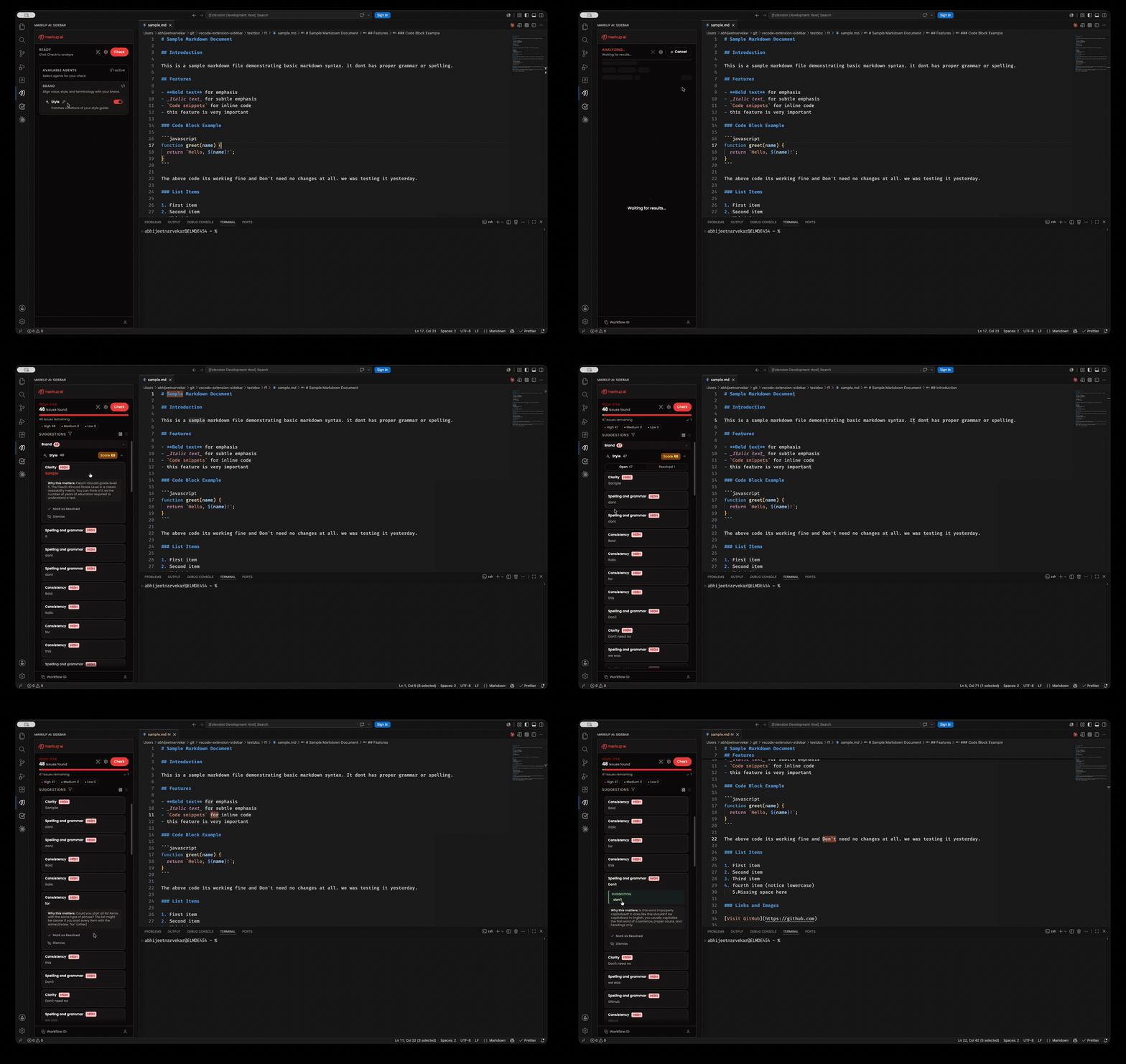
Markup AIMarkup AI in VS Code: a sidebar panel that checks the active document (or your selection), highlights issues in the editor, and applies suggestions inline. Installation Launch VS Code Quick Open ( Ctrl+P), paste the following command, and press enter.Copied to clipboard |

Markup AIThe Markup AI sidebar for VS Code — a panel that opens from the activity bar, checks the active document (or just your selection) with the Markup AI Style Agent, highlights flagged text in the editor, and applies suggestions directly to your document.
PrerequisitesTo use Markup AI for VS Code, you need a Markup AI account. Once the extension is installed, sign in from inside the sidebar panel to start checking your content. This extension isn't a stand-alone authoring tool — it works only with the Markup AI platform. To procure the Markup AI solution, please visit markup.ai/pricing. Features
Getting Started1. Install the ExtensionInstall from the VS Code Marketplace. 2. Open the SidebarClick the Markup AI icon in the activity bar, then sign in from within the panel. 3. Start CheckingOpen a supported document (Markdown, HTML, DITA/XML, plain text), then run a check from the panel. Click any issue to jump to it in the editor, and apply suggestions. Requirements
SupportFor issues, feature requests, or questions, please visit the Markup AI documentation or contact support. |