Codex Accounts
Switch between multiple Codex (ChatGPT) accounts in VS Code, with the usage
limits of every account in one sidebar panel — no need to switch accounts
just to find out how much is left on each.
What it does
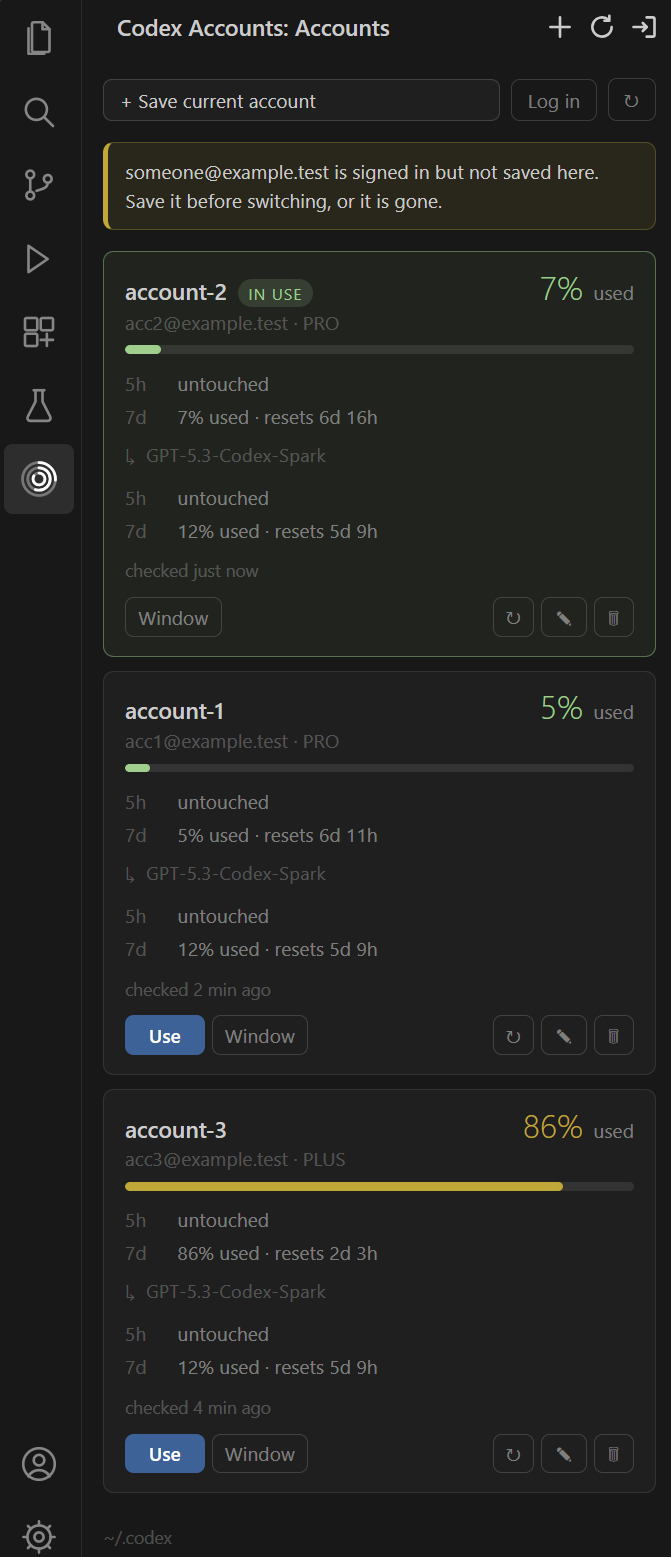
- Activity bar panel where each account leads with the consumption of its
tightest window — one figure and one bar, both reading the same direction —
with the account in use pinned to the top and the rest ordered
least-used-first, so the account to switch to is the one right below it.
- Per-model limits nested under the account. Codex reports an account-wide
limit plus one per model family (Spark, …); the account-wide one drives the
headline, the families sit below it.
- Account switching by writing the profile's
auth.json into the active
CODEX_HOME.
- Isolated usage reads: each account's limits are queried in a throwaway
CODEX_HOME, so checking usage does not switch the active account or
invalidate a session in progress.
- Login without leaving the editor, driven over
codex app-server — the
same path the official extension uses. The account you were on stays saved
and valid, and the one you sign in to becomes active.
How it works
Codex keeps its session in $CODEX_HOME/auth.json (~/.codex/auth.json by
default) — the same file the CLI and the official extension read. A profile here
is a copy of that file:
- metadata (name, email, plan) lives in
globalState;
- tokens live in VS Code's SecretStorage, never in
globalState.
Limits come from codex app-server itself, over JSON-RPC on stdin/stdout
(method account/rateLimits/read) — there is no public HTTP endpoint that does
the same. To query an account that is not the active one, the extension creates
a temporary CODEX_HOME (mode 0700) holding only that profile's auth.json,
makes the call, and deletes the directory. If the app-server refreshes the token
along the way, the new token is written back into the profile.
Identity comes from the id_token claims; two accounts are considered the same
when chatgpt_account_id matches — the only stable field, since the
access_token changes on every refresh and the same email repeats across
workspaces.
Requirements
- VS Code 1.85+
- The Codex CLI (
codex) on PATH — or point codexAccounts.codexCommand at it.
Usage
- Sign in to an account with the panel's Log in button. The browser opens,
and the account becomes the active one when the login finishes. It appears
in the panel on its own — the extension watches
auth.json and saves an
account it does not recognise, labelled by email. A codex login you run
yourself is picked up the same way.
- Repeat for the other accounts.
- Press Use on a card, and reload the window when the extension asks.
Removing a profile is respected: an account you delete is not auto-saved
again. Pressing + Save current account is what takes it off that list.
Codex only picks up the new account after the window reloads. Turn on
codexAccounts.autoReloadAfterSwitch to skip the prompt.
Settings
| Key |
Default |
What it does |
codexAccounts.pollIntervalSeconds |
900 |
How often usage limits refresh (floor of 120s). |
codexAccounts.autoReloadAfterSwitch |
false |
Reload the window automatically after a switch. |
codexAccounts.codexHome |
"" |
Explicit CODEX_HOME. Empty = env var, or ~/.codex. |
codexAccounts.codexCommand |
codex |
Codex CLI command. |
codexAccounts.warnThresholdPercent |
80 |
Where the usage bar turns red. |
Known limitations
Independent window is best-effort. It prepares a CODEX_HOME for that
profile alone and opens the window from a terminal carrying the variable, but
the new window only picks up the right account if it inherits that
environment. Under Remote-SSH, WSL and dev containers, VS Code usually reuses
an already-running server, so the variable never reaches the extension host.
To isolate properly in those setups, launch VS Code from a shell that already
exports CODEX_HOME.
Every refresh spawns one codex app-server process per profile (in batches of
3). With many profiles, prefer longer intervals.
Only one copy of an account's credentials can be current. Codex uses OAuth
refresh-token rotation: every renewal issues a new refresh token and revokes
the previous one. A profile is a copy of auth.json, so whichever copy
refreshes last invalidates the others.
The extension keeps its copies current from the one place that is always
right — the file on disk. It watches auth.json and adopts what it finds,
reads and rewrites it directly for whichever account is active, and captures
the signed-in account before starting a login, since codex login overwrites
the file and the tokens it overwrites cannot be recovered.
A login no longer signs the previous account out. codex login revokes
the credential it finds before it starts the new flow — it posts the stored
refresh token to /oauth/revoke, so the account you were on dies server-side
and the saved copy dies with it. The Log in button therefore does not use
the CLI: it drives the login over codex app-server, which has no such step.
Nothing is cleared out of the way, auth.json is written only once the new
login succeeds, and abandoning the flow leaves the account you were on
exactly where it was.
Where the app-server cannot do it — a Codex old enough to lack the method —
it falls back to a terminal running codex login, and there auth.json is
cleared first: revocation reads the auth store and does nothing when it is
empty.
What is still outside its reach: an account you have also signed into
somewhere else (another machine, another CODEX_HOME) can be revoked from
there. When that happens the card says so and offers a login instead of a
switch — switching to dead credentials would only sign you out.
Development
npm install
npm run watch      # bundle in watch mode
npm run typecheck
npm run test:smoke # exercises identity + limits against your real account (read-only)
npm run build:vsix
test:smoke makes a real call to the app-server and asserts, among other
things, that ~/.codex/auth.json was not modified.
License
MIT
| |

