Claude Accounts
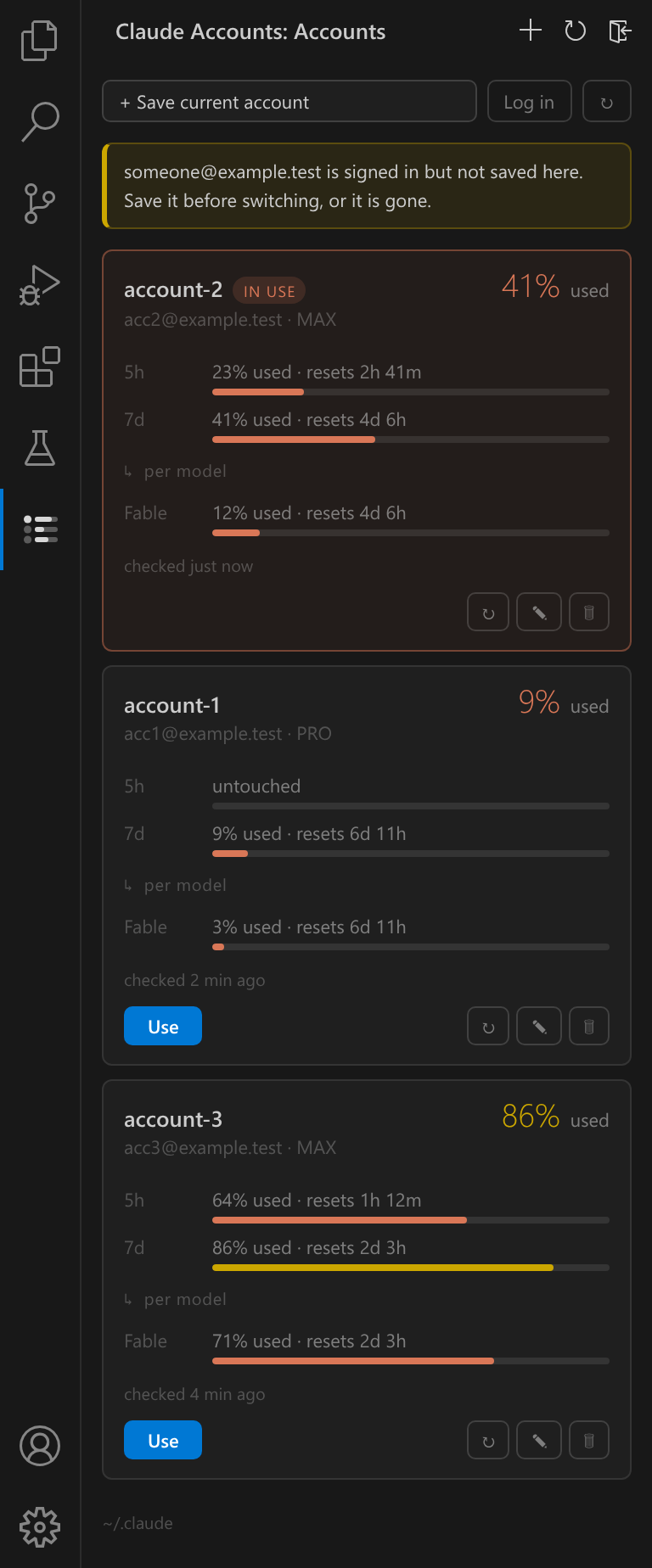
Switch between multiple Claude accounts in VS Code, with the plan usage of
every account in one sidebar panel: the 5-hour session, the week, and the
per-model weekly windows. You don't have to switch accounts to find out how much
each one has left.
The sister of Codex Accounts.
What it does
- Activity bar panel. Each account leads with the consumption of its
tightest window (session or week). The account in use is pinned to the top,
and the rest are ordered least-used first.
- Per-model windows ("Fable", "Opus"…) are listed under the account.
- Switching writes the profile into Claude Code's own credential store.
Claude Code picks it up without a reload: new conversations use the new
account right away.
- Usage reads never switch accounts. Each profile's usage is one HTTP
request made with that profile's own token.
- Login without leaving the account you're on.
claude auth login runs
against a throwaway config directory, and the account it produces becomes a
new profile.
How it works
Claude Code keeps a signed-in account in two places:
|
What |
Where |
| Credential |
claudeAiOauth (access and refresh token) |
~/.claude/.credentials.json on Linux/WSL/Windows, the Keychain on macOS |
| Identity |
oauthAccount (account, email, organization) |
~/.claude.json |
A profile is a copy of both: metadata in globalState, the credential in VS
Code's SecretStorage. A switch writes both back, the credential under the
CLI's own .storage-write lock and the identity under the CLI's .claude.json
lock. .claude.json is re-read under that lock and only oauthAccount is
replaced, so nothing else in it is touched. Writing the identity is what makes
the official extension notice the change by itself.
Usage comes from GET https://api.anthropic.com/api/oauth/usage. The account
key is accountUuid + organizationUuid: one person with a personal plan and a
Team seat has two subscriptions under one account UUID.
Token rules
OAuth refresh tokens rotate: renewing one invalidates the previous one.
Several processes renew Claude's tokens (every claude process and the
official extension), so the extension follows a few rules:
- The account in use: the store is the source of truth. Its usage is read
with the token in the store, never with the saved copy. If that token has to
be renewed, it is renewed the way the CLI does it: under the storage lock,
after re-reading the store. The result goes back into the store first.
- Other accounts: this extension is the only renewer. It renews only when
the token is about to expire. It holds a lock per profile, shared by all VS
Code windows, and saves the result before anything else can read the old one.
- Every change to the live files is adopted, so the saved copy of the active
account never falls behind.
- Tokens are checked against
/api/oauth/profile when they are new. A
conversation left open during a switch can renew the old account and write
its token back under the new account's name. The panel detects this and warns
instead of filing the token under the wrong profile.
- Never a logout. Logging out revokes the token on the server. A switch is
only a write.
Usage
- Sign in to Claude Code as usual. The account shows up in the panel on its own.
- Log in to add more accounts. A terminal runs
claude auth login and the
browser opens. The account you're on stays active.
- Use on a card switches to that account. Conversations that are already
open stay on the previous account until you close them or reload the window.
Settings
| Setting |
Default |
Description |
claudeAccounts.pollIntervalSeconds |
300 |
Automatic usage refresh (minimum 180s; the endpoint is rate-limited). |
claudeAccounts.autoReloadAfterSwitch |
false |
Reload the window after a switch, to move conversations that are already open too. |
claudeAccounts.configDir |
"" |
Claude config dir. Empty = CLAUDE_CONFIG_DIR from claudeCode.environmentVariables, then the environment, then ~/.claude. |
claudeAccounts.claudeCommand |
"" |
CLI used for login. Empty = the binary bundled with the official extension, then claude. |
claudeAccounts.warnThresholdPercent |
80 |
Usage (%) above which the bar turns red. |
Known limitations
- Conversations open during a switch keep the old account's token in
memory, and may renew it and write it back over the new account. The panel
warns when this happens. Close them, or reload the window.
- Two accounts with the same email in different organizations switch
correctly, but the official extension only reacts to a change of email, so
its header may lag until the next reload.
- Windows Credential Manager (behind a remote flag in Claude Code) is not
supported yet; the default file store is.
- On macOS the Keychain can't be watched. Token rotation there is picked up
on the next refresh rather than immediately.
Development
npm install
npm run compile      # bundle to dist/
npm run test:smoke   # unit + read-only checks against the real account
npm run build:vsix   # package
License
MIT

