Skip to content
| Marketplace
Sign in
Visual Studio Code>AI>MareArts AI GadgetNew to Visual Studio Code? Get it now.
MareArts AI Gadget

MareArts AI Gadget

MareArts

|
4 installs
| (0) | Free
Let the AI agent in VS Code or Cursor use your MareArts AI Gadget apps (MARK, REMO and more) through MCP. Found automatically, nothing to paste.
Installation
Launch VS Code Quick Open (Ctrl+P), paste the following command, and press enter.
Copied to clipboard
More Info

MareArts AI Gadget

MareArts AI Gadget

Let the AI agent in your editor use your MareArts apps. GitHub Copilot's agent mode in VS Code, or Cursor's agent, can work with MARK (Markdown Studio), REMO (Remote Desktop) and the other MareArts AI Gadget apps on your computer. It can read and write your notes, export a PDF, or check and stop screen sharing.

The extension finds the installed apps and connects them through MCP. There is nothing to copy, paste or restart.

How it works, what you can ask and how it stays safe: AI Gadget on MareArts Open Lab

Apps
App What your AI agent can do
MARK · Markdown Studio Find, read, create and save notes and documents; work with sheets, highlights and versions; export PDF
REMO · Remote Desktop See what is shared, stop sharing, remove a viewer, lower the quality
BACK · Backup Connects by itself when its AI support arrives
MIV · Image Viewer Connects by itself when its AI support arrives
VIDE · Video Editor Connects by itself when its AI support arrives
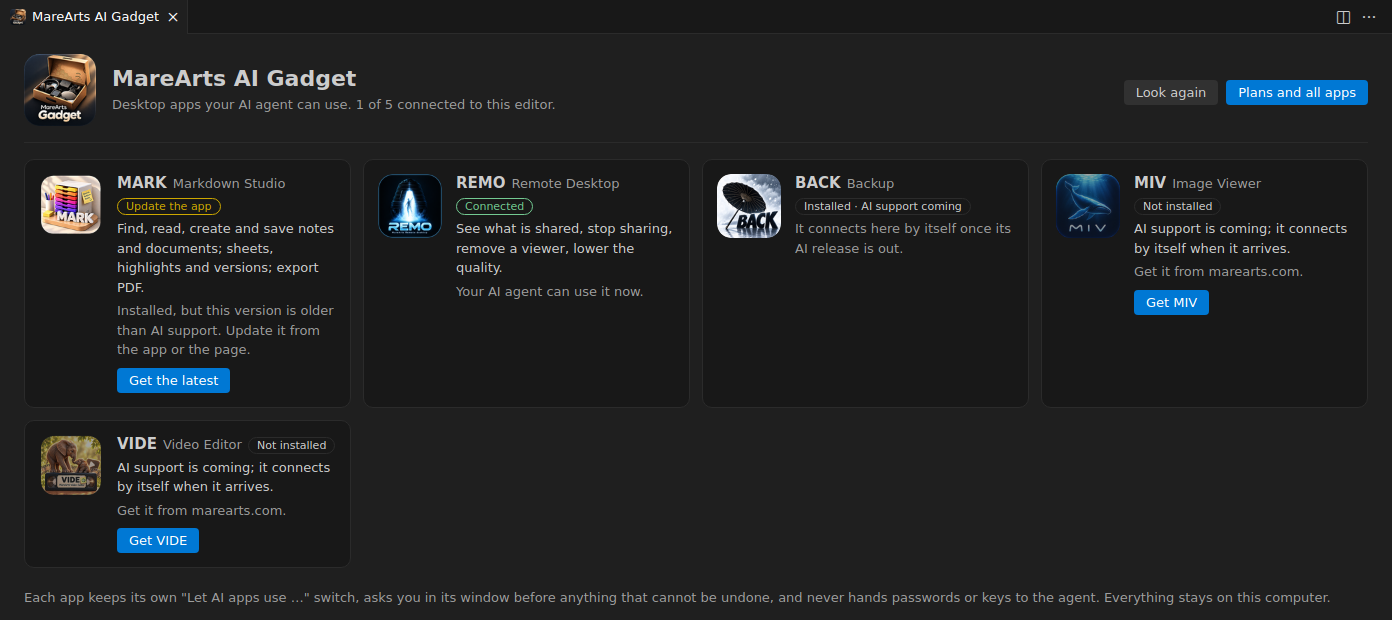
The MareArts AI Gadget apps page in VS Code

Run MareArts AI Gadget: Show Apps for a page with every app, its icon and whether it is connected. A missing app has a button to its download page. Plans and all apps: marearts.com.

Safe by design

  • Your app decides. Each app has its own "Let AI apps use …" switch in its settings. The agent cannot turn that switch on or off.
  • A person confirms. For deleting or replacing anything, the app asks in its own window and waits for you to click Yes.
  • No secrets pass to the agent. The agent never receives passwords, licence keys or sign-in data. Sign-in happens in the app's window.
  • Local only. The apps talk to your editor over standard input and output on your own computer. This extension sends nothing over the network and collects no data.
  • The extension edits no files. It does not change your editor's settings files. It registers the apps through the editor's own MCP interface, and you can switch them off in the editor's MCP list.

Works in

VS Code 1.101 or later (agent mode with MCP) and Cursor. The apps run on Windows, macOS and Linux.

Licence

The extension is free under the MIT licence. Some of the apps need a MareArts plan.

About MareArts

MareArts · Computer Vision Lab

MareArts · Computer Vision Lab is a computer vision research lab. We teach machines to see: to find and read what is in images and video, to join many cameras into one live picture, and to run vision AI fast on everyday computers. We turn that research into tools for people and for the AI agents they work with.

  • Website: www.marearts.com
  • Research notes: MareArts Open Lab
  • Contact us
  • Jobs
  • Privacy
  • Manage cookies
  • Terms of use
  • Trademarks
  • Your Privacy Choices
  • Consumer Health Privacy
© 2026 Microsoft