Developer Productivity Suite for Quarkus
Quarkus Studio supercharges your Quarkus workflow inside Visual Studio Code. Designed for both single-module and complex multi-module enterprise architectures, Quarkus Studio brings real-time Dev Mode orchestration, intelligent Dev Services container management, dynamic port resolution, and direct access to developer tools right from the Activity Bar.
I have furnished a detailed learning resource at : quarkus-studio.github.io
✨ Features
Project Builder
| Title |
Description |
| Create Multi Module Project |
Scaffolds enterprise multi-module Quarkus project with Maven/Gradle parent, common library, microservices, and Docker Compose stack. |
| Create Single Module Project |
Scaffolds standard single-module Quarkus Maven/Gradle application with extension selector. |
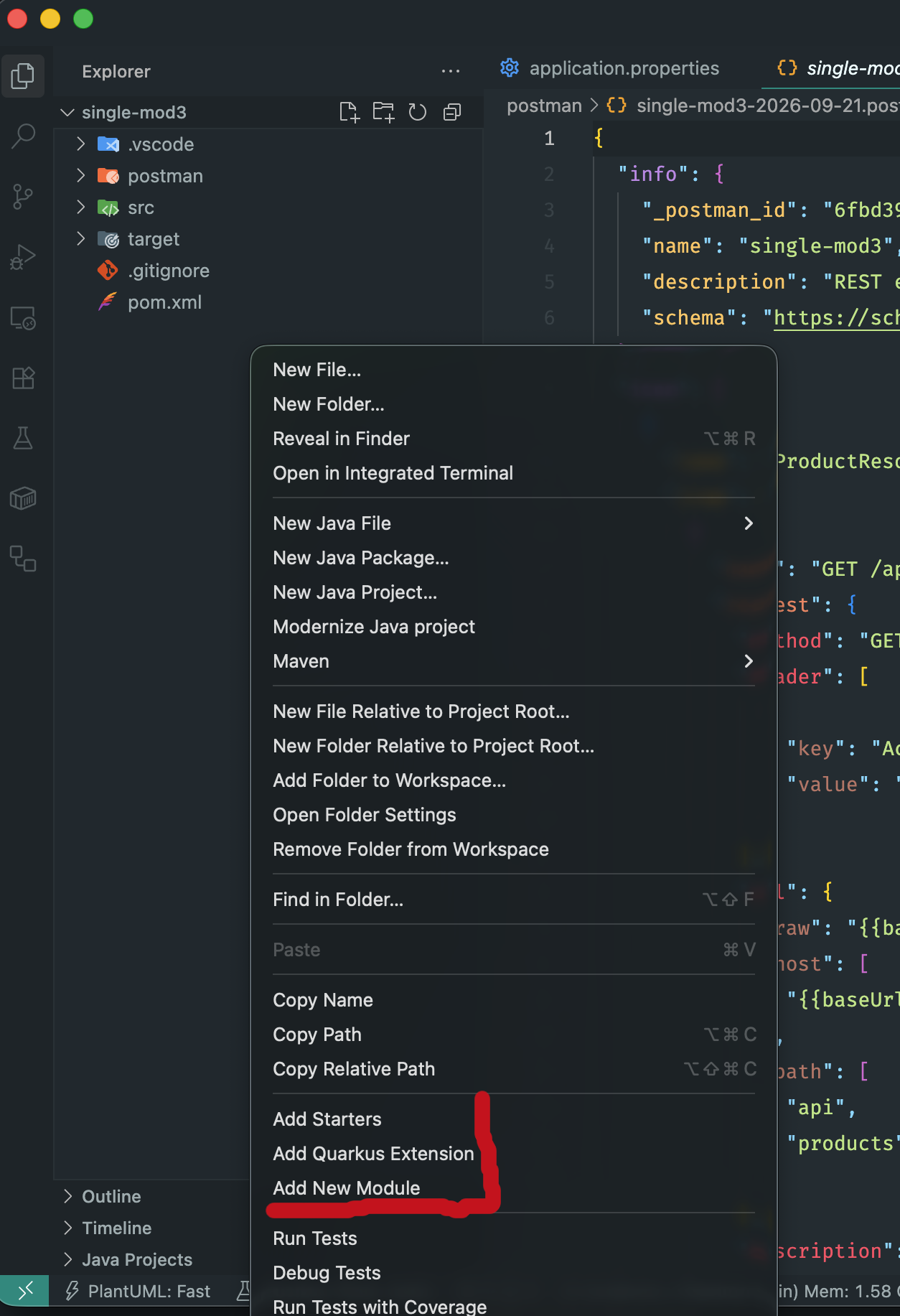
| Add New Module |
Adds a new microservice or shared library module to an existing workspace under project root, assigns dev port, and updates parent build file. |
| Add Starters |
Adds curated technology starter packs (Web API, PostgreSQL Panache, Kafka, OIDC) and configures application.properties. |
| Add Quarkus Extension |
Interactive extension selector with smart recommendations, search, and safe injection into pom.xml or build.gradle. |
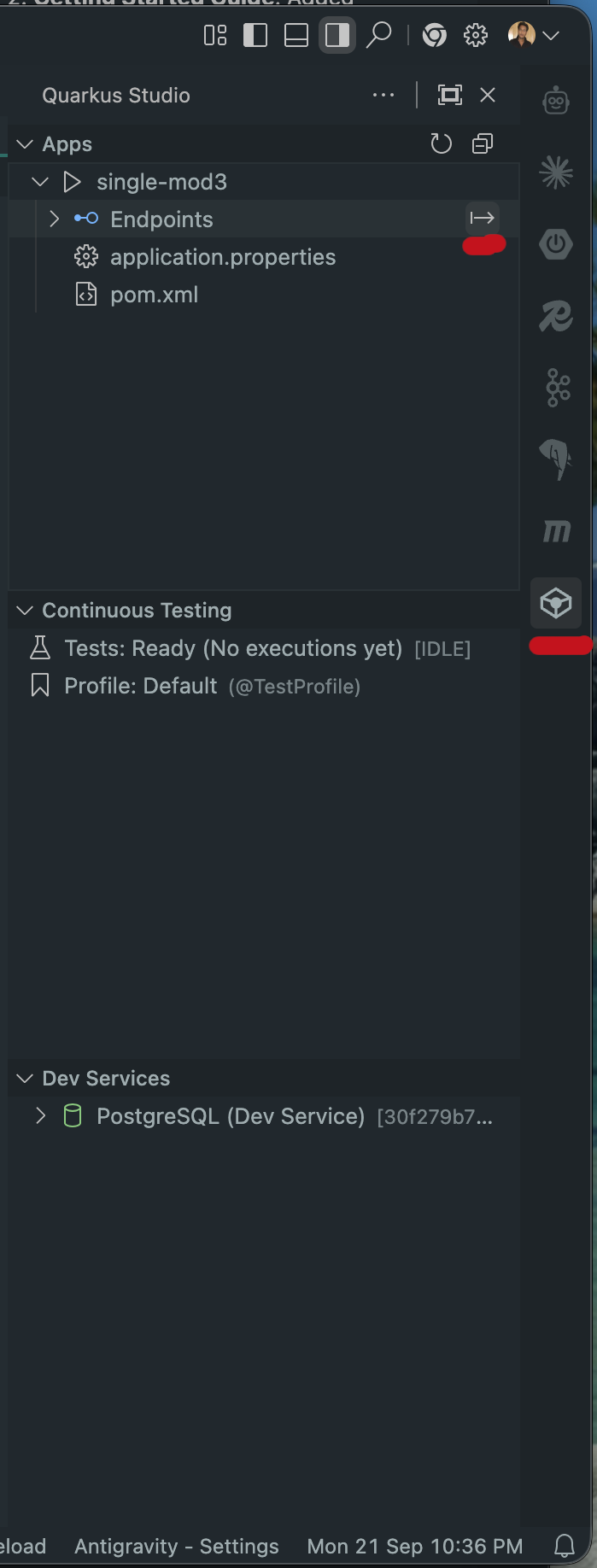
1. 📂 Apps View
Gain complete visibility and control over single-module and multi-module Quarkus workspaces directly in the Quarkus Studio sidebar.
- Single & Multi-Module Workspace Detection: Automatically identifies Maven root POMs (
<modules>) and Gradle settings.gradle / settings.gradle.kts configurations, mapping submodules hierarchically.
- Accurate Submodule Naming: Accurately resolves individual child module
artifactIds in multi-module POMs (bypassing parent <parent><artifactId> ambiguities).
- Service Status & Play Icons:
- Clean, dedicated play icons for every runnable Quarkus app:
- Stopped: Outline play icon (
ThemeIcon('play')) with inline Start Dev Mode action.
- Running: Solid filled green play icon (
ThemeIcon('debug-start')) with inline Stop, Restart, View Logs, and Open Dev UI actions.
- One-Click Dev Mode Lifecycle: Start, stop, and restart Dev Mode (
./mvnw compile quarkus:dev, ./gradlew quarkusDev) per service with a dedicated integrated terminal.
- Dynamic Dev UI Launcher: Reads
quarkus.http.port from application.properties (e.g. port 8081) to automatically route the Open Dev UI action to the exact running endpoint (e.g. http://localhost:8081/q/dev-ui), falling back to http://localhost:8080/q/dev-ui.
- Endpoints Explorer: Automatically discovers all REST endpoints (
@Path, @GET, @POST, @PUT, @DELETE, @PATCH, and Spring Web mappings) in Java and Kotlin source files under an Endpoints tree node:
- Jump to Source: Click any endpoint to jump directly to the handler method in the editor.
- Method Badges: Color-coded HTTP verbs (GET, POST, PUT, DELETE, PATCH).
- Inline Actions: One-click to Open in Browser, Copy Endpoint URL, or Copy Endpoint Path.
- Generate Postman Collections: Right-click the Endpoints node to export all detected REST endpoints into a Postman Collection v2.1.0 JSON file (
AppName-<date>.postman_collection.json) under the project root/postman folder with folder grouping by resource class, path variables, request headers, bodies, and configurable baseUrl.
- Live Sync: Watches
**/*.{java,kt} to refresh endpoints dynamically as you write code.
- Clean Tree Presentation: Focused, uncluttered view displaying configuration files (
application.properties / application.yaml) and build files (pom.xml, build.gradle) with instant click-to-open access.
2. 🐳 Dev Services Visualizer
Effortlessly monitor, manage, and connect to background Quarkus Dev Services and active container dependencies.
- Docker & Podman Support: Seamless compatibility with both Docker Desktop and Podman, with auto-detection or manual runtime configuration (
quarkusStudio.containerRuntime).
- Comprehensive Service Recognition: Automatically detects and categorizes containers for:
- Databases: PostgreSQL, MySQL, MariaDB, Oracle, Microsoft SQL Server, MongoDB.
- Brokers & Messaging: Apache Kafka, RabbitMQ.
- Caches & Storage: Redis, OpenSearch, Elasticsearch.
- Security & Identity: Keycloak, HashiCorp Vault.
- Testing & Emulation: LocalStack, WireMock, Mailpit.
- Smart Container Filtering: Intelligently surfaces active service and database containers while filtering out maintenance sidecars (such as
testcontainers/ryuk) and proxy gateways.
- One-Click Container Control: Stop, restart, or inspect individual containers directly from the sidebar.
- Live Container Logs: Stream real-time container output (
docker logs -f) into dedicated VS Code output channels with auto-scroll.
- One-Click Connection String Copy: Copy ready-to-use connection strings and JDBC URLs to your clipboard:
jdbc:postgresql://localhost:<port>/quarkusjdbc:mysql://localhost:<port>/quarkusredis://localhost:<port>localhost:<port> (Kafka Bootstrap Servers)amqp://guest:guest@localhost:<port>
- Web Console Launcher: Launch web management interfaces (Keycloak Admin Console, Mailpit Web UI, RabbitMQ Management) in your default browser with a single click.
- Quick Dev Mode Bootstrap: Launch Quarkus Dev Mode from the Dev Services view header to immediately provision missing containers.
3. ⚙️ Smart application.properties Config Assistant
Supercharge Quarkus configuration with in-editor intelligence, build-time safety checks, and real-time cloud deployment cost estimates.
- code.quarkus.io Integration & Catalog:
- Directly synchronizes with the
code.quarkus.io extension registry (/api/extensions) to discover extension metadata, guides, and custom configuration keys.
- Bundles a high-performance offline catalog covering Quarkus Core, Hibernate ORM, RESTEasy Reactive, Agroal Datasource, Redis, Kafka, OIDC, Security, Virtual Threads, and Cloud/Serverless extensions.
- Automatically analyzes project dependencies (
pom.xml / build.gradle) to prioritize configurations for installed extensions.
- Command: Quarkus Studio: Reload Config Metadata (
quarkus-studio.configAssistant.reload).
- Contextual & Profile-Aware Autocompletion:
- Full property key completion with Markdown documentation, phase tags (
[🔒 Build Time] vs [⚙️ Runtime]), default values, and types.
- Seamless support for environment profiles:
%dev., %test., %prod., %staging..
- Value autocompletion after
= for enums (e.g. postgresql, mysql, fast-jar, native) and boolean flags (true, false).
- Build-Time Fixed Property Diagnostics & Quick-Fixes:
- In Quarkus, properties marked as build-time fixed (e.g.
quarkus.package.type, quarkus.datasource.db-kind, quarkus.hibernate-orm.database.generation) cannot be dynamically modified at runtime.
- Flags invalid runtime overrides (such as
%prod.quarkus.datasource.db-kind=...) with clear in-editor diagnostic warnings.
- One-click Quick Fix (
Remove '%prod.' prefix) to safely configure properties globally for the build phase.
- Inline Cloud Cost & Resource Footprint Estimates:
- Inlay Hints: Displays live memory, cold start, and serverless pricing badges directly in
application.properties:
quarkus.package.type=native ➔ 💡 [Cloud Est: ~32MB RSS | Cold start <25ms | Lambda: ~$0.25/1M]quarkus.package.type=fast-jar ➔ 💡 [Cloud Est: ~192MB RSS | Cold start ~1.5s | Lambda: ~$0.83/1M]quarkus.virtual-threads.enabled=true ➔ 💡 [Loom: ~90% lower thread memory per req]quarkus.datasource.jdbc.max-size=25 ➔ 💡 [Pool Buffer: ~50MB RAM | 25 conns]
- Rich Hover Tooltips: Hover over any property to inspect detailed comparison tables comparing GraalVM Native vs OpenJDK JVM footprints, AWS Lambda invocation costs, Google Cloud Run pay-per-use, and Kubernetes pod density.
- Full Cloud Report: Run Quarkus Studio: Show Cloud Cost & Resource Estimates (
quarkus-studio.configAssistant.showCostEstimates) to output a comprehensive deployment sizing report.
4. ⚡ Panache Entity & DTO Generator
Instantly generate production-grade Hibernate with Panache or MongoDB with Panache entities, Java 17+ Record DTOs, companion repositories, and full CRUD REST endpoints with a single right-click or command.
- Multiple Input Sources:
- Contextual Right-Click Menus: Right-click any Java package folder,
.java file, .json payload, or .sql / .ddl migration script in the Explorer or active editor.
- Interactive Wizard: Prompts for entity name, field definitions (
name:String, price:BigDecimal, inStock:Boolean), and architecture preferences.
- JSON Payload Inference: Automatically infers Java types from JSON samples (e.g. integer vs decimal/
BigDecimal, ISO dates to LocalDate/LocalDateTime, UUIDs, booleans, and arrays).
- SQL / DDL Schema Parser: Parses
CREATE TABLE DDL statements, maps SQL types (VARCHAR, BIGSERIAL, DECIMAL, TIMESTAMP, BOOLEAN) to Java types, extracts primary keys, and converts snake_case columns to camelCase properties with @Column(name = "...") and @Table(name = "...").
- Flexible Architectural Patterns:
- Active Record Pattern (Recommended for Quarkus):
- Extends
PanacheEntity (with inherited public Long id;) or PanacheEntityBase (for custom UUID / String IDs).
- Public fields enhanced at build-time with idiomatic Quarkus bytecode transformation.
- Generates static finder helper methods (e.g.
findByName(String name)).
- Repository Pattern (DDD / Clean Architecture):
- Generates standard
@Entity class with primary key annotations.
- Generates companion
@ApplicationScoped repository implementing PanacheRepository<Entity> with custom query helpers.
- Dual Persistence Backends:
- Hibernate ORM with Panache: Tailored for PostgreSQL, MySQL, MariaDB, Oracle, SQL Server, and H2 with
@Entity, @Table, @Column, and @Transactional.
- MongoDB with Panache: Generates
@MongoEntity(collection = "..."), ObjectId ID mappings, and PanacheMongoEntity / PanacheMongoRepository.
- Modern Java 17+ Record DTOs:
- Generates immutable Java
record DTOs for safe API transport.
- Includes bidirectional conversion helper methods:
fromEntity(Entity entity): Static factory mapping entity to DTO.toEntity(): Instantiates and maps DTO to fresh entity.updateEntity(Entity entity): Applies DTO mutation to existing managed entity.
- Complete JAX-RS / Quarkus REST CRUD Endpoints:
- Automatically scaffolds REST resources under
@Path("/api/<entities>") with @Produces and @Consumes(MediaType.APPLICATION_JSON):
GET /api/<entities>: Returns full list mapped to DTOs.GET /api/<entities>/{id}: Returns 200 OK or 404 Not Found.POST /api/<entities>: @Transactional create endpoint returning 201 Created with Location header.PUT /api/<entities>/{id}: @Transactional update endpoint returning 200 OK or 404 Not Found.DELETE /api/<entities>/{id}: @Transactional delete endpoint returning 204 No Content.
- Automatic Package & Directory Resolution:
- Automatically identifies
src/main/java root and derives the appropriate Java package name.
- Creates files directly in the target directory and immediately opens the generated entity in the editor.
5. 🧪 Live Testing & Continuous Feedback HUD
Supercharge test-driven development with deep Quarkus Continuous Testing integration, real-time code gutter indicators, instant rerun of failed tests on save, and interactive test profile switching.
- Seamless Continuous Testing Integration:
- Automatically interfaces with Quarkus Dev Mode's continuous testing engine.
- Sends direct keystrokes to active Dev Mode terminals (
r to rerun all, f to rerun failed, p to pause, t to toggle, o to view output).
- Listens to Surefire, Failsafe, and Gradle JUnit XML reports in real-time to synchronize test state instantly without manual terminal switching.
- In-Editor Code Gutter Indicators:
- 🟢 Passing Tests: Clean green check indicator beside passing
@Test and @ParameterizedTest methods.
- 🔴 Failing Tests: High-visibility red error indicator in the editor gutter for failing test methods.
- ⚪ Skipped & 🔄 Running Indicators: Real-time indicators showing skipped or currently executing tests.
- Rich Markdown Failure Tooltips: Hover over any failing test gutter icon to inspect execution duration, failure messages, and complete Java stack traces directly in the editor.
- Instant Failed Test Rerun on Save:
- Automatically triggers a rapid re-run of failed tests (
f) as soon as you save any .java or configuration file (application.properties).
- If a test class (
*Test.java) is saved, immediately targets and executes tests in that class.
- Configurable via
quarkusStudio.continuousTesting.rerunOnSave.
- Continuous Feedback HUD in Status Bar:
- Live status item in the VS Code status bar:
$(pass-filled) Quarkus Tests: 12 passed$(error) Quarkus Tests: 2 failed (10 passed)$(sync~spin) Quarkus Tests: running...$(debug-pause) Quarkus Tests: paused
- Click-to-Action Quick Menu: Click the status bar HUD to instantly rerun all tests, rerun failed tests, pause/resume testing, switch test profiles, or jump to the test terminal.
- Interactive Test Profile Swapper (
@TestProfile):
- Automatically scans your workspace for classes implementing
io.quarkus.test.junit.QuarkusTestProfile.
- Open any test class and trigger Switch Test Profile (@TestProfile):
- Select from all discovered test profiles in your workspace.
- Automatically updates or inserts
@TestProfile(MyProfile.class) onto the test class.
- Automatically manages package imports (
import io.quarkus.test.junit.TestProfile;).
- Option to Remove @TestProfile to revert to default configuration.
- Option to Create New QuarkusTestProfile... to scaffold a custom test profile class with
getConfigOverrides() and imports.
- Sidebar Continuous Testing Tree View:
- Dedicated Continuous Testing tree view under the Quarkus Studio activity bar container.
- Displays overall test suite execution state, active
@TestProfile, and hierarchical view of test classes and test methods.
- Color-coded icons, execution duration badges, and full failure tooltips on test case nodes.
- Jump to Source: Click any test method in the tree to jump directly to its definition in the Java editor.
- Inline Action Buttons: Header actions to Rerun All Tests, Rerun Failed Tests, Toggle/Pause Continuous Testing, Switch Test Profile, and Refresh.
- In-Editor CodeLens Actions:
▶ Run Test: Execute any single test method directly above its declaration.❌ Rerun Failed (<time>ms): Highlights failed tests with direct one-click rerun.▶ Run Tests in <Class> & 🏷 Profile: ...: Class-level CodeLens to execute all tests in class or swap test profile.
6. ✂️ Quarkus Studio Snippets (qs-)
Boost your daily Quarkus development speed with a curated, comprehensive collection of context-aware snippets for configuration files and Java source code. All snippets share the uniform qs- prefix—simply type qs or qs- in any supported file to view immediate suggestions.
- Language-Specific Scoping:
application.properties: Ready-to-use blocks for PostgreSQL/MySQL/Oracle datasources, Reactive Vert.x clients, Hibernate ORM, MongoDB, Redis, Kafka Reactive Messaging, OIDC/Keycloak, OpenAPI/Swagger UI, GraalVM Native flags, and profile overrides (%dev, %prod, %test).application.yaml: Full Quarkus hierarchical YAML configuration templates.- Java (
*.java):
- Full File Scaffolding: Panache Active Record entities (
extends PanacheEntity), standard JPA entities, Panache repositories (PanacheRepository<T>), MongoDB Panache entities/repositories, complete JAX-RS CRUD resources with pagination and validation, Java 17+ Record DTOs, custom Bean Validation constraints, @QuarkusTest suites, @TestProfile implementations, scheduled jobs, startup/shutdown observers, and Kafka reactive messaging consumers/producers.
- Quarkus & CDI Annotations:
@Transactional, @ApplicationScoped, @Blocking, @NonBlocking, @RunOnVirtualThread (Loom), @RolesAllowed, @Fallback, @Retry, @CircuitBreaker, @ConfigProperty, and more.
- REST Endpoints:
@GET, @POST, @PUT, @DELETE, @PATCH, and Server-Sent Events (SSE) stream methods.
- Panache Operations: Quick expressions for
listAll(), findByIdOptional(), parameterized find(), persist(), deleteById(), count(), and bulk updates.
- Bean Validation: Inline constraint annotations (
@NotBlank, @NotNull, @Size, @Min, @Max, @Email, @Pattern, @Positive, @Valid).
- Common Dev Patterns & Logging: Fast static logging via
io.quarkus.logging.Log (qs:log-info, qs:log-error, qs:log-warn, qs:log-debug), programmatic JTA transactions (qs:tx-run), Mutiny reactive streams, and try-catch error blocks.
✂️ Quarkus Studio Snippets Reference
All snippets use the prefix qs- (Quarkus Studio). Type qs in your editor to trigger IntelliSense.
1. ⚙️ application.properties Snippets
| Prefix |
Description |
Example Generated Content |
qs-http |
HTTP server port, root path, and CORS |
quarkus.http.port=8080
quarkus.http.cors=true
quarkus.http.cors.origins=http://localhost:3000... |
qs-datasource-pg |
PostgreSQL JDBC datasource & Agroal pool |
quarkus.datasource.db-kind=postgresql
quarkus.datasource.jdbc.url=jdbc:postgresql://localhost:5432/... |
qs-datasource-reactive-pg |
PostgreSQL Reactive datasource (Vert.x SQL) |
quarkus.datasource.db-kind=postgresql
quarkus.datasource.reactive.url=postgresql://localhost:5432/... |
qs-datasource-mysql |
MySQL JDBC datasource & credentials |
quarkus.datasource.db-kind=mysql
quarkus.datasource.jdbc.url=jdbc:mysql://localhost:3306/... |
qs-datasource-mariadb |
MariaDB JDBC datasource & credentials |
quarkus.datasource.db-kind=mariadb
quarkus.datasource.jdbc.url=jdbc:mariadb://localhost:3306/... |
qs-datasource-oracle |
Oracle JDBC datasource configuration |
quarkus.datasource.db-kind=oracle
quarkus.datasource.jdbc.url=jdbc:oracle:thin:@localhost:1521/... |
qs-datasource-mssql |
MS SQL Server JDBC datasource |
quarkus.datasource.db-kind=mssql
quarkus.datasource.jdbc.url=jdbc:sqlserver://localhost:1433;... |
qs-hibernate |
Hibernate ORM generation & SQL logging |
quarkus.hibernate-orm.database.generation=drop-and-create
quarkus.hibernate-orm.log.sql=true |
qs-flyway |
Flyway database migrations configuration |
quarkus.flyway.migrate-at-start=true
quarkus.flyway.locations=db/migration |
qs-mongodb |
MongoDB client connection & database |
quarkus.mongodb.connection-string=mongodb://localhost:27017
quarkus.mongodb.database=quarkus_db |
qs-redis |
Redis client connection & pool size |
quarkus.redis.hosts=redis://localhost:6379
quarkus.redis.max-pool-size=10 |
qs-kafka |
Kafka bootstrap & SmallRye channels |
kafka.bootstrap.servers=localhost:9092
mp.messaging.incoming.channel-in.connector=smallrye-kafka |
qs-oidc |
Quarkus OIDC / Keycloak authentication |
quarkus.oidc.auth-server-url=http://localhost:8080/realms/quarkus
quarkus.oidc.client-id=quarkus-app |
qs-jwt |
SmallRye MicroProfile JWT token validation |
mp.jwt.verify.issuer=https://auth.example.com
mp.jwt.verify.publickey.location=publicKey.pem |
qs-openapi |
OpenAPI spec path & Swagger UI setup |
quarkus.smallrye-openapi.path=/q/openapi
quarkus.swagger-ui.always-include=true |
qs-logging |
Log levels, category overrides, format |
quarkus.log.level=INFO
quarkus.log.category."org.acme".level=DEBUG |
qs-health-metrics |
SmallRye Health & Prometheus metrics |
quarkus.smallrye-health.root-path=/q/health
quarkus.micrometer.export.prometheus.path=/q/metrics |
qs-mailer |
Quarkus Mailer host, port, sender |
quarkus.mailer.from=noreply@example.com
quarkus.mailer.port=1025 |
qs-virtual-threads |
Java 21 Project Loom Virtual Threads |
quarkus.virtual-threads.enabled=true |
qs-native |
GraalVM Native Image container build |
quarkus.package.type=native
quarkus.native.container-build=true |
qs-devservices |
Dev Services container customization |
quarkus.datasource.devservices.image-name=postgres:16-alpine |
qs-profile-dev |
Development profile block (%dev) |
%dev.quarkus.log.level=DEBUG
%dev.quarkus.hibernate-orm.database.generation=drop-and-create |
qs-profile-prod |
Production profile block (%prod) |
%prod.quarkus.log.level=INFO
%prod.quarkus.hibernate-orm.database.generation=validate |
qs-profile-test |
Testing profile block (%test) |
%test.quarkus.datasource.jdbc.url=jdbc:h2:mem:test;... |
2. 📄 application.yaml Snippets
| Prefix |
Description |
Example Generated Structure |
qs-http |
HTTP server & CORS in YAML |
quarkus:
http:
port: 8080
cors: { ~: true } |
qs-datasource-pg |
PostgreSQL datasource in YAML |
quarkus:
datasource:
db-kind: postgresql
jdbc: { max-size: 16 } |
qs-datasource-reactive-pg |
Reactive PostgreSQL in YAML |
quarkus:
datasource:
reactive: { url: postgresql://... } |
qs-datasource-mysql |
MySQL datasource in YAML |
quarkus:
datasource:
db-kind: mysql |
qs-hibernate |
Hibernate ORM in YAML |
quarkus:
hibernate-orm:
database: { generation: drop-and-create } |
qs-flyway |
Flyway migrations in YAML |
quarkus:
flyway:
migrate-at-start: true |
qs-mongodb |
MongoDB client in YAML |
quarkus:
mongodb:
database: quarkus_db |
qs-redis |
Redis client in YAML |
quarkus:
redis:
hosts: redis://localhost:6379 |
qs-kafka |
Kafka & Reactive Messaging in YAML |
kafka: { bootstrap: { servers: localhost:9092 } }
mp: { messaging: { incoming: ... } } |
qs-oidc |
OIDC / Keycloak auth in YAML |
quarkus:
oidc:
auth-server-url: http://... |
qs-jwt |
SmallRye JWT verification in YAML |
mp:
jwt:
verify: { issuer: https://... } |
qs-openapi |
Swagger UI & OpenAPI in YAML |
quarkus:
swagger-ui: { always-include: true } |
qs-logging |
Logging levels & format in YAML |
quarkus:
log:
level: INFO |
qs-health-metrics |
Health & Micrometer in YAML |
quarkus:
micrometer: { enabled: true } |
qs-native |
GraalVM Native Image in YAML |
quarkus:
package: { type: native } |
qs-profiles |
Profile blocks ("%dev", "%prod") |
"%dev":
quarkus: { log: { level: DEBUG } } |
3. 🏗️ Java File Generator Snippets (*.java)
Generate full, compilable class files with correct packages, imports, and best-practice Quarkus patterns:
| Prefix |
Type |
Description |
Included Components & Features |
qs-gen-entity-active-record |
Class |
Panache Entity (Active Record) |
Extends PanacheEntity, @Entity, @Table, public fields, validation, and static query methods (findByName, findActive). |
qs-gen-entity-base |
Class |
Panache Entity (Custom ID Base) |
Extends PanacheEntityBase, custom Primary Key (UUID id), @Id, @Column. |
qs-gen-entity-repository |
Class |
Standard JPA Entity |
@Entity, @Table, @GeneratedValue(IDENTITY), @Version, standard getters/setters for Repository pattern. |
qs-gen-repository |
Class |
Panache Repository |
@ApplicationScoped, implements PanacheRepository<Entity>, custom finder queries and delete methods. |
qs-gen-entity-mongo |
Class |
Panache MongoDB Entity |
Extends PanacheMongoEntity, @MongoEntity(collection = "..."), public fields and BSON query methods. |
qs-gen-repository-mongo |
Class |
Panache MongoDB Repository |
@ApplicationScoped, implements PanacheMongoRepository<Entity>, query methods. |
qs-gen-resource-rest |
Class |
Complete REST CRUD Resource |
@Path, @Produces, @Consumes, @GET with pagination (Page.of()), @GET /{id}, @POST with @Valid & @Transactional, @PUT, and @DELETE. |
qs-gen-dto-record |
Record |
Java 17+ Record DTO |
Immutable record with Jakarta validation (@NotBlank, @NotNull, @Size, @Email, @Positive). |
qs-gen-validation-custom |
Annotation |
Custom Bean Validation |
Custom constraint @interface + nested ConstraintValidator<A, T> implementation. |
qs-gen-test |
Class |
Quarkus Unit/Integration Test |
@QuarkusTest, RestAssured integration tests with JSON assertions (given().when().then()). |
qs-gen-test-profile |
Class |
Custom @TestProfile |
Implements QuarkusTestProfile, override config properties via getConfigOverrides(). |
qs-gen-exception-mapper |
Class |
JAX-RS Exception Mapper |
@Provider, implements ExceptionMapper<E>, produces RFC 7807/JSON structured error responses. |
qs-gen-scheduled |
Class |
Scheduled Task Service |
@ApplicationScoped, @Scheduled(every = "10s") and @Scheduled(cron = "0 0 2 * * ?"). |
qs-gen-startup |
Class |
Startup & Shutdown Observer |
@ApplicationScoped, listens to @Observes StartupEvent and @Observes ShutdownEvent. |
qs-gen-kafka-consumer |
Class |
Kafka Message Consumer |
SmallRye Reactive Messaging @Incoming("channel") consumer with @Blocking worker pool. |
qs-gen-kafka-producer |
Class |
Kafka Message Producer |
SmallRye Reactive Messaging @Channel("channel") Emitter<T> producer. |
qs-gen-restclient |
Interface |
MicroProfile REST Client |
@RegisterRestClient(configKey = "..."), declarative HTTP client interface. |
4. 🏷️ Quarkus & CDI Annotation Snippets (*.java)
| Prefix |
Annotation / Member |
Description |
Example Usage |
qs-inject |
@Inject |
Dependency injection field |
@Inject MyService myService; |
qs-config |
@ConfigProperty |
MicroProfile config property injection |
@ConfigProperty(name = "app.limit", defaultValue = "10") int limit; |
qs-transactional |
@Transactional |
Declarative database transaction boundary |
@Transactional |
qs-applicationscoped |
@ApplicationScoped |
CDI Application-scoped bean lifecycle |
@ApplicationScoped |
qs-requestscoped |
@RequestScoped |
CDI Request-scoped bean lifecycle |
@RequestScoped |
qs-singleton |
@Singleton |
CDI Singleton bean lifecycle |
@Singleton |
qs-blocking |
@Blocking |
RESTEasy Reactive offload to worker pool |
@Blocking |
qs-nonblocking |
@NonBlocking |
RESTEasy Reactive event-loop execution |
@NonBlocking |
qs-runonvirtualthread |
@RunOnVirtualThread |
Dispatch execution to Project Loom Virtual Thread |
@RunOnVirtualThread |
qs-rolesallowed |
@RolesAllowed |
Restrict access to specific security roles |
@RolesAllowed({"admin", "manager"}) |
qs-authenticated |
@Authenticated |
Require an authenticated security identity |
@Authenticated |
qs-permitall |
@PermitAll |
Permit all unauthenticated/public access |
@PermitAll |
qs-retry |
@Retry |
Fault tolerance automatic retry |
@Retry(maxRetries = 3, delay = 200) |
qs-fallback |
@Fallback |
Fault tolerance fallback handler method |
@Fallback(fallbackMethod = "fallbackHandler") |
qs-circuitbreaker |
@CircuitBreaker |
Fault tolerance circuit breaker pattern |
@CircuitBreaker(requestVolumeThreshold = 4, failureRatio = 0.5) |
qs-timeout |
@Timeout |
Fault tolerance execution deadline |
@Timeout(250) |
qs-cache-result |
@CacheResult |
Quarkus Cache result caching |
@CacheResult(cacheName = "item-cache") |
qs-cache-invalidate |
@CacheInvalidate |
Quarkus Cache invalidation |
@CacheInvalidate(cacheName = "item-cache") |
5. 🌐 REST Endpoints & Methods Snippets (*.java)
| Prefix |
HTTP Verb |
Description |
Generated Method Skeleton |
qs-endpoint-get |
GET |
GET endpoint with @Path parameter |
@GET @Path("/{id}") public Response getById(@PathParam("id") Long id) { ... } |
qs-endpoint-post |
POST |
POST endpoint with @Valid and @Transactional |
@POST @Transactional public Response create(@Valid MyDto dto) { ... } |
qs-endpoint-put |
PUT |
PUT update endpoint with @Path("/{id}") |
@PUT @Path("/{id}") @Transactional public Response update(...) { ... } |
qs-endpoint-delete |
DELETE |
DELETE endpoint with @Path("/{id}") |
@DELETE @Path("/{id}") @Transactional public Response delete(...) { ... } |
qs-endpoint-sse |
GET |
Server-Sent Events (SSE) stream using Mutiny Multi |
@GET @Path("/stream") @Produces(MediaType.SERVER_SENT_EVENTS) Multi<String> stream() { ... } |
6. 🗄️ Panache Operations & Query Snippets (*.java)
| Prefix |
Operation |
Description |
Generated Code |
qs-panache-find-all |
Query |
List all entity records |
List<MyEntity> items = MyEntity.listAll(); |
qs-panache-find-by-id |
Query |
Find entity by ID returning Optional |
Optional<MyEntity> item = MyEntity.findByIdOptional(id); |
qs-panache-find-query |
Query |
Parameterized HQL query with arguments |
List<MyEntity> items = MyEntity.find("status = ?1 and age > ?2", status, age).list(); |
qs-panache-find-paged |
Query |
Paginated query with Page.of(index, size) |
List<MyEntity> items = MyEntity.findAll().page(Page.of(page, size)).list(); |
qs-panache-persist |
Mutation |
Persist entity instance |
entity.persist(); |
qs-panache-delete-by-id |
Mutation |
Delete entity by primary key |
boolean deleted = MyEntity.deleteById(id); |
qs-panache-count |
Aggregate |
Count entities matching query |
long count = MyEntity.count("status", status); |
qs-panache-update |
Mutation |
Bulk update records with query |
int updated = MyEntity.update("status = ?1 where id = ?2", status, id); |
7. 🛡️ Jakarta Bean Validation Snippets (*.java)
| Prefix |
Constraint |
Description |
Example Generated Annotation |
qs-val-notblank |
@NotBlank |
Enforce non-null and trimmed length > 0 |
@NotBlank(message = "Field cannot be blank") |
qs-val-notnull |
@NotNull |
Enforce non-null value |
@NotNull(message = "Field is required") |
qs-val-size |
@Size |
Enforce string or collection length boundaries |
@Size(min = 1, max = 100, message = "Size must be between 1 and 100") |
qs-val-min-max |
@Min / @Max |
Enforce numeric minimum and maximum values |
@Min(value = 1) @Max(value = 100) |
qs-val-email |
@Email |
Enforce well-formed email address |
@Email(message = "Email address must be valid") |
qs-val-pattern |
@Pattern |
Enforce regular expression match |
@Pattern(regexp = "^[A-Z0-9_-]+$", message = "Invalid format") |
qs-val-positive |
@Positive |
Enforce numeric value strictly greater than 0 |
@Positive(message = "Value must be positive") |
qs-val-valid |
@Valid |
Cascade nested validation to child objects |
@Valid |
8. 📝 Common Dev Patterns & Logging Snippets (*.java)
Quarkus provides a fast, zero-allocation static logging API via io.quarkus.logging.Log. These snippets can be triggered using either qs: (e.g. qs:log-info) or qs- (e.g. qs-log-info):
| Prefix (Aliases) |
Description |
Example Generated Code |
qs:log-info / qs-log-info |
Informational log message (Log.info) |
Log.info("message"); |
qs:log-infof / qs-log-infof |
Formatted informational log (Log.infof) |
Log.infof("User %s created", username); |
qs:log-error / qs-log-error |
Error log message (Log.error) |
Log.error("Error occurred"); |
qs:log-error-throwable / qs-log-error-throwable |
Error log with Throwable |
Log.error("Failed to process request", e); |
qs:log-errorf / qs-log-errorf |
Formatted error log with Throwable |
Log.errorf(e, "Transaction %s failed", txId); |
qs:log-warn / qs-log-warn |
Warning log message (Log.warn) |
Log.warn("Resource threshold approaching"); |
qs:log-warnf / qs-log-warnf |
Formatted warning log (Log.warnf) |
Log.warnf("Retry attempt %d failed", attempt); |
qs:log-debug / qs-log-debug |
Debug log message (Log.debug) |
Log.debug("Payload received"); |
qs:log-debugf / qs-log-debugf |
Formatted debug log (Log.debugf) |
Log.debugf("Computed value: %d", val); |
qs:logger / qs-logger |
Static JBoss Logger declaration |
private static final Logger LOG = Logger.getLogger(MyClass.class); |
qs:tx-run / qs-tx-run |
Programmatic transaction execution |
QuarkusTransaction.requiringNew().run(() -> { ... }); |
qs:try-catch-log / qs-try-catch-log |
Try-catch block with Log.error |
try { ... } catch (Exception e) { Log.error("...", e); } |
qs:security-identity / qs-security-identity |
Inject SecurityIdentity |
@Inject SecurityIdentity securityIdentity; |
qs:uni-item / qs-uni-item |
Mutiny Uni creation |
Uni.createFrom().item(payload); |
qs:multi-items / qs-multi-items |
Mutiny Multi stream creation |
Multi.createFrom().items(elements); |
qs:require-non-null / qs-require-non-null |
Parameter non-null check |
Objects.requireNonNull(param, "Parameter cannot be null"); |
📋 Requirements & Dependencies
- VS Code:
v1.105.0 or later.
- Java: Java 17+ or 21+ (recommended for modern Quarkus 3.x+ applications).
- Extension Dependency:
- Container Engine: Docker Desktop or Podman (required for Dev Services container detection and lifecycle management).
🚀 Getting Started
- Open any Quarkus project in VS Code (single-module or multi-module Maven/Gradle).
- Click on the Quarkus Studio icon in the Activity Bar.
- In the Apps view:
- Browse your project hierarchy and submodules.
- Click the Start Dev Mode (▶) button next to any runnable application module.
- Expand the Endpoints node to view all discovered REST endpoints. Click any endpoint to jump directly to its method in the source code, or click the browser icon to launch it.
- Right-click the Endpoints node and choose Generate Postman collections to export a Postman Collection v2.1.0 file (
AppName-<date>.postman_collection.json) directly into the project root's postman/ directory.
- Click the inline Open Dev UI (🌐) icon on any running application row to open the dashboard (automatically detected on
quarkus.http.port if configured).
- In the Dev Services view:
- View running containers provisioned by Quarkus or Docker/Podman.
- Click Copy Connection String to use database/service credentials in external clients.
- Click View Live Logs to inspect container stdout/stderr.
- Click Open Web UI to access web management dashboards (e.g., Keycloak or Mailpit).
- Open
application.properties:
- Start typing
quarkus. or %dev.quarkus. to trigger intelligent autocompletion with build-time vs runtime tags.
- Notice live Inlay Hints showing cloud memory and serverless invocation cost estimates.
- Hover over properties to see detailed Native vs JVM cloud sizing metrics.
- Generate Panache Entities & CRUD:
- Right-click any package folder in Explorer and select Generate Panache Entity & CRUD.
- Or right-click a
.json file and select Generate Panache from JSON Payload.
- Or right-click a
.sql schema file and select Generate Panache from SQL / DDL Schema.
- Live Continuous Testing & Feedback HUD:
- Start Dev Mode for your Quarkus project.
- Open any Java test file (
*Test.java).
- Observe live Quarkus Tests HUD in the Status Bar and green/red indicators in the editor gutter next to your test methods.
- Hover over failing test gutter icons to view instant assertion failure messages and stack traces.
- Edit any Java source or config file and press Save: failed tests are automatically re-run!
- Switch or scaffold
@TestProfile classes using the CodeLens link, sidebar action, or command palette.
- Use Quarkus Studio Snippets (
qs- / qs:):
- In
application.properties or application.yaml, type qs-http, qs-datasource-pg, qs-hibernate, qs-kafka, or qs-oidc to instantly scaffold datasources, security, messaging, and environment profiles.
- In any
.java file, type qs-gen to generate full Panache entities, repositories, REST CRUD resources, DTO records, or @QuarkusTest suites.
- Type
qs:log-info, qs:log-error, qs-transactional, qs-applicationscoped, qs-endpoint, qs-panache, or qs-val for instant Quarkus logging, annotations, endpoint methods, Panache queries, and Bean Validation constraints.
🛠 Extension Settings
Quarkus Studio provides the following configuration settings under quarkusStudio:
| Setting |
Type |
Default |
Description |
quarkusStudio.containerRuntime |
string |
"auto" |
Preferred container runtime (auto, docker, or podman). |
quarkusStudio.devServices.autoRefresh |
boolean |
true |
Automatically refresh Dev Services containers periodically. |
quarkusStudio.devServices.refreshInterval |
number |
5 |
Polling interval in seconds for Dev Services container refreshes. |
quarkusStudio.devServices.quarkusDevUrl |
string |
"http://localhost:8080" |
Fallback base URL for the running Quarkus Dev instance. |
quarkusStudio.configAssistant.enableInlayHints |
boolean |
true |
Show inline cloud deployment resource and cost estimates in application.properties. |
quarkusStudio.configAssistant.enableDiagnostics |
boolean |
true |
Warn when build-time fixed properties are marked for runtime override in application.properties. |
quarkusStudio.configAssistant.codeQuarkusUrl |
string |
"https://code.quarkus.io/api/extensions" |
Metadata API endpoint URL for code.quarkus.io extension catalog. |
quarkusStudio.panache.defaultBackend |
string |
"hibernate-orm" |
Default persistence provider for Panache code generation (hibernate-orm or mongodb). |
quarkusStudio.panache.defaultPattern |
string |
"active-record" |
Default architectural pattern for Panache generation (active-record or repository). |
quarkusStudio.continuousTesting.enabled |
boolean |
true |
Enable live continuous testing integration and HUD. |
quarkusStudio.continuousTesting.rerunOnSave |
boolean |
true |
Automatically rerun failed tests on Java file save. |
quarkusStudio.continuousTesting.showGutterIndicators |
boolean |
true |
Render pass/fail indicators directly in the code gutter next to test methods. |
quarkusStudio.continuousTesting.showCodeLens |
boolean |
true |
Show interactive Run / Rerun CodeLens buttons above test methods. |
quarkusStudio.continuousTesting.devUiUrl |
string |
"http://localhost:8080" |
Quarkus Dev UI base URL for continuous testing REST API polling. |
⌨️ Contributed Commands
Apps View Commands
| Command |
Title |
Description |
quarkus-studio.projectViewer.refresh |
Refresh Apps |
Rescans workspace for Quarkus Maven and Gradle projects. |
quarkus-studio.projectViewer.startDevMode |
Start Dev Mode |
Starts dev mode for selected project or module in an integrated terminal. |
quarkus-studio.projectViewer.stopDevMode |
Stop Dev Mode |
Terminates the running dev mode process. |
quarkus-studio.projectViewer.restartDevMode |
Restart Dev Mode |
Restarts dev mode for the selected module. |
quarkus-studio.projectViewer.viewLogs |
View Dev Logs |
Focuses the integrated terminal running dev mode. |
quarkus-studio.projectViewer.openDevUi |
Open Dev UI |
Opens the Quarkus Dev UI (/q/dev-ui) at the configured HTTP port. |
quarkus-studio.projectViewer.openConfigFile |
Open Config File |
Opens application.properties or application.yaml in the editor. |
quarkus-studio.projectViewer.openBuildFile |
Open Build File |
Opens pom.xml or build.gradle in the editor. |
quarkus-studio.projectViewer.copyEndpointPath |
Copy Endpoint Path |
Copies the endpoint's relative path (e.g. /hello) to clipboard. |
quarkus-studio.projectViewer.copyEndpointUrl |
Copy Endpoint URL |
Copies the full endpoint URL (http://localhost:<port>/...) to clipboard. |
quarkus-studio.projectViewer.openEndpointInBrowser |
Open Endpoint in Browser |
Opens the HTTP endpoint in the default web browser. |
quarkus-studio.projectViewer.generatePostmanCollection |
Generate Postman collections |
Generates a Postman Collection v2.1.0 JSON file (AppName-<date>.postman_collection.json) in project root/postman from endpoints. |
Dev Services Commands
| Command |
Title |
Description |
quarkus-studio.devServices.refresh |
Refresh Dev Services |
Reloads active container list from Docker/Podman. |
quarkus-studio.devServices.startDevMode |
Start Quarkus Dev Mode |
Launches dev mode to initialize Dev Services containers. |
quarkus-studio.devServices.stop |
Stop Container |
Stops the selected test/dev container. |
quarkus-studio.devServices.restart |
Restart Container |
Restarts the selected container. |
quarkus-studio.devServices.viewLogs |
View Live Logs |
Streams live container logs to a dedicated output channel. |
quarkus-studio.devServices.copyConnectionString |
Copy Connection String |
Copies connection URL or JDBC URL to the clipboard. |
quarkus-studio.devServices.openWebUI |
Open Web UI |
Opens service web consoles (Keycloak, Mailpit, etc.) in the browser. |
Config Assistant Commands
| Command |
Title |
Description |
quarkus-studio.configAssistant.reload |
Reload Config Metadata |
Refreshes extension metadata and configuration schema from code.quarkus.io. |
quarkus-studio.configAssistant.showCostEstimates |
Show Cloud Cost & Resource Estimates |
Displays full serverless and container sizing estimate report for the application. |
Panache Generator Commands
| Command |
Title |
Description |
quarkus-studio.panache.generateEntity |
Generate Panache Entity & CRUD |
Launches interactive wizard to scaffold Panache entity, DTO, repository, and REST resource. |
quarkus-studio.panache.generateFromJson |
Generate Panache from JSON Payload |
Scaffolds Panache models from selected JSON file or pasted sample payload. |
quarkus-studio.panache.generateFromSql |
Generate Panache from SQL / DDL Schema |
Scaffolds Panache models from CREATE TABLE DDL statements with type mapping. |
Continuous Testing Commands
| Command |
Title |
Description |
quarkus-studio.continuousTesting.toggle |
Toggle Continuous Testing |
Toggles live continuous testing execution (t). |
quarkus-studio.continuousTesting.start |
Start / Resume Continuous Testing |
Starts or resumes continuous testing runner (r). |
quarkus-studio.continuousTesting.pause |
Pause Continuous Testing |
Pauses continuous testing runner (p). |
quarkus-studio.continuousTesting.rerunAll |
Rerun All Tests |
Reruns entire test suite (r). |
quarkus-studio.continuousTesting.rerunFailed |
Rerun Failed Tests |
Instantly reruns only tests that failed in the last cycle (f). |
quarkus-studio.continuousTesting.rerunSingle |
Rerun Test |
Runs a single test method or test class. |
quarkus-studio.continuousTesting.switchProfile |
Switch Test Profile (@TestProfile) |
Quick-pick menu to swap, remove, or scaffold @TestProfile implementations. |
quarkus-studio.continuousTesting.openOutput |
Show Continuous Testing Output |
Focuses the active Quarkus dev mode terminal. |
quarkus-studio.continuousTesting.refresh |
Refresh Continuous Testing |
Rescans test reports from filesystem and updates state. |
Project Builder Commands
| Command |
Title |
Description |
quarkus-studio.projectBuilder.createMultiModuleMaven |
Create Multi Module Project with Maven |
Scaffolds a multi-module Maven project with parent POM (bare minimum dependencies), common, and deployment. |
quarkus-studio.projectBuilder.createMultiModuleGradle |
Create Multi Module Project with Gradle |
Scaffolds a multi-module Gradle project with root settings, common, and deployment. |
quarkus-studio.projectBuilder.createSingleModuleMaven |
Create Single Module Project with Maven |
Scaffolds a single-module Quarkus Maven application. |
quarkus-studio.projectBuilder.createSingleModuleGradle |
Create Single Module Project with Gradle |
Scaffolds a single-module Quarkus Gradle application. |
quarkus-studio.projectBuilder.addSubmodule |
Add New Module |
Adds a new Quarkus microservice or shared library under the project root. |
quarkus-studio.projectBuilder.addStarters |
Add Starters |
Adds curated technology starter packs (Web API, PostgreSQL Panache, Kafka, OIDC, etc.). |
quarkus-studio.projectBuilder.addExtension |
Add Quarkus Extension |
Searches and adds individual Quarkus extensions from the catalog to pom.xml or build.gradle. |
| |