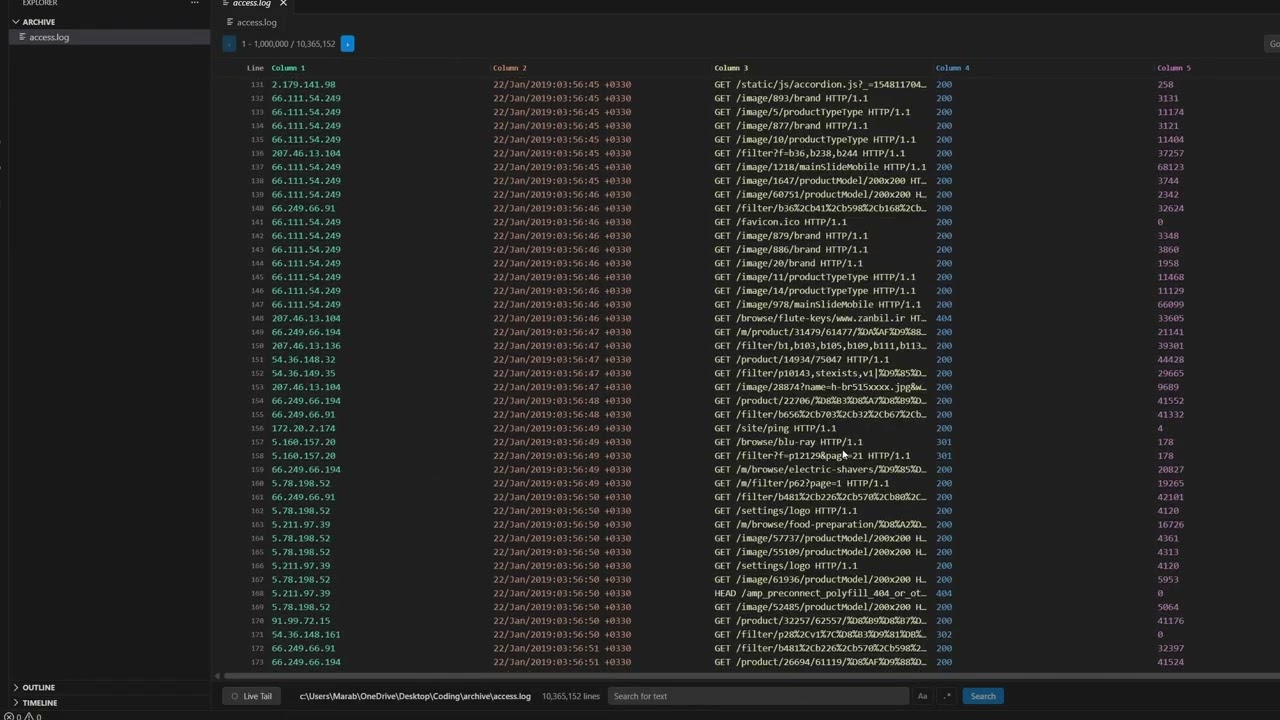
FatFile: Ultra-Fast Large Log ViewerOpen 10GB+ logs instantly with O(1) random access. High-performance streaming powered by a Rust backend. Installation Launch VS Code Quick Open ( Ctrl+P), paste the following command, and press enter.Copied to clipboard |

FatFile - Lightning-Fast Log Viewer for VSCode
Handle massive log files with ease. FatFile is a high-performance VSCode extension built with a powerful Rust backend that lets you instantly open, search, and navigate log files with millions of lines without breaking a sweat. No more crashes. No more freezing. No more waiting. Just instant access to your logs, no matter how large. Why FatFile?Traditional text editors choke on large log files. Even VSCode's default editor struggles with files larger than a few MB. FatFile changes everything:
Whether you're debugging production issues, analyzing server logs, or investigating security incidents, FatFile is your go-to tool for working with large text files. Getting StartedUsing FatFile is incredibly simple:
FeaturesAutomatic Format DetectionFatFile automatically detects popular log formats including Apache, Nginx, Common Log Format, and more. Your logs are instantly parsed into clean, readable columns.
Custom Parsing RulesNeed to parse a custom log format? No problem. FatFile lets you define your own regex patterns with capture groups to extract exactly the data you need.
Powerful Search with Split-Screen ResultsSearch through millions of lines instantly with regex support. Results appear in a dedicated panel below the main viewer, making it easy to jump between matches without losing context.
Search Features:
Live Tail ModeMonitor log files in real-time as new lines are written. Perfect for watching application logs, server logs, or any file that's actively being updated.
Intelligent Navigation
Technical ExcellenceRust-Powered BackendFatFile uses a high-performance Rust backend that handles all file operations with minimal memory overhead. The backend processes files line-by-line, ensuring you can work with multi-gigabyte files without consuming all your RAM. Smart CachingOnly the visible portions of your file are loaded into memory. As you scroll or search, FatFile intelligently caches the data you need while evicting what you don't, keeping memory usage consistently low. Cross-Platform SupportFatFile works seamlessly on:
Platform-specific binaries are automatically selected for optimal performance. Use Cases
Performance BenchmarksFatFile can handle files that would crash traditional editors:
Why "FatFile"?Because it handles fat files that other viewers can't. Simple as that. ContributingFound a bug? Have a feature request? Contributions are welcome! Visit our GitHub repository to:
LicenseFatFile is licensed under the FatFile Non-Commercial License.
See the LICENSE file for complete terms and conditions. Copyright (c) 2026 Hamza DADDA. All rights reserved. Download FatFile today and never struggle with large log files again. Made with performance in mind. Built with Rust. Designed for developers who need to get things done. |