Eating Token - Copilot Token Tracker
Know exactly how many tokens you're eating.
Track your GitHub Copilot token consumption and estimated cost in real-time, right inside VS Code. Inspired by NVIDIA CEO Jensen Huang's statement that a $500K/year engineer should spend at least $250K on AI tokens annually -- are you eating enough tokens?
Features
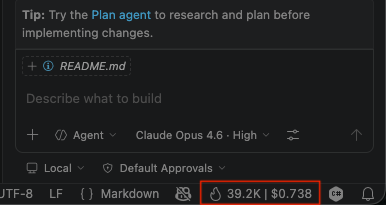
Real-Time Status Bar
A persistent status bar item shows your live token count and estimated cost for the current session. Resets automatically when idle for 5+ minutes.
Interactive Dashboard
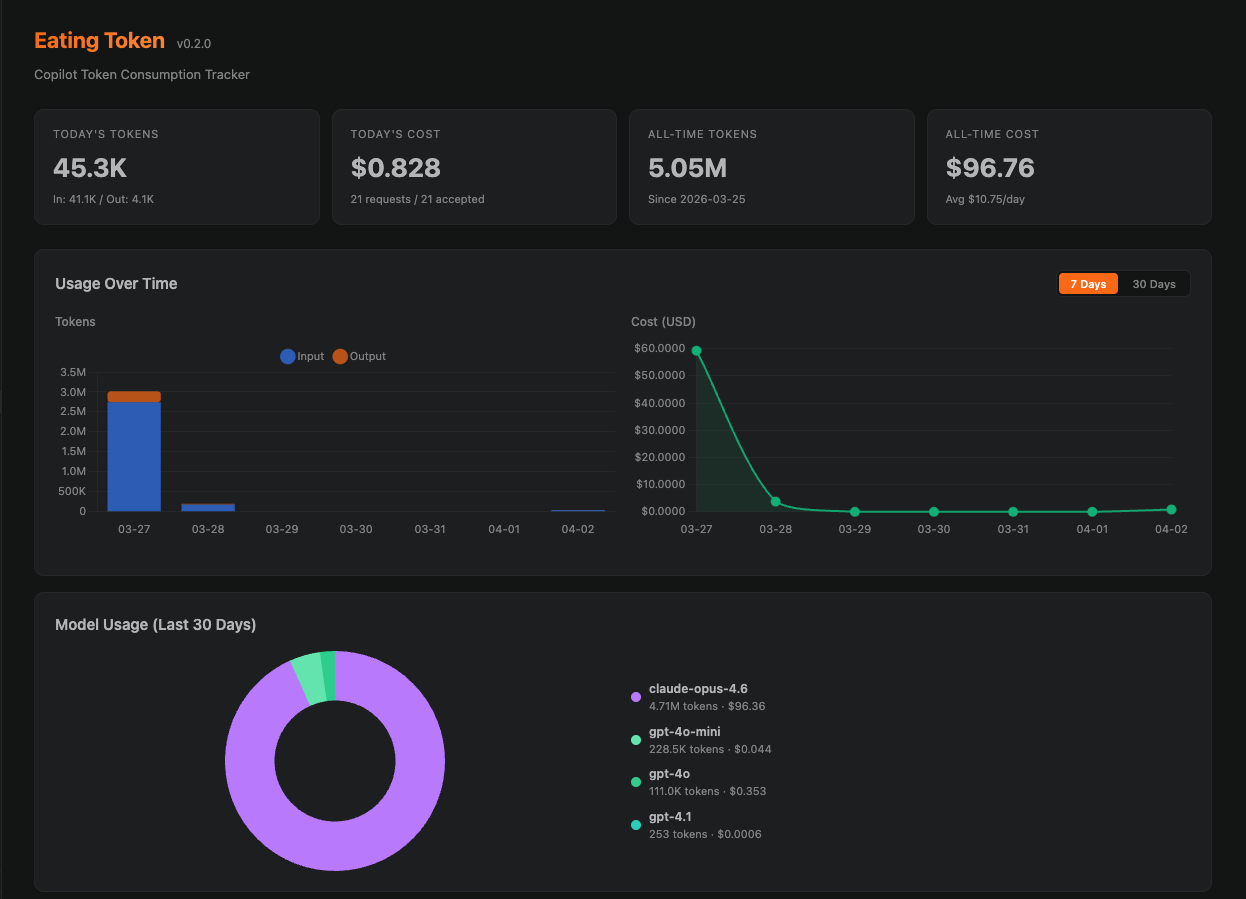
Open the dashboard from the activity bar or via command palette. Visualize your usage with:
- Stacked bar charts -- daily token consumption broken down by model
- Cost trend lines -- track your spending over 7 or 30 days
- Language breakdown -- see which languages consume the most tokens
- Model breakdown -- donut chart showing usage per model (GPT-4o, Claude Sonnet, etc.)
- Jensen Benchmark -- a progress bar tracking your yearly spending against the $250K target
Toggle between 7-day and 30-day views. All data is stored locally in VS Code's globalState.
Energy Tracking
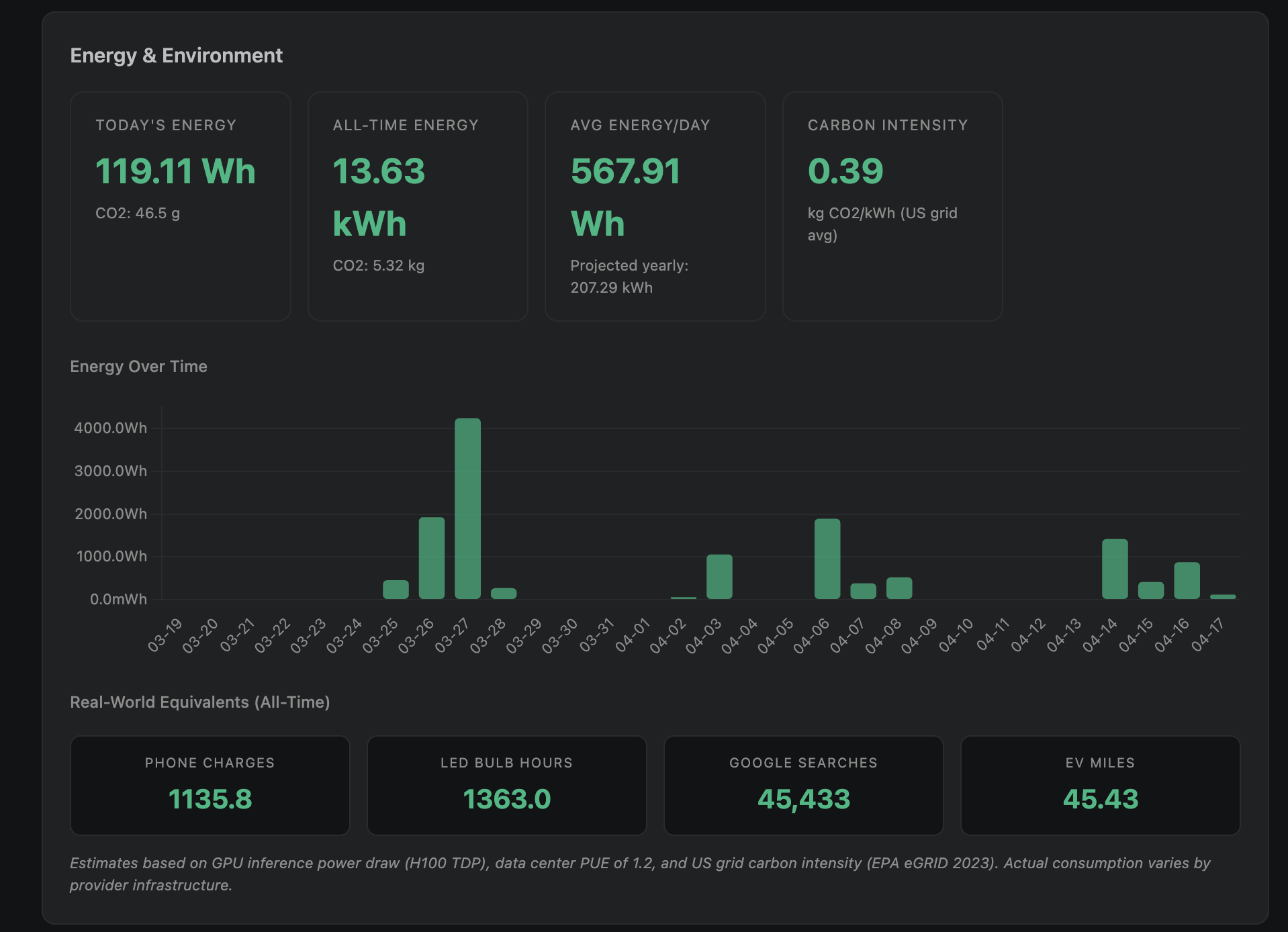
See how much electricity your AI-assisted coding consumes. Per-model energy estimates based on H100 inference benchmarks, data center PUE, and published research.
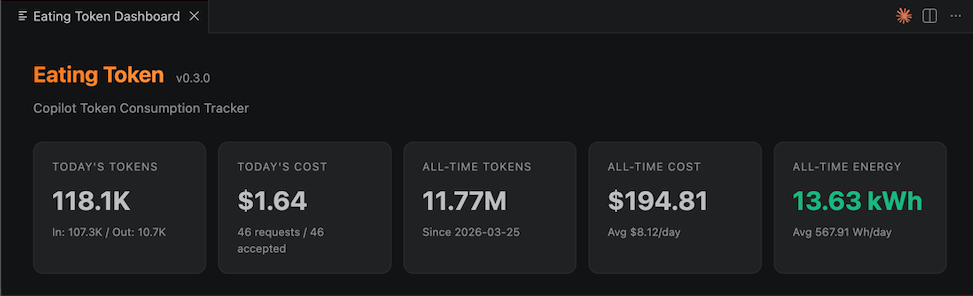
A dedicated Energy & Environment section shows energy over time, CO2 emissions, and real-world comparisons (phone charges, LED bulb hours, Google searches, EV miles).
Multi-Window Support
All VS Code windows contribute to a shared usage total. The dashboard shows combined data across all windows, while each window's status bar reflects its own live session.
4-Layer Tracking System
Eating Token uses multiple data sources to capture Copilot activity as accurately as possible:
| Layer |
What it tracks |
Data quality |
| Session Watcher |
Reads events.jsonl from Copilot's session state directory |
Actual token counts with model info |
| Log Watcher |
Parses VS Code's Copilot Chat log output |
Estimated tokens from response duration + model info |
| Chat Tracker |
Detects Apply/Insert operations from Copilot Chat |
Heuristic token estimates |
| Completion Tracker |
Detects inline ghost text acceptances |
Heuristic token estimates |
Session Watcher events take priority over Log Watcher events via deduplication, so actual token counts are preferred when available.
Installation
From Source (Local .vsix)
git clone https://github.com/manishsat/eatingtoken.git
cd eatingtoken
npm install
npm run build
npx @vscode/vsce package
Then install the generated .vsix file:
- Open VS Code
Ctrl+Shift+P / Cmd+Shift+P -> Extensions: Install from VSIX...- Select the
eatingtoken-*.vsix file
Prerequisites
- VS Code 1.85.0 or later
- GitHub Copilot extension installed and active
Commands
| Command |
Description |
Eating Token: Show Dashboard |
Open the usage dashboard in a new tab |
Eating Token: Reset Session Stats |
Reset the current session counters |
Eating Token: Export Usage Data |
Export all usage data as JSON |
Configuration
All settings are under eatingtoken.* in VS Code settings:
| Setting |
Default |
Description |
eatingtoken.costModel |
gpt-4o |
Model pricing for cost estimation |
eatingtoken.contextMultiplier |
1.3 |
Multiplier for estimating Copilot's full prompt size |
eatingtoken.showInStatusBar |
true |
Show token count in the status bar |
eatingtoken.statusBarFormat |
tokens-and-cost |
Display format: tokens-only, cost-only, or tokens-and-cost |
eatingtoken.trackCompletions |
true |
Track inline completion acceptances |
eatingtoken.yearlyTarget |
250000 |
Yearly spending target in USD |
Supported Cost Models
Since GitHub Copilot doesn't publish its internal token pricing, costs are estimated using equivalent API rates:
| Model |
Input (per 1M tokens) |
Output (per 1M tokens) |
| gpt-4o |
$2.50 |
$10.00 |
| gpt-4o-mini |
$0.15 |
$0.60 |
| gpt-4.1 |
$2.00 |
$8.00 |
| gpt-4 |
$30.00 |
$60.00 |
| claude-opus-4.6 |
$15.00 |
$75.00 |
| claude-sonnet-4 |
$3.00 |
$15.00 |
| claude-sonnet-3.5 |
$3.00 |
$15.00 |
How It Works
Data Sources
Copilot Session Events (~/.copilot/session-state/<uuid>/events.jsonl):
Copilot writes structured JSONL events including assistant.message (with outputTokens) and session.shutdown (with complete modelMetrics per model). The Session Watcher tails these files for actual token counts.
VS Code Copilot Chat Logs:
VS Code's output channels log ccreq: lines for each Copilot Chat request, including the model name and response duration. The Log Watcher parses these and estimates tokens using model-specific output rates.
Document Change Heuristics:
Inline completions and Chat Apply/Insert operations are detected through document change patterns. These provide heuristic estimates when direct token data isn't available.
Deduplication
Events from Session Watcher and Log Watcher may overlap (same Copilot request logged in both places). A deduplication layer ensures each request is counted only once, preferring the Session Watcher's actual token counts over the Log Watcher's estimates.
Storage
All data is stored in VS Code's globalState, which persists across sessions and is shared across all VS Code windows. Usage is recorded per-day with breakdowns by language and model.
Development
# Install dependencies
npm install

# Watch mode (auto-rebuild on changes)
npm run watch

# Run tests (111 tests across 7 files)
npm test

# Build for production
npm run build

# Package as .vsix
npx @vscode/vsce package
To test in VS Code, press F5 to launch the Extension Development Host.
Limitations
- No direct Copilot API access: VS Code does not expose APIs to observe another extension's inline completions or intercept Copilot Chat messages. Token counts from the Completion Tracker and Chat Tracker are heuristic estimates.
- Cost estimates are approximate: Copilot's actual internal pricing is not public. The costs shown are based on equivalent OpenAI/Anthropic API pricing.
- Cross-window race conditions: While the extension uses merge-before-write with immediate saves, there is a small theoretical window for race conditions between VS Code instances writing to globalState simultaneously.
License
MIT
Contributing
Contributions are welcome. Please open an issue first to discuss proposed changes.
- Fork the repository
- Create a feature branch
- Run
npm test to make sure all tests pass
- Submit a pull request

