Claude Code Usage Dashboard
Monitor your Claude Code rate limits, API-equivalent costs, and token usage directly in VS Code — with a full analytics dashboard.
Features
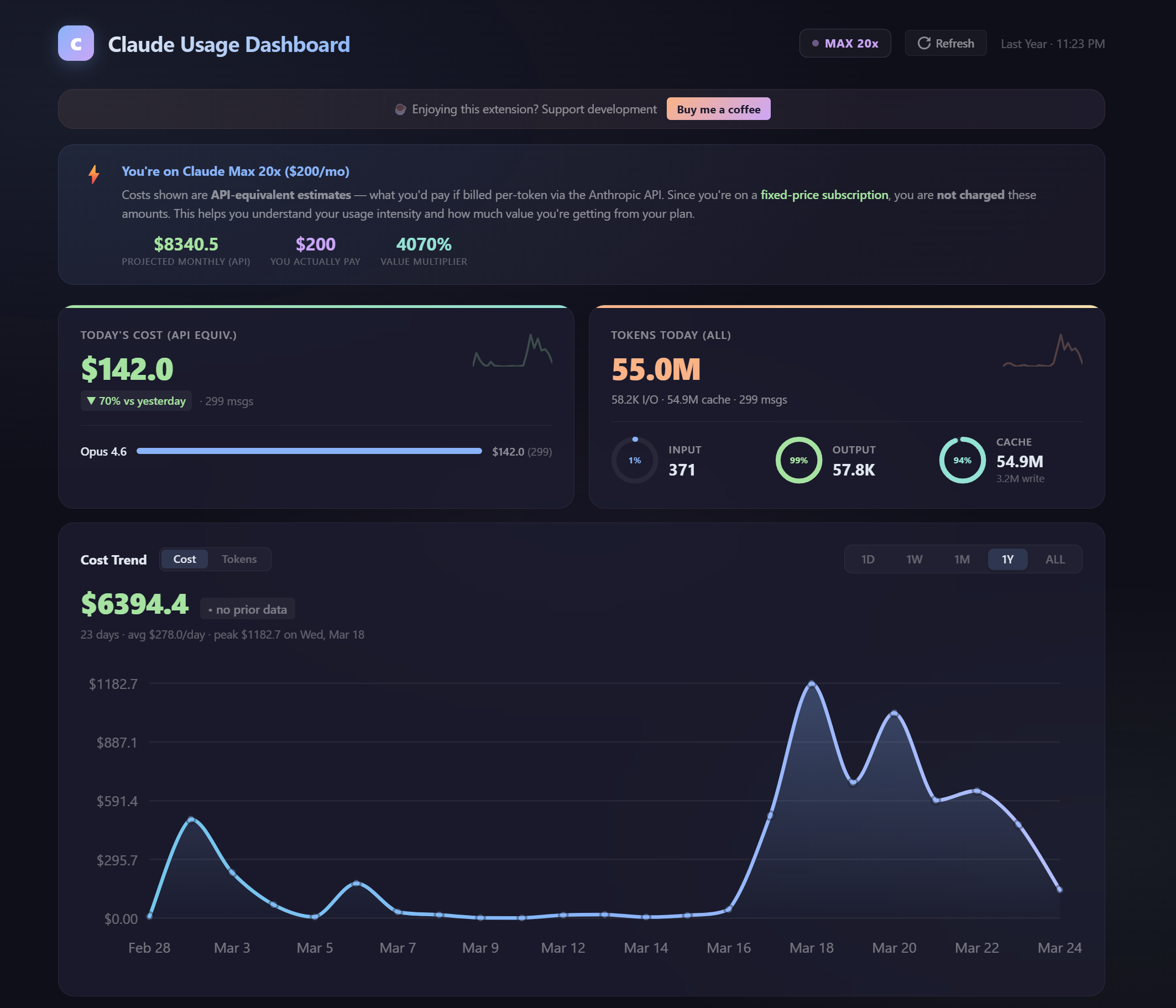
Status Bar & Hover Overlay
A single status bar item shows your current rate limit utilization at a glance. Hover for a detailed breakdown of rate limits, today's cost, tokens, cache performance, and model usage — all in one card.

Analytics Dashboard
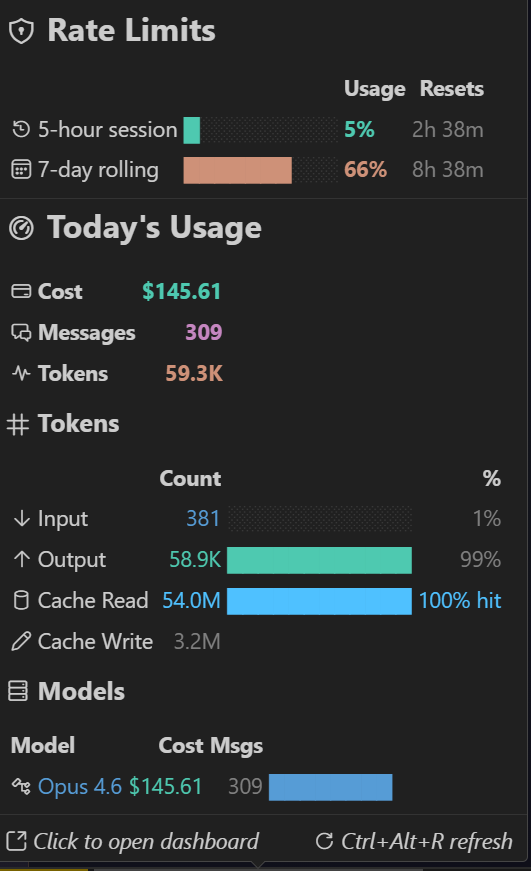
Press Ctrl+Alt+C (or click the status bar) to open the full dashboard:
KPI Cards, Cost Trend & Subscription Info
- KPI Cards — Today's cost with per-model breakdown, token ring gauges (input/output/cache), sparklines
- Subscription Banner — Shows your plan, projected monthly API cost vs. actual price, and value multiplier
- Unified Cost/Token Trend — Toggle between Cost and Tokens view with smooth bezier curves, animated draw-in, and period tabs (1D / 1W / 1M / 1Y / ALL)
- 1D Hourly View — When viewing Today, the chart shows 24 hourly data points with cost/token distribution
- Interactive Tooltips — Hover any data point for cost (green), messages, tokens (peach), and per-model breakdown
Model Distribution, Cache & Projects
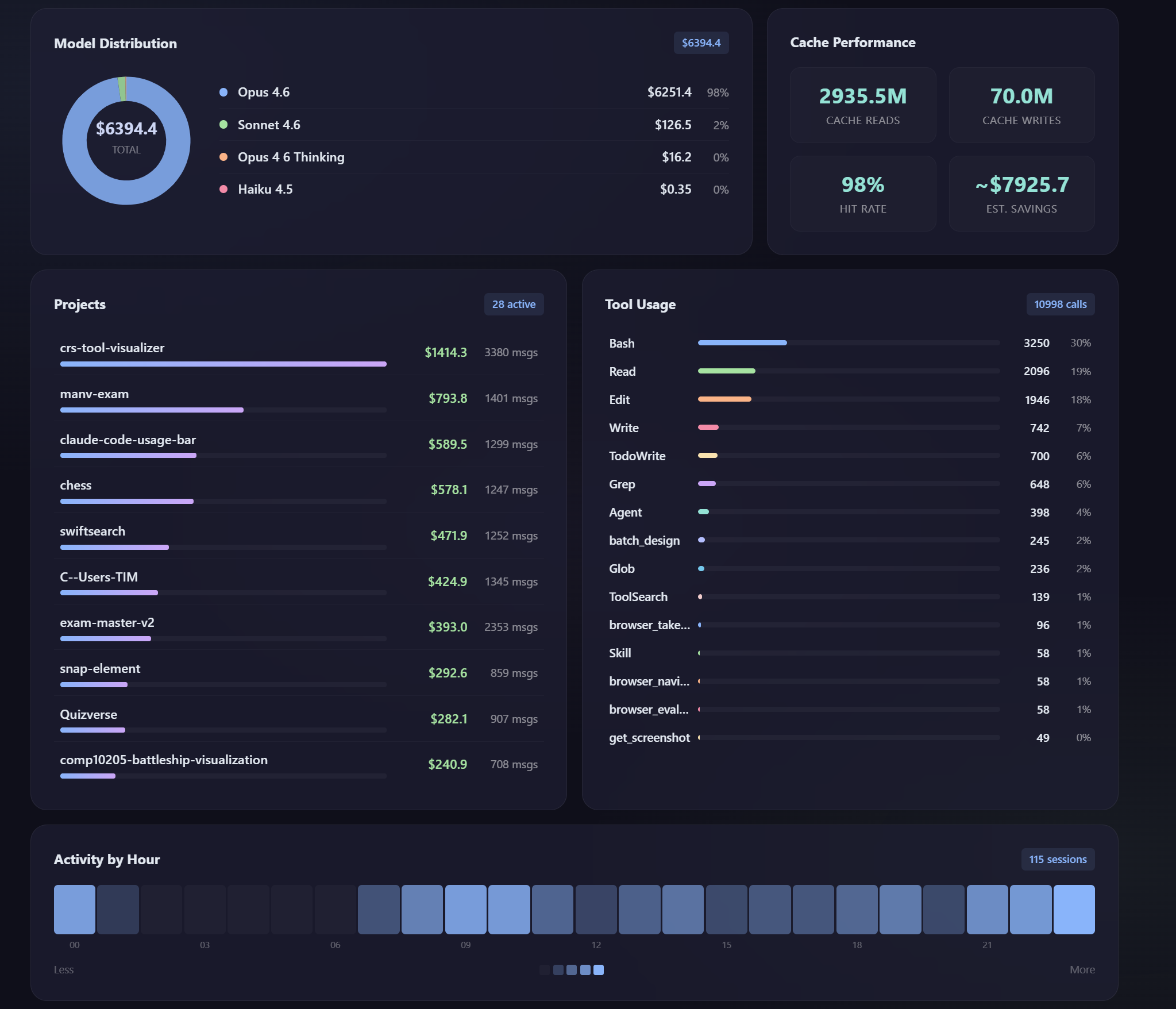
- Model Distribution — Donut chart showing cost split across Opus, Sonnet, Haiku, and Thinking models
- Cache Performance — Read/write volumes, hit rate, and estimated savings
- Projects — Ranked by cost with progress bars, message counts — all filtered by period
- Tool Usage — Top 15 tools ranked by frequency (Bash, Read, Edit, etc.) — filtered by period
- Activity Heatmap — 24-hour activity pattern showing when you code with Claude
Period Filtering
All dashboard sections respond to the period tabs — switch between 1D, 1W, 1M, 1Y, and ALL to see data for any time range. The comparison badge adapts: "vs yesterday" for 1D, "vs prev week" for 1W, etc.
Subscription Awareness
Automatically detects your Claude subscription tier (Max 20x, Max 5x, Pro, Free) and displays an info banner explaining that costs shown are API-equivalent estimates — you are not charged these amounts on a subscription plan. Shows a value multiplier comparing projected API cost vs. what you actually pay.
Offline & Private
All usage data is computed locally by scanning Claude Code's JSONL conversation files (~/.claude/projects/). Zero network calls for cost/token data — the only API call is the rate limit check to api.anthropic.com.
Installation
From VS Code Marketplace
Search for "Claude Code Usage Dashboard" in the Extensions panel, or:
ext install man-vu.claude-code-usage-dashboard
From VSIX
- Download the
.vsix file from Releases
Ctrl+Shift+P → "Install from VSIX"
Requirements
Commands
| Command |
Shortcut |
Description |
| Claude Usage: Show Dashboard |
Ctrl+Alt+C |
Open the full analytics dashboard |
| Claude Usage: Refresh All |
Ctrl+Alt+R |
Force refresh all data |
| Claude Usage: Toggle Status Bar |
|
Show/hide the status bar item |
| Claude Usage: Scan Today's Stats |
|
Re-scan JSONL files for today |
Settings
| Setting |
Default |
Description |
claudeUsageBar.refreshInterval |
300 |
Auto-refresh interval in seconds (minimum 60) |
claudeUsageBar.warningThreshold |
70 |
Usage % to show yellow warning |
claudeUsageBar.criticalThreshold |
90 |
Usage % to show red alert |
claudeUsageBar.dailyBudget |
0 |
Daily cost budget in USD (0 = disabled) |
How It Works
- Rate limits — Fetched from
api.anthropic.com/api/oauth/usage using your Claude Code OAuth token (cached aggressively with exponential backoff to avoid 429s)
- Cost & tokens — Computed locally by scanning
~/.claude/projects/*/*.jsonl conversation files. Each assistant message contains usage.input_tokens, usage.output_tokens, and the model name, which we multiply by API pricing
- Tool usage — Extracted from
message.content[].type === "tool_use" entries in the same JSONL files
- Hourly activity — Derived from message timestamps
- Project breakdown — Grouped by the project directory in the JSONL file path
Privacy
- All data stays on your machine
- No telemetry, no tracking, no analytics
- The only network request is the rate limit API call (using your existing Claude Code OAuth token)
- Source code is fully open
Support
If this extension helps you, consider supporting development:

License
MIT

