Skip to content
| Marketplace
Sign in
Visual Studio Code>Visualization>Size-Cost-ImportNew to Visual Studio Code? Get it now.
Size-Cost-Import

Size-Cost-Import

Lalit Mahato

|
2 installs
| (1) | Free
Display the size of imported packages inline.
Installation
Launch VS Code Quick Open (Ctrl+P), paste the following command, and press enter.
Copied to clipboard
More Info

Size-Cost-Import

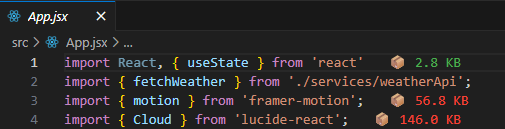
Display the size of imported packages inline in your code.

Size Cost Import Demo

Description

Size-Cost-Import helps you manage the size of your JavaScript and TypeScript applications by displaying the cost of imported packages right in the editor. As you code, this extension calculates and displays the gzipped size of your imports, providing immediate feedback on the "weight" you are adding to your bundle.

It highlights the size with color-coded indicators (Green, Orange, Red) to help you quickly identify heavy dependencies and make informed decisions about your project's performance.

Features

  • Inline Size Display: Shows the gzipped size of imported packages directly at the end of the import line.
  • Smart Color Coding:
    • Green: Lightweight (< 10KB)
    • Orange: Medium (10KB - 50KB)
    • Red: Heavy (> 50KB)
  • Wide Compatibility: Works seamlessly with:
    • JavaScript (.js, .jsx)
    • TypeScript (.ts, .tsx)
  • Performance Optimized: Caches package sizes to minimize API calls and ensure a smooth editing experience.
  • Local Import Validation: Intelligently ignores local file imports (starting with ./ or /) to focus only on external dependencies.

How It Works

The extension parses your import and require statements to identify package names. It then queries the Bundlephobia API to fetch the gzipped size of the package.

Requirements

  • VS Code version 1.80.0 or higher.
  • An active internet connection (to fetch package sizes from Bundlephobia).

Extension Settings

This extension currently works out-of-the-box and does not require additional configuration.

Known Issues

  • Sizes are estimates provided by Bundlephobia and may vary slightly from your actual build size depending on your bundler configuration (Webpack, Vite, Rollup, etc.).

Release Notes

0.0.5

  • Added author and funding information.
  • Initial public release with core functionality.

Support

If you find this extension helpful, considering supporting the development:

  • Ko-fi: https://ko-fi.com/lalitmahato

Author

Lalit Mahato

  • GitHub: mahatolalit
  • Contact us
  • Jobs
  • Privacy
  • Manage cookies
  • Terms of use
  • Trademarks
© 2025 Microsoft