log-test
English | 简体中文
English
Capture Android app logs, then let AI read the latest log and analyze it together with your code.
1. Capture the log
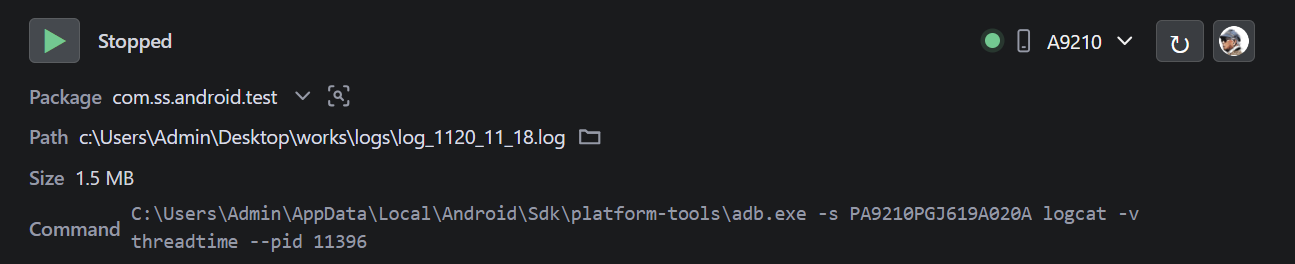
- Open the
log-test panel.
- Connect and authorize the Android device.
- Select the device, app package, and log directory.
- Start capture, reproduce the issue, then stop capture.
2. Ask AI to analyze it
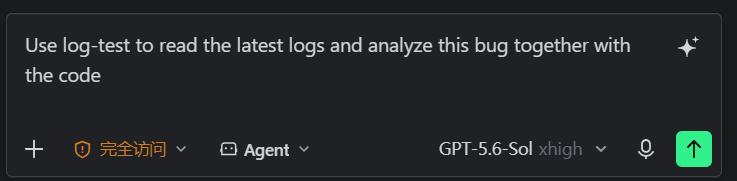
After capture stops, enter this in an Agent chat:
Use log-test to read the latest logs and analyze this bug together with the code
log-test locates the latest log automatically. You do not need to select or upload the file.
Before you start
- Install Android SDK Platform-Tools and make sure
adb is available.
- Keep the target app running on a connected device or emulator.
- AI log reading requires an IDE or client with MCP support. Use log-test: Configure MCP if automatic setup is unavailable.
Useful interactions
- Click the log path to copy it; double-click to open the log.
- Click the author icon to open help and extension settings.
Privacy
Logs stay on your computer. log-test does not include telemetry or upload captured logs.
简体中文
抓取 Android 应用日志,然后让 AI 自动读取最新日志,并结合代码分析问题。
1. 抓取日志
- 打开底部的
log-test 面板。
- 连接并授权 Android 设备。
- 选择设备、应用包名和日志目录。
- 开始抓取,复现问题,完成后停止抓取。
2. 让 AI 分析
停止抓取后,在智能体对话中输入:
使用 log-test 读取最新日志,并结合代码分析这个问题
log-test 会自动找到最新日志,不需要手动选择或上传文件。
使用前准备
- 安装 Android SDK Platform-Tools,并确保可以使用
adb。
- 保持目标应用在已连接的真机或模拟器中运行。
- AI 读取日志需要 IDE 或客户端支持 MCP;无法自动接入时,执行“log-test:配置 MCP”。
常用操作
- 单击日志路径复制,双击打开日志。
- 单击作者头像打开帮助和插件设置。
隐私
日志只保存在本机。log-test 不包含遥测,也不会上传抓取的日志。
| |

