
Agents Config
A VS Code extension for managing Claude Code and Codex configurations
Visualize, organize, and control instruction files, configs, and profiles from one interface.


How is this different from Claude-Code-Config?
This repository started as a fork of Claude-Code-Config, but it is being expanded into a broader agent tooling manager instead of staying Claude-only.
| Area |
Claude-Code-Config |
Agents Config |
| Product scope |
Focused on Claude Code files and workflows |
Manages Claude Code and Codex instructions, configs, profiles, and automation |
| Instruction files |
CLAUDE.md |
CLAUDE.md and AGENTS.md |
| Config coverage |
Claude config files |
Claude settings plus Codex config.toml, ~/.codex/, project .codex/, and profile roots |
| Sidebar views |
Claude-centric views |
Broader "Instructions", "Configs", and "Rules" views alongside commands, skills, hooks, and permissions |
| Rules support |
No dedicated Claude rules browser |
Adds support for .claude/rules/ with rule templates and visible path targeting |
| Settings namespace |
claudeCodeConfig.* |
New agentsConfig.* settings with legacy compatibility kept in place |
If you already know the upstream extension, the short version is: this fork keeps the same core workflow, but adds Codex awareness, profile/config browsing, and Claude rules support under the broader Agents Config name.
Why did I build this?
I love using Claude Code for my personal and professional projects when it works well. When CC goes off the rails with hallucinations or doing a task incorrectly, I would get frustrated. Antrhopic has provided lots of configurations for memories, slash commands, hooks, etc that fix these problems.
However, these configs can be scattered all over the place. I would forget where I told Claude how to draft a pull request -- was it a skill? a memory? a slash command? all three?
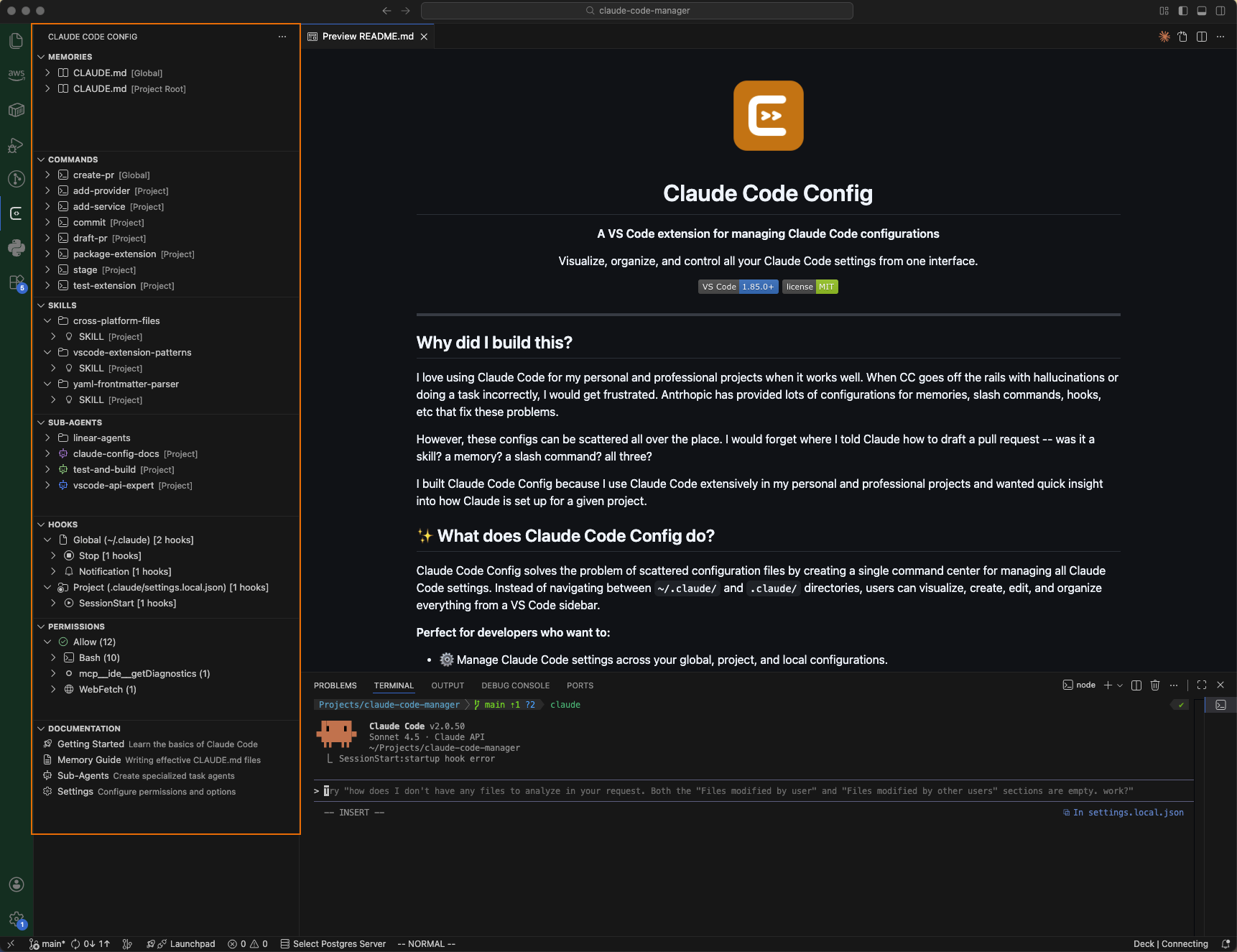
I built Agents Config because I use Claude Code extensively in my personal and professional projects and wanted quick insight into how Claude and Codex are set up for a given project.
What does Agents Config do?
Agents Config solves the problem of scattered configuration files by creating a single command center for managing Claude Code and Codex setup. Instead of bouncing between ~/.claude/, ~/.codex/, profile directories, and workspace config files, users can visualize, create, edit, and organize everything from a VS Code sidebar.
Perfect for developers who want to:
- Manage Claude Code settings across your global, project, and local configurations.
- Quickly add agents, hooks, skills, commands with templates directly from Claude docs so you set them up right every time.
- Move a skill, hook, agent from a local project config to your global set up with one click so your other projects benefit from that skill.
- Quickly see what can and can't be executed by Claude Code Permissions
🎯 Key Features
Unified Configuration Management
All your agent configurations organized in one tree view:
Instructions (CLAUDE.md, AGENTS.md) - Your project context and persistent knowledge with drill down into specific markdown levels.
Configs (settings.json, ~/.claude.json, config.toml) - Quick access to Claude and Codex config files across global, project, and profile roots.
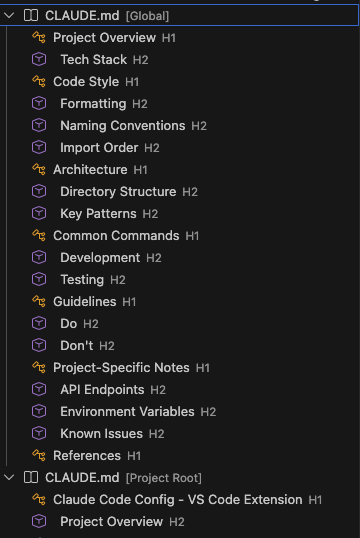
Navigate through your CLAUDE.md files by section - expand any heading to jump directly to that content.
Commands - Custom slash commands for your workflow
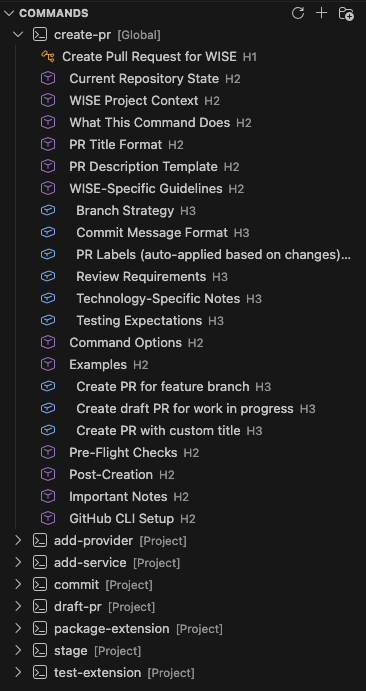
Explore command structure with expandable sections showing all H1, H2, and H3 headings for quick navigation.
Skills - Reusable AI capabilities and specialized behaviors
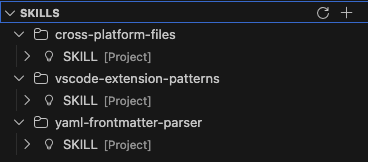
Organize skills in folders - each skill folder contains a SKILL.md file with specialized AI capabilities.
Sub-Agents - Task-specific agents with custom prompts (color coding included)
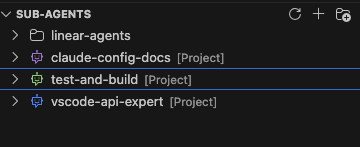
Organize agents in folders and see them color-coded based on their YAML frontmatter configuration.
Rules - Modular Claude rules with folder organization and path targeting
Manage rule files in .claude/rules or ~/.claude/rules and surface their paths frontmatter directly in the tree.
Hooks - Create, edit, delete with a GUI interface for quick adding
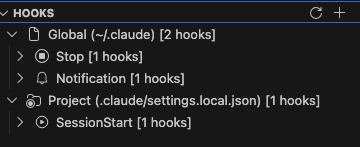
View all hooks organized by location (Global/Project), event type, and execution context.
Permissions - Fine-grained control over tool access
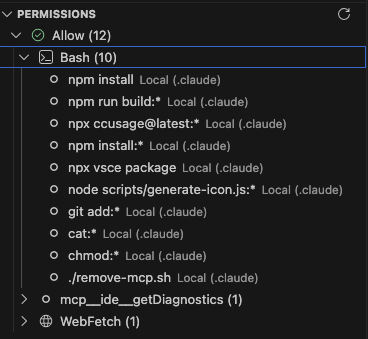
Browse all permission rules organized by type (Allow/Ask/Deny) and tool - see exactly what Claude Code can access.
- One-Click Creation - Add new configs with templates via
+ buttons
- Quickly Change Scopes - Move files between Global and Project with right-click
- Folder Organization - Create logical groupings for commands and sub-agents
- Live Sync - Auto-refresh when files change
- Color-Coded Agents - Sub-agents display in their configured colors for easy identification
- Quick Links to official Claude Code documentation for configs and setup.
Hooks Management Interface
Create and manage Claude Code hooks without touching JSON:
- Visual Hook Builder - Multi-step wizard for all hook types
- Organized Hierarchy - Browse by location → event → matcher → hook
- Quick Actions - Edit, delete, duplicate, or copy hooks with one click
- Support for All Events - PreToolUse, PostToolUse, SessionStart, and more
- Both Types - Command-based and LLM prompt-based hooks
🚀 Quick Start
Installation
From VS Code Marketplace (Coming Soon)
Download "Agents Config" from the VS Code Marketplace
From VSIX
- Download the latest
.vsix from Releases
- Open VS Code Extensions view (
Cmd+Shift+X / Ctrl+Shift+X)
- Click
... menu → Install from VSIX...
- Select the downloaded file
From Source
git clone https://github.com/maddada/claude-code-config.git
cd claude-code-config
npm install
npm run build
# Press F5 in VS Code to launch Extension Development Host
First Steps
- Click the icon - Look for the Agents Config icon in the Activity Bar (left sidebar)
- Explore your configs - Expand sections to see your existing Claude Code and Codex files
- Create something new - Click any
+ button to add instruction files, commands, skills, sub-agents, or rules
- Organize with folders - Right-click in Commands or Sub-Agents to create organizational folders
- Set up hooks - Click
+ in Hooks view to add automation to your Claude Code workflow
📖 Documentation
Configuration Files
Agents Config manages files in standard Claude Code and Codex locations:
~/.claude/                           # Global (all projects)
├── CLAUDE.md
├── commands/
│   ├── my-command.md
│   └── workflows/                   # Organized in folders
│       └── deploy.md
├── rules/
│   └── typescript.md
├── skills/
│   └── code-review.md
├── agents/
│   ├── researcher.md                # color: blue (in YAML frontmatter)
│   └── planner.md                   # color: purple
├── mcp_servers.json
└── settings.json                    # Hooks and permissions

~/.codex/                            # Global Codex
├── AGENTS.md
└── config.toml

~/.codex-profiles/work/              # Example profile root
└── config.toml

.claude/                             # Project-specific
├── CLAUDE.md
├── commands/
├── rules/
├── agents/
└── settings.local.json              # Project hooks (gitignored)

.codex/                              # Project-specific Codex
├── AGENTS.md
└── config.toml
VS Code Settings
Configure Agents Config in VS Code settings:
| Setting |
Description |
Default |
agentsConfig.autoRefresh |
Auto-refresh views on file changes |
true |
agentsConfig.globalClaudePath |
Custom global .claude directory |
~/.claude |
agentsConfig.globalCodexPath |
Custom global .codex directory |
~/.codex |
agentsConfig.claudeJsonPath |
Custom global ~/.claude.json path |
~/.claude.json |
agentsConfig.profilePaths |
Extra profile roots, one per line |
Provided defaults |
Available Commands
Access via Command Palette (Cmd+Shift+P / Ctrl+Shift+P):
- Refresh All Views - Reload all configurations
- Create Instruction File - New
CLAUDE.md or AGENTS.md
- Create Command - New slash command
- Create Skill - New skill definition
- Create Sub-Agent - New sub-agent with template
- Create Rule - New Claude rule with template
- Create Hook - Launch hook creation wizard
🎨 Features in Detail
Hooks Management
Create powerful automation for your Claude Code workflow:
Supported Event Types:
PreToolUse / PostToolUse - Before/after tool executionPermissionRequest - When permissions are requestedUserPromptSubmit - When you submit a promptSessionStart / SessionEnd - Session lifecycleStop / SubagentStop - When agents finishNotification - System notificationsPreCompact - Before context compaction
Example Use Cases:
- Auto-format code after edits
- Run tests after file changes
- Validate prompts before submission
- Log all tool usage for auditing
- Block access to sensitive files
Permissions Visualization
See all your permission rules organized by:
- Type - Allow, Ask, or Deny
- Tool - Read, Edit, Write, Bash, etc.
- Pattern - Specific files or patterns
Click any rule to jump to the settings file for editing.
Sub-Agent Colors
Configure agent colors in YAML frontmatter:
---
name: my-agent
color: purple
---
The icon in the tree view will display in that color for easy identification!
🔧 Development
Prerequisites
- Node.js 18+
- VS Code 1.85.0+
Build Commands
npm install          # Install dependencies
npm run watch        # Development mode with auto-rebuild
npm run build        # Production build
npm run lint         # Run ESLint
npm run package:vsix # Build .vsix package
Project Structure
src/
├── extension.ts              # Main activation
├── core/
│   ├── types.ts             # TypeScript interfaces
│   └── constants.ts         # Shared constants
├── providers/
│   └── claudeTreeDataProvider.ts  # Tree view logic
├── services/
│   ├── fileDiscoveryService.ts    # Find configs
│   ├── fileOperationsService.ts   # CRUD operations
│   ├── hooksService.ts            # Hooks management
│   ├── permissionsService.ts      # Permissions parsing
│   └── mcpService.ts              # MCP server discovery
└── utils/
    ├── yamlParser.ts        # YAML frontmatter parsing
    └── markdownParser.ts    # Markdown section parsing
Contributing
Contributions are welcome! Here's how to help:
- Fork the repository
- Create a feature branch -
git checkout -b feature/amazing-feature
- Make your changes - Follow existing code style
- Test thoroughly - Ensure nothing breaks
- Commit with conventional commits -
feat:, fix:, docs:, etc.
- Push and create a PR - Describe your changes
Areas for Contribution
- 📊 Usage analytics dashboard
- 🌐 Internationalization (i18n)
- 🔌 Plugin Management Support
- 🎨 Additional themes/icons
- 📝 Documentation improvements
- 🐛 Bug fixes and optimizations
License
See LICENSE file for details.
Support
Built with ❤️ for the Claude Code community
If this extension helps your workflow, consider giving it a ⭐ on GitHub!

