A sidebar for the parallel Claude Code sessions you have running: which repo, which branch, what plan, which step.
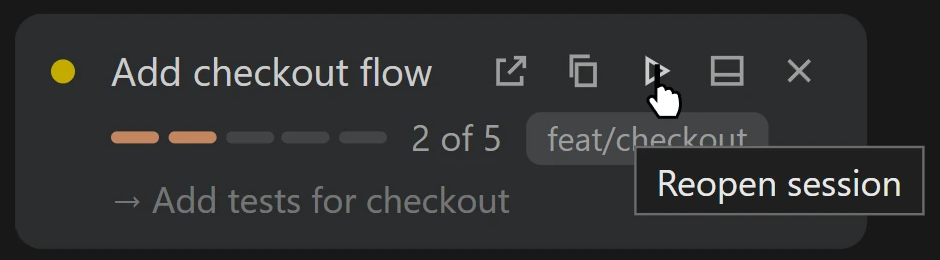
Click the Questlog icon in the Activity Bar to open Sessions. Sessions are grouped by repo and shown as cards. Each shows its plan, a progress bar, and the step it is on, with a summary strip and All, Active and Unfinished filters above them. The status bar shows the stage of the session in the active tab.
Pick up where you stopped
Sessions with plan steps left get a play button. One click reopens the session in a Claude tab.
Needs the mod
This extension only reads what the questlog mod writes to ~/.claude/questlog/ (or $CLAUDE_CONFIG_DIR/questlog/). Without the mod the view is empty. Install the mod from your terminal:
claude plugin marketplace add m4cd4r4/questlog
claude plugin install questlog@questlog
Details
A session appears once Claude calls the questlog tool, which the mod adds and asks Claude to use for tasks of 3 or more steps.
A finished session, or one with no plan steps yet, that goes quiet for 6 hours is marked idle and dropped after 24 hours. One with plan steps left that goes quiet shows as unfinished (amber) and stays for 7 days. Sessions continued with /clear, finished sessions in closed tabs, and sessions that never got a message or a plan are hidden.
Hover a card and click x to hide it. It comes back if the session updates.
If restart-note.md exists in the same folder, it is shown at the top of the view.
The Refresh button re-reads the folder.
No network requests. The extension only reads local files.