PortPilot for VS Code
Every dev server and port in your sidebar, with crash alerts and the servers your AI assistant started marked.
PortPilot lists your registered apps and every listening port in the VS Code sidebar. Running apps come first, crashes get a badge and a toast, and a ✦ marks anything an AI assistant started through PortPilot. It shares one config with the PortPilot desktop app and its MCP server, so the editor, the desktop app and Claude all see the same state.
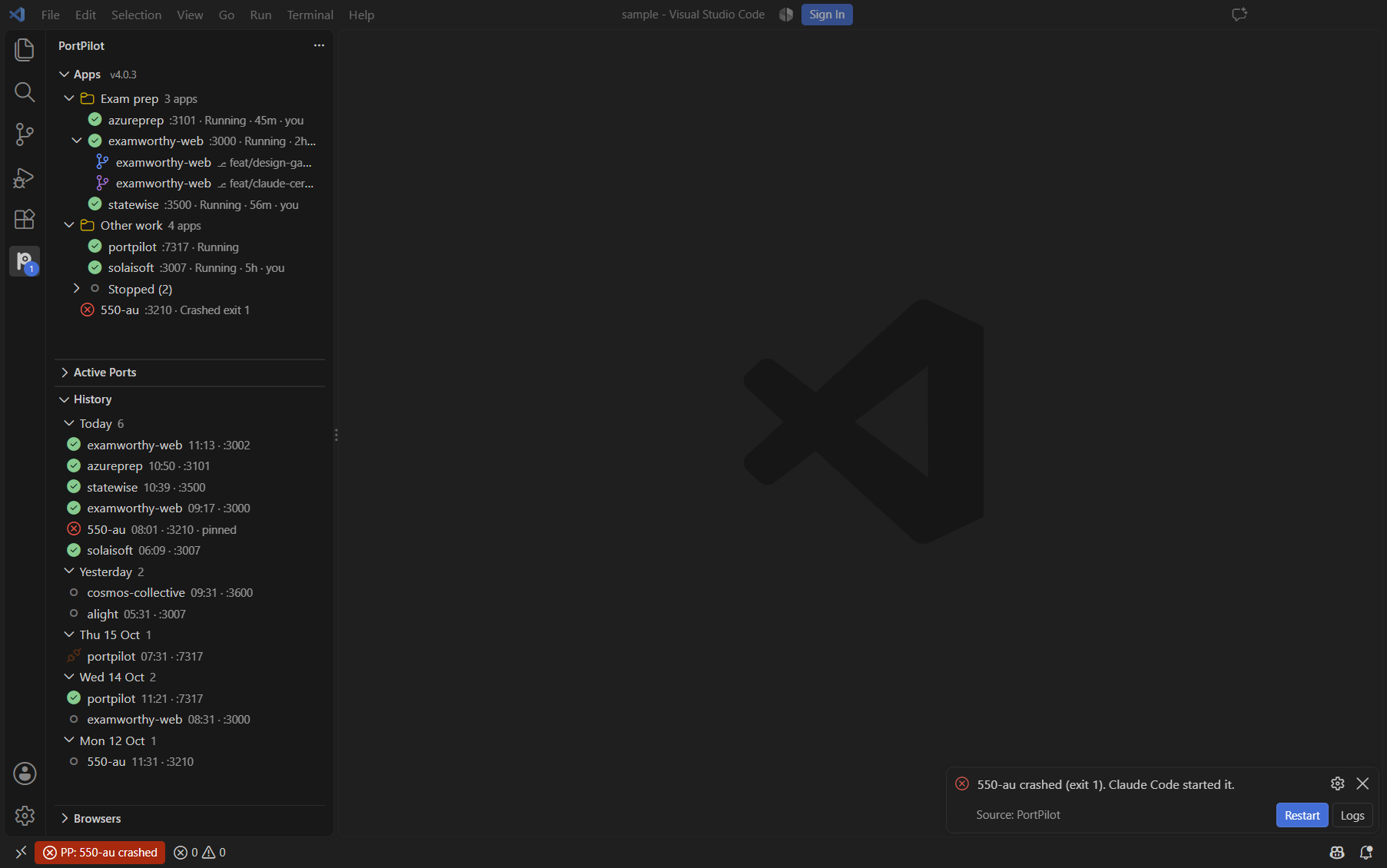
Apps, running first. Each app shows its port, its state, how long it has been in that state and who started it: you, or a Claude Code session. Stopped apps fold into a collapsed Stopped (N) node at the end of each group, so the running ones stay on screen. Worktree branches sit under their app.
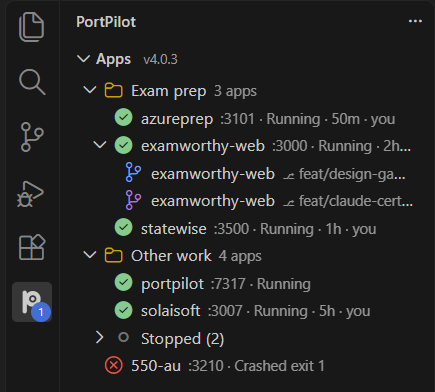
Ports that name their app. Active Ports shows the app that owns each port where PortPilot knows it, and the process and PID where it does not. A ✦ marks a server Claude Code started.
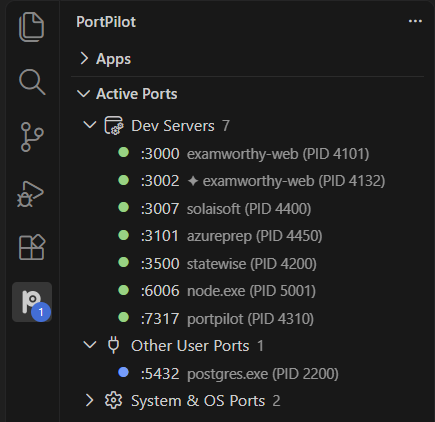
Crash alerts. When an app crashes, the PortPilot icon gets a count badge and a toast says which app crashed, its exit code and whether an AI assistant started it. Restart brings it back; Logs opens its output with the stderr tail. A crash from before the window opened shows in the badge without a toast. The status bar switches from PP: 6 running to PP: 550-au crashed.

History: go back to a page from last week. The History view lists past localhost pages from PortPilot's local run history, newest first: Today, Yesterday, then one group per day for a week, then a collapsed Earlier. Each row shows the app, start time and port, with an icon for running, stopped, crashed or ended-unseen. Hover for the page title, URL, git branch and commit, and the page thumbnail. Servers PortPilot found without you registering them carry a detected marker once the desktop app records them.
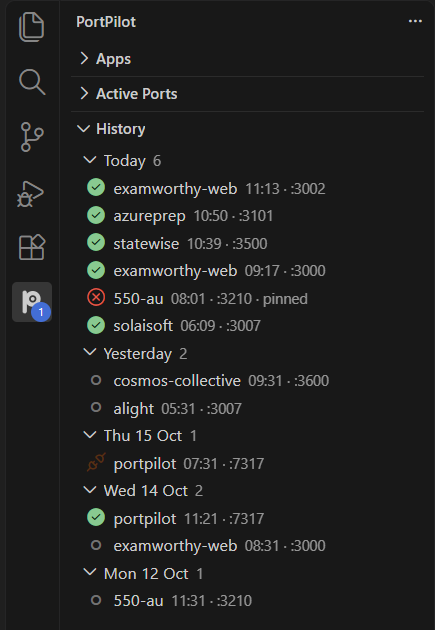
- Click a running page to open it in your browser. Click a closed one to start it again: it needs a recorded folder and start command, and PortPilot waits for the port to answer before opening the page. Without those it says why.
- Row buttons and menu: open or start again, copy URL, pin or unpin (pinned runs are never pruned), open folder.
- Search (title-bar icon) filters by name, port, page title or branch. The list shows the newest 200 runs.
The view reads history/runs.json beside your PortPilot config and re-reads it only when it changes. Thumbnails are read from that folder and never leave your machine.
Browsers: manage your debug-port browsers without leaving the editor. The Browsers view lists the named browser profiles from the PortPilot app's Browsers tab (or created by Claude with start_browser): one row each with :port · mode · browser, running first, then port held, then stopped. A running profile expands to its open tabs (title and URL, the first 30). Hover for the note, start URL, profile folder and, when a Claude session has leased the profile, who has it.
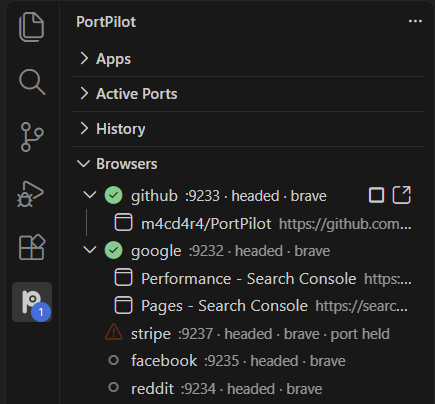
- Row buttons and menu: Start, Stop, Set mode (headed, offscreen or headless; it applies the next time the profile starts), Open URL in this profile, Copy CDP URL (
http://127.0.0.1:<port>), Copy port.
- Click a tab to bring it to the front inside its browser.
- Stop only ends a browser PortPilot started for that profile. If something else holds the port, or the owner cannot be confirmed, PortPilot says so and leaves it running.
The view looks only while it is on screen, once per 10 seconds, and only at the profile's own debug port on 127.0.0.1: it reads tab titles and URLs, never page content, and navigates only when you use Open URL (http and https only). The profile list is re-read only when the config changes. Where the editor's Node has no built-in WebSocket (older VS Code), Stop cannot ask the browser to quit cleanly and ends it after a short wait instead.
Everything else from the tree. Start and stop apps, kill a port, open in the browser, change a port, toggle favourites, and add, edit or delete apps. Running detection is two-phase: an app on a dynamic or non-preferred port is still found, with its live port shown.
Web portal, hosted from VS Code
Turn on portpilot.webPortal.enabled and PortPilot runs its full browser UI from VS Code, with no desktop app needed. A PP Portal item appears in the status bar; click it to open http://127.0.0.1:<port>/.
The portal binds 127.0.0.1 only and needs a per-session token. It runs on the editor's own Node, shuts down cleanly on Windows, and exits if the editor closes. Threat model: SECURITY.md.
Use it with Claude Code
The ✦ marks and the "An AI assistant started it" line appear for any app an MCP assistant started through PortPilot. The PortPilot plugin for Claude Code adds the same view inside Claude: a status line, a guard that reuses a running server instead of starting a second copy, and a crash band with Fix it.
/plugin marketplace add m4cd4r4/PortPilot
/plugin install portpilot@portpilot
Settings
| Setting |
Default |
Description |
portpilot.foldStoppedApps |
true |
Sort running and crashed apps first and fold stopped apps into a Stopped (N) node. |
portpilot.rowPreviews |
true |
Show a page preview when you hover a running app. |
portpilot.webPortal.enabled |
false |
Run the web portal whenever this window is open. |
portpilot.webPortal.stopAppsOnStop |
false |
Also stop the dev servers the portal started when it stops. |
Commands
Start, stop and open the web portal; fold or unfold stopped apps; search, refresh and reopen runs in History; start, stop, set the mode of and open pages in browser profiles; add, edit and delete apps; change ports, kill ports and scan ports. All are in the Command Palette under PortPilot: and on the sidebar.
Links
MIT licensed.

