cornerman
Browse your Claude Code handovers and resume one in a fresh conversation.
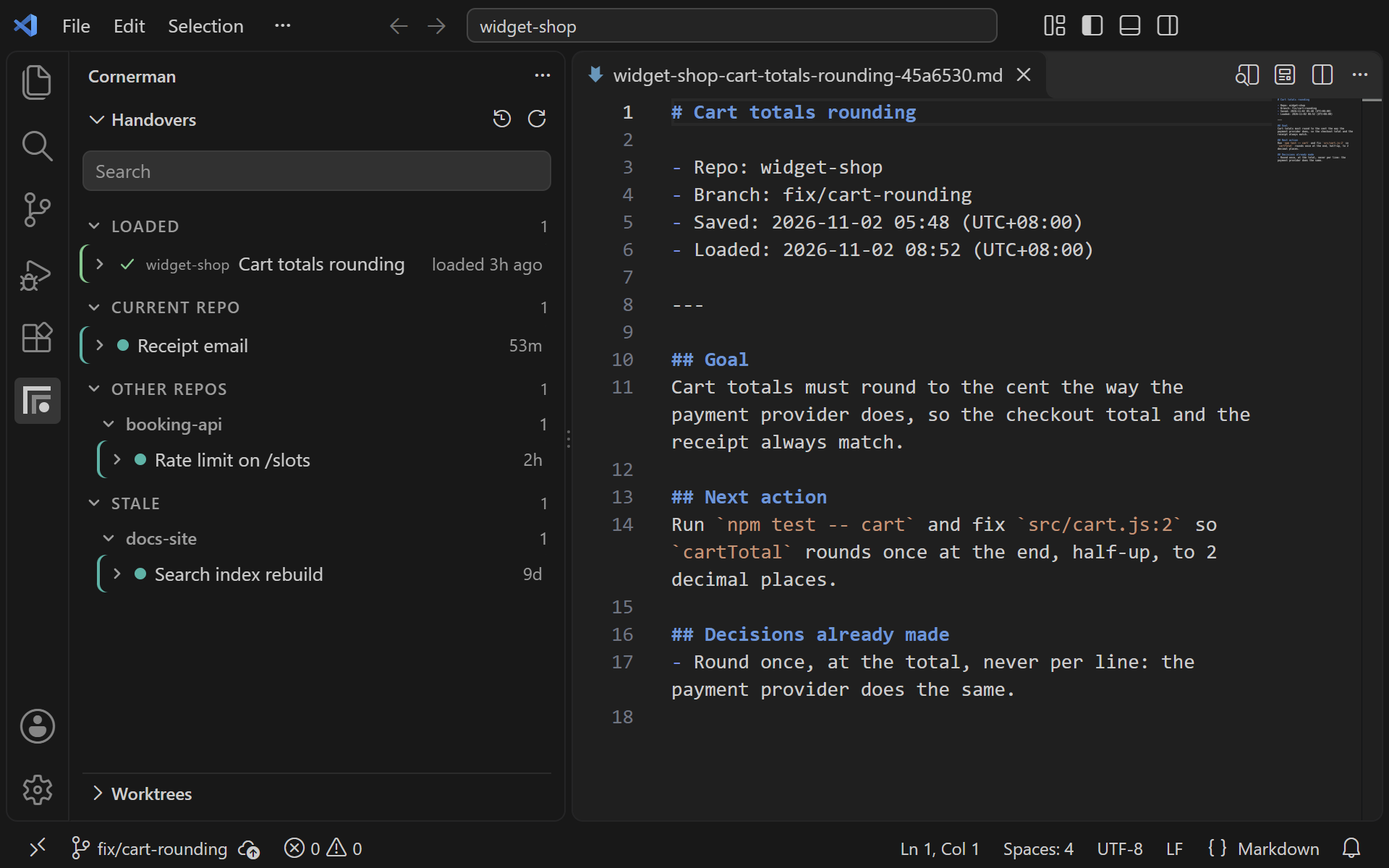
A handover is a short brief a session writes about its own work, so the next
session can carry on without the conversation that produced it. This extension
lists them in a VS Code sidebar. The cornerman plugin
writes them and loads them automatically when you /clear.
It needs that plugin. Install it first, in Claude Code:
claude plugin marketplace add https://github.com/m4cd4r4/cornerman
claude plugin install cornerman@cornerman
What it gives you
- A Handovers sidebar, grouped into Current repo, Other repos and Stale.
- A Loaded group at the top lists the handovers loaded in the last 24 hours. Click
one to open its readable copy.
- Resume opens a Claude Code tab with that handover's prompt pre-filled and
not submitted, so you read it before you send it.
- Pin keeps a handover out of the stale and delete timers.
- A context pie in the status bar fills towards the plugin's nudge size: amber from
80%, red past it. Hover it for the handover this tab loaded (such as
Handover: Cart totals rounding (loaded 3h ago), with an Open handover link), the relay, the chain of sessions it has continued, and
an upper bound on what the clears saved.
- A relay item shows this window's clears used against its budget. Click it to pick
a new budget or turn the relay off, the same as typing
/relay in that window.
- A Spare Cycles countdown, off by default, such as
1:42 Wash the dishes. It
needs the spare-cycles plugin, which owns the timer. Click it to mark the task Done,
Skip it or Snooze it, and you get one notification with the same choices when a task
comes due. Turn it on with cornerman.spareCycles.
The plugin handles the usual case: you write a handover, type /clear, and the next
session in that folder loads it automatically. The sidebar is for the rest: an older
handover, one from another repo, or one you want to read before resuming.
Worktrees view
When a repo has several git worktrees open at once, the Worktrees view lists them
oldest first, one row per checkout: its branch, when it was created, and the state of
its newest handover. Click a row to open that worktree in its own window.
main · started 05-30 10:33 · handover waiting
35. U3 · ux-study-mode · ux-plan [#5](https://github.com/m4cd4r4/cornerman/issues/5)/5 · wave 2 · from 10-04 11:50
It works with no setup. If you keep a registry of planned worktrees, point
cornerman.registryPath at it and each row also names its plan row, its position in
the plan and its wave, and entries not yet started appear under Next up. The
registry is a JSON file of { "entries": [...] }, each entry carrying slug, branch,
status and optionally plan, wave, label and why.
Scripts that create worktrees can use the same labels:
node plugin/scripts/label.mjs <slug> --registry <registry.json> prints the label
for one entry as JSON, so a window title matches the sidebar.node plugin/scripts/save.mjs --unowned ... writes a kickoff handover for a session
that has not started yet. Without --unowned it would be marked as held by the
window that ran the script.
Settings
| Setting |
Default |
What it does |
cornerman.storePath |
~/.cornerman |
Folder holding the handover store. |
cornerman.showArchived |
false |
Show archived handovers (loaded, resumed or replaced by a newer save) in the tree. |
cornerman.registryPath |
(empty) |
Optional worktree registry. When set, the Worktrees view labels each worktree by its plan row and lists queued entries as Next up. |
cornerman.spareCycles |
false |
Show the Spare Cycles countdown in the status bar, with Done / Skip / Snooze on click and one notification per due task. Needs the spare-cycles plugin. |
The extension does not read Claude Code's settings. If you moved the store with
CORNERMAN_HOME there, set cornerman.storePath to the same folder.
Privacy
The store is plain JSON files on disk, one per handover. Nothing leaves your
machine unless you set up syncing.
Once the store is synced, a resume, pin, unpin or delete in the sidebar pushes it
to your git remote in the background.

