Skip to content
| Marketplace
Sign in
Visual Studio Code>Other>AvioflowNew to Visual Studio Code? Get it now.
Avioflow

Avioflow

lxp3

|
2 installs
| (0) | Free
High-performance audio engine and toolkit for VS Code
Installation
Launch VS Code Quick Open (Ctrl+P), paste the following command, and press enter.
Copied to clipboard
More Info

Avioflow Audio Previewer for VS Code

High-performance audio previewer for VS Code using the avioflow native engine. This extension provides a custom editor for various audio formats, allowing users to visualize waveforms and inspect metadata directly within VS Code.

UI & Controls

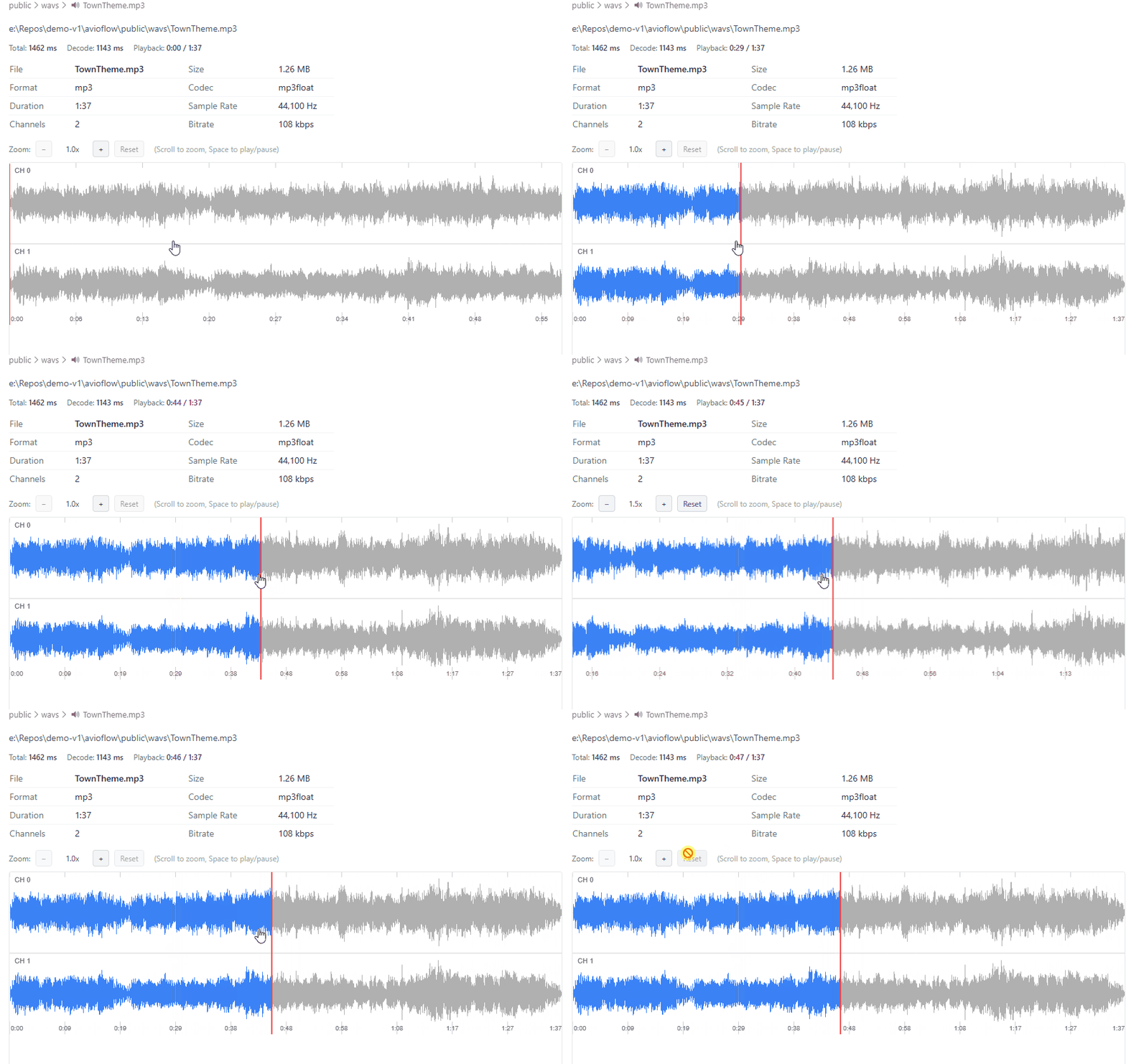
  • Waveform View: Visualizes multiple audio channels (CH 0, CH 1, etc.).
  • Metadata Panel: Displays File Name, Size, Format, Codec, Duration, Sample Rate, and Bitrate.
  • Decoding Info: Shows total load time and actual decoding time.

Shortcuts

  • Space: Play / Pause audio.
  • Mouse Wheel / Trackpad Scroll: Zoom in/out of the waveform.
  • Click & Drag: Navigate through the zoomed waveform.
  • Reset Button: Restore original zoom level.

Architecture

This extension uses a high-performance WebAssembly (WASM) core built from C++ and FFmpeg. This ensures fast decoding while maintaining cross-platform compatibility without native Node.js binary headaches.


VSIX Structure

avioflow-0.2.2.vsix
├─ extension/
�? ├─ package.json
�? ├─ README.md
�? └─ out/
�?    ├─ src/ (Extension logic)
�?    ├─ webview/ (Svelte UI)
�?    └─ wasm/
�?       ├─ avioflow.js
�?       └─ avioflow.wasm

Installation

code --install-extension avioflow-0.2.2.vsix

Getting Started

Prerequisites

  • Node.js (installed in your system PATH)
  • pnpm

Installation & Build

# Install dependencies
pnpm install

# Build the extension and webview
pnpm compile

Running the Extension

  1. Open the project in VS Code.
  2. Press F5 to open a new [Extension Development Host] window.
  3. Open any audio file (e.g., .mp3, .wav, .flac) to see the preview.

Features

  • High Performance: Leverages native C++ and FFmpeg for fast decoding.
  • WASM Core: Runs at near-native speed with zero installation overhead.
  • Modern UI: Clean waveform visualization built with Svelte.
  • Contact us
  • Jobs
  • Privacy
  • Manage cookies
  • Terms of use
  • Trademarks
© 2026 Microsoft