MindMirror 🪞
A VS Code companion for coding health + stuck rescue — track focus, spot interruptions, and “rubber-duck” your way out of blocks.
✨ What is MindMirror?
MindMirror is a developer-friendly VS Code extension that helps you:
- Stay aware of your coding rhythm (active time, focus streak, interruptions)
- Reduce “stuck time” with a structured “Rubber Duck Debugging” workflow
- Generate daily reports & help requests as clean Markdown for review, sharing, or AI prompts
It adds a Sidebar Plugin Hub with one-click access to two core panels:
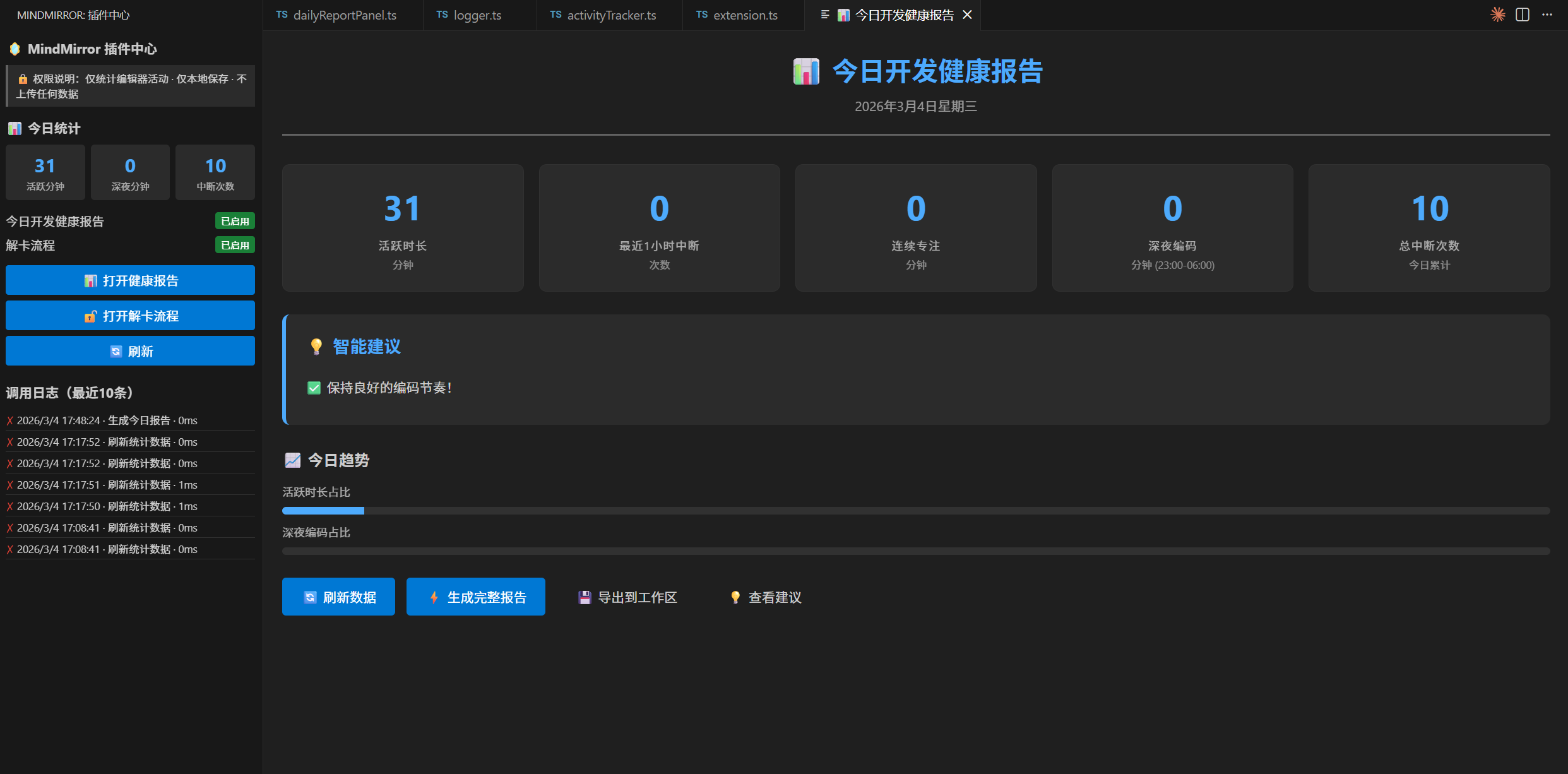
- 📊 Daily Coding Health Dashboard
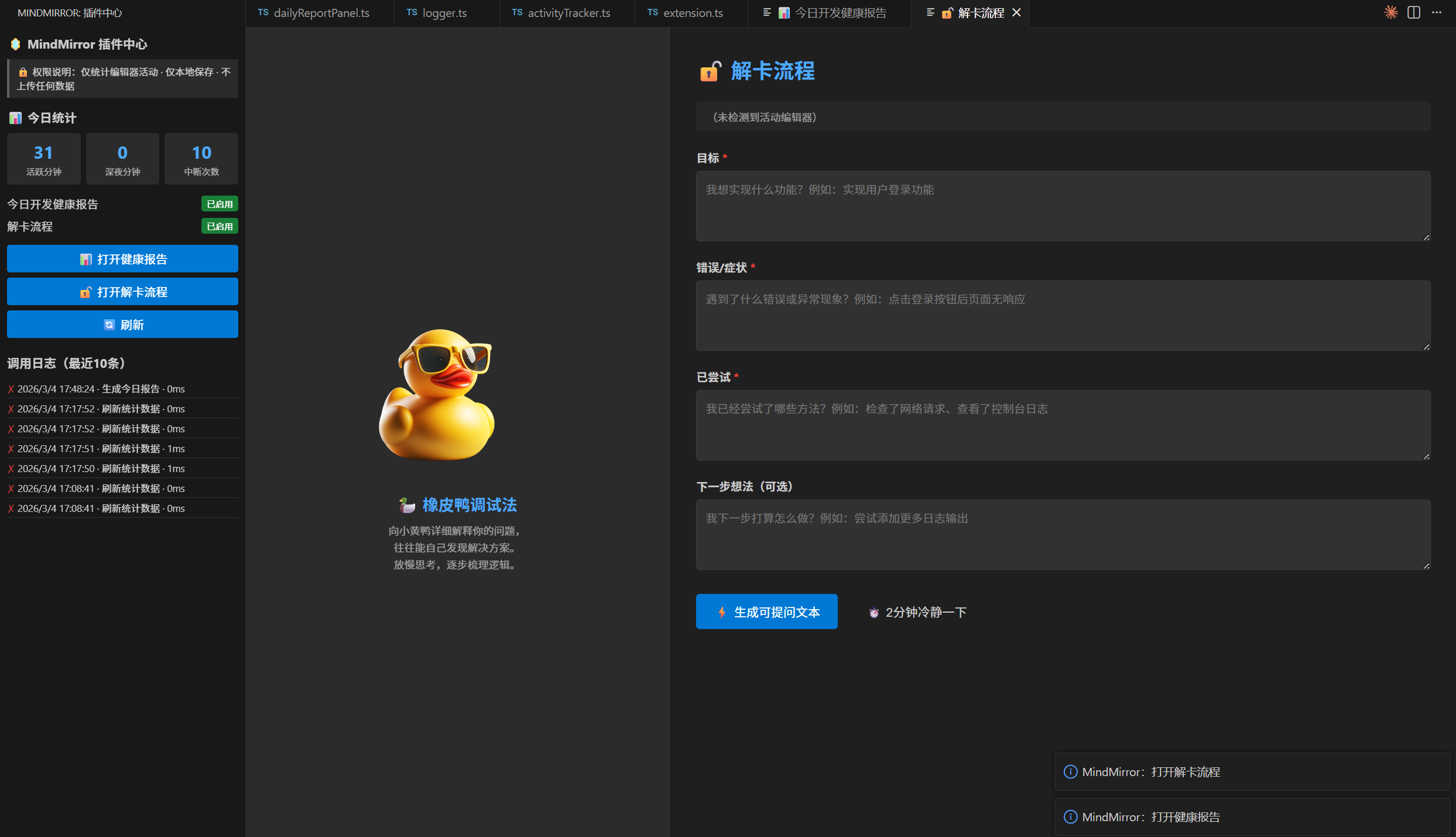
- 🔓 Stuck Rescue (Rubber Duck Debugging)
🔥 Highlights
📊 Daily Coding Health Dashboard
Track and visualize:
- Active coding time (minutes)
- Late-night coding (23:00–06:00)
- Interruptions / stuck signals (frequency + totals)
- Focus streak duration (continuous minutes)
Actionable rule-based suggestions (simple, explainable — no heavy ML):
- Frequent interruptions in the last hour → take a short break or split the task
- Focus streak ≥ 60 minutes → stand up & move for 2 minutes
- Too much late-night coding → reminder to rest and protect sleep
- Low active time but high interruptions → use DND or schedule a quiet time block
Export a daily Markdown report:
🔓 Stuck Rescue (Rubber Duck Debugging)
A calm, structured workflow to help you explain problems clearly.
You get:
- A Rubber Duck visual zone (image/video placeholder you can replace)
- A structured form:
- Goal
- Error / Symptom
- Tried
- Next Step (optional)
- One-click output:
- Generate Markdown help request
- Copy to clipboard
- Save to workspace:
mindmirror_help.md
- (Optional) “2-minute calm down” timer
Perfect for:
- Asking AI better questions
- Requesting help from teammates
- Creating GitHub Issues / StackOverflow posts
✅ Features
- Sidebar Plugin Hub (quick access + daily stats)
- Daily dashboard with metrics cards + suggestions
- Stuck rescue workflow + structured Markdown output
- Export to workspace Markdown files
- Recent action log (latest 10 operations)
- Privacy-first local storage (optional backend sync)
🚀 Getting Started
Install
Search for MindMirror in the VS Code Marketplace and install.
After installation:
- Open VS Code
- Locate MindMirror in the Activity Bar (left sidebar)
- Open the Plugin Hub
🧭 Usage
📊 Open Daily Health Dashboard
- In Sidebar → 📊 打开健康报告
- Or run command:
You can:
- Refresh stats
- Generate a full report
- Export to workspace (
mindmirror_today.md)
🔓 Open Stuck Rescue
- In Sidebar → 🔓 打开解卡流程
- Or run command:
You can:
- Fill the structured form
- Generate Markdown help request
- Copy / Save (
mindmirror_help.md)
⚙️ Configuration
Open VS Code Settings → search MindMirror.
| Setting |
Type |
Default |
Description |
mindmirror.enableDailyReportPlugin |
boolean |
true |
Enable Daily Health Dashboard |
mindmirror.enableStuckRescuePlugin |
boolean |
true |
Enable Stuck Rescue workflow |
mindmirror.syncUrl |
string |
"" |
Optional backend sync URL |
mindmirror.stuckThreshold |
number |
4 |
Last-hour interruption threshold |
mindmirror.continuousThreshold |
number |
60 |
Focus streak threshold (minutes) |
mindmirror.duckAsset |
string |
base64 |
Duck image/video placeholder (Base64/URL) |
🔒 Privacy
MindMirror is privacy-first by default:
- All stats are stored locally (VS Code local storage)
- No code, files, or personal content are uploaded
- Optional backend sync is only enabled when you set
mindmirror.syncUrl
- Offline use works fully even without sync
🧪 Tips
- If you want “real” activity stats quickly:
- Edit any file and save a few times
- Open the dashboard and click Refresh
- For best accuracy, keep VS Code open while working (timers are session-based)
📌 Roadmap (optional)
- More trend visualizations (daily/weekly)
- Custom rules for suggestions
- More “stuck signals” (idle patterns, context switching)
- Export as JSON / CSV
📄 License
MIT License

