CodePi
Github: lutrarutra/codepi
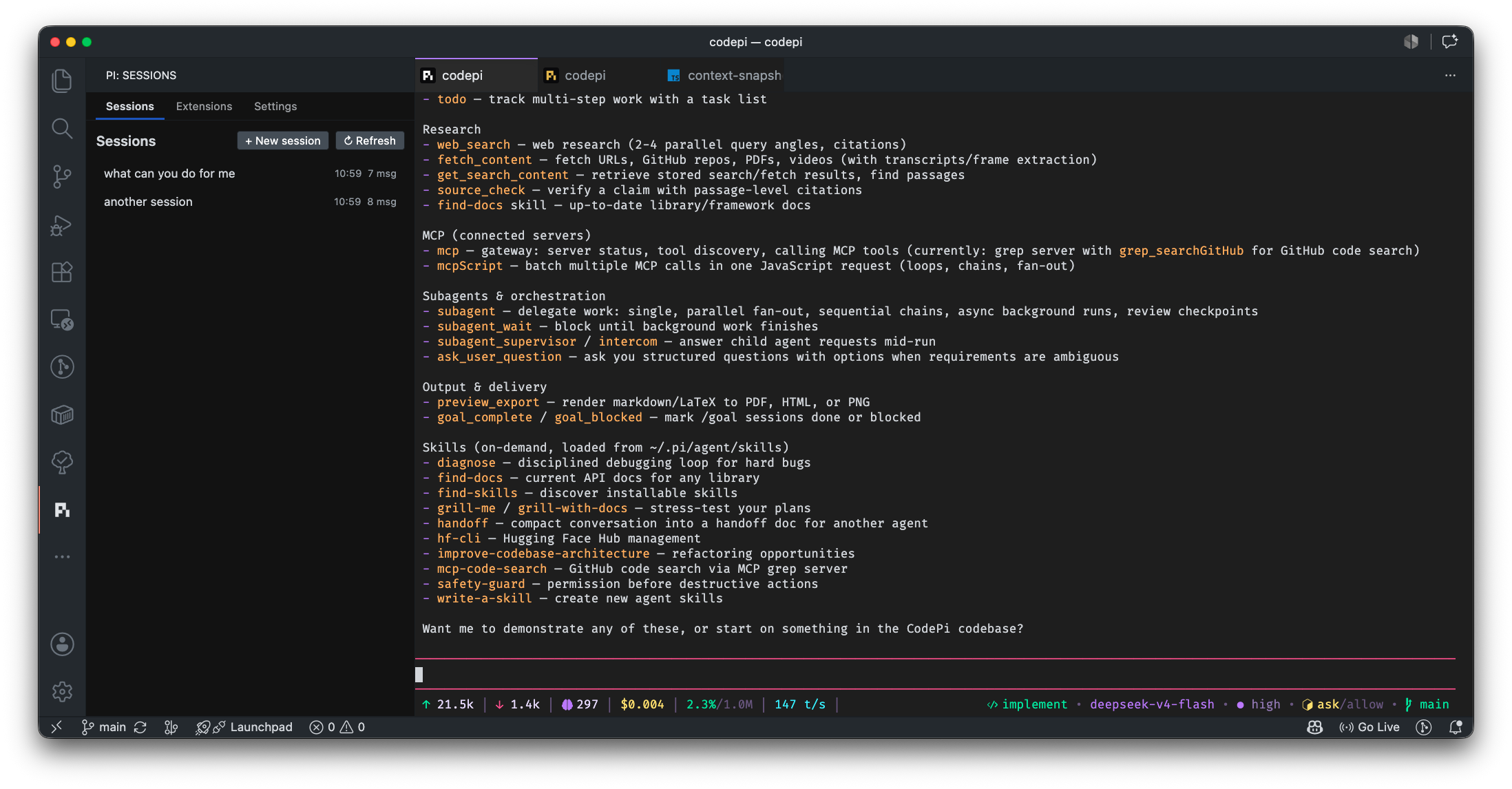
CodePi embeds the pi coding agent in VS Code. It runs pi in
the extension host, renders pi's terminal UI in a webview, and adds VS Code
context, workspace tools, edit review, session management, and safety controls.
Third-party notice: CodePi is an independent extension. It is not
affiliated with, endorsed by, sponsored by, or maintained by pi.dev or the pi
project.
Note: CodePi is in development and was built with the help of agentic coding. Opening issues for bugs, feature requests, and feedback, are highly encouraged and appreciated.
Requirements
- VS Code 1.93 or newer.
- A configured pi installation and provider in
~/.pi/agent.
- A workspace folder. The Sessions view is empty when no workspace is open.
CodePi uses pi's normal resources, including settings.json, models.json,
auth.json, skills, prompts, themes, packages, and user extensions.
Getting started
- Install CodePi and open a workspace in VS Code.
- Open the PI activity-bar view.
- Create a session from Sessions or run CodePi: Start new session from
the Command Palette.
- Configure models and authentication if pi needs them.
The session is pi's interactive terminal UI, not a separate pi CLI process.
Multiple sessions can remain open as editor tabs and are restored after a VS
Code reload.
Features
VS Code-native agent experience
CodePi provides streaming chat, tool calls, thinking levels, markdown, syntax
highlighting, and the familiar PI terminal-backed TUI. Sessions can be created, reopened,
renamed, deleted, refreshed, and restored after reloads. Session files are
stored in CodePi's VS Code extension storage, separately for each VS Code
window and remote host.
Editor context
Each session receives an editor-context snapshot containing:
- Active file, language, cursor, selections, and selection text.
- Open editors, recently visited files, dirty state, workspace folders, trust state, and open terminals.
- Git repositories, branches, changed files, line counts, and the SCM commit box.
- Active debug session.
get_editor_context for a current snapshot.get_git_diff for Git diffs, including untracked files.- Live context refreshes when the active editor or selection changes.
Snapshots and diffs are bounded so large workspaces do not consume the entire
model context window.
Editor Integration
- ctrl + click to open files or follow links.
- Tab handle icon tracks the state of the agent: idle (white), active (cyan), or waiting for user input (yellow).
CodePi overrides PI's default tools with VS Code-native tools:
read, head, ls, find, and grep for workspace exploration.get_diagnostics for language-server and problem-matcher diagnostics.write and edit for file changes.
These tools use VS Code workspace APIs rather than a shell. Shell commands use
the separate bash tool below.
Edit review
File changes are applied to disk immediately and tracked as pending proposals:
- File-level accept/reject CodeLens actions in the editor.
- Side-by-side diff views, edit cards in chat, and a pending-edits status bar.
- Rejecting restores the captured original content; accepting resolves review state.
- Changes made manually while a proposal is pending are marked stale instead of being overwritten.
/filechanges provides a session-level change log; accept or decline changes with /filechanges-accept and /filechanges-decline.- Editor review state and the file-change tracker stay synchronized.
Agent modes
Switch with /codepi-ask, /codepi-plan, and /codepi-implement:
- Ask — read-only mode; editing, shell commands, and non-whitelisted tools are blocked.
- Plan — explore the project and write Markdown planning files without changing source or configuration code.
- Implement — full tool access.
Ask-mode tools are configurable with codepi.modes.ask.allowedTools.
VS Code terminal bash
The bundled codepi-bash extension runs commands through a hidden VS Code terminal:
ask mode with approval, denial, revision, or auto-approve options.allow mode for automatic execution.disabled mode to block shell commands.- Shell integration, timeouts, output truncation, and temp-file spillover for large output.
- Toggle with
/codepi-bash-ask, /codepi-bash-allow, and /codepi-bash-disable.
codepi-task-run uses the same terminal backend for saved project tasks.
Reusable project tasks
Define build, test, lint, package, and other commands in .pi/tasks.json:
codepi-task-create, codepi-task-edit, codepi-task-deletecodepi-task-run, codepi-task-listbefore-implement, after-implement, and anytime task timing.- Read-only tasks can run in Ask mode.
- Creating, editing, and deleting tasks requires user confirmation.
Example .pi/tasks.json:
{
	"tasks": {
		"test": {
			"command": "npm test",
			"when": "after-implement",
			"readOnly": true,
			"timeout": 600,
			"description": "Run the test suite"
		}
	}
}
The default task timeout is 600 seconds.
Using in Remote with Remote-SSH
- Since pi is bundled with the extension, it does not need to be installed on the remote host.
- However, you will need to copy your local
~/.pi/agent directory to the remote host scp -r ~/.pi/agent user@remotehost:~/.pi/agent if you want to use your local pi extensions, settings, and models on the remote.
- The footer shows token and cost information, model, thinking level, context usage, Git branch, mode, and bash approval state.
- The bundled
nebula-pulse theme and Nerd Font icons are enabled by default.
Verification and workflow automation
- Automatic post-edit diagnostics via
codepi.autoVerify: nextTurn, followUp, or off.
nextTurn adds diagnostics to the next prompt; followUp asks pi to address them immediately. This reads diagnostics; it does not run builds or tests.
Settings and extension management
The CodePi sidebar includes:
- Sessions, Settings, and Extensions views.
- Bundled-resource toggles for
codepi-footer, codepi-diff, codepi-modes, codepi-bash, codepi-context, codepi-task, and nebula-pulse.
- Links to pi's
settings.json, models.json, and auth.json.
- A live inventory of loaded core, bundled, project, user, and package extensions, commands, tools, handlers, flags, shortcuts, and message renderers.
- Configuration for terminal font, terminal size, auto-verify, terminal shortcut, task behavior, and Ask-mode tools.
CodePi also loads pi's normal resources and extension ecosystem: configured models and providers, authentication, skills, prompt templates, themes, packages, and custom extensions.
Settings and storage
CodePi-specific settings are stored under codepi in ~/.pi/agent/settings.json:
codepi.fontFamily and codepi.fontSize — terminal appearance.codepi.autoVerify — nextTurn, followUp, or off.codepi.modes.ask.allowedTools — Ask-mode tool allowlist.codepi.tasks.injectPrompt and codepi.tasks.remindAfterImplement — task prompt behavior.codepi.bundledExtensions.* and codepi.bundledThemes.* — bundled-resource toggles.
Storage is split between ~/.pi/agent for pi configuration, VS Code global
storage for CodePi sessions, <workspace>/.pi/tasks.json for project tasks,
and the extension's resources/ directory for bundled resources. Local and
Remote-SSH windows do not share session files.
The Settings view links to pi's settings.json, models.json, and auth.json.
The Extensions view inventories loaded core, bundled, project, user, and
package resources, including commands, tools, and load errors.
Commands
The Command Palette provides session, review, and dashboard commands, including
CodePi: Start new session, New Session, Open Session, Rename
Session, Delete Session, Refresh Sessions, edit accept/reject actions,
Open Edit Diff, and the Sessions, Settings, and Extensions tabs.
Pi slash commands are provided by bundled extensions:
- Modes:
/codepi-ask, /codepi-plan, /codepi-implement.
- Bash:
/codepi-bash-ask, /codepi-bash-allow, /codepi-bash-disable.
- Tasks:
/codepi-task-create, /codepi-task-edit, /codepi-task-delete,
/codepi-task-run, /codepi-task-list.
Use pi's /model command or its model keybinding to change models.
Development
make deps        # install root and webview dependencies
make build       # production webview and extension build
make watch       # rebuild webview, TypeScript, and extension on changes
make check-types # TypeScript check
make unit        # Vitest suite
make smoke       # load bundled extensions in isolation
make verify      # type-check, tests, and smoke test
make vsix        # package a VSIX in dist/
make install     # package and install the VSIX into VS Code
For watch mode:
The npm equivalents include npm run build, npm test, npm run lint, and
npm run watch. Packaging synchronizes the package version to the latest
reachable Git tag when the tag is valid semver.
Known limitations and compatibility notes
- Large editor and Git states are truncated or capped before being sent to pi.
- Edited extension source may require a VS Code reload before the runtime sees the change.
- Disabling the bundled
codepi-bash resource removes the approval bridge; /codepi-bash-disable keeps the safety layer active and rejects commands.
- The contributed
codepi.piPath setting is currently not used by the runtime and should be treated as stale compatibility configuration.
Acknowledgments
License
MIT
| |

