Turn codebase chaos into crystal clarity



Lumyst is an AI-powered VS Code extension that helps developers quickly understand complex codebases through intelligent, interactive visualizations and guided Code Tours. By combining static analysis with LLMs, it generates a hierarchical graph of your code, highlighting key components, dependencies, and architectural patterns, while filtering out noise to reduce cognitive load. Call Trace lets you view full execution paths for any function without running the code, making it easier to onboard, review AI-generated code, or navigate unfamiliar projects.
Visualize Your Codebase Like Never Before
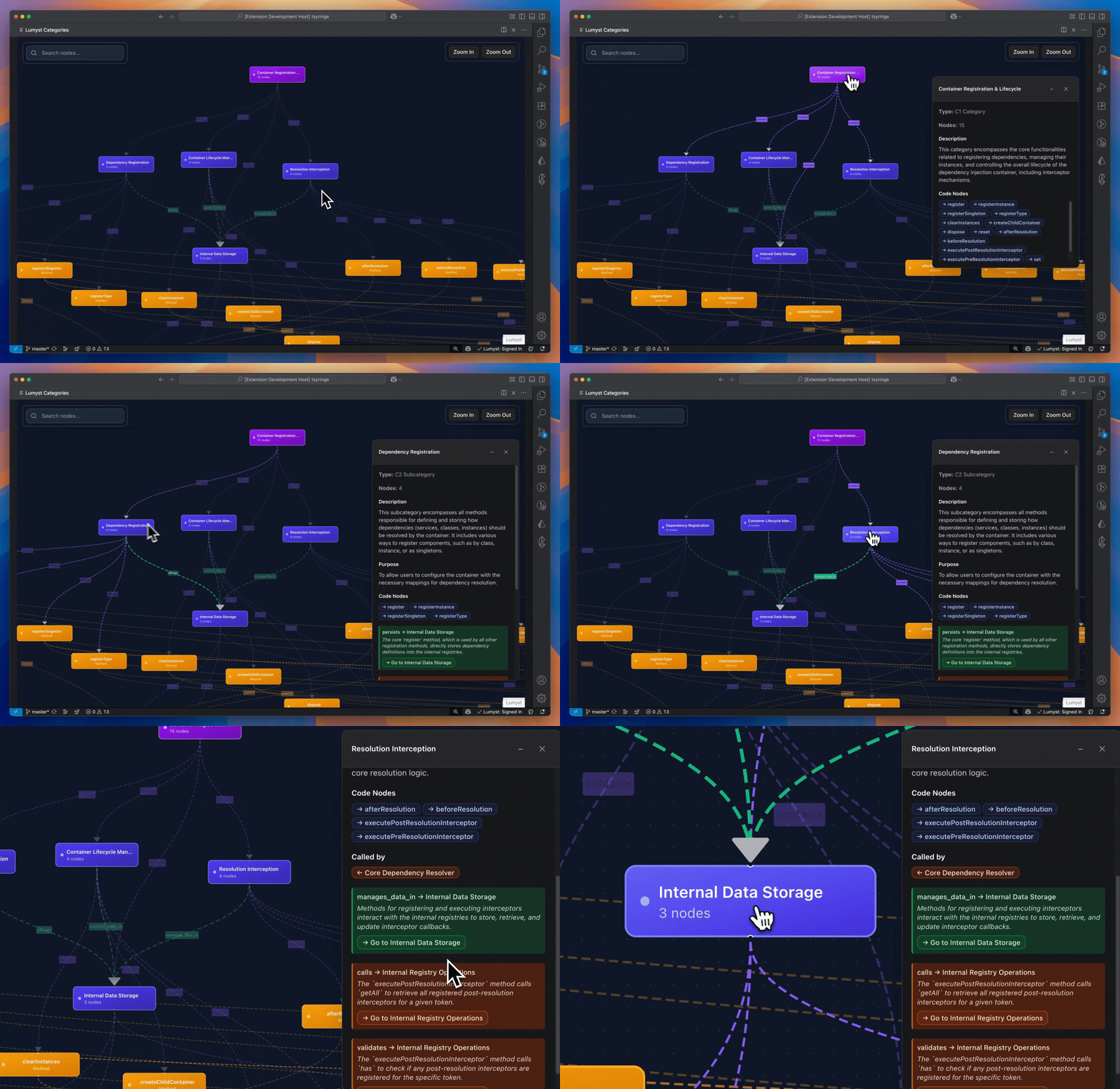
Explore high-level architecture with interactive Level 1/Level 2 semantic nodes: understand the system’s structure at a glance and navigate connected components seamlessly.
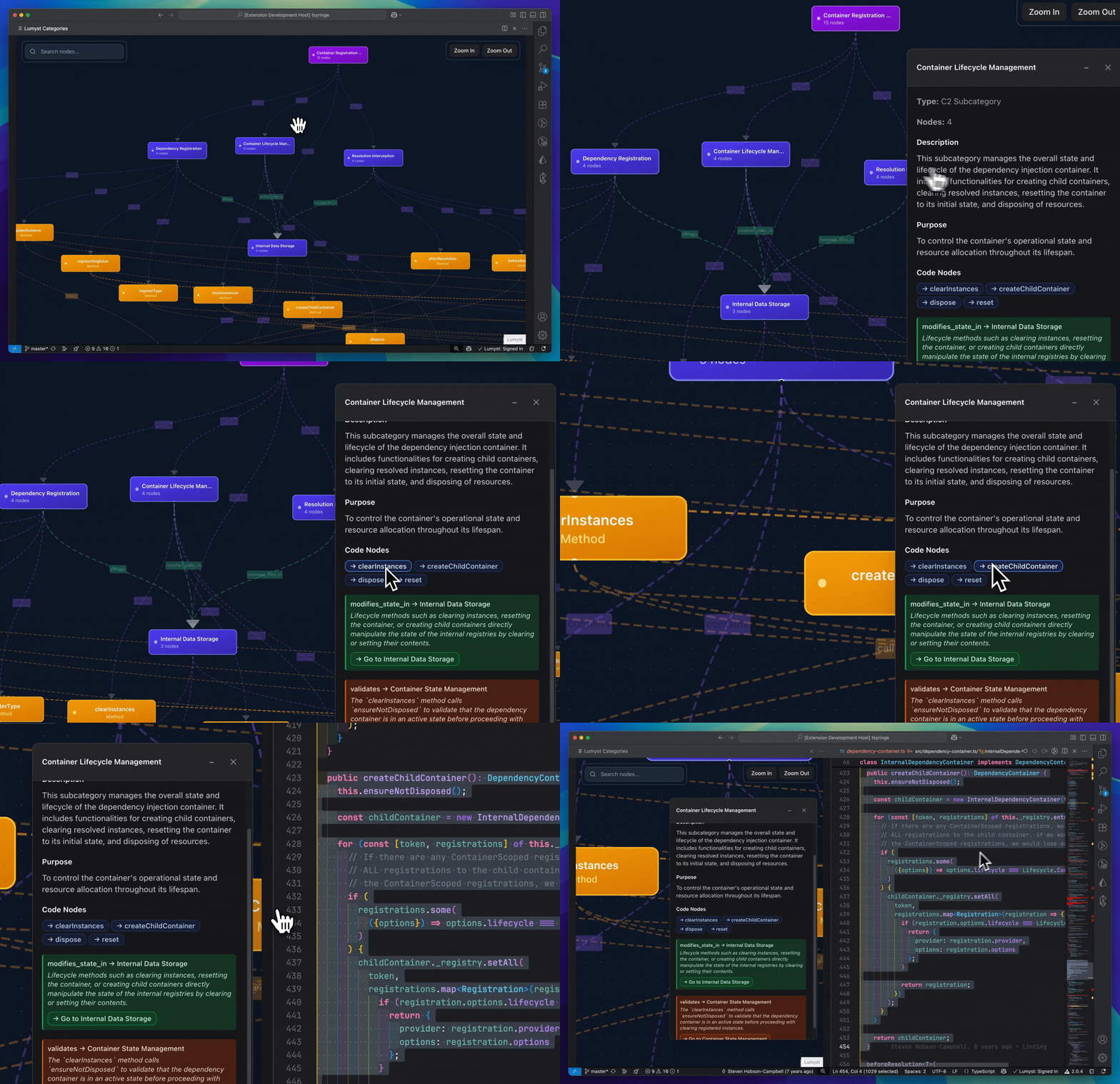
Drill down from Level 2 overviews to actual code, click a Level 2 semantic node to see an overview of the component, then follow its relationships to dive into the underlying code nodes.
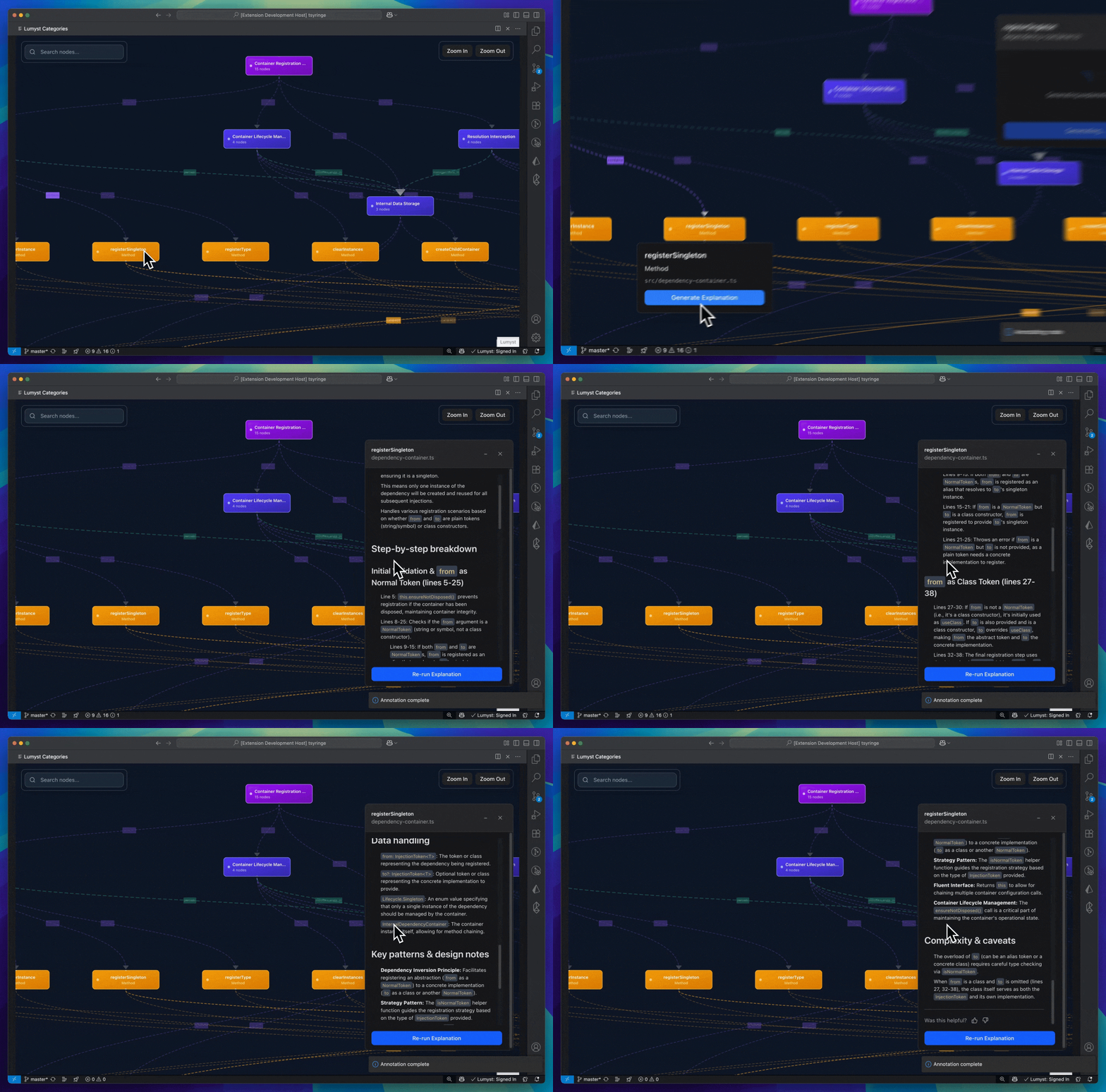
See a detailed breakdown of each function, view the code alongside clear explanations to quickly grasp its purpose and logic.
The Problem Lumyst Solves
Ever felt lost in a new codebase?
- Slow Onboarding to a project: New developers can take weeks to become productive.
- Code Complexity: Monoliths, microservices, and legacy systems create a maze of dependencies that is hard to navigate.
- Contribution Barriers: Understanding a large open-source project is often the biggest hurdle to making your first contribution.
- Cognitive Overload: Manually tracing logic and dependencies is tedious, time-consuming, and mentally draining.
Lumyst cuts through the noise, providing the context and clarity you need to be confident and productive from day one.
Features
Lumyst combines deep code analysis with intuitive visualization to help you understand your codebase faster:
- Smart Graph Generation: Only the most important components are surfaced.
- Hierarchical Navigation: Start at the architecture level (Level 1/Level 2), then drill down to functions and files.
- Seamless Code Integration: Click any node to jump to the code.
- Dual-Layer Understanding: See both code structure (functions, classes) and semantic meaning (services, pipelines, gateways).
- AI-Powered Code Tours: After analysis, generate an interactive guided tour for any Level 1 category. Lumyst will walk you through that category, step by step.
- Call Trace Visualization: Right-click any function or method to generate an interactive call trace graph showing the complete execution path and dependencies.
- Export and Import Analysis: Share analysis results with your team by exporting and importing them, eliminating the need for everyone to rerun analyses on the same codebase.
Coming Soon:
- Smart Code Diffs: Visualize pull requests as architectural changes on the graph, not just line-by-line text diffs. Understand the impact of a change instantly.
- Living Documentation: Automatically keep your architectural knowledge base in sync with your code.
Getting Started
- Install: Install the Lumyst extension from the VS Code Marketplace.
- Authenticate: Click on
Side Panel and sign in using your email or github account. This will connect you to the Lumyst AI cloud service that powers our advanced LLM features.
- Analyze Your Project: Select the files you want to analyze and then click on
Run Analysis. The interactive graph will open once analysis is complete!
- Trace Function Calls: Right-click on any function or method in your code and select
Lumyst: Call Trace to generate an interactive call trace graph instantly.
Prerequisites
Zero Setup Hassle:
- Lumyst will automatically install Node.js (v20.18.0) on your machine the first time you run the extension.
- You may briefly see a system pop-up from Node.js asking for permission, please allow it to complete.
- This ensures Lumyst works smoothly without extra setup steps.
Common Use Cases
- Accelerate Onboarding: Give new team members a guided tour of the codebase so they can start contributing in hours, not weeks.
- Simplify Open Source Contributions: Quickly grasp the architecture of a new project and find the right place to make your contribution.
- Master Legacy Systems: Demystify complex, poorly documented codebases by visualizing their core structure and logic.
- Review AI-Generated Code: Get a high-level view of what AI-generated code actually does and how it impacts your application's architecture before merging it.
Security & Privacy by Design
We believe your code is your most valuable asset, and it should never leave your control.
- Local-First Analysis: All static analysis and graph construction happen 100% locally on your machine.
- Minimal Data Exposure: Only small, relevant code snippets are processed by LLMs.
- Zero-Retention AI: Our LLM provider operates under a strict zero-data retention policy.
- Bring Your Own Key: Use your own OpenAI/Gemini/Anthropic API key for full transparency and control.
Read our Privacy Policy to learn more.
Languages We Support
Lumyst supports the following programming languages and their respective Language Server Protocols (LSPs):
Python
ms-python.pythonms-python.vscode-pylancems-pyright.pyright
JavaScript & JSX
vscode.typescript-language-featuresms-vscode.vscode-typescript-nextdenoland.vscode-deno
TypeScript & TSX
vscode.typescript-language-featuresms-vscode.vscode-typescript-next
Java
oracle.oracle-javaredhat.java
C++
ms-vscode.cpptoolsllvm-vs-code-extensions.vscode-clangd
Kotlin
Rust
C
llvm-vs-code-extensions.vscode-clangd
Go
golang.gogolang.Go-nightlyms-vscode.go
C#
ms-dotnettools.csharpms-dotnettools.csdevkit
Swift
Dart
dart-code.dart-codedart-code.flutter
License
EULA 1.0, See LICENSE for more information.
We are building Lumyst for you! We'd love to hear your feedback, bug reports, and feature requests.
Made with ❤️ by the team at Lumyst.

