
JAR Explorer EnhancedBrowse, decompile, search, and live-edit files inside JAR, WAR, EAR, and ZIP archives directly in VS Code. Installation Launch VS Code Quick Open ( Ctrl+P), paste the following command, and press enter.Copied to clipboard |

|
 JAR Explorer Enhanced
 Original Repo |
Fork Repo |
 Original Author |
🧩 VS Code Marketplace |
✨ Features
Original features (from v1.1.0)
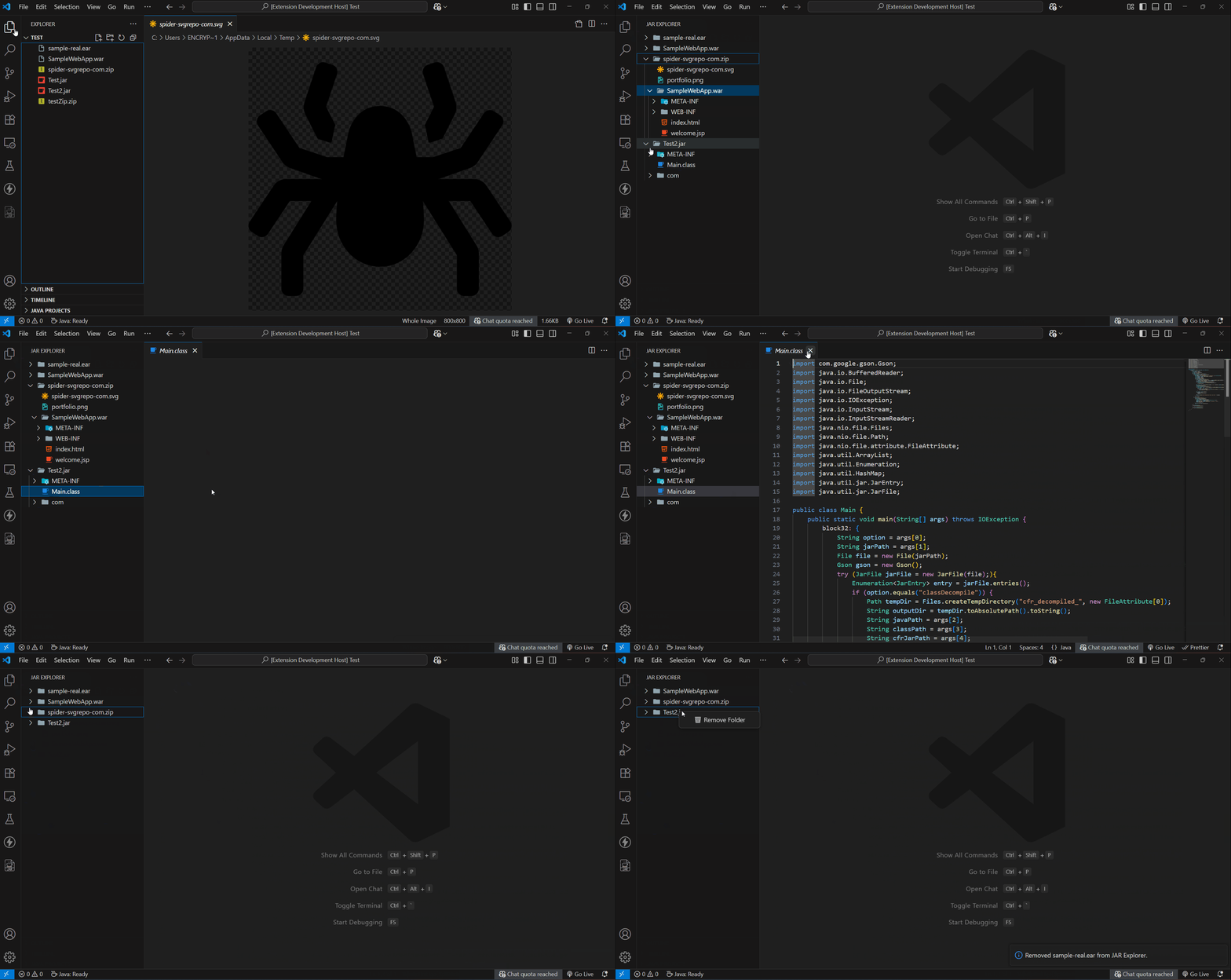
- 📁 Tree view of
.jar,.war,.ear,.zipand.vsixfile structures - 🧬 View
.classfiles with syntax highlighting and decompiled Java source - 🧪 Integrates with the CFR decompiler
- ⚙️ Configurable JDK path via extension settings
- ⏳ Loading state while decompiling large files
- 📂 Handles multiple archives simultaneously
- 🔁 Supports nested archives (e.g. JAR inside WAR)
- 🖼️ View embedded images:
.png,.jpg,.jpeg,.gif,.svg - ❌ Remove from Jar Explorer option
- 🧭 Dedicated Activity Bar icon
New in this fork (v1.2.0)
- ✏️ Live editing — edit any text or resource file directly inside a JAR and save it back
- 🔁 Full nested JAR write-back — edits inside nested archives propagate all the way to the root JAR
- 🔍 Rich Full-text search — dedicated webview with Regex, Case Sensitivity, and live filtering
- 🔄 Session Persistence — open archives automatically restore when VS Code restarts
- 🖱️ Drag and Drop — drop JAR files directly from your OS into the sidebar
- 📊 Offline Archive analysis — dependency bloat visualizer with charts, Markdown, and JSON exports
- 🔄 Toggle JVM bytecode — switch between decompiled source and raw bytecode for
.classfiles - 💾 Advanced Export — export files and choose to preserve their full directory structure
- 🧹 Granular Cache Control — status bar size tracking, clear cache per-archive, and refresh buttons
- 🟢 Single-click nested JAR expansion with loading spinner and green "ready" icon
- 🔒 Security hardening — full XSS protection in webviews, Content Security Policy
- ⚡ Performance improvements — async background decompilation, O(1) file deduplication
📽 Demo
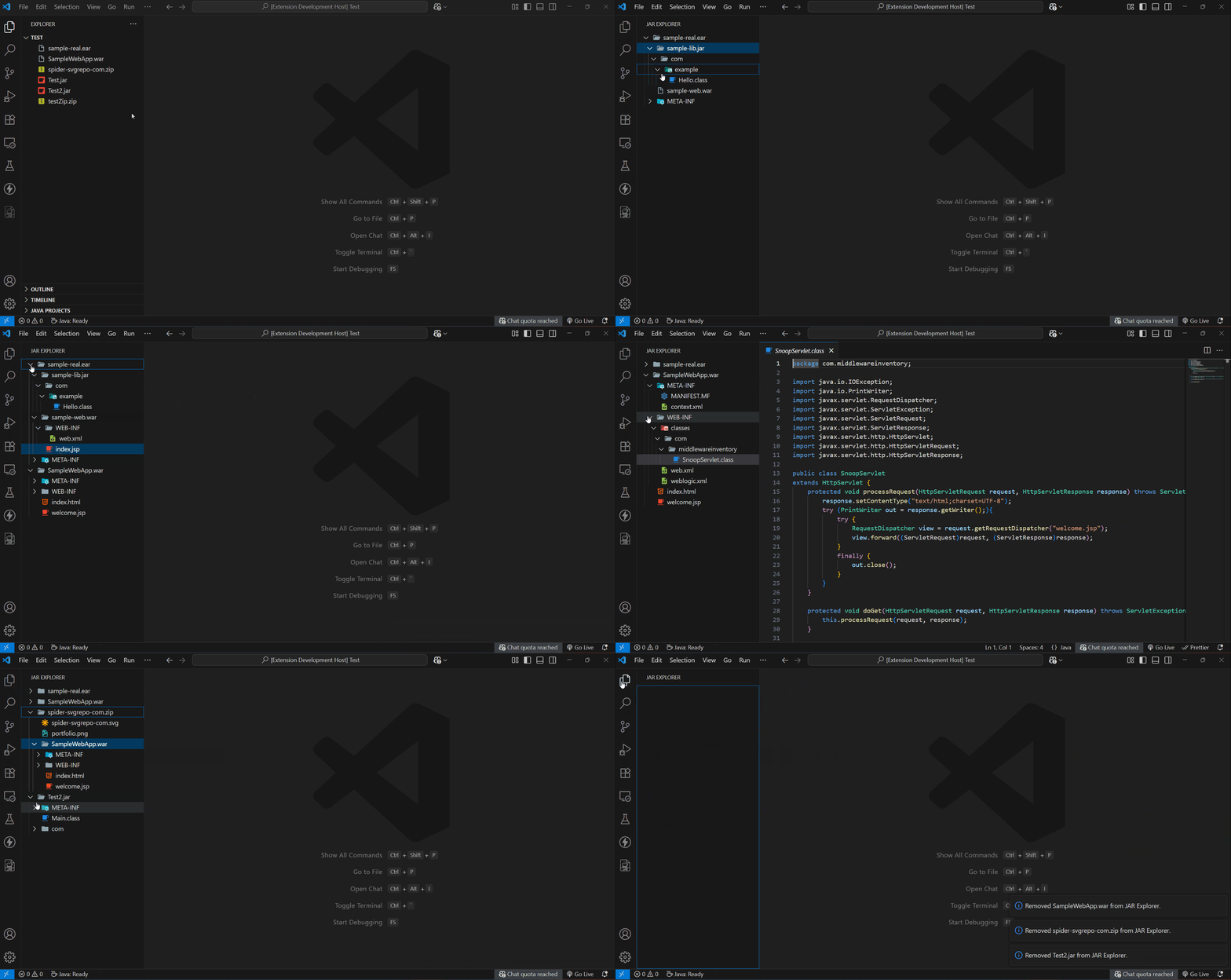
🧪 How to Use
1️⃣ Install Java
- Install Java JDK 21 and ensure
javais on yourPATH, or configure the path in settings.
2️⃣ Open an Archive
- Right-click any
.jar,.war,.ear,.zip, or.vsixfile in the Explorer and select 🧩 Open in JAR Explorer Enhanced - Drag and drop files directly from your OS into the JAR Explorer sidebar
- Use the Reopen Recent Archive button in the sidebar title to quickly jump back to previous files
3️⃣ Browse the Tree
- The archive opens as a folder-like tree structure
- Expand folders, navigate nested packages and files
- Toggle alphabetical sorting using the $(list-ordered) icon in the sidebar title
- Hover over any file to see its fully qualified path in a tooltip
4️⃣ View Any File
- Click any file —
.classfiles are decompiled asynchronously (you'll see a loading placeholder that refreshes when ready) - Images (
.png,.jpg,.gif,.svg) are rendered inline - Text and resource files (
.xml,.properties,.json, etc.) open as editable documents
5️⃣ Edit and Save Back into the JAR
- Open any text/resource file from inside the archive and edit it normally in VS Code
- On save, you'll be asked to confirm repacking it back into the archive
- For files inside nested JARs, the change propagates all the way to the root archive
6️⃣ Open Nested Archives
- Click any nested archive (
.jar,.war, etc.) once — it loads automatically - A spinner appears on the icon while extracting; it turns green when ready
- The tree expands automatically — no second click needed
7️⃣ Search Inside an Archive
- Right-click any JAR root or folder → 🔍 Search Text in Archive...
- A rich webview opens. Use the Aa (Case Sensitive) or .* (Regex) buttons
- Filter the results live by typing a filename or path into the filter box
- Click any result line to open the file directly at that exact match
8️⃣ Analyze an Archive
- Right-click a JAR root → 📊 Analyze Archive Metadata
- See a manifest overview and a dependency bloat chart of bundled libraries
- Click Copy as Markdown or Export as JSON to easily share the analysis
9️⃣ Toggle Bytecode View
- Open any
.classfile - Click the $(file-binary) button in the editor title bar
- Switch between decompiled Java source and raw JVM bytecode
🔟 Export & Copy Tools
- Right-click any file → 💾 Export File to Workspace... and choose to save it flat or preserve its directory structure (e.g.
com/example/Config.java) - Right-click to Copy Entry Path or Copy Class Name (FQCN)
📁 Supported File Types
| File Type | Description |
|---|---|
.jar |
Java Archive |
.war |
Web Application Archive |
.ear |
Enterprise Application Archive |
.zip |
ZIP Archive |
.vsix |
VS Code Extension Package |
⚙️ Requirements
- Java JDK 21 installed or added to PATH
🔧 Extension Settings
| Setting | Description |
|---|---|
jarExplorer.jdkPath |
Path to your Java executable (java) |
jarExplorer.openInPreview |
Open decompiled/resource files in preview mode (single tab). Set to false to always open in permanent tabs. |
📝 Release Notes
📦 v1.2.0 — Fork by Luiz Dores
This release represents a comprehensive overhaul of the original extension. Every change was made with a specific reason in mind — correctness, security, performance, or user experience. Below is a detailed breakdown.
✏️ Live Editing with JAR Write-Back
What changed: Text and resource files (.xml, .properties, .json, .yml, etc.) inside a JAR now open as real, editable documents on disk. When you save, the extension repacks the modified file back into the archive using the standard jar CLI tool. For files inside nested archives (e.g. a .properties inside a .jar inside a .war), the change propagates through both levels — the nested JAR is updated first, then repacked back into the root archive.
Why: The original extension was entirely read-only. For developers who need to patch configuration files or resources inside deployed archives without rebuilding from source, live editing is essential. The two-level write-back was specifically needed because nested archives are common in Spring Boot and Java EE deployments.
🔍 Rich Full-Text Search Webview
What changed: Right-clicking any JAR root or folder in the tree now opens a dedicated webview panel for searching. The new UI supports toggling Case Sensitivity and Regular Expressions, groups results elegantly by file path, and includes a live filter box to narrow down results by filename. It also limits results to 500 to prevent memory exhaustion and properly extracts nested archives on-the-fly for searching.
Why: Large enterprise JARs can contain hundreds of files. The original extension lacked search, and early fork attempts using QuickPicks were clunky for hundreds of results. The webview provides a massive readability upgrade, making it genuinely useful for debugging and investigation tasks.
🔄 Session Persistence & Workspace UX
What changed: The tree view now saves opened JARs across VS Code restarts. It also natively supports drag-and-drop. Added a "Reopen Recent Archive" command, tree sorting (alphabetical vs natural), detailed tooltips on hover, and standard VS Code file-type icons next to files.
Why: Closing VS Code previously meant losing your entire loaded workspace of archives. This brings the extension up to standard VS Code UX expectations.
📊 Offline Archive Analysis & Dependency Bloat Visualizer
What changed: Right-clicking a JAR root shows an analysis webview. It displays a manifest overview and a dependency bloat chart. Chart.js is now bundled locally, meaning this feature works entirely offline in restricted enterprise environments. Added buttons to export the data as JSON or copy it directly to your clipboard as formatted Markdown.
Why: Understanding what's inside a fat JAR is valuable for debugging. Bundling the scripts locally ensures the extension respects enterprise security policies that block external CDNs.
💾 Advanced Export Enhancements
What changed: Exporting a file now prompts you to either save a single flat file or "Preserve directory structure", which reconstructs the internal package path (e.g., com/example/MyClass.java) in your chosen folder. Exported code also automatically injects a header comment noting the source archive it came from.
Why: Extracting a single class file is useful, but extracting it with its proper directory structure is critical if you intend to modify and recompile it in a separate workspace.
⚡ Performance: Async Decompilation & Cache Granularity
What changed: Decompiling a .class file no longer locks the UI. A placeholder tab (⏳ Extracting...) opens instantly, and the content automatically refreshes once the Java process finishes in the background. A new status bar item tracks cache size, and users can now Clear Cache for This Archive specifically, or trigger a Refresh Archive command without wiping the entire global cache.
Why: CFR decompilation is slow for large classes. The async placeholder improves perceived performance drastically. Granular cache controls mean you don't have to punish your entire cache just because one archive was rebuilt.
🔄 JVM Bytecode Toggle
What changed: When viewing a decompiled .class file, a button appears in the editor title bar. Clicking it switches the view between decompiled Java source (via CFR) and raw JVM bytecode (via javap -c -p -constants).
Why: Decompiled source is not always accurate — CFR can produce incorrect or uncompilable output for heavily obfuscated or compiler-optimized code. The raw bytecode view gives developers a ground truth for understanding exactly what the JVM will execute.
🟢 Single-Click Nested JAR Expansion with Visual Feedback
What changed: A single click on any nested archive triggers extraction immediately, shows a loading~spin spinner icon on the node while the Java process runs, and automatically expands the node when loading completes. Once loaded, the icon changes to a green checkmark.
Why: The original two-click interaction was confusing. The spinner gives immediate feedback, and the green icon prevents re-clicking archives that are already loaded. This was the single biggest UX friction point in the original.
🔒 Security Hardening & Cleanup
What changed: - escapeHtml() applied to all user-controlled values injected into webview HTML to prevent XSS.
- Content Security Policy on all webviews —
default-src 'none', permitting only inline styles and isolated local resources. - The extension now cleans up all temporary files it creates (on document close, on deactivate, and orphaned directories on startup).
Why: VS Code extensions that open arbitrary third-party files are an attractive attack surface. These protections make the extension safe to use with untrusted archives, and the cleanup routines ensure it behaves like a good citizen on your OS.
📦 v1.1.0 (original)
- Added support for
.war,.ear,.zip, and.vsixarchives - Full support for nested archives
- Embedded image viewing
- Improved decompiler support with loading indicators and cancel
- Modern WebView UI with syntax-highlighted
.classfiles - Activity Bar icon
- Remove from Explorer option
- Multiple archive files simultaneously
📦 v1.0.0 (original)
- Support for viewing files other than
.classfiles - Multiple
.jarfiles simultaneously
📦 v0.0.1 (original)
- Initial beta release with
.classfile viewing
📁 Supported File Types
| File Type | Description |
|---|---|
.jar |
Java Archive – packages Java classes, libraries, and metadata |
.war |
Web Application Archive – packages Servlets, JSP, HTML etc. |
.ear |
Enterprise Application Archive – packages multiple Java EE modules |
.zip |
ZIP Archive – compressed bundle of multiple files |
.vsix |
VS Code Extension Package |
💳 Credits
- Original extension by Shiv Wakchaure — all credit for the foundation, the JarExplorerService Java backend, and the original concept.
- Fork maintained by Luiz Dores.
- Decompilation powered by CFR.
- Icons from bearicons – Flaticon.
🙌 Stay Connected
|
|
⭐️ Star the fork on GitHub — or the original if you prefer the lighter version |
|
|
🐛 Found a bug? Open an issue on the fork's issue tracker |
This fork exists because the original was good and worth making great. 💙