🎺 Overview
All-in-one command center for development productivity. A VSCode extension that integrates task management, variables, replacements, and git excludes into a unified sidebar.
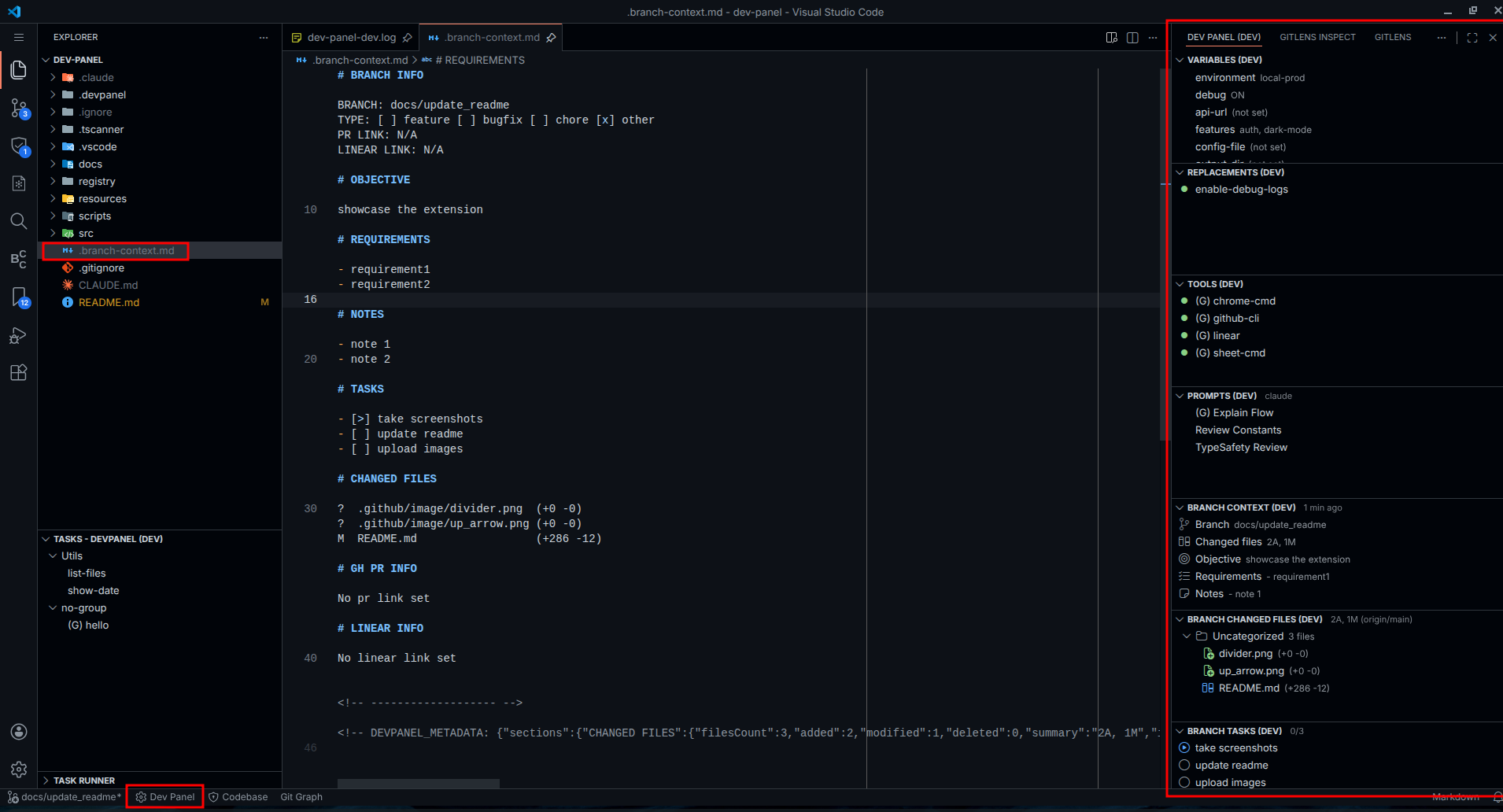 manage tasks, variables, replacements, and excludes in the sidebar
⭐ Features
- Multi-Source Task Runner - Run npm scripts, VSCode tasks, and custom tasks with optional inputs
- Dynamic Variables - Configure project options with choose, input, toggle, file, and folder types
- File Replacements - Replace entire files or apply search/replace patches with git integration
- Git Excludes - Manage
.git/info/exclude patterns directly from the sidebar
- Keybinding Support - Bind keyboard shortcuts to tasks, variables, and replacements
🚀 Quick Start
Installation
Install from VSCode Marketplace or build from source:
git clone https://github.com/lucasvtiradentes/dev-panel.git
cd dev-panel
npm install && npm run build
Then press F5 to launch Extension Development Host or install the built .vsix file.
📖 Usage
Tasks View
Multi-source task runner in the Explorer sidebar.
Task Sources:
- DevPanel Tasks (custom commands)
- npm Scripts (from package.json)
- VSCode Tasks (from .vscode/tasks.json)
Features:
- Switch between sources
- Organize by groups
- Set keybindings
- Navigate to task definition
- Collect inputs before execution
- Run silently with
hideTerminal
Example:
{
  "tasks": [
    {
      "name": "deploy",
      "command": "npm run build && ./deploy.sh $ENV",
      "group": "CI",
      "inputs": [
        { "name": "ENV", "type": "choice", "options": ["staging", "prod"] }
      ]
    },
    {
      "name": "quick-test",
      "command": "npm test",
      "hideTerminal": true
    }
  ]
}
Variables View
Manage dynamic configuration options for your project.
Variable Types:
- choose - Single or multi-select from predefined options
- input - Text input field
- toggle - ON/OFF switch
- file - Single or multiple file selection
- folder - Single or multiple folder selection
Features:
- Group variables by category
- Set keybindings for quick access
- Run shell commands on value change
- Values shown in status bar
Example:
{
  "variables": [
    {
      "name": "environment",
      "kind": "choose",
      "options": ["local", "staging", "prod"],
      "command": "echo Selected: $VALUE",
      "group": "Config"
    },
    {
      "name": "debug",
      "kind": "toggle",
      "default": false
    }
  ]
}
Replacements View
Apply file replacements with git skip-worktree integration. Changes are hidden from git status.
Replacement Types:
- file - Replace entire file with another
- patch - Apply search/replace patches to a file
Features:
- Toggle individual or all replacements
- Preview diff before applying
- Auto-restore on deactivation
- Group by category
Example:
{
  "replacements": [
    {
      "name": "use-local-api",
      "type": "file",
      "source": ".devpanel/replacements/api-local.ts",
      "target": "src/config/api.ts",
      "group": "Config"
    },
    {
      "name": "enable-debug",
      "type": "patch",
      "target": "src/index.ts",
      "patches": [
        { "search": "DEBUG = false", "replace": "DEBUG = true" },
        { "search": "logger.level = 'error'", "replace": "logger.level = 'debug'" }
      ]
    }
  ]
}
Excludes View
Manage .git/info/exclude patterns directly from the sidebar. Local gitignore rules that aren't committed.
Features:
- Add/remove exclude patterns
- Auto-refresh on file changes
- Open exclude file directly
Configuration
Configure Dev Panel in your workspace:
workspace-root/
  .devpanel/
    config.jsonc              # Main configuration
    variables.json            # Variable values (auto-generated)
    replacements/             # Source files for replacements
The extension provides JSON schema validation for config.jsonc.
Full Example:
{
  "$schema": "./node_modules/dev-panel/resources/schema.json",
  "settings": {
    "exclude": ["**/node_modules/**", "**/dist/**"]
  },
  "variables": [
    { "name": "env", "kind": "choose", "options": ["dev", "prod"] }
  ],
  "replacements": [
    { "name": "mock-api", "type": "file", "source": ".devpanel/mock.ts", "target": "src/api.ts" }
  ],
  "tasks": [
    { "name": "build", "command": "npm run build" }
  ]
}
🤝 Contributing
Contributions are welcome! Feel free to open issues or submit pull requests.
npm run build      # Build the extension
npm run lint       # Check code style
npm run format     # Format code
npm run typecheck  # Type checking
📜 License
MIT License - see LICENSE file for details.
| |